BookX Review (2026)
 By Daan Haket · Researched and written with an AI assistant · who does what
The free plan is a demonstration rather than a plan.
Shopify merchants running appointment-based services — salons, studios, clinics, rentals, classes and events — who want the booking calendar inside the store they already sell from, with staff and multi-location schedules and payment taken at the Shopify checkout..
you do not sell on Shopify; you need a booking system that stands on its own website and payment flow so customers who never visit your shop can still book; or you run more than twenty staff or locations and want a published price before you commit..
Transparency: the “Visit” links on this page are affiliate links — we may earn a commission if you sign up, at no extra cost to you. No vendor can pay for a better review or verdict. How we make money →
Pricing (2026)
✓ Pricing re-verified 13 Oct 2026
| Plan | Price | What you get |
|---|---|---|
| Free | $0 a month | one service and one team member, with unlimited bookings on every tier |
| Starter | $9.99 a month, or $107.99 a year | five locations and team members, unlimited services, full-day, multi-day and bundle bookings, book-now-pay-later and partial payments |
| Growth | $19.99 a month, or $203.99 a year | ten locations and team members, deposits and multi-payment options, workflows, Shopify Flow and POS, seasonal pricing |
| Business | $39.99 a month, or $407.99 a year | twenty locations and team members, the all-in-one booking widget, two-way Google Calendar sync, Klaviyo and webhooks, priority support |
Four tiers billed in USD every 30 days, and the meter is locations and team members rather than bookings — every tier, the free one included, carries unlimited bookings. Free costs nothing and covers one service and one team member, minute or hour scheduling, lead and buffer time, email notifications, timezone and multi-language support, blockout dates and slots, and live support by chat, email and Zoom.
Starter is $9.99 a month or $107.99 a year (10% off) and lifts that to five locations and team members with unlimited services, full-day, multi-day and bundle bookings, Google Calendar and Zoom, book-now-pay-later and partial payments, customer reschedule and cancel, and a universal booking button. Growth is $19.99 or $203.99 a year (15%) for ten locations and team members, deposits and multi-payment options, workflows and a custom email sender, Shopify Flow and POS, seasonal pricing and advanced bundle and multi-day conditions.
Business is $39.99 or $407.99 a year (15%) for twenty locations and team members, the all-in-one booking widget, two-way Google Calendar sync per team member, advanced seasonal pricing, Klaviyo and webhook integrations and priority support. Every paid tier has a 14-day free trial. What the table does not publish is what happens above twenty locations or team members: the ladder simply ends there. Plans change — always verify the live price on their site.
Category context: Operations & Workflow. Across the 53 tools in this category that we researched with a public US-dollar price, the median entry price is $29 a month (lowest paid plan as listed, per seat where the vendor prices per seat). Compare pricing conditions in the Software Cost Atlas →
What the pricing page doesn’t say
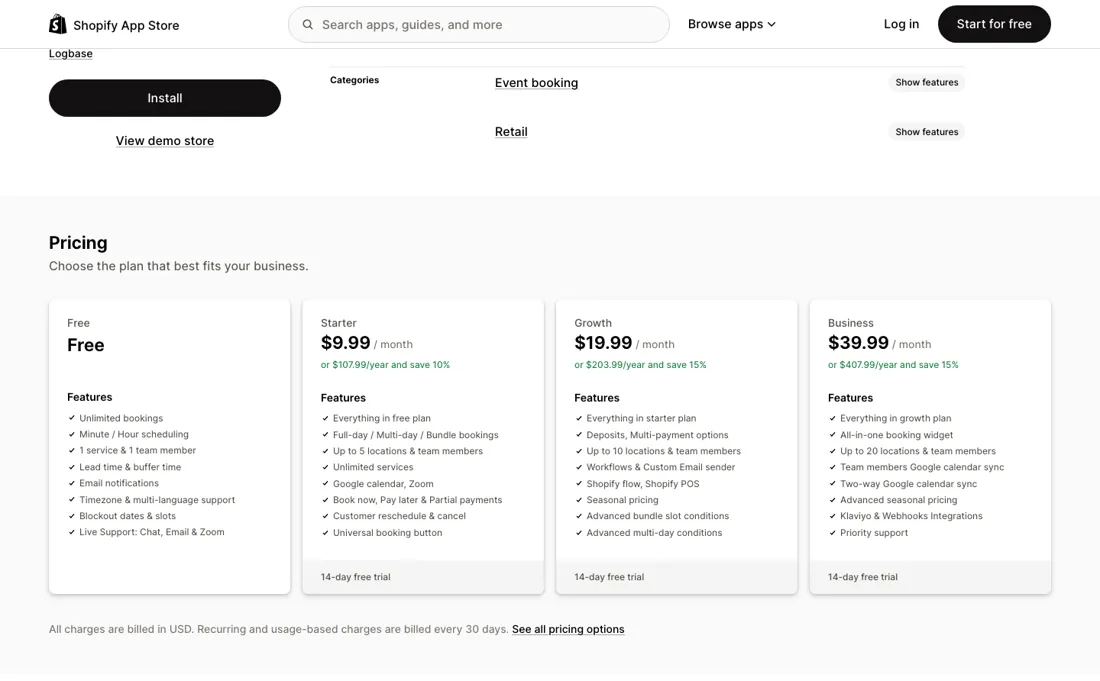
One service and one team member means a salon with two stylists, or a studio running two class types, is already on Starter — so treat $9.99 a month as the real entry price, not zero. From there the ladder is gated on locations and team members rather than on how much you actually book: five, ten and twenty at $9.99, $19.99 and $39.99. A busy single-location business therefore pays the same as a quiet one, which is generous, while a small chain climbs the ladder for reasons that have nothing to do with volume.
Above twenty locations or team members the published table stops and you have to ask. And the whole thing only exists inside Shopify — the calendar rides on your storefront, checkout and POS — so there is nothing here for a business that takes bookings anywhere else.
Watch the video review
The video version of this review, from our YouTube channel.
What BookX does
Shopify appointment booking that lives in the storefront: Calendly-style slots for services, classes, rentals and events, with staff and multi-location schedules, deposits and partial payments, and the money taken at your own checkout. Bookings are unlimited on every tier — the ladder is gated on locations and team members.
What buyers report about BookX
Hands-on: not tested by usReported by buyers: the Shopify App Store listing, read September 2026
Themes from the buyer-review sites listed at the foot of this page, read in September 2026. We have not run BookX ourselves, so this is other buyers' experience rather than ours. We summarise it here because the complaints are usually the part a vendor page leaves out.
- • Rental and tour operators are the clearest fit: a Dutch rental business names seasonal pricing, multi-day and full-day bookings as the features it runs on, and reports fast replies at weekends.
- • It bends to unusual scheduling. A kayak tour company of about a year says the configuration options cover almost everything they need.
- • Live support by chat, email and Zoom is on every tier including the free one, and reviewers in several countries confirm getting help outside business hours.
- • The same tour operator who recommends it says the app is not intuitive and that they need support often — praise for the help desk and a complaint about the interface arrive in one review.
- • The free tier's 'one service' means one product, which is not obvious. A merchant who attached three classes in January 2026 says the app locked them out with no explanation, and another gave up after 17 minutes because they could not test more than one service without paying.
- • Manual invoices are a gap: a merchant reported in March 2026 that booking slots could not be picked when sending one, which matters if most bookings are invoiced rather than self-served.
- • In February 2025 a merchant published emails in which a Logbase employee pressed them to take down a negative review; the co-founder replied publicly on the listing apologising and said it did not reflect company policy.
Pages read (September 2026): Shopify App Store
The free plan is a demo, and the meter is staff, not bookings
Every tier carries unlimited bookings, the free one included, so nothing here meters what you sell. What the ladder gates is locations and team members, and that makes the free plan a demonstration rather than a plan: one service and one team member means a salon with two stylists, or a studio running two class types, is already on Starter. Treat $9.99 a month as the entry price, not zero.
Above that the steps are small and specific. Deposits and multiple payment options are Growth at $19.99, not Starter — Starter carries book-now-pay-later and partial payments, which is a different thing. Shopify Flow, POS and seasonal pricing are Growth too. Two-way Google Calendar sync per team member, Klaviyo and webhooks are Business at $39.99. That is not a number being withheld behind a sales call, it is a ceiling with nothing above it — so if you schedule across more sites or a bigger roster than that, settle the arrangement before you build on it.
Our monthly capture read this vendor's pricing page in September 2026 and again in October 2026, and the amounts were the same both times, including $39.99, $107.99, $203.99 and $407.99 from the pricing above. We keep watching — the registry records what moves.
Questions we are still checking
Facts about BookX that would change a buying decision, and where we stand on each. An unanswered question does not mean the feature is missing; it means we have not confirmed it yet.
- Is the team-member Google Calendar sync add-on available below Business, and what does it cost? Still checking
Applies to: Starter, Growth and Business.
Why it matters: the help article calls per-member sync an add-on while the plan table lists it on Business at $39.99; neither prices it separately.
Checked: BookX help centre: Multiple Team Member Google Sync (2026-10-13); BookX on the Shopify App Store (2026-10-13) - Do locations and team members share one limit, or does each count separately? Still checking
Applies to: Starter (5), Growth (10), Business (20).
Why it matters: the plan table says 'up to N locations & team members' and the help article on team members does not say how the two are counted.
Checked: BookX help centre: How to create a team member on BookX (2026-10-13); BookX on the Shopify App Store (2026-10-13)
Have a public source that answers one of these? How we review explains how we check and correct.
How to actually use BookX
Setup is guided. Install, click Get Started, and pick one of eight service templates — regular, full-day or multi-day, each in a pay-at-checkout and a pay-later variant, plus a custom route and a service without a product. Name the service, link your products to it, set the booking slots, then optionally set lead time and capacity. Finally enable the BookX app embed in the Theme Editor and preview the widget; you can skip that and return to it.
Before you take a real booking, do the three checks the vendor files under Mandatory: disable the dynamic checkout button, disable the accelerated checkout buttons on the cart page and cart drawer, and enable cart checkout validation. Express checkout otherwise routes buyers around the slot logic. One trap the free tier sets: a service is tied to a product, so one service means one product. Merchants who attached several classes on Free have reported being locked out with no explanation why.
Where this section comes from: our research notes (114 words)
the BookX help centre at bookeasy.helpkit.so — the Getting Started article and the three articles filed under Mandatory Checks — read on 8 September 2026, together with the plan table and the 605 merchant reviews on apps.shopify.com/appointment-booking-bookeasy the same day Re-verified 13 October 2026: the four tiers and amounts on apps.shopify.com/appointment-booking-bookeasy are unchanged (614 reviews that day), and the help-centre articles 'How does the Google calendar integration work? Is it one way?', 'Multiple Team Member Google Sync', 'How to create a team member on BookX', 'How to Set Payments Options for Your Service' and 'How to Enable Refundable Security Deposit for Your Service' on bookeasy.helpkit.so were read the same day for the buyer questions.
BookX vs SimplyBook.me, side by side
Each column shows the vendor’s own published entry price, read on the date shown. Entry prices can cover different services or units, so check what each one buys. We do not average them into a score.
Both names above are affiliate links: we may earn a commission if you sign up, at no extra cost to you. Neither changes what this table says.
The natural comparison is SimplyBook.me — SimplyBook.me is a standalone booking platform with its own booking page, client records and payment providers, and it works whatever you sell on. BookX makes sense the other way round: you are already committed to Shopify and you want the calendar, the staff schedule and the money to sit inside that storefront instead of beside it. The trade is reach against integration — SimplyBook.me can take a booking from someone who never sees your shop, BookX cannot, but BookX takes the payment through the checkout you already run and keeps the appointment in the same admin as the order.
Frequently asked questions
Can each team member sync their own Google Calendar, or only the store account?
Read in the BookX help centre on 13 October 2026. The store's primary Google account connects under Settings, Integrations and puts each booking on the owner's and the customer's calendar, with a Meet link for virtual services. Per-member sync — each staff member connecting their own Google account, blocking slots from their own calendar events and sending notifications from their own Gmail — is described in 'Multiple Team Member Google Sync' as the Google Calendar Sync Add-On, and the Shopify plan table lists team-member calendar sync and two-way sync on Business at $39.99 a month. A booking syncs to one calendar at a time, and availability comes from either the primary or the team member's calendar, never both combined. Whether the add-on can be bought on a lower plan is not confirmed.
Which plan do I need to take a deposit?
On the Shopify plan table read 13 October 2026, Starter ($9.99) carries book-now-pay-later and partial payments, and 'Deposits, Multi-payment options' start at Growth ($19.99). The help article 'How to Set Payments Options for Your Service' calls partial payment a deposit, with the balance due on arrival, after a set number of days or on a fixed date; a separate refundable security deposit must be a fixed amount, applies to every enabled payment method for that service and is refunded from the Shopify order. Neither article says which plan each option needs, so which of the two the Growth line means is not confirmed — ask before buying Starter for deposits.
Is this a hands-on review of BookX?
This is a researched assessment, not a hands-on test — where we've used a tool ourselves, we say so explicitly. We name what each tool is good and bad at, and we earn a commission only if you sign up, at no cost to you.
- Buyer reviews on the Shopify App Store listing (apps.shopify.com/appointment-booking-bookeasy), including the one- to three-star filter, read September 2026.
- Read 2026-09-08 on apps.shopify.com/appointment-booking-bookeasy and checked against the vendor's own pricing section on logbase.io, which lists the same tiers.
- A dated screenshot of that pricing page, kept on this site as the receipt.
Others in this category
Reviewed operations & workflow tools that share ground with BookX — comparable in what they do, not drop-in swaps:
New reviews, price changes we recorded, and the cost conditions we found. No sponsored placements. Unsubscribe anytime.
This is our researched assessment — not a paid placement. The “Visit” links on this page are affiliate links: we may earn a commission if you sign up, at no extra cost to you, and it never changes our take. How we review →