 Hive Review (2026)Three Add-Ons Make $12 Into $27
The seat price is honest bait, the add-on grid is the business model: switch on three add-ons and your $12 seat becomes $27 — a la carte flexibility that punishes teams who need the full toolkit. Throughout this review we weigh it against monday.com.
Visit Hive → Affiliate link — we may earn a commission if you sign up; it does not change what this page says.
Watch the 2-minute review
The video version of this review, from our YouTube channel.
⚡ Short on time? Watch the 30-second verdict Short.
Pricing (2026)
✓ Pricing re-verified 3 Sep 2026
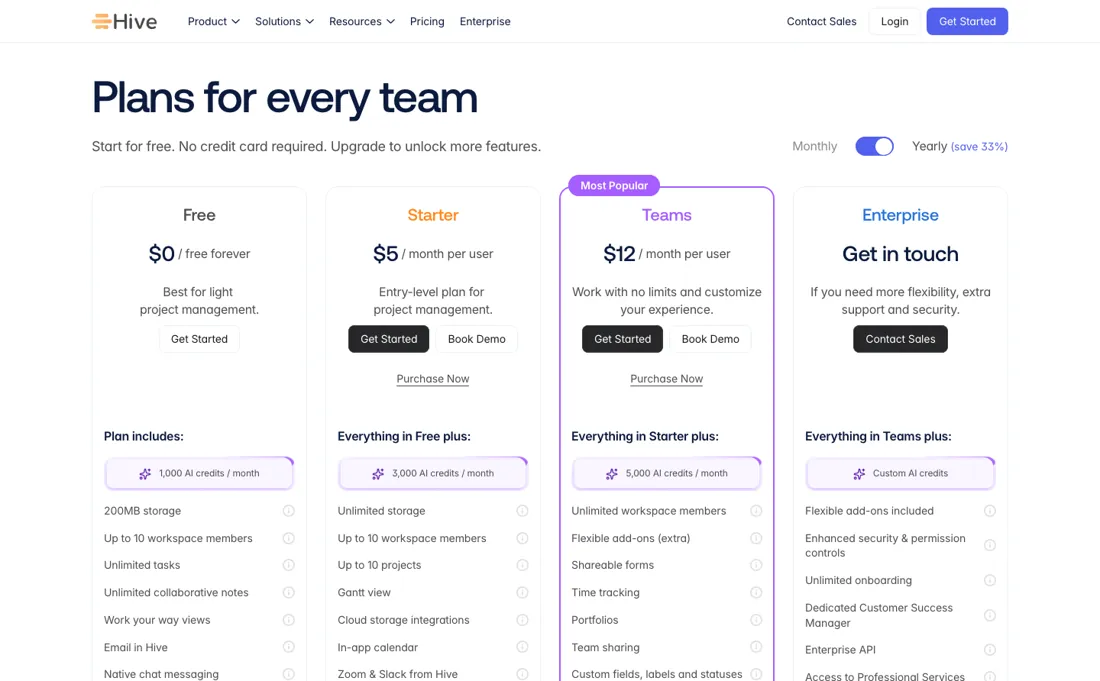
Free forever for up to 10 workspace members, with 1,000 AI credits a month and 200MB of storage; Starter $5 per user a month and Teams $12 per user a month on yearly billing, which the page states saves 33% against monthly; Enterprise is custom. Read the Starter row before you pay for it: it lifts storage to unlimited and AI credits to 3,000 a month, but it keeps the same 10-member cap as Free and adds a 10-project cap.
Only Teams, at $12 with 5,000 AI credits, gives unlimited workspace members. The add-ons are the part to budget: proofing and approvals, timesheets, team resourcing, advanced dashboards, SSO and enterprise controls, and external users each cost $5 per user a month on top, which their own calculator confirms. Two further add-ons, CRM and Finance, are listed on the page with no price at all. The external-user add-on includes 5 external licences per seat. Plans change — always verify the live price on their site.
What the price did
We capture Hive’s own pricing page every month and keep the figures, so this is our record of the page — not a forecast, and not someone else’s summary.
Hive's rate card was identical in our July and August 2026 captures — $0, $5 and $12 per user with the same '+$5 each' add-on framing — and the page returned the same on 17 August 2026 and again on 3 September 2026. What changed on the page rather than in the price: AI credits are now published as a meter (1,000 a month on Free, 3,000 on Starter, 5,000 on Teams, custom on Enterprise), and CRM and Finance have appeared in the add-on grid without a price.
What the pricing page doesn’t say
List your must-have modules first and compare the DRESSED price against all-inclusive rivals; for teams needing only core PM, though, Hive is genuinely cheap and pleasant.
What Hive does
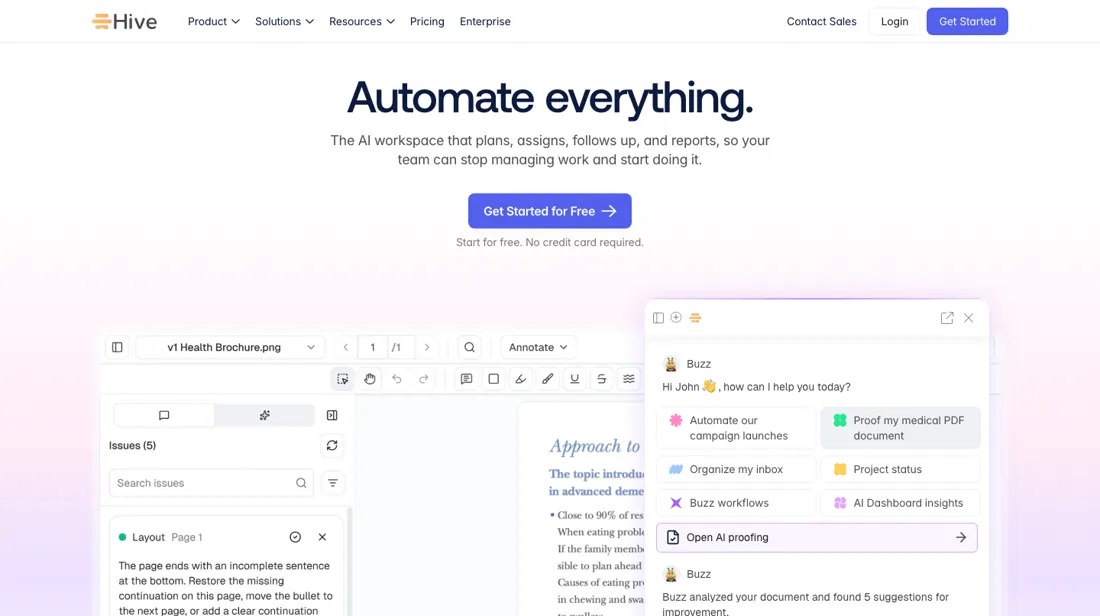
Project management and team collaboration in one workspace. Plan projects, assign tasks and centralize communication so work keeps moving.
What buyers report about Hive
Recurring themes from the buyer-review sites listed at the foot of this page, read in August 2026. We have not run Hive ourselves, so this is other buyers' experience rather than ours. We summarise it here because the complaints are usually the part a vendor page leaves out.
- • Document storage, task progress and project planning consolidated properly — teams say it replaces several tools.
- • From $5 per user with a 14-day trial that does not ask for a card.
- • The mobile app is well behind the desktop, with bugs appearing after updates.
- • Reviewers flag the privacy policy as a genuine concern — worth reading it yourself if you handle client data.
- • The interface is inconsistent, adds extra clicks and has a steeper learning curve than the price suggests.
- • Automation and reporting are thinner than reviewers want, and the useful features sit on higher plans.
When the paid plan is worth it
The free tier covers up to ten members, about $120 a month of product at Teams pricing, so the first question is whether you have outgrown free at all. What paying $5 for Starter does not buy: the same ten-member cap stays, plus a ten-project one. Only Teams at $12 gives unlimited workspace members. Both are yearly rates; the page states yearly saves 33% against monthly. The seat price is honest; the add-on grid is the business model.
Proofing and approvals, timesheets, team resourcing, advanced dashboards, SSO and enterprise controls, and external users each cost $5 a user a month on top. One add-on takes a $12 seat to $17, three take it to $27, four to $32, and all six to $42 — three and a half times the headline. Two more, CRM and Finance, carry no price at all, so $42 is a floor rather than a ceiling.
So the comparison that decides this is not Hive's $12 against a rival's $20. It is Hive's DRESSED price against an all-inclusive tool: write down the modules you cannot work without, add $5 a seat for each, and compare that. For a team needing only core project management — Gantt, Kanban, forms, chat — Hive is genuinely cheap. For an agency needing proofing, timesheets and resourcing, it is $27 a seat and the flexibility has become a surcharge.
The external-user add-on includes five external licences per seat, so it does not scale one for one with the clients you invite.
Our monthly capture read this vendor's pricing page in July 2026 and again in August 2026, and the amounts were the same both times. We keep watching — the registry records what moves.
How to actually use Hive
List your must-have modules before you look at the seat price, because the add-on grid is the business model. Switch on three and a $12 Teams seat becomes $27; four makes it $32. Compare that dressed price against all-inclusive rivals rather than the headline. À la carte is good value for a team wanting two modules and punishing for one needing the full toolkit — and which you are is knowable in advance.
Use the free tier to find out. It is free forever for up to ten members — and note that Starter at $5 keeps that same ten-member cap and adds a ten-project one, so that first upgrade buys credits and storage, not room to grow; only Teams at $12 gives unlimited members. Note that the external-user add-on includes five external licences per seat, which matters if you work with clients, and that yearly billing is a third cheaper than monthly.
Distilled from the Hive pricing page at https://hive.com/pricing plus hive.com/llms.txt, both read 3 September 2026. Note the exact URL: hive.com/pricing/ with a trailing slash answers 308 and never resolves for a plain fetch, and www.hive.com does the same, so the page has to be requested as hive.com/pricing. The $5 add-on rate was confirmed against their own price calculator on the same page.
Hive vs ClickUp, side by side
Both columns come from the same place: each vendor’s own published pricing, read on the date shown in the sources at the foot of this page. We do not average them into a score.
Both names above are affiliate links: we may earn a commission if you sign up, at no extra cost to you. Neither changes what this table says: both columns come straight from the vendors’ own pricing pages.
The natural comparison is Asana or ClickUp — the PM heavyweights — ClickUp bundles more per dollar, Asana wins polish; Hive wins if your module list is genuinely short. Weigh it against monday.com on the job you actually need done.
Frequently asked questions
What does Hive cost?
Free for up to 10 members, then $5 per user a month on Starter and $12 on Teams, billed yearly (33% off monthly). Enterprise is quoted. Read on 17 August 2026.
Why do people report paying much more than $12 a seat?
Because of the modular add-ons. Proofing and approvals, timesheets, resourcing, advanced dashboards, SSO and external users are each roughly $5 per user a month on top of the plan. An agency that needs proofing, timesheets and resourcing is at about $27 a seat, not $12 — list the modules you need before comparing with an all-inclusive competitor.
Is the free tier a real plan?
Yes, up to 10 members and marked free forever rather than a trial. That makes it genuinely usable for a small team doing task management; what it will not give you is the proofing, timesheet and resourcing layer that makes Hive an agency tool.
What should I weigh before buying Operations & Workflow software?
Usually it sits on top rather than replacing everything. Tools in this class tend to become the layer where work is tracked and handed off, while your existing systems stay the source of truth for their own data. Before you buy, map which tools it would replace outright and which it would merely sync with. If the answer is that it syncs with all of them, you are adding a layer rather than removing one.
Is this a hands-on review of Hive?
This is a researched assessment, not a hands-on test — where we've used a tool ourselves, we say so explicitly. We name what each tool is good and bad at, and we earn a commission only if you sign up, at no cost to you.
- Buyer reviews on Capterra, GetApp, SelectHub and Cloudwards, read August 2026.
- Re-verified 2026-09-03.
- A dated screenshot of that pricing page, kept on this site as the receipt.
Others in this category
Reviewed operations & workflow tools that share ground with Hive — comparable in what they do, not drop-in swaps:
New reviews, price changes we recorded, and the cost conditions we found. No sponsored placements. Unsubscribe anytime.
This is our researched assessment — not a paid placement. The “Visit” links on this page are affiliate links: we may earn a commission if you sign up, at no extra cost to you, and it never changes our take. How we review →