SurveyMonkey pricing: what checkout actually shows (tested 5 Nov 2026)
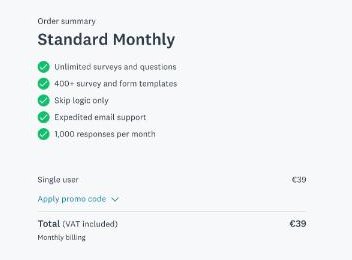
We opened SurveyMonkey’s own checkout on 5 Nov 2026 for Standard Monthly, single user (Netherlands) and stopped before paying: no card entered, nothing bought. Below is what the pricing page says, what the checkout screen showed, and what that means for your bill.
- Total€39, labelled "Total (VAT included)"
- RenewalAutomatic; the renewal sentence says "plus applicable taxes"
- What pricing opens onTeam plans first: "€30 / user / month, Starting at 3 users, billed annually"; Individual plans had to be selected
What the pricing page says
“€39 / month Billed monthly” (read 5 Nov 2026 on www.surveymonkey.com/pricing)
What the checkout showed (5 Nov 2026)
| Total | €39, labelled "Total (VAT included)" |
|---|---|
| Renewal | Automatic; the renewal sentence says "plus applicable taxes" |
| What pricing opens on | Team plans first: "€30 / user / month, Starting at 3 users, billed annually"; Individual plans had to be selected |
| Tax | Included per the label, not itemised |
| Annual switch | "Save 7% with annual billing" shown, switched off |
| Seats | Single user |
“Unknown” means the screen did not show it before card details; it is not zero. Amounts are exactly as displayed, in the currency the checkout used.
What that means for you
- Pricing opens on Team plans (3 users minimum, billed annually); switch to Individual if you are one person.
- Today's €39 says VAT included, but the renewal line says "plus applicable taxes". Ask before you rely on €39 at renewal.
- The free Basic plan locks exports and some question types, so many people end up at this checkout.
Screenshot
Who it is not for
Not for teams that need several editors on a monthly term: the team route starts at 3 users billed annually.
How the pricing page moved
We re-read SurveyMonkey’s pricing page every month, 7 Jul 2026 to 2 Nov 2026 (5 checks). The text of the pricing page changed between 4 of 4 monthly checks; the most recent change happened between 1 Oct 2026 and 2 Nov 2026. Our monthly check compares the whole page text, so a change can be a new testimonial as well as a new price; the checkout figures above are what we saw on the test date.
Check it yourself
Affiliate link: if you sign up through the button we may earn a commission, at no extra cost to you. It does not change what this page says.
This page covers price and checkout only. How SurveyMonkey did in our hands-on test, what works and what does not: read the SurveyMonkey review →. More tools like it: Operations & Workflow.