Wrike pricing: what checkout actually shows (tested 29 Oct 2026)
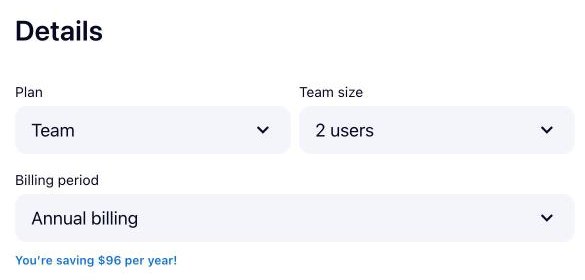
We opened Wrike’s own checkout on 29 Oct 2026 for Team, 2 users, annual billing and stopped before paying: no card entered, nothing bought. Below is what the pricing page says, what the checkout screen showed, and what that means for your bill.
- Amount shown$240 per year, before tax
- Seats2 users is the minimum at the Team checkout
- Billing termAnnual billing was preselected; the page also lists $14 billed monthly
What the pricing page says
“$10 user / month billed yearly” (read 29 Oct 2026 on www.wrike.com/free-trial)
What the checkout showed (29 Oct 2026)
| Amount shown | $240 per year, before tax |
|---|---|
| Seats | 2 users is the minimum at the Team checkout |
| Billing term | Annual billing was preselected; the page also lists $14 billed monthly |
| Tax | Not measured: the total is explicitly before tax, so the amount you pay is unknown |
| Auto-renewal | Not measured |
| Card needed for the trial | No (trial page: "No credit card, no commitment, no downloads") |
“Unknown” means the screen did not show it before card details; it is not zero. Amounts are exactly as displayed, in the currency the checkout used.
What that means for you
- The $10 a user is the annual-billed price: $240 a year for 2 users, before tax.
- Annual billing is preselected; choosing monthly means $14 a user.
- The 2-user minimum applies, and tax is added on top of the $240 shown.
Screenshot
Who it is not for
Not for a solo user who does not want to pay for a second seat, or for buyers who need a tax-inclusive total before they enter a card.
How the pricing page moved
We re-read Wrike’s pricing page every month, 7 Jul 2026 to 2 Nov 2026 (5 checks). The text of the pricing page changed between 4 of 4 monthly checks; the most recent change happened between 1 Oct 2026 and 2 Nov 2026. Our monthly check compares the whole page text, so a change can be a new testimonial as well as a new price; the checkout figures above are what we saw on the test date.
Check it yourself
Affiliate link: if you sign up through the button we may earn a commission, at no extra cost to you. It does not change what this page says.
This page covers price and checkout only. How Wrike did in our hands-on test, what works and what does not: read the Wrike review →. More tools like it: Operations & Workflow.