Assembly Review (2026)
 By Daan Haket · Tested hands-on · written with an AI assistant · who does what
Active contacts bite first: Starter stops at 50, and the step to 500 costs $70 more a month on yearly billing ($90 monthly).
agencies and professional services firms who want one branded place for clients to message, sign, pay and share files instead of four tools and an email thread.
you have a handful of clients and already use a shared drive and an invoicing tool, because the value here is the single branded portal and that only matters once clients get confused about where things live.
Transparency: the “Visit” links on this page are affiliate links — we may earn a commission if you sign up, at no extra cost to you. No vendor can pay for a better review or verdict. How we make money →
Exit test (measured 2026-10-24)
- Export route
- CRM > Companies or Contacts tab > Export
- Formats
- CSV
- Attachments included
- Not tested
- Re-import tested
- No
- Lost on export
- Nothing we checked
Formats describe this export route; offered formats may not have been inspected. Full exit test and scope ↓
Tested by our team on 24 October 2026 on the Free plan, without inviting anyone, without building an app and without using build credits: Daan created the account and our AI assistant ran the test in Daan's browser. We imported two made-up contacts into the CRM and exported the contacts and companies.
How we tested
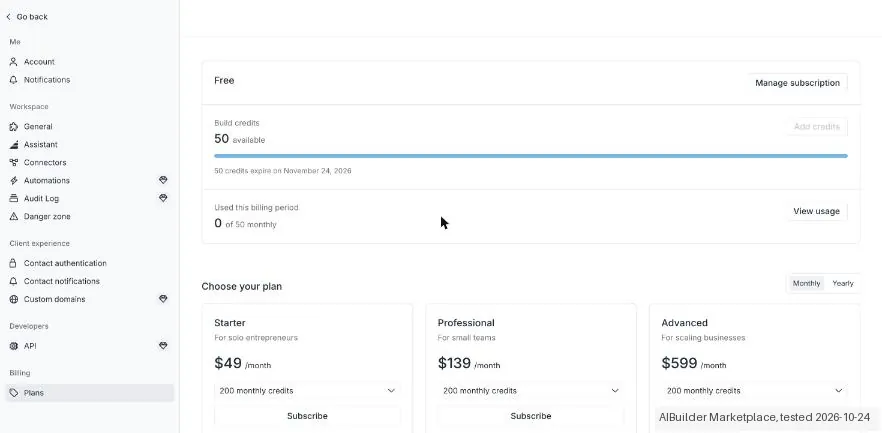
- Opened the app builder and Settings > Plans
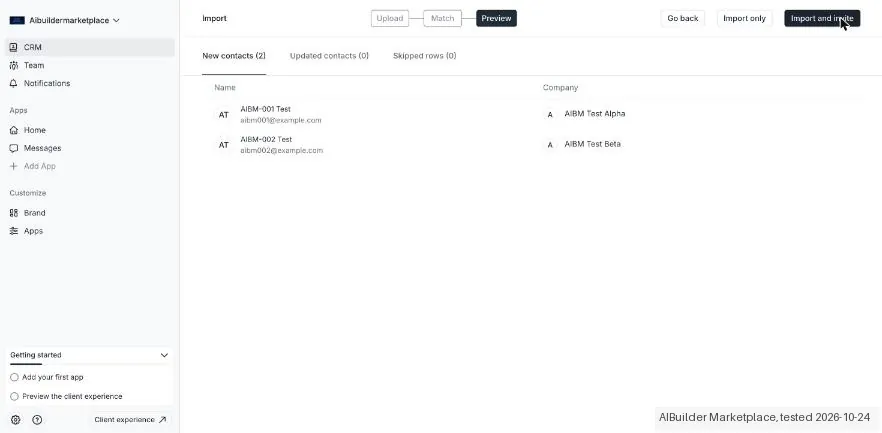
- Imported two CRM contacts using Import only
- Downloaded the Companies and Contacts tabs through CRM > Export
Test files: fixture.csv SHA-256: 4b20e63e02a5a12b58361bf518eda5f2414f25acdafdef9aadd4edc35b478639
- Settings > Plans showed the Free plan with 'Build credits 50 available', '50 credits expire on November 24, 2026' and 'Used this billing period 0 of 50 monthly', while Assembly's pricing page lists '75 build credits / month' for Free. The paid plans in the app were Starter $49, Professional $139 and Advanced $599 a month, each with 200 credits.
- The contact import ('Email and First name/Last name are required') mapped all four of our columns and previewed 'New contacts (2)', 'Updated contacts (0)' and 'Skipped rows (0)'. It offers 'Import only' or 'Import and invite'; with Import only, the companies were created automatically and both contacts stayed 'Inactive', not invited.
- Export downloads a CSV of the open CRM tab straight away. The Contacts file had first name, last name, email, company, status, creation date and 'Invited by'; the Companies file listed each company's contacts in one cell. Both test contacts came back complete.
Pricing (2026)
✓ Pricing re-verified 28 Sep 2026
| Plan | Price | What you get |
|---|---|---|
| Free | $0 | 5 active contacts, 1 internal user, 50 build credits a month, 3 apps |
| Starter | $29 a month billed yearly or $49 monthly | 50 active contacts, 1 internal user |
| Professional | $99 billed yearly or $139 monthly | 500 active contacts, 3 internal users included |
| Advanced | $499 billed yearly or $599 monthly | unlimited active contacts, 5 internal users included |
| Enterprise | no published price | quoted after a demo |
Summarised from the pricing notes below; the notes carry the conditions.
Assembly, the client-portal platform at assembly.com, publishes five tiers. Free, a free-forever plan: $0 with 5 active contacts, 1 internal user, 50 build credits a month and 3 apps. Starter: $29 a month billed yearly or $49 monthly, 50 active contacts, 1 internal user. Professional: $99 billed yearly or $139 monthly, 500 active contacts, 3 internal users included and each extra one +$29 a month yearly or +$39 monthly.
Advanced: $499 billed yearly or $599 monthly, unlimited active contacts, 5 internal users included and each extra one +$59 or +$79. Enterprise is quoted after a demo. Every paid plan includes 200 build credits a month and 5 apps; extra credits are $0.60 each up to 10,000 a month, unused credits roll over for one month, and extra apps are $5 a month each.
Full pricing notes (2 more paragraphs)
If you bill clients through Assembly, cards cost 2.9% + $0.30 on every plan and ACH 1% (capped at $10 from Professional up); the table also lists store fees of 2.0%, 1.5%, 1% and 0.7% from Free to Advanced, invoices at +0.7% down to +0.3% and recurring subscriptions at +1.1% down to +0.5%. The FAQ says there are no setup, hosting or per-client fees, no contracts on self-serve plans, and downgrades take effect at the end of the billing period.
Correction: until 28 September 2026 this field described a different company's employee-recognition plan at $3 per user; that was never the price of Assembly's client portal.
Plans change — always verify the live price on their site.
What the price did
We capture Assembly’s own pricing page every month and keep the figures, so this is our record of the page — not a forecast, and not someone else’s summary.
Two readings of the right page. On 15 August 2026, the reading behind our plan sections, Starter was $29 a month billed yearly, Professional $99 and Advanced $499, with extra internal users at $29 and $59, automation tasks capped by plan and Enterprise from a $2,000 minimum. On 28 September 2026 the three yearly-billed prices and the extra-user rates are unchanged; monthly billing reads $49, $139 and $599, a free plan has appeared, build credits for the AI app builder have replaced the automation-task caps, and no Enterprise minimum is printed. The monthly Price Watch captures that showed a single $3 figure were of a different company's recognition product and are not a record of Assembly's pricing.
What the pricing page doesn’t say
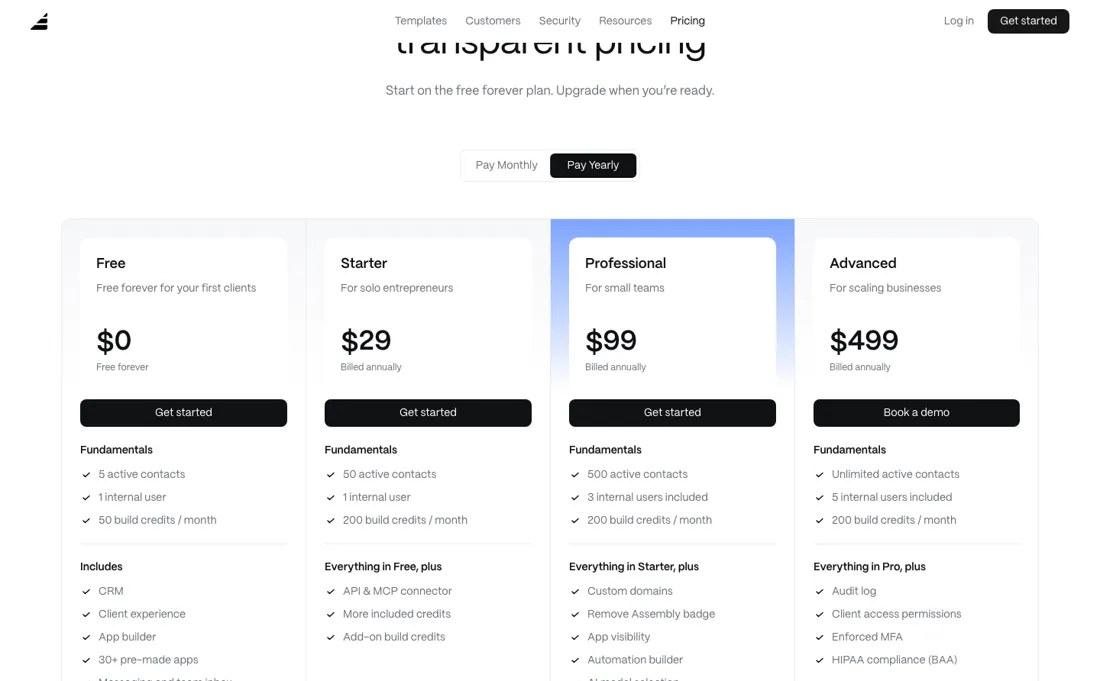
Internal users are the other, and they get dearer as you climb: an extra colleague is $29 a month on Professional and $59 on Advanced (yearly-billed; $39 and $79 monthly), so the more expensive plan makes each additional person more expensive too. A newer third meter is build credits for the AI app builder — 200 a month on every paid plan, $0.60 each beyond that.
Watch the video review
The video version of this review, from our YouTube channel.
What Assembly does
Branded client portal for agencies and professional service firms: messaging, invoices, proposals, contracts and e-signatures in one place.
What buyers report about Assembly
Hands-on: tested 2026-10-24Reported by buyers: Capterra, read September 2026
Themes from the buyer-review sites listed at the foot of this page, read in September 2026. We tested Assembly ourselves on 2026-10-24, but one test is a narrow sample, so here is what other buyers report. We summarise it here because the complaints are usually the part a vendor page leaves out.
- • Owners in accounting and marketing describe the portal as clean and professional enough to put in front of clients, and say it cut the back-and-forth of client email (July 2025).
- • Reviewers value messaging, file sharing and billing sitting in one place instead of separate tools, and say non-technical clients find their way around it.
- • Support is named repeatedly: hands-on help through onboarding and quick personal replies, most recently in January 2026.
- • The layout is called rigid: 2025 reviewers want more control over layout and find it hard to customise beyond the standard modules.
- • Billing gaps named by users: no native accounting integrations, no built-in invoice reminders and no self-serve client subscription setup (July 2025); an older review also misses partial payments on invoices.
- • Messaging lacks snooze and team-member tagging, and some find the dashboard spartan and features hard to locate (2024-2025).
Pages read (September 2026): Capterra
When the paid plan is worth it
Starter is a real plan rather than a demo: $29 a month billed yearly ($49 monthly) carries the CRM, the branded client experience, messaging, billing, contracts and e-signature, file sharing, forms and tasks, plus the API, Zapier, Make and the MCP connector. What it does not carry is room — 1 internal user and 50 active contacts — so what pushes you up is usually a count. The Free plan below it (5 contacts, 3 apps) is for trying the portal, not for running a firm on it.
Professional at $99 billed yearly ($139 monthly) is where the portal starts looking like yours: a custom domain, a custom email domain, the Assembly badge removed, app-visibility settings and the automation builder, with 3 internal users and 500 contacts. Advanced at $499 ($599) is a compliance tier more than a capacity one: audit log, client access permissions, enforced MFA and HIPAA with a BAA, plus unlimited contacts and 5 users.
Three things paying more does not fix. Extra internal users cost more on the pricier plan — +$29 a month on Professional, +$59 on Advanced, yearly-billed — the reverse of how a tier ladder usually works. Build credits stay at 200 a month on every paid tier, so heavy app building costs $0.60 a credit whichever plan you are on. And the card fee is 2.9% + $0.30 on every plan; only the smaller store, invoice and subscription percentages fall as you climb. Read on 28 September 2026.
Our monthly capture read this vendor's pricing page in September 2026 and again in October 2026, and the amounts were the same both times, including $29, $49, $99 and $499 from the pricing above. We keep watching — the registry records what moves.
What we found running Assembly ourselves
The first findings are at the top of this page. The rest:
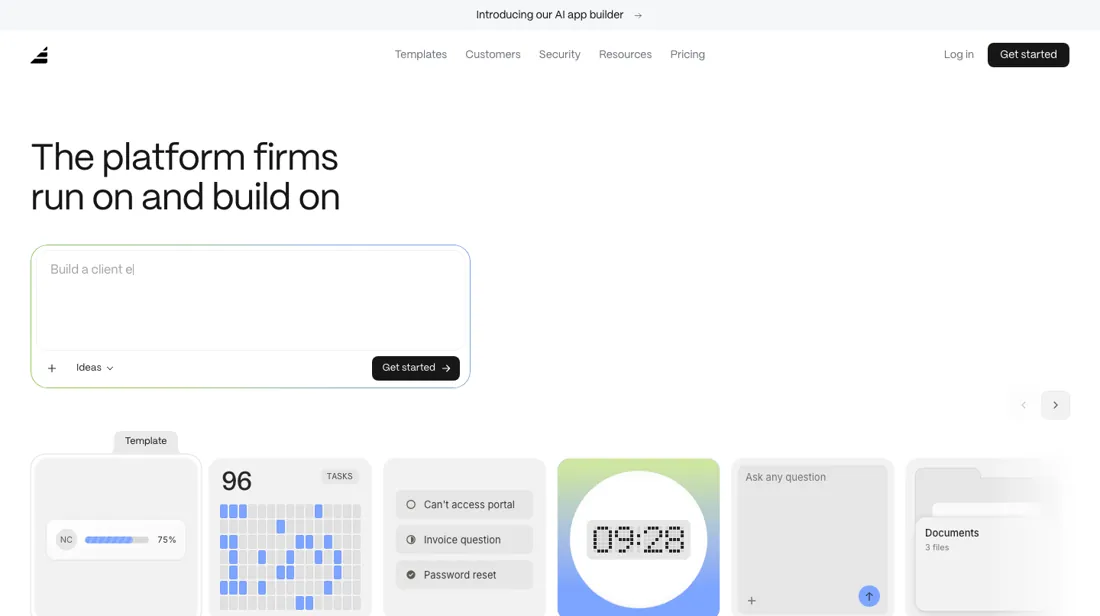
- After sign-up Assembly opens on its app builder ('what app will you add?') with an AI prompt and 30 templates, such as a client project tracker, intake form, helpdesk, data room and contracts.
Claim vs. what we measured
We set a claim from Assembly's own pages next to what we saw in our test, on the plan named. The status says whether the two describe the same thing and match; it is not a verdict on the product. Confirmations are listed too.
| What the vendor says | What we measured | Status | What it means if you buy |
|---|---|---|---|
| "75 build credits / month"Source: assembly.com, read 23 Oct 2026 | Measured 2026-10-24: Settings > Plans in the new Free workspace showed 'Build credits 50 available' and 'Used this billing period 0 of 50 monthly', with the credits expiring on 24 Nov 2026.Our test, 24 Oct 2026; Free | ContradictedSame quantity: monthly build credits on the Free plan. | Expect 50 build credits a month on Free rather than 75; the app showed them expiring on 24 November 2026. Whether unused credits roll over we did not test. |
Exit test: can you take your data out?
On 24 October 2026, in the Free workspace from this test, we exported the Companies and Contacts tabs of the CRM after importing two made-up contacts, and compared the files with our import file. We did not re-import them. Test date: 24 Oct 2026. We describe the friction rather than score it; this is one run with synthetic records, not a verdict on Assembly.
| What we checked | What we saw |
|---|---|
| Came along in the export |
|
| Lost in the export | Nothing we could show was lost in this check. |
| Awkward but not lost | Creation dates come out as a date only, without a time, and a company's contacts are merged into a single cell. |
| Export route | CRM > Companies or Contacts tab > Export; direct download. |
| Export format | One CSV per tab; for companies the contacts are merged into one cell. |
| Re-importing the export | Not tested. |
| Cancelling | Not tested. |
What the exit test does not show:
- Exporting files (the Files app) and messages
- Re-importing the export
- Custom fields
Screenshots from our test (click to enlarge)
What this test does not show:
- Building apps with AI (build credits)
- The client portal and invitations
- Files and Messages
- The limit on active contacts
Most of our reviews are researched rather than run — how we review explains which is which, and why we do not pretend otherwise.
How to actually use Assembly
Assembly's own documentation puts two setup steps in an order that matters, and your plan decides whether you can follow it. A custom domain is a Professional feature ($99 a month billed yearly, $139 monthly), and the domain guide advises setting one up before you invite clients — otherwise, in its words, they will need to log in again. A firm that starts on Starter and moves the portal to portal.yourfirm.com later pays for that ordering with a second round of client logins.
Connecting it is Settings > Domains, a CNAME added at your registrar, then 5 minutes to 24 hours of waiting; the docs single out Cloudflare, where the proxy — the orange cloud — has to be off. Getting clients in runs three ways: one at a time, a CSV bulk import, or direct sign-up. The import is where the documented limits bite — First name, Last name and Email are required (or a Full name field that has to contain both), 200 rows per CSV file, and a comma anywhere in a field value makes the import fail.
The last step asks for Import only or Import and invite, and clients left in Not invited status get no email notifications at all, which the docs suggest using on purpose while you upload files and assign forms first. Automations need Professional: the September 2026 comparison table leaves the automation builder off Free and Starter. The automations guide we read on 7 August 2026 listed three templates — assign a contract or a form when a client first logs in, and upload files or folders when a client or company is created — plus a build-from-scratch option.
The AI app builder, documented as a private beta then, is on every plan by 28 September 2026 and metered in build credits: planning an app is free, failed builds cost nothing, and the pricing FAQ puts a typical app at a few dozen credits. Every limit and timing above is what the vendor documents, not something we measured.
Where this section comes from: our research notes (152 words)
Assembly's own pricing page, re-read 15 August 2026 with both the yearly and monthly billing tabs open, plus their documentation at assembly.com/docs — the custom-domains, inviting-clients and automations guides and the Studio welcome page — read 7 August 2026. No independent hands-on walkthrough was found: searches returned vendor material, review-directory listings and comparison pages, and directory ratings are not used as evidence here. Pricing re-read 28 September 2026 in a rendered (playwright) browser at assembly.com/pricing: the plan cards on both the Pay Yearly and Pay Monthly tabs ($0; $29/$49; $99/$139; $499/$599), the expanded 'Compare all features' table (contacts, included and additional internal users, build credits, apps, features per tier, payment processing fees) and the pricing FAQ (build credits, $0.60 add-on credits, one-month rollover, $5 extra apps, no setup or per-client fees).
assembly.com/llms.txt and /pricing.md return 404. The earlier price, price_history and buyer_qa fields described a different company's employee-recognition product and were replaced.
The natural comparison is Copilot or HoneyBook — the direct client-portal peers — compare on client count and cost per extra internal user, not on the feature list.
Frequently asked questions
Can you export your data from Assembly?
Exit check 2026-10-24; route excerpt: CRM > Companies or Contacts tab > Export …; came along (excerpts): Both test contacts with first name, last name, email, company, status, creation date and 'Invited by' / Both companies, with their contacts (name and email) listed in one cell; lost (excerpts): none recorded in this test; re-import: not tested.
What does Assembly cost?
There is a free plan with 5 active contacts, 1 internal user and 3 apps. The paid plans, read on 28 September 2026: Starter $29 a month billed yearly or $49 monthly, Professional $99 or $139, Advanced $499 or $599, and Enterprise quoted after a demo. Extra internal users are +$29 a month on Professional and +$59 on Advanced when billed yearly ($39 and $79 monthly). Self-serve plans have no contract, and downgrades take effect at the end of the billing period.
What does Assembly take when my clients pay through it?
Card payments are 2.9% + $0.30 on every plan, and ACH is 1%, capped at $10 per payment from Professional up. The comparison table read on 28 September 2026 also lists store fees of 2.0% on Free, 1.5% on Starter, 1% on Professional and 0.7% on Advanced, with invoices at +0.7% down to +0.3% and recurring subscriptions at +1.1% down to +0.5%. The FAQ says there are no setup, hosting or per-client fees. Run those percentages against your monthly billing before you pick a tier.
Do I need to budget for the AI app builder?
Only if you build a lot. Every paid plan includes 200 build credits a month (Free gets 50), unused credits roll over for one extra month, and planning an app or a failed build costs nothing; the FAQ says a typical app takes a few dozen credits. Beyond that, credits are $0.60 each, up to 10,000 a month, at the same rate on every paid plan. Using live apps consumes no credits, and paid plans include 5 apps before the $5-a-month charge per extra app.
Is this a hands-on review of Assembly?
Yes. We tested Assembly ourselves on 2026-10-24; the section above says what we tested, what we found and what we did not test, and where a figure comes from the vendor's own documentation instead. Most of our reviews are researched rather than run; we say which is which. We name what each tool is good and bad at, and we earn a commission only if you sign up, at no cost to you.
- Buyer reviews on Capterra (the Assembly client-portal listing, formerly Copilot), read September 2026.
- Re-verified 28 September 2026 in a rendered browser, both billing tabs and the full comparison table.
- A dated screenshot of that pricing page, kept on this site as the receipt.
- Our own hands-on session with Assembly (2026-10-24), written up in full further down this page.
Others in this category
Reviewed business operations tools that share ground with Assembly — comparable in what they do, not drop-in swaps:
Also in business operations, for browsing rather than as an alternative:
New reviews, price changes we recorded, and the cost conditions we found. No sponsored placements. Unsubscribe anytime.
This is our researched assessment — not a paid placement. The “Visit” links on this page are affiliate links: we may earn a commission if you sign up, at no extra cost to you, and it never changes our take. How we review →