BugHerd Review (2026)
 By Daan Haket · Tested hands-on · written with an AI assistant · who does what
The per-team-member tiers are the thing to size honestly: your clients report for free as guests, but everyone on your side who works the feedback needs a seat, so a growing agency steps up tiers.
web agencies and site teams that want clients to point-and-click feedback directly on the page — and, new in 2026, want AI agents (Claude Code, Cursor and others) to read, triage and action that feedback via BugHerd's MCP server, free in beta.
you don't work with external clients or website revisions (a plain issue tracker is enough), or you need deep dev-workflow tracking that belongs in Jira.
Transparency: the “Visit” links on this page are affiliate links — we may earn a commission if you sign up, at no extra cost to you. No vendor can pay for a better review or verdict. How we make money →
Exit test (measured 2026-10-24)
- Export route
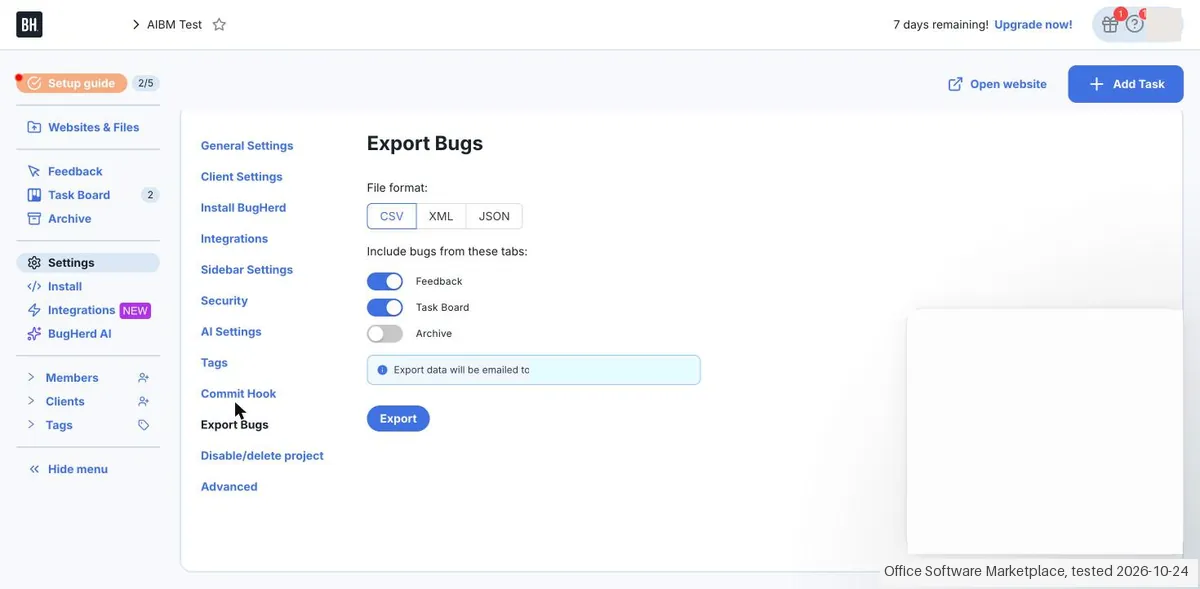
- Project > Settings > Export Bugs > CSV, XML or JSON
- Formats
- CSV, JSON, XML
- Attachments included
- Not tested
- Re-import tested
- No
- Lost on export
- The changed title of task 2: the export has no title column; only the updated time moved; The uploaded design itself: the export only links to a screenshot
- Signing up
- To sign up: screens not tested, no card, chat/call not tested (observed 2026-10-24)
- Cancelling
- To cancel: screens not tested, chat/call not tested
Formats describe this export route; offered formats may not have been inspected. Full exit test and scope ↓
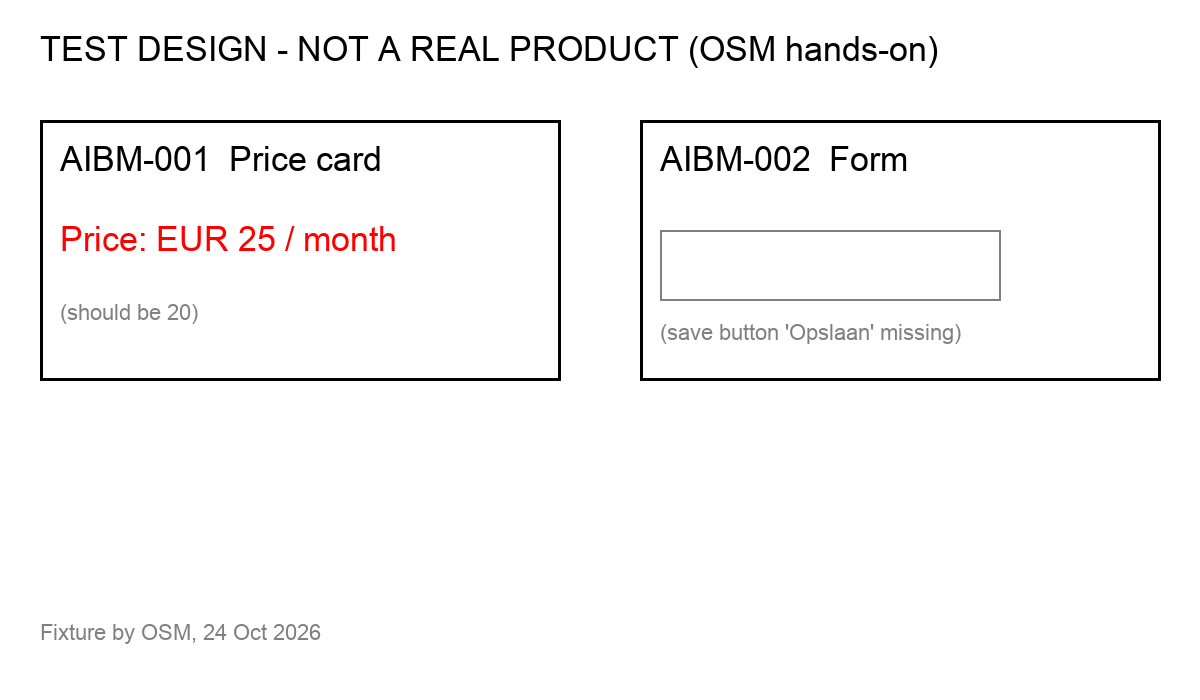
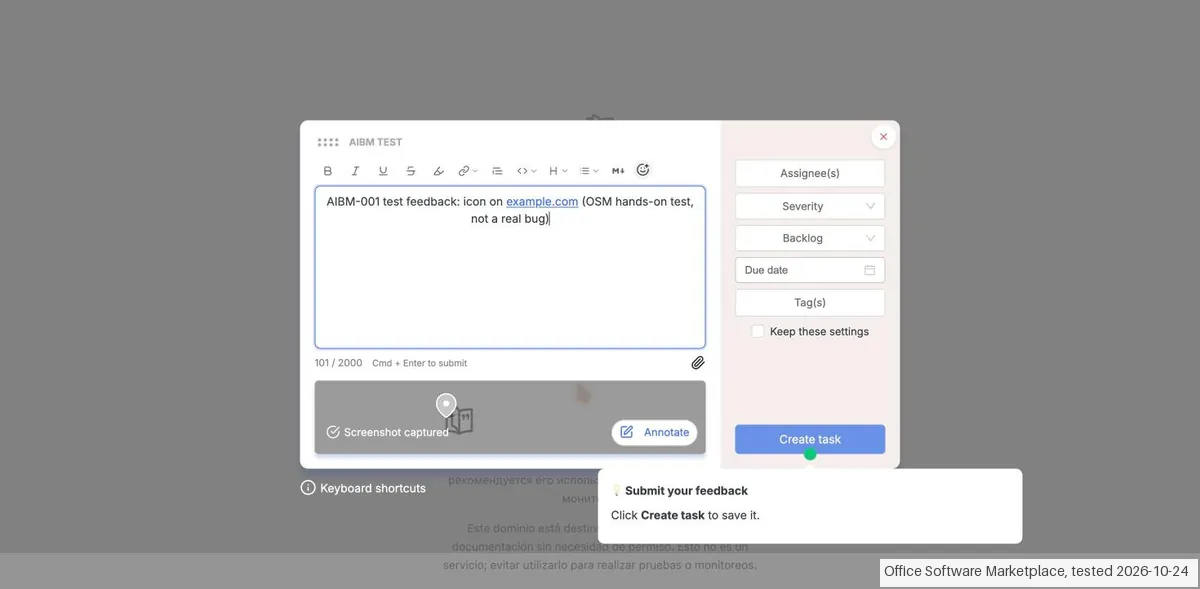
Tested by our team on 24 October 2026 during the trial, without a card and without inviting anyone: Daan created the account and installed the BugHerd Chrome extension, and our AI assistant ran the test in Daan's browser. We left one feedback task on a website (example.com) and one on our own uploaded test design, changed the title of the second task, and exported both tasks as CSV and JSON.
How we tested
- Completed the project setup with the browser extension
- Pinned website feedback through the BugHerd sidebar
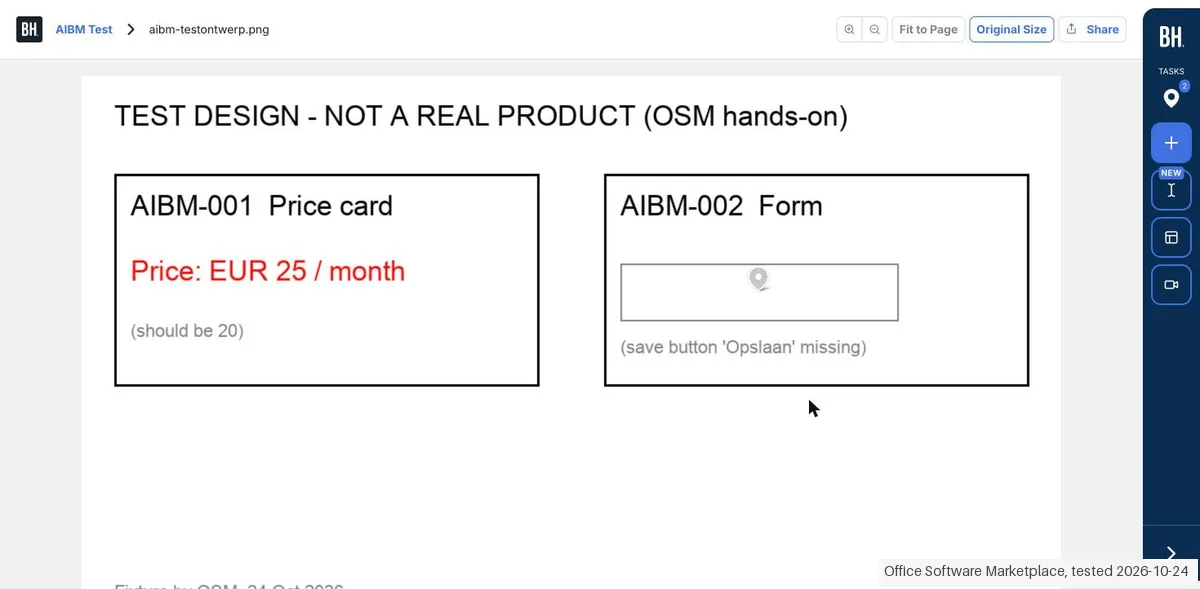
- Uploaded our test design and pinned feedback on its form
- Changed the second feedback task title
- Requested CSV and JSON through Settings > Export Bugs
- Compared the emailed task files with the feedback records
Test files: aibm-testontwerp.png SHA-256: 10b60d3e8c5db16cf00a1a86731c13ab91a11d87c14e94e0638a4bd7cf2d1da2
- Before you reach the task board you must install BugHerd on a site: the setup window 'Learn to use BugHerd in 3 simple steps' could not be closed (Escape did nothing) until the extension or a script was in place.
- Leaving feedback on a page opens a form with description, assignee, severity, status, due date and tags, and captures a screenshot automatically. The task then appears on the board with the screenshot, URL, browser and operating system.
- An uploaded image (PDF, image or Figma are offered) becomes a design asset with the same feedback sidebar; our pin on the test design became a task labelled 'IMAGE'.
Pricing (2026)
✓ Pricing re-verified 13 Oct 2026
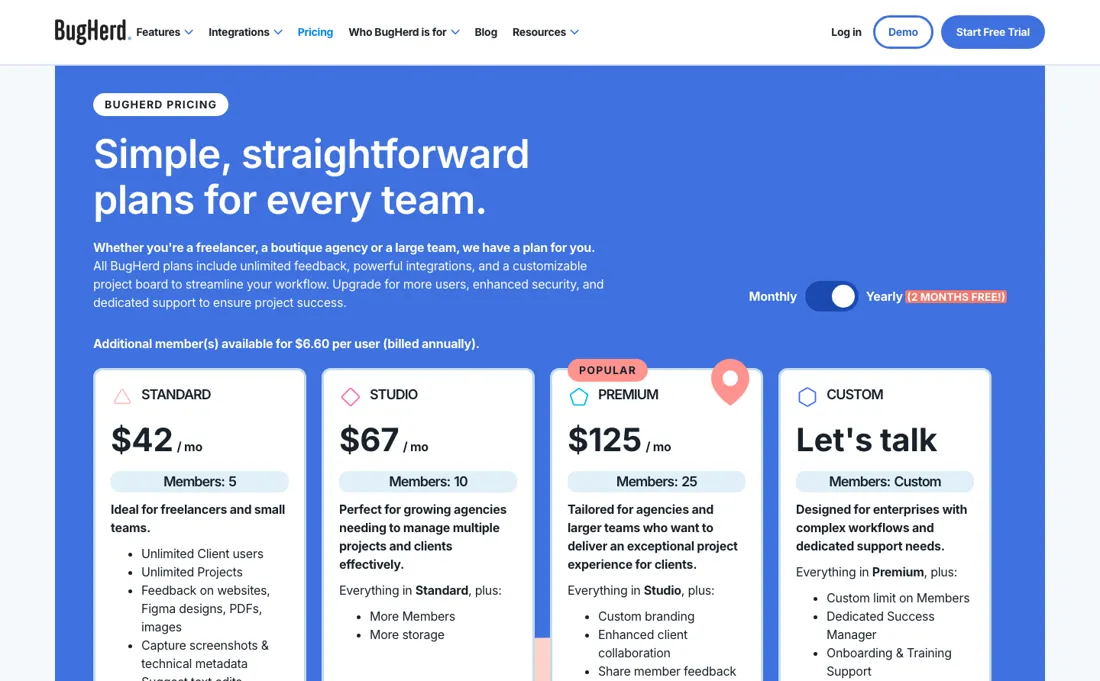
Standard $42/mo billed yearly or $50 month-to-month (5 members, 10 GB), Studio $67 or $80 (10 members, 25 GB), Premium $125 or $150 (25 members, 50 GB), plus a custom tier quoted as "Let's talk" — all with unlimited projects and unlimited client users; annual billing reads $500/$800/$1,500 a year ("two months free"), extra members $8 per user billed monthly or $6.60 billed annually ($80 a year each).
Free trial; 60-day money-back guarantee; data export via CSV, XML and JSON on every plan. Prices in US dollars excluding applicable taxes (re-verified 13 October 2026 on bugherd.com/pricing; unchanged since our July read). MCP and auto-title generation sit in every plan, auto-tagging and similar task detection in Premium and up, all still marked beta. Plans change — always verify the live price on their site.
Category context: Operations & Workflow. Across the 53 tools in this category that we researched with a public US-dollar price, the median entry price is $29 a month (lowest paid plan as listed, per seat where the vendor prices per seat). BugHerd’s entry price of $42 a month sits above that median. Compare pricing conditions in the Software Cost Atlas →
What the pricing page doesn’t say
It's deliberately a visual-feedback layer, not a full project-management or dev-issue tracker — most teams run it alongside Jira/Trello rather than instead of. The new MCP feature is genuinely interesting but currently beta: treat AI-agents-triaging-your-feedback as a bonus to evaluate, not the reason to buy.
⚡ Short on time? Watch the 30-second verdict Short.
What BugHerd does
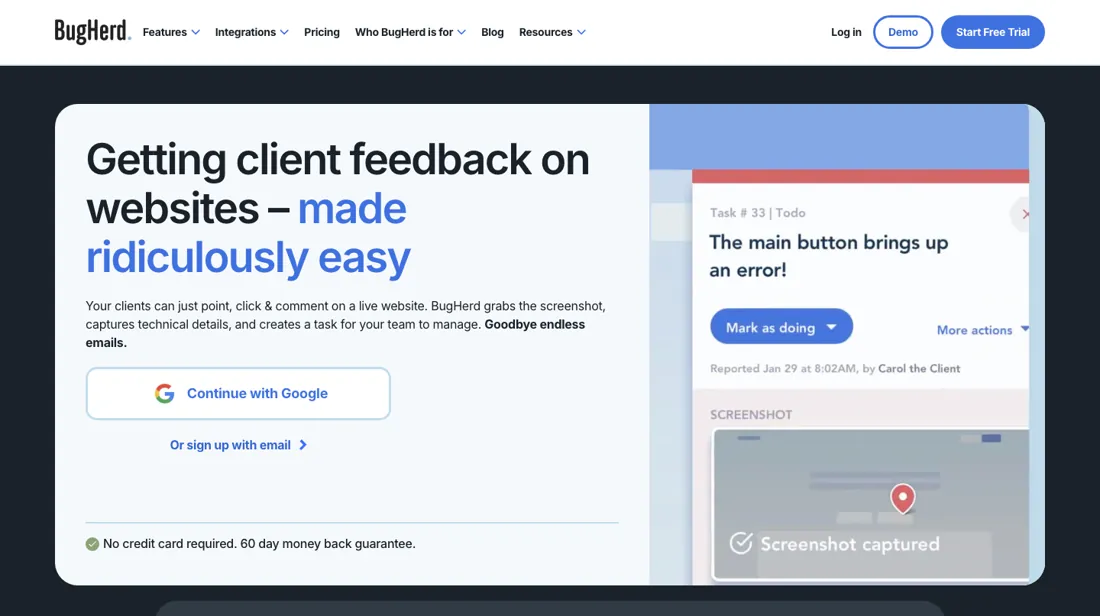
Visual bug tracking and website feedback. Let clients and teams point-and-click to report issues right on the page, turned into trackable tasks.
What buyers report about BugHerd
Hands-on: tested 2026-10-24Reported by buyers: G2, Capterra and SourceForge, read August 2026
Themes from the buyer-review sites listed at the foot of this page, read in August 2026. We tested BugHerd ourselves on 2026-10-24, but one test is a narrow sample, so here is what other buyers report. We summarise it here because the complaints are usually the part a vendor page leaves out.
- • Clients point at the thing that is wrong on the page and it becomes a ticket with the browser and screenshot attached. That is the whole product and reviewers love it. 4.7 across 243 verified reviews.
- • It removes the email chain from website QA, which is what agencies actually buy it for.
- • Past the included members the bill climbs with every extra seat, and reviewers name that step as the most common reason teams look elsewhere; the current per-member rates are in the price section.
- • The interface dates from 2011 and reviewers say so on every platform.
- • Website only. No mobile feedback, no feature voting, no roadmaps.
- • No free plan; Standard is $50/month for 5 members plus $8 per extra.
When the paid plan is worth it
BugHerd's price list runs Standard, Studio, Premium and a Custom tier quoted as "Let's talk". Standard is $50/mo month-to-month or $42/mo billed yearly and covers 5 members with 10GB storage; Studio is $80 or $67 for 10 members and 25GB; Premium is $150 or $125 for 25 members and 50GB. Every tier already includes unlimited projects and unlimited client users, so moving up buys seats, storage and a short list of gated features rather than scale.
Standard to Studio adds only members and storage. The genuine jump is Studio to Premium, which unlocks custom branding, letting guests see other guests' and members' feedback, the Guest Task Board, and the Jira, Asana, Linear, ClickUp and Monday.com integrations; SSO and a dedicated success manager sit only in Custom. Extra members cost $8 per user monthly or $6.60 on annual billing, so teams slightly over their seat count should price add-on seats against the next tier.
Note that the pricing table places auto-tagging and similar task detection under Premium, while BugHerd's AI page says every AI feature is available to all users, most in free beta — their claim, not our measurement. Upgrading fixes none of the install and extension frictions below.
Our monthly capture read this vendor's pricing page every month from July 2026 to October 2026, and the amounts were the same all 4 times, including $125, $150, $500 and $800 from the pricing above. We keep watching — the registry records what moves.
What we found running BugHerd ourselves
The first findings are at the top of this page. The rest:
- The export (CSV, XML or JSON) arrived as an email attachment within about 15 seconds. Both tasks came back with description and metadata, but not the title we had changed on task 2 (there is no title column), and not the uploaded design itself, only a screenshot link. Those screenshot links opened without logging in.
- In Settings, creating tasks by email and commenting on tasks by email were both switched on by default, and archived tasks are left out of the export unless you switch them on.
- The header said '7 days remaining! Upgrade now!' and no card was asked. We found no import function.
Claim vs. what we measured
We set a claim from BugHerd's own pages next to what we saw in our test, on the plan named. The status says whether the two describe the same thing and match; it is not a verdict on the product. Confirmations are listed too.
| What the vendor says | What we measured | Status | What it means if you buy |
|---|---|---|---|
| "free 7-day trial"Source: bugherd.com, read 23 Oct 2026 | Measured 2026-10-24: The new account showed '7 days remaining! Upgrade now!' in the header. No card was asked.Our test, 24 Oct 2026; Trial | ConfirmedSame quantity: trial length shown on day one. | You get 7 days without a card, but you must install the browser extension or a script on a site before you can use the board. |
Exit test: can you take your data out?
On 24 October 2026, in the trial account from this test, we exported the project's two feedback tasks (one left on a website, one on an uploaded test design whose title we had changed afterwards) as CSV and as JSON, and compared both files with what we had entered. Test date: 24 Oct 2026. We describe the friction rather than score it; this is one run with synthetic records, not a verdict on BugHerd.
| What we checked | What we saw |
|---|---|
| Came along in the export |
|
| Lost in the export |
|
| Awkward but not lost | The screenshot links in the export (files.bugherd.com) opened without logging in, so anyone with the file can view them. Archived tasks are left out unless you switch them on. |
| Export route | Project > Settings > Export Bugs > CSV, XML or JSON; the file arrives as an email attachment (within about 15 seconds for us); archived tasks are not included by default. |
| Export format | CSV (22 columns) or JSON/XML with one row per task; screenshots as links, no attachments or design files. |
| Re-importing the export | Not testable: we found no import function. |
| Cancelling | Not tested. |
What the exit test does not show:
- The XML export
- Comments and attachments in the export (we added none)
- Archived tasks
- Re-importing (no importer found)
Mail in the first 14 days
Measurement running until 2026-11-06T23:00:00Z (last observed 2026-10-25T11:09:34.691999Z).
5 emails in the 14-day window so far; first email after signup: unknown (exact signup time not recorded); 0 with an explicit offer.
Retained inbox and junk only; removed or archived mail is outside this observation. Ambiguous supplier attribution is excluded. Day numbers use elapsed 24-hour periods since the recorded signup date at midnight Europe/Amsterdam; the signup hour is unknown. Offer flags quote literal subject/body text. Replies in our own correspondence (support tickets, our comment requests) are excluded; one-time codes, our own address, our account name and our name are replaced in brackets.
| Day | Time (UTC) | Sender | Literal subject | Folder | Offer evidence |
|---|---|---|---|---|---|
| Day 0 | 2026-10-24 08:46:26 UTC | BugHerd team / bugherd.com | Welcome to BugHerd. Best decision you've made today! | inbox | |
| Day 0 | 2026-10-24 09:18:55 UTC | BugHerd team / bugherd.com | Your Task export for AIBM Test project on BugHerd | inbox | |
| Day 0 | 2026-10-24 09:18:59 UTC | BugHerd team / bugherd.com | Your Task export for AIBM Test project on BugHerd | inbox | |
| Day 0 | 2026-10-24 11:16:24 UTC | BugHerd team / bugherd.com | Congrats on setting up BugHerd. What's next? | inbox | |
| Day 1 | 2026-10-25 09:36:37 UTC | BugHerd team / bugherd.com | A few quick questions about BugHerd | inbox |
Screenshots from our test (click to enlarge)
What this test does not show:
- Inviting clients and the client view
- Video feedback
- Integrations and BugHerd AI
- Installing via a script on our own site
- What happens after 7 days
Most of our reviews are researched rather than run — how we review explains which is which, and why we do not pretend otherwise.
Questions we are still checking
Facts about BugHerd that would change a buying decision, and where we stand on each. An unanswered question does not mean the feature is missing; it means we have not confirmed it yet.
- What happens if we downgrade while we have more members than the smaller plan allows? Still checking
Applies to: Standard 5, Studio 10, Premium 25 members.
Why it matters: neither the pricing page nor the user-roles article says whether the downgrade is blocked, extra members are billed at $8/$6.60, or members are removed.
Checked: BugHerd pricing page (2026-10-13) - Do Managers and Billing Users take a paid member seat? Still checking
Applies to: Owner, Manager and Billing User roles.
Why it matters: the roles article describes them as having Member-level access plus extra rights, but does not say how they are counted against the member limit.
Checked: BugHerd help: difference between Members, Clients and other user roles (2026-10-13)
Have a public source that answers one of these? How we review explains how we check and correct.
How to actually use BugHerd
BugHerd's Getting Started guide is eight articles: an overview plus seven chapters. Chapter 1 has you create a project from "My projects", give it a name and an initial website URL, then add further URLs under "Websites & Files"; a project can span multiple domains or sub-sections. Chapter 2 covers installation, where the route recommended for non-technical users is pasting BugHerd's JavaScript snippet into the site's head section, with Google Tag Manager and a WordPress plugin as alternatives.
The extension route needs no code, but the docs concede members and clients also need the browser extension, calling it "a hurdle to smooth adoption". Invites go out one at a time — "you can only invite a single user at a time to the Team" — and each invitee must create a BugHerd account. The real friction is the sidebar failing to appear. BugHerd's troubleshooting article blames content security policies that block the script, ad blockers and uBlock Origin's EasyPrivacy filter, blocked third-party cookies, WordPress optimisation plugins minifying the script, self-hosting the script (unsupported), and the same domain being used across different projects.
Distilled from Everything above comes from BugHerd's own pricing page, help centre chapters, troubleshooting article and feature pages fetched in this session; we found no independent walkthrough worth citing. Re-verified 13 October 2026 on bugherd.com/pricing (plan table, feature comparison and FAQ) and BugHerd's help article on Members, Clients and other user roles (https://support.bugherd.com/en/articles/11424346-what-s-the-difference-between-members-clients-and-other-user-roles-in-bugherd), read 13 October 2026.
The natural comparison is Marker.io or Userback — close visual-feedback rivals — BugHerd currently stands out with its MCP/AI-agent integration; compare per-seat costs at your team size.
Frequently asked questions
Does BugHerd's trial require a credit card?
Sign-up check 2026-10-24: card not requested in this account; trial length confirmed: 7 days.
Who counts as a paid member, and who can join for free?
Your own team counts; clients do not. The pricing page (bugherd.com/pricing, read 13 October 2026) limits Members — 'Devs, designers, PMs, QAs' — to 5 on Standard, 10 on Studio and 25 on Premium, with extra members at $8 a month or $6.60 billed annually, while Clients/stakeholders are unlimited on every plan. BugHerd's roles article (read the same day) says clients can create tasks, comment and see the tasks they created, but cannot see the project board below Premium. Owners, Managers and Billing Users get Member access plus project, user or billing rights; whether those roles each take a paid seat is not confirmed.
Can my clients see each other's feedback?
Not on Standard or Studio. The pricing comparison (read 13 October 2026) marks 'Guests see other guest feedback', 'Let guest users see member feedback', member-only commenting, the Guest Task Board and scheduling a feedback deadline as Premium and Custom only. On the two lower plans each client sees the tasks they reported.
Can I take my data with me, and can I get my money back?
Yes to both, per the pricing-page FAQ (read 13 October 2026): every plan supports data export as CSV, XML and JSON, plus access through the BugHerd API, and there is a 60-day money-back guarantee — 'If you're not satisfied within 60 days of purchase, contact us and we'll refund your subscription.' What happens when you downgrade with more members than the smaller plan allows is not confirmed.
Is this a hands-on review of BugHerd?
Yes. We tested BugHerd ourselves on 2026-10-24; the section above says what we tested, what we found and what we did not test, and where a figure comes from the vendor's own documentation instead. Most of our reviews are researched rather than run; we say which is which. We name what each tool is good and bad at, and we earn a commission only if you sign up, at no cost to you.
- Buyer reviews on G2, Capterra and SourceForge, read August 2026.
- BugHerd’s own published pricing page.
- A dated screenshot of that pricing page, kept on this site as the receipt.
- Our own hands-on session with BugHerd (2026-10-24), written up in full further down this page.
Others in this category
Reviewed operations & workflow tools that share ground with BugHerd — comparable in what they do, not drop-in swaps:
New reviews, price changes we recorded, and the cost conditions we found. No sponsored placements. Unsubscribe anytime.
This is our researched assessment — not a paid placement. The “Visit” links on this page are affiliate links: we may earn a commission if you sign up, at no extra cost to you, and it never changes our take. How we review →