DocHub Review (2026)Free Plan Has 3 Uses, Tested Nov 2026
 By Daan Haket · Tested hands-on · written with an AI assistant · who does what
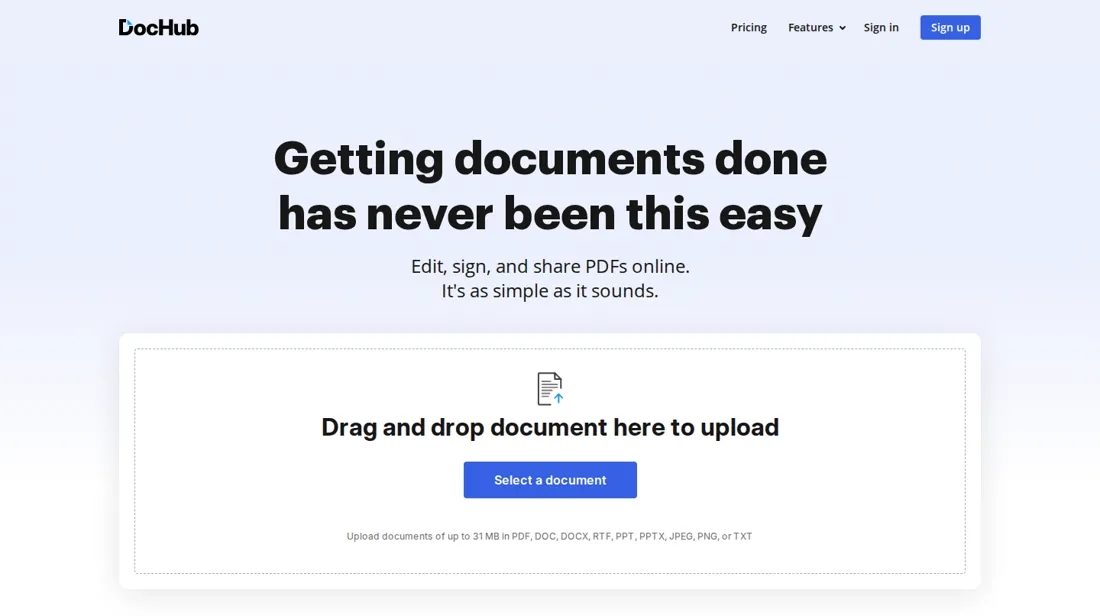
The free plan's 3 uses a month are shared by editing, self-signing and sign requests, and our test could not show which actions counted.
- Best for Freelancers who sign their own client paperwork
From €8 · Basic · per month, Basic billed yearly, before tax, as the page showed it from a European · read 2026-11-18
Try DocHub free →Affiliate link: we may earn a commission if you sign up, at no extra cost to you. It never changes our verdict.
Is DocHub right for you?
Your pain“Every contract a client sends me means printing it, signing by hand and scanning it back in.”
Does DocHub solve it?YesOur test (18 Nov 2026): a PDF went from upload to a typed signature in under 2 minutes, and the pricing page lists unlimited self sign on Basic.
Your planBasic, €8 a month billed yearly (€11 monthly)
Try DocHub →
Your pain“We still print, sign and scan contracts because the big e-sign suites cost more than our few documents justify.”
Does DocHub solve it?PartlyOur test (18 Nov 2026): editing and signing worked on the free plan, but every core action shares a cap of 3 uses a month and the Pro trial wants a card.
Your planPro, €12 a month per member who needs it, billed yearly (€16 monthly); cancel the trial before day 30
Try DocHub →
Your pain“Clients sign something of mine a few times a month, and a monthly e-sign bill is out of proportion for that.”
Does DocHub solve it?PartlyPricing page, read 18 Nov 2026: Free lists sending sign requests, but inside the same 3 uses a month as editing and self-signing; Pro makes them unlimited.
If that catch rules it out: SignThis.
Your planFree, €0; each sign request counts toward the 3 monthly uses
Try DocHub →
- you send several documents a month for others to sign and want that on a free plan, or you will not put a card down to try Pro.
The “Try” buttons are affiliate links: we may earn a commission if you sign up, at no extra cost to you, and it never changes our verdict.
Also in: Software for freelancers and solo businesses
Transparency: the “Visit” links on this page are affiliate links: we may earn a commission if you sign up, at no extra cost to you. No vendor can pay for a better review or verdict. How we make money →
What DocHub costs at your size
What each plan costs a month on annual billing (monthly billing below it), per user from DocHub’s own pricing page. The cheapest plan at each size is marked. On annual billing the cheapest plan changes from Free to Pro between 1 and 2 users. Free stops at 1 user; Basic stops at 1 user; Site License is quote only.
| Users | Free | Basic | Pro | Site License |
|---|---|---|---|---|
| 1 user | €0Best value at this size | €8 €11 monthly | €12 €16 monthly | quote only |
| 3 users | not available | not available | €36Best value at this size €48 monthly | quote only |
| 5 users | not available | not available | €60Best value at this size €80 monthly | quote only |
| 10 users | not available | not available | €120Best value at this size €160 monthly | quote only |
| 25 users | not available | not available | €300Best value at this size €400 monthly | quote only |
| 50 users | not available | not available | €600Best value at this size €800 monthly | quote only |
Prices read 2026-11-18; tax excluded unless the vendor says otherwise. Calculated by our cost engine; the same numbers are in our open data.
See current prices on DocHub →Tested by our team on 18 November 2026 on the free plan: Daan created the account and our AI assistant ran the test in Daan's browser, with the interface in English. We uploaded a two-page test invoice, edited it and signed it ourselves. We sent nothing to another signer and did not start the Pro trial.
How we tested
- Uploaded one test PDF and timed it from upload to signed document
- Added text, a date field and a typed signature on the free plan
- Read the plans page and the Pro checkout and stopped before paying
- Import a Document took our 2-page test PDF of 2.2 kB and opened it in the editor once its status read Ready. We skipped the welcome tour and answered Not now when DocHub offered to add fillable fields automatically.
- We added a text field with a purchase-order number, a date field that the Fill button set to 11/18/2026, a line of free text and a signature field.
- Sign, Create Signatures offered four ways to make a signature: Phone, Draw, Upload Image and Type. We typed a test name and saved it as the default, and it appeared in the signature field. The screen says signatures created with DocHub are legally valid.
Pricing (2026)
✓ Pricing re-verified 18 Nov 2026
DocHub has four plans. Free costs €0. Its core features, which are editing existing text, self sign, sending sign requests, templates, envelopes and sharing by link, all draw on one limit of 3 uses a month, next to basic PDF tools, the AI Assistant and the mobile apps; the comparison table also caps Free at 3 folders. Basic is €8 a month billed yearly or €11 billed monthly.
It makes self sign, PDF downloads, templates and folders unlimited and adds advanced fillable fields and document attachments, but editing existing text, sign requests and envelopes stay inside the limit of 3 uses a month. Pro is €12 a month billed yearly or €16 billed monthly and makes PDF editing, sign requests and envelopes unlimited, with bulk send, in-person signing and the DocHub Intelligence tools on top.
Site License is priced through sales and adds unlimited users, single sign-on, and HIPAA with a BAA available. The yearly switch says it saves 25%, and in an organization each member who needs Pro features is paid for. Pro has a 30-day free trial. At checkout on 18 November 2026 it asked for a card through Stripe and said the first payment of €16.00 would be due on 18 December 2026, plus taxes, unless the trial is cancelled before that date; the yearly Pro checkout showed €12 a month billed as €144 a year. We could not read US dollar prices. Plans change, so check the live price on their site before you buy.
Category context: IT & Productivity. Across the 44 tools in this category that we researched with a public US-dollar price, the median entry price is $15 a month (lowest paid plan as listed, per seat where the vendor prices per seat). Compare pricing conditions in the Software Cost Atlas →
What the pricing page doesn’t say
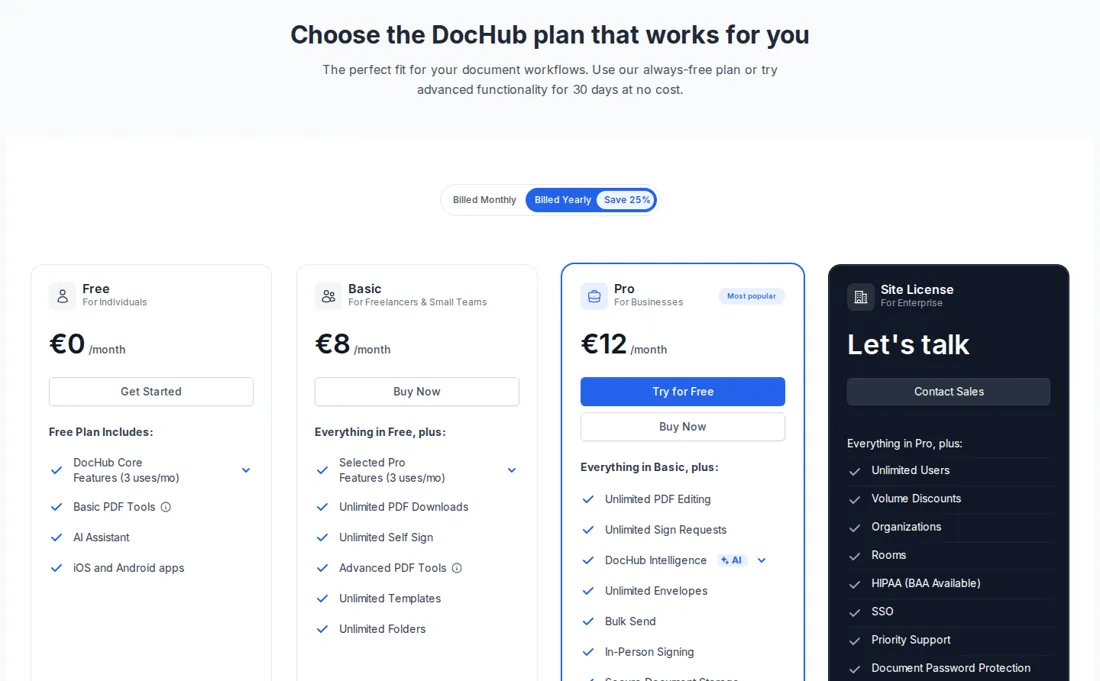
Unlimited sign requests need Pro, whose trial asks for a card and becomes a €16 monthly charge after 30 days unless you cancel.
What DocHub does
Online PDF editor and e-signature tool: edit text and fields in a PDF, sign it yourself and send sign requests, with a free plan capped at a few uses a month.
Basic frees your own signing, Pro frees sending
On the free plan every core action draws on the same 3 uses a month, so it works as a trial more than a working plan. Basic is the step for people who mostly sign their own paperwork: self sign, PDF downloads, templates and folders have no cap there. Sending documents to other people is still capped at Basic, because sign requests and envelopes stay inside the 3 uses. Pro is where sending opens up, with unlimited sign requests and envelopes, bulk send and in-person signing.
Paying yearly takes Basic from €11 to €8 a month and Pro from €16 to €12, so a year of Pro came to €144 at our checkout. An organization pays for each member who needs Pro, so price it per person before you choose.
What we found running DocHub ourselves
The first findings are at the top of this page. The rest:
- From the upload at 18:01:06 to the signed document at 18:02:53 took about 1 minute 47 seconds and roughly 12 steps.
- The free plan shows 'DocHub Core Features (3 uses/mo)' and says all features share a monthly limit of 3 uses. Nothing on screen told us whether our edits and signature used any of them.
- The plans page in the app showed Basic at €8 and Pro at €12 a month billed yearly, and €11 and €16 billed monthly, with Send for Signature marked as a Pro feature.
- Try for Free on Pro opened a Stripe card form. It said the plan is free for 30 days, after which the first payment of €16.00 is due on December 18, 2026 with taxes on top, and that cancelling before that date means no charge. We stopped there and entered nothing.
What this test does not show:
- Sending a sign request to a second signer, and what the signer sees
- The Pro trial itself, and cancelling it
- Google Drive and Dropbox connections
- How many of the 3 monthly uses our test used
Most of our reviews are researched rather than run. How we review explains which is which, and why we do not pretend otherwise.
How to actually use DocHub
Sign up for the free plan; it asked for no card in our test. On the dashboard, Import a Document opens your PDF in the editor, where you can add text, fillable fields and a date, then sign it yourself under Sign, Create Signatures, by phone, drawing, an uploaded image or a typed name. Our first signed document took under two minutes. Each of those actions can count toward the 3 uses a month on the free plan.
For unlimited sign requests you need Pro. Its 30-day trial asks for a card at checkout. To stop it, go to Settings, Billing, Change Plan, choose Cancel Subscription and turn off automatic renewal before the date the checkout names; the pricing FAQ says the account then moves to the free plan.
Where this section comes from: our research notes (96 words)
DocHub's own pricing page (dochub.com/pricing), with the plan cards, the full comparison table and the FAQ, read in a browser on 18 November 2026. From our European connection it showed euros, and we could not read US dollar prices. The in-app plans page and the Pro checkout were read in our own test the same day, on the free plan. DocHub is an affiliate partner of ours through Impact. Buyer reviews on G2, Capterra and TrustRadius were behind a bot check when we tried to read them on 18 November 2026, so this review quotes none.
DocHub vs SignThis, side by side
Each column shows the vendor’s own published entry price, read on the date shown. Entry prices can cover different services or units, so check what each one buys. We do not average them into a score.
Both names above are affiliate links: we may earn a commission if you sign up, at no extra cost to you. Neither changes what this table says.
The natural comparison is SignThis: SignThis is in our directory as a tested e-signature tool whose free plan counts only sent documents, 3 a month with several signers each. DocHub adds PDF editing next to signing, but on its free plan edits, signatures and sign requests share one limit of 3. Pick by whether you mostly edit and sign yourself or mostly send.
Frequently asked questions
How much does DocHub cost?
Read on 18 November 2026 in euros, before tax: Free is €0, Basic €8 a month on a yearly bill or €11 month to month, Pro €12 yearly or €16 month to month, and Site License is quoted by sales. We could not see US dollar prices.
What does the free plan really allow?
A handful of actions a month. Editing existing text, self sign, sign requests, templates, envelopes and link sharing all share one limit of 3 uses. In our test we uploaded, edited and signed a PDF on the free plan, and the screen did not tell us how many uses that took.
Can I send documents for others to sign without Pro?
A few. Free and Basic both list sending sign requests, inside the same limit of 3 uses a month. Pro makes sign requests unlimited. The Send for Signature row in the table, Pro only, is an AI Assistant feature that helps prepare requests.
Does the Pro trial need a card?
Yes, in our test. The checkout asked for card details through Stripe before the 30-day trial could start and named 18 December 2026 as the date of the first payment of €16.00. It said nothing is charged if you cancel before then. The free plan needed no card.
How do I cancel the trial?
The pricing FAQ says: Settings, Billing, Change Plan, Cancel Subscription, then turn off automatic renewal, after which the account moves to the free plan. We stopped before starting a trial, so we only have the FAQ's word for this route.
Are DocHub signatures legally valid?
DocHub's signature screen says signatures created with DocHub are legally valid. We did not check that claim against the law of any country, so ask your adviser if a contract depends on it.
Is this a hands-on review of DocHub?
Yes. We tested DocHub ourselves on 2026-11-18; the section above says what we tested, what we found and what we did not test, and where a figure comes from the vendor's own documentation instead. Most of our reviews are researched rather than run; we say which is which. We name what each tool is good and bad at, and we earn a commission only if you sign up, at no cost to you.
- Read 2026-11-18 on dochub.com/pricing in a browser and in our own test the same day; from our European connection the page showed euros, and prices are before tax.
- A dated screenshot of that pricing page, kept on this site as the receipt.
- Our own hands-on session with DocHub (2026-11-18), written up in full further down this page.
Bottom line
In one line: PDF editing and e-signing; the free plan has 3 uses a month.
Best for: freelancers who sign their own client paperwork.
The Try button is an affiliate link; we may earn a commission at no extra cost to you.
Others in this category
Reviewed it & productivity tools that share ground with DocHub. They are comparable in what they do, not drop-in swaps:
New reviews, price changes we recorded, and the cost conditions we found. No sponsored placements. Unsubscribe anytime.
This is our researched assessment, not a paid placement. The “Visit” links on this page are affiliate links: we may earn a commission if you sign up, at no extra cost to you, and it never changes our take. How we review →