Wondershare PDFelement Review (2026)$79.99/yr or $129.99 Once
The prices on the store are a launch discount next to higher list prices, and the yearly plan renews automatically.
individuals and small offices on Windows or Mac who want a full PDF editor with OCR, forms and conversion, and prefer a one-time licence over an Acrobat subscription.
you need e-signatures or AI document work at volume, your team needs central licence management at scale, or you only edit a PDF now and then and a free online tool will do.
Transparency: the “Visit” links on this page are affiliate links — we may earn a commission if you sign up, at no extra cost to you. No vendor can pay for a better review or verdict. How we make money →
Pricing (2026)
✓ Pricing re-verified 9 Oct 2026
All three prices are shown as a PDFelement 13 launch discount next to a struck-through list price. The Yearly Plan is US$79.99 a year (list US$129) and renews automatically. The 2-Year Plan is US$109.99 (list US$149) and renews manually. The Perpetual Plan is US$129.99 once (list US$159) for perpetual access to PDFelement 13. Each paid plan includes 20 GB of PDFelement Cloud storage, no watermark and tech support; the yearly and 2-year plans include updates for their term.
The comparison table gives every paid plan 50 'trial uses' of the PDF AI and 3 eSign requests; the FAQ has a question about extra charges for AI that we could not read in the render. The free trial without an account allows only create, view, protect and organise and adds a watermark; a registered 14-day trial without a card unlocks nearly all features but still watermarks saved files.
There is a 30-day money-back guarantee. On the same store, the cross-platform individual licences (desktop plus iOS, Android and web) were US$89.99 a year (list US$305), US$119.99 for two years (list US$510) and US$139.99 once (list US$695), with 100 GB of cloud storage instead of 20 GB; on the perpetual licence, mobile and web access is for a limited time. Mac single-platform, team and education prices were not read. Plans change — always verify the live price on their site.
Category context: IT & Productivity. Across the 35 tools in this category that we researched with a public US-dollar price, the median entry price is $14 a month (lowest paid plan as listed, per seat where the vendor prices per seat). Compare pricing conditions in the Software Cost Atlas →
What the pricing page doesn’t say
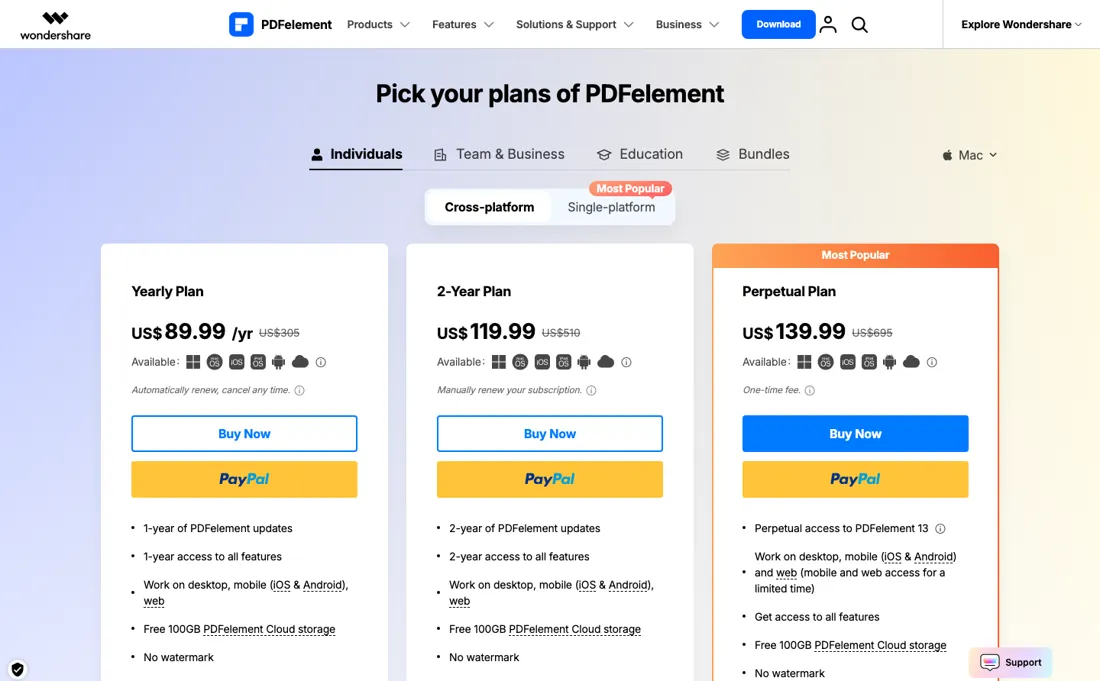
Every paid plan shows only 50 PDF AI uses and 3 eSign requests in the comparison table. A perpetual licence covers PDFelement 13, not later major versions, and the prices we read are for one platform. We have not used PDFelement ourselves.
What Wondershare PDFelement does
Desktop PDF editor for Windows and Mac with OCR, forms, conversion, redaction and an AI assistant, sold as a yearly, two-year or one-time licence.
Perpetual pays off within two years, at least at the launch price
At the launch prices shown, the perpetual licence (US$129.99) costs about the same as 20 months of the yearly plan (US$79.99 a year). If you edit PDFs regularly and do not need every new major version, the one-time licence is the cheaper route; it covers PDFelement 13, not later versions. The yearly plan renews automatically, the store does not show the renewal price, and the struck-through list price is US$129, so check what the second year costs before the first one ends.
The 2-Year Plan renews manually, which avoids a surprise charge. What no plan makes generous is AI and e-signatures: the comparison table shows 50 AI uses and 3 eSign requests on every paid plan. If you need either at volume, budget for something else.
How to actually use Wondershare PDFelement
Register for the 14-day trial (no card) and test the features you need on your own files; saved files carry a watermark until you buy. Pick the platform before you pay: these prices are for one platform (Windows here), and cross-platform licences cost more. Choose perpetual if you edit PDFs every week and do not care about version 14.
Distilled from Wondershare's PDFelement store page for Windows individuals, read in a headless browser on 2026-10-09 (plans, struck-through prices, the comparison table and the trial FAQ). Wondershare is a CJ partner of ours. We have not used PDFelement ourselves.
Wondershare PDFelement vs Foxit, side by side
Each column shows the vendor’s own published entry price, read on the date shown. Entry prices can cover different services or units, so check what each one buys. We do not average them into a score.
Both names above are affiliate links: we may earn a commission if you sign up, at no extra cost to you. Neither changes what this table says.
The natural comparison is Foxit — Foxit is in our dossiers too and also sells a desktop PDF editor priced under Acrobat with a perpetual option; compare the per-user yearly price and the eSign allowance, because PDFelement caps eSign requests at 3 on every plan in its table.
Visit Wondershare PDFelement →
Frequently asked questions
How much does PDFelement cost?
Read on 9 October 2026 for one user: on one platform (Windows) US$79.99 a year, US$109.99 for two years or US$129.99 once; cross-platform US$89.99 a year, US$119.99 for two years or US$139.99 once. All are shown as launch discounts on higher list prices.
Does PDFelement have a free version?
There is a free trial. Without an account it only creates, views, protects and organises PDFs; a registered 14-day trial unlocks nearly everything. Both add a watermark when you save.
Is the PDFelement perpetual licence lifetime?
It gives perpetual access to PDFelement 13. New major versions are not included.
What should I weigh before buying IT & Productivity software?
Judge it on evidence rather than adjectives. Look for a published security page, single sign-on and role controls on the plan you would actually buy (they are often gated to higher tiers), a status page with real incident history, and a clear answer on where your data is stored. If the tool will hold anything sensitive, those four answers matter more than any feature comparison.
Is this a hands-on review of Wondershare PDFelement?
This is a researched assessment, not a hands-on test — where we've used a tool ourselves, we say so explicitly. We name what each tool is good and bad at, and we earn a commission only if you sign up, at no cost to you.
- Read 2026-10-09 in a browser render of pdf.wondershare.com/store/windows-individuals.html, USD, Windows, individuals, single-platform tab.
- A dated screenshot of that pricing page, kept on this site as the receipt.
Others in this category
Reviewed it & productivity tools that share ground with Wondershare PDFelement — comparable in what they do, not drop-in swaps:
New reviews, price changes we recorded, and the cost conditions we found. No sponsored placements. Unsubscribe anytime.
This is our researched assessment — not a paid placement. The “Visit” links on this page are affiliate links: we may earn a commission if you sign up, at no extra cost to you, and it never changes our take. How we review →