Cloudways Review (2026)
 By Daan Haket · Researched and written with an AI assistant · who does what
"Fully managed" here means the server, not your site — and that distinction is where the money is.
agencies and PHP shops running many sites who want servers managed but not metered. One server holds as many sites as it can carry with no visit caps, billing is hourly and post-paid with no annual term, and Magento and Laravel are first-class alongside WordPress. It suits teams who genuinely do not want anyone patching kernels at 2am.
you are comfortable in a terminal, or you run a single small site. Going direct to the cloud provider with your own control panel keeps the server in your own account for materially less. And one low-traffic site is better served by shared hosting, or by a per-site managed host that bundles CDN and application support. Cloudways also has no email hosting of its own, reselling a Rackspace add-on instead.
Transparency: the “Visit” links on this page are affiliate links — we may earn a commission if you sign up, at no extra cost to you. No vendor can pay for a better review or verdict. How we make money →
Pricing (2026)
✓ Pricing re-verified 12 Oct 2026
| Plan | Price | What you get |
|---|---|---|
| Micro (DigitalOcean, Premium NVMe) | $14/month, $0.0208/hour | 1GB RAM, 1 vCPU, 25GB NVMe, 1TB bandwidth |
| Small | $28/month, $0.0417/hour | 2GB RAM, 1 vCPU, 50GB NVMe, 2TB bandwidth; the Standard column prices the same box at $11 with an hourly rate that says $24 |
| Medium | $54/month, $0.0804/hour | 4GB RAM, 2 vCPU, 80GB NVMe, 4TB bandwidth |
| Large | $99/month, $0.1473/hour | 8GB RAM, 4 vCPU, 160GB NVMe, 5TB bandwidth — the same droplet is $48 direct from DigitalOcean |
| Autonomous (Small / Medium / Large) | $35 / $240 / $995 per month | autoscaling WordPress hosting metered on unique visits and bandwidth, 3-day free trial |
No free tier, but a 3-day free trial with no credit card required. Billing is hourly and post-paid, invoiced in the first week of the following month, with no annual contract — and the hourly figure is the one that decides the bill: every card divides its monthly price by 672 hours, so $0.0208 an hour is the $14 plan. The page now opens on DigitalOcean's Premium (NVMe) column, where Micro is 1GB RAM / 1 vCPU / 25GB NVMe / 1TB bandwidth at $14/month, Small 2GB / 1 vCPU / 50GB NVMe / 2TB at $28, Medium 4GB / 2 vCPU / 80GB / 4TB at $54 and Large 8GB / 4 vCPU / 160GB / 5TB at $99.
Two of those have moved since July: the entry machine is now half the size for three dollars more (July's Micro was 2GB / 50GB at $11), and the 8GB plan went from $88 to $99. Switch the column to Standard and that same 2GB / 50GB box reads $11 a month — but the hourly figure printed underneath it, $0.0357, works out to $24 at the 672-hour month the other cards use, so the two numbers on that one card cannot both be right; read the live estimate before you commit.
Full pricing notes (4 more paragraphs)
Bought direct from DigitalOcean on the same day, an 8GB / 4 vCPU / 160GB / 5TB droplet lists at $0.07143 an hour, $48 a month. Add-ons are monthly and separate: Cloudflare Enterprise CDN from $4.99 per domain, Site Manager from $3 per app, Malware Protection from $4 per app, Rackspace email $1 per mailbox, DNS Made Easy $0.50 per domain, offsite backup storage $0.033 per GB.
Advance Support is $100/month or 10% of your invoice, whichever is higher, with a limited-time flat rate of $25/month advertised on the page today; the $500 Premium Support tier we recorded in July is no longer listed there. Cloudways Autonomous, the separate autoscaling product, now prices at $35, $240 and $995 a month where July's page showed $99, $199 and $399, and it meters unique visits and bandwidth rather than RAM (30k visits and 100GB on Small, 70k and 200GB on Medium) with a 3-day free trial.
Markups on AWS and Google Cloud still cannot be calculated because Cloudways does not publish the underlying instance types. A site-wide banner advertises 40% off for four months until 15 September 2026 — promotions move, so read the live price. US list prices, excluding tax. Re-verified 12 October 2026 in a live browser on cloudways.com/en/pricing.php: Micro $14 ($0.0208 an hour), Small $28 ($0.0417), Medium $54 ($0.0804) and Large $99 ($0.1473) on the DigitalOcean Premium column, unchanged; the page adds $0.033/GB per server for offsite backup storage and says listed prices exclude taxes.
The support page still lists Advanced at $100 a month or 10% of the invoice, whichever is higher, and Premium at $500 on the same rule, next to a banner offering Advanced at '$25/mo flat' as a 'Lifetime deal: 75% OFF'.
Plans change — always verify the live price on their site.
Category context: IT & Productivity. Across the 35 tools in this category that we researched with a public US-dollar price, the median entry price is $14 a month (lowest paid plan as listed, per seat where the vendor prices per seat). Cloudways’s entry price of $14 a month sits roughly at that median. Compare pricing conditions in the Software Cost Atlas →
Correction after re-checking: Advanced Support was listed at "$100/month or 10% of your invoice"; on 31 July 2026 support.php showed $100 struck through and $25/mo under the label "75% OFF for lifetime". Both figures appear in words and numbers, and the date it was read now sits in the sentence itself rather than only in the source list.
NETWORK26 — 20% off for 3 months, no end date (vendor-supplied via Awin, 23 Jul 2026); Cloudways bills hourly in arrears, so it comes off your first three invoices. The public code SUMMER404, 40% off for four months, ran until 15 September 2026; since then this 20% is the standing discountVendor-confirmed: Supplied by Cloudways via Awin, 23 Jul 2026. Not tested by us at a checkout. Claim the deal →
What the pricing page doesn’t say
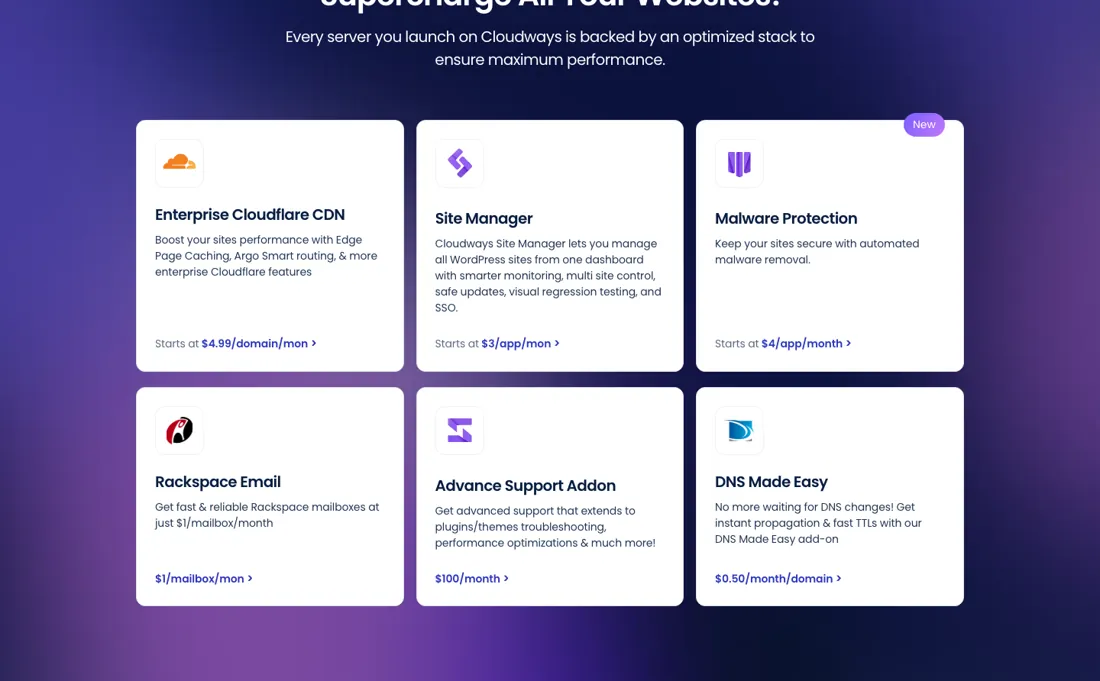
Cloudways' own support page puts infrastructure and platform work in the included tier but treats application help as guidance only. Plugin and theme troubleshooting, database work and performance tuning sit behind Advanced Support at $100/month or 10% of your invoice, whichever is higher, on a six-month minimum. On a small server that add-on costs more than the server it supports. Content changes, custom code debugging and code audits stay out of scope on every tier, paid ones included.
The deeper catch is ownership: Cloudways documents that you get no root access and cannot use your own cloud credentials, so the machine sits in Cloudways' account — you cannot fire the management layer and keep the server, you migrate. And read the billing terms before you rely on it: their help centre states that an unpaid invoice restricts server access and can lead to the server and its backups being deleted, with backups kept for only 14 days after deletion.
Watch the video review
The video version of this review, from our YouTube channel.
⚡ Short on time? Watch the 30-second verdict Short.
What Cloudways does
Managed-hosting layer that rents you servers on DigitalOcean, Vultr, Linode, AWS or Google Cloud through one dashboard, with the stack, caching, staging, cloning, backups and 24/7 platform support pre-built on top. You buy a server and put as many sites on it as it holds — no per-site plans and no visit metering — billed hourly and invoiced monthly in arrears with no contract. The trade is control: Cloudways' own documentation states there is no root access and no bring-your-own cloud account, so the server lives in Cloudways' name. Owned by DigitalOcean since September 2022.
What buyers report about Cloudways
Hands-on: not tested by usReported by buyers: Trustpilot, G2 and hosting-review sites, read August 2026
Themes from the buyer-review sites listed at the foot of this page, read in August 2026. We have not run Cloudways ourselves, so this is other buyers' experience rather than ours. We summarise it here because the complaints are usually the part a vendor page leaves out.
- • Managed hosting on top of DigitalOcean, Vultr or AWS without you running the server — 4.6 on Trustpilot, 4.7 on G2, and performance is the consistent praise.
- • Ranked third in G2's Best Web Hosting category.
- • You pay a real premium for the management layer. A VPS that costs $6 at Vultr runs about $16 here. That may well be worth it — but know what the markup is.
- • Support quality changed after the 2022 DigitalOcean acquisition, and reviewers say so directly. Phone support and a private Slack channel sit in Premium Support, around $400 above Advanced.
- • Billing and add-on confusion come up repeatedly, and prices have risen.
- • The dashboard takes learning.
Pages read (August 2026): Trustpilot
When the paid plan is worth it
There is no free tier here — only a 3-day trial that needs no credit card — so the question is not free versus paid but which add-ons you bolt onto a server that starts at $14/month. The boundary that decides money is support scope. The free Standard tier covers infrastructure and promises an initial ticket response within 12 hours, or 3 hours for high priority tickets; plugin and theme troubleshooting, performance and database optimisation and server error investigation only start at Advanced Support.
Proactive monitoring is not that clean a line: the comparison table gives Standard "Alerts" and both Advanced and Premium "Proactive Investigation". Advanced is listed at $100/month or 10% of your invoice, whichever is higher, and Premium at $500/month on the same rule; a banner on the same page offers Advanced at "$25/mo flat" as a lifetime 75% discount (read 31 July and again 12 October 2026). The six-month minimum commitment we read there on 31 July was not on the page when we looked on 12 October.
Advanced also tightens the ticket SLA to 6 hours, or 30 minutes for high priority. Upgrading fixes none of the hard limits: website content changes, debugging custom code, auditing your code and migrating away from Cloudways stay out of scope on every tier, Premium included.
Questions we checked
Facts about Cloudways that would change a buying decision, and where we stand on each. An unanswered question does not mean the feature is missing; it means we have not confirmed it yet.
- Is a stopped (not deleted) server still billed? Sources disagree
Applies to: Flexible servers on DigitalOcean, Linode and Vultr.
Why it matters: two Cloudways help articles answer it differently, and the difference is a full month of server cost.
Answer: 'How Do I Stop My Cloudways Billing?' (read 12 October 2026) says billing continues regardless of server status on DigitalOcean, Linode and Vultr and that only deleting the server stops it; the FAQ in 'Understanding Monthly vs. Hourly Billing on Cloudways' (read the same day) answers that an inactive server incurs no future charges. We budget on the first, more specific article.
Checked: How Do I Stop My Cloudways Billing? (2026-10-12); Understanding Monthly vs. Hourly Billing on Cloudways (2026-10-12)
Have a public source that answers one of these? How we review explains how we check and correct.
How to actually use Cloudways
Signup needs no card and the trial runs three days; the pricing page lets you pick a cloud provider (DigitalOcean, Vultr, Linode, AWS, GCE) and a server size before signing up. The migration add-on page shows two tables that do not agree. One table lists WordPress/WooCommerce as "Free Unlimited Sites" with Joomla/OpenCart, LMS & Ecommerce and custom applications each at $99 per application; the other charges $25 per application for WordPress/Woo, $99 for Joomla/OpenCart, $125 for LMS Platforms and $199 for custom applications.
The page does not say which customers each table applies to. Cloudways writes that "Your first migration is included at no cost", that migrations are usually completed within 1–2 business days depending on the complexity of your site, and that "WordPress users can also migrate unlimited sites at no cost using our WordPress Migrator Plugin". A 16 June 2026 changelog entry gives Cloudways Copilot automatic 5xx monitoring of hosted WordPress and WooCommerce websites.
Distilled from Cloudways pricing page https://www.cloudways.com/en/pricing.php (read 2026-07-31); Cloudways support plans https://www.cloudways.com/en/support.php (read 2026-07-31); Cloudways Autonomous https://www.cloudways.com/en/autonomous.php (read 2026-07-31); Cloudways migration add-on https://www.cloudways.com/en/addon/application-migration.php (read 2026-07-31); Cloudways changelog https://www.cloudways.com/en/changelog.php (read 2026-07-31); Cloudways status page https://status.cloudways.com/ (read 2026-07-31). All of these are vendor-published pages, not independent reviews. Re-verified 12 October 2026 in a live browser on cloudways.com/en/pricing.php and cloudways.com/en/support.php, plus the help-center articles 'How Do I Stop My Cloudways Billing?' (support.cloudways.com/en/articles/5119650), 'Understanding Monthly vs. Hourly Billing on Cloudways' (articles/12157984) and 'Upcoming Cloudways Billing Updates' (articles/11154372), read 12 October 2026.
The natural comparison is Going direct on DigitalOcean with your own control panel — DigitalOcean owns Cloudways and sells both sides, which makes this the honest comparison: the same 8GB machine is $48/month as a droplet and $99/month wrapped in Cloudways. Add DigitalOcean's own daily backups and a control-panel licence and a like-for-like self-managed box lands nearer $75-80, so the real premium is smaller than the sticker gap suggests. The decisive difference is not price but ownership: with your own droplet the account and root are yours and you can drop the panel and keep the server, whereas leaving Cloudways is a migration.
Frequently asked questions
Does stopping a server stop the bill?
Not on most providers; only deleting it does. Cloudways' help article 'How Do I Stop My Cloudways Billing?' (support.cloudways.com/en/articles/5119650, read 12 October 2026) says billing applies to inactive or stopped servers, suspended servers and enabled paid add-ons, and that on DigitalOcean, Linode and Vultr it continues regardless of server status, covering CPU, RAM, disk and IP; on AWS and Google Cloud a stopped server incurs minimal charges, mainly disk and IP. To stop charges you download a backup, delete the server and deactivate paid add-ons, and because billing is post-paid you still get one final invoice the next month. The FAQ in a second article, 'Understanding Monthly vs. Hourly Billing on Cloudways' (read the same day), says an inactive server incurs no future charges; the two disagree, so budget on the first.
How are partial months and add-ons billed?
By the hour, with a cap. 'Understanding Monthly vs. Hourly Billing on Cloudways' (support.cloudways.com/en/articles/12157984, read 12 October 2026) says a server on DigitalOcean, Linode or Vultr that is active the whole month pays its capped monthly price even when the month runs past 672 hours; one that exists for part of the month pays its hourly rate for those hours, and resizing mid-month splits the hours across both sizes. AWS and Google Cloud are always hourly, with no monthly cap. Third-party add-ons such as DNS Made Easy are charged for the full month on activation, even if you remove them the same month. 'Upcoming Cloudways Billing Updates' (articles/11154372, read the same day) adds Billing Alerts under Billing, Settings, which email you when usage passes a threshold you set.
Is this a hands-on review of Cloudways?
This is a researched assessment, not a hands-on test — where we've used a tool ourselves, we say so explicitly. We name what each tool is good and bad at, and we earn a commission only if you sign up, at no cost to you.
- Buyer reviews on Trustpilot, G2 and hosting-review sites, read August 2026.
- Read 2026-08-26 on cloudways.com/en/pricing.php, DigitalOcean tab.
- A dated screenshot of that pricing page, kept on this site as the receipt.
Others in this category
Reviewed it & productivity tools that share ground with Cloudways — comparable in what they do, not drop-in swaps:
New reviews, price changes we recorded, and the cost conditions we found. No sponsored placements. Unsubscribe anytime.
This is our researched assessment — not a paid placement. The “Visit” links on this page are affiliate links: we may earn a commission if you sign up, at no extra cost to you, and it never changes our take. How we review →