Ngram Review (2026)3,000 Credits Is Five Minutes
 By Daan Haket · Tested hands-on · written with an AI assistant · who does what
The sticker price buys a credit allowance, not finished video, and the two are easy to confuse.
product and marketing teams that want to turn docs, screenshots and recordings into polished, on-brand videos quickly and repeatably.
you need bespoke, high-end studio production, or your video volume would make the per-export credit model expensive versus a flat-fee tool.
Transparency: the “Visit” links on this page are affiliate links — we may earn a commission if you sign up, at no extra cost to you. No vendor can pay for a better review or verdict. How we make money →
A new free account in ngram's v2 studio. We pasted the link to one of our own published reviews (ActiveCampaign) with a one-line brief, asked for 30 seconds, ran the same prompt twice and read the credit meter before and after each run.
- The new account opened with 1,200 credits, while ngram's pricing page (read the same day) lists the Free plan at 600 one-time credits. We report what the meter showed; we do not know why it was double.
- The composer states the rate plainly: 10 credits a second, billed on the generated duration. It reserved 300 credits for a 30-second request, but both videos came out slightly long, at 32.5 and 32 seconds, and were charged 330 and 320 credits. The meter went 1,200 to 870 to 550, matching those charges exactly.
- From the link alone it read the page, picked up the site's own colours, type and logo, and wrote a scene-by-scene storyboard with the narration script in about a minute and a half. Nothing was charged until we approved that plan, which is the moment to catch a wrong claim.
Pricing (2026)
✓ Pricing re-verified 7 Oct 2026
Credit-based, three published tiers plus a quote-only Enterprise, with annual billing 20% off. Free is a one-time 600-credit allocation capped at 60 seconds of premium AI generation and 720p exports. Basic is $29/mo, or $23.20/mo billed annually at $278.40 a year, with 3,000 credits a month. Premium is $59/mo, or $47.20 annually at $566.40, with 10,000 credits a month. Ultimate is $299/mo, or $239.20 annually at $2,870.40, with 50,000 credits a month and up to three workspace users; every other plan has one.
The credit allowance rather than the seat is what forces an upgrade. Premium and Ultimate monthly credits roll over for one billing cycle and annual-plan credits stay until renewal; Basic credits refresh monthly. Upgrades are charged pro rata straight away, and downgrades apply from the next billing date (pricing FAQ, read 7 October 2026). Plans change — always verify the live price on their site.
Category context: IT & Productivity. Across the 35 tools in this category that we researched with a public US-dollar price, the median entry price is $14 a month (lowest paid plan as listed, per seat where the vendor prices per seat). Ngram’s entry price of $29 a month sits above that median. Compare pricing conditions in the Software Cost Atlas →
Vendor-confirmed: Confirmed in writing by Ngram, 10 Aug 2026. Not tested by us at a checkout.
What the price did
We capture Ngram’s own pricing page every month and keep the figures, so this is our record of the page — not a forecast, and not someone else’s summary.
The figures have not moved between our monthly captures. July and August 2026 both record $23.20 against $29, $47.20 against $59 and $239.20 against $299, with the same annual totals of $278.40, $566.40 and $2,870.40, and the page returned them again on 17 August 2026. One note for anyone reading an automated price comparison of this tool: $23.20 is the annual monthly-equivalent of Basic, not a rise from a lower monthly rate, and mistaking the two produces a large phantom increase.
What the pricing page doesn’t say
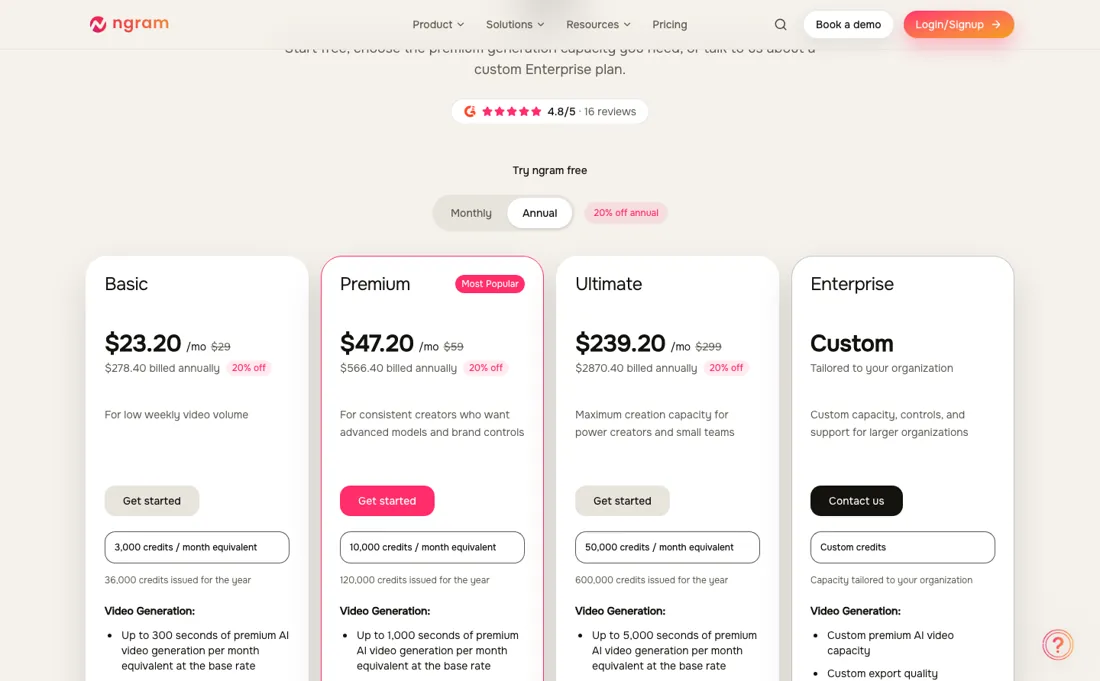
Premium AI generation runs from 10 credits a second, so Basic's 3,000 credits a month come out at roughly 300 seconds — about five minutes of generated footage. Ngram says as much on the page: generation seconds measure premium AI-generated footage, not final video length, and manual editing and exports are unlimited on paid plans. So the tier you need tracks how much AI footage you generate, not how many videos you publish.
The top-up economics run the wrong way for small buyers. Extra credits cost 1,000 for $40 on Free, $20 on Basic, $15 on Premium and $10 on Ultimate — the cheapest plan pays four times per credit what the dearest one pays. Anyone topping up regularly on Basic is paying a premium for staying on the cheap tier, and should price the next tier against a month of actual top-ups rather than against the headline gap between the two.
Two smaller things before you pick. Export quality is tiered — 720p on Basic, 1080p on Premium, 4K on Ultimate — so the resolution you need may set your plan before the credits do. And image and audio generation still consume credits on Basic, going unlimited only from Premium up.
Watch the video review
The video version of this review, from our YouTube channel.
⚡ Short on time? Watch the 30-second verdict Short.
What Ngram does
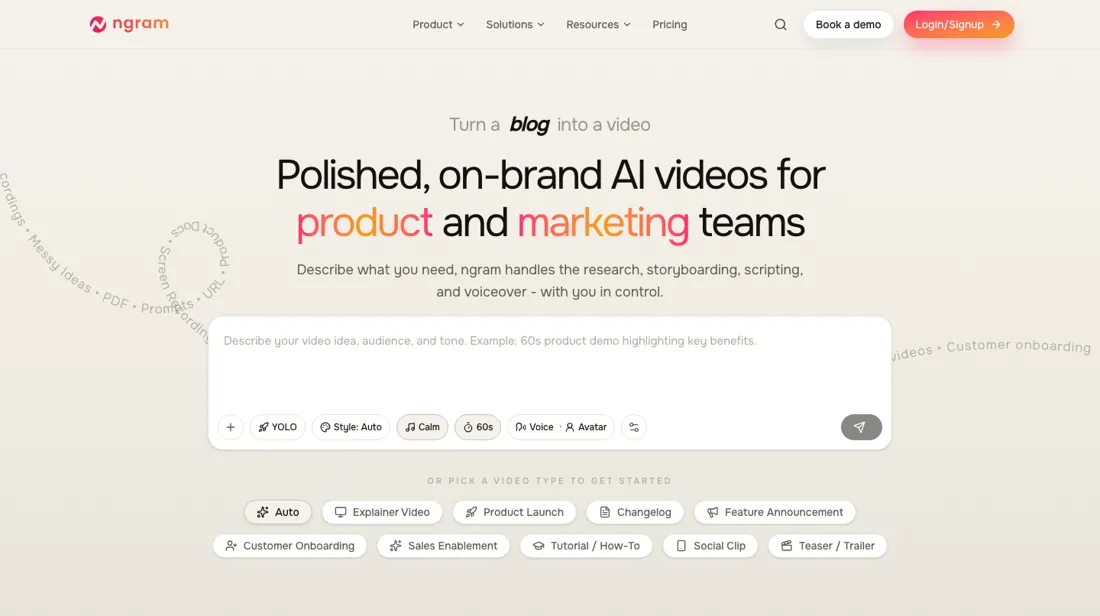
AI video creation for product and marketing teams. Turn docs, screenshots and recordings into polished, on-brand videos — scripted, storyboarded and produced with AI on a credit-based model, with a brand kit, captions and subtitles, AI voiceover and an AI avatar presenter. A published blog post or doc URL is a valid starting point in its own right: paste the link and it handles the research, script, storyboard, voice and style choice and the render in one sitting, with no editor in the loop, and hands back a shareable public link or an embed.
What buyers report about Ngram
Hands-on: tested 2026-09-30Reported by buyers: G2 and practitioner reviews, read August 2026
Themes from the buyer-review sites listed at the foot of this page, read in August 2026. We tested Ngram ourselves on 2026-09-30, but one test is a narrow sample, so here is what other buyers report. We summarise it here because the complaints are usually the part a vendor page leaves out.
- • Document or URL to a structured video with script, storyboard, visuals and voiceover in one pass — for turning dense material into a demo that is a genuinely specific strength.
- • Automatic screen-recording edits with zoom, highlights and cuts, plus brand kits applied consistently. Free plan gives 300 credits, and paid plans have a 7-day trial.
- • Independent reviews on G2, Trustpilot and Reddit are sparse compared with established tools. There is not much outside evidence yet.
- • No AI avatars and no voice cloning.
- • Web only — no mobile app — and collaboration features plus enterprise integrations are still in development.
- • It is built for document-to-video and screen recordings. As a general video tool it is the wrong shape.
When the paid plan is worth it
The sticker buys a credit allowance, not finished video, and the two are easy to confuse. Free is a one-time 600 credits capped at sixty seconds of premium AI generation and 720p exports. Basic is $29 a month ($23.20 annually) for 3,000 credits, Premium $59 ($47.20), and Ultimate $299 ($239.20). Annual billing is 20% off throughout. Premium AI generation runs from ten credits a second, so Basic's 3,000 credits are about 300 seconds — five minutes of generated footage a month.
So the tier you need tracks how much AI footage you generate, not how many videos you publish, and a team that mostly edits recordings will sit comfortably on a plan that looks far too small on paper. The top-up economics run the wrong way for small buyers, and this is the number that decides upgrades. A thousand extra credits cost $40 on Free, $20 on Basic, $15 on Premium and $10 on Ultimate — so Basic pays double per credit what Ultimate pays, and Free pays four times.
Anyone topping up regularly on Basic is paying a premium for staying on the cheap tier. Price the next tier against a month of your actual top-ups rather than against the headline gap between the plans; two top-ups a month on Basic already costs more than the jump to Premium. Two smaller things that can set your plan before the credits do. Export quality is tiered — 720p on Basic, 1080p on Premium, 4K on Ultimate — so the resolution your channel needs may decide for you.
Our monthly capture read this vendor's pricing page in July 2026 and again in August 2026, and the amounts were the same both times. We keep watching — the registry records what moves.
What we found running Ngram ourselves
The first findings are at the top of this page. The rest:
- Every figure in both scripts matched the review: $15 a month as the floor, and $149, $189, $375 and $589 at 10,000 contacts, as read on 29 September 2026. It declined to animate prices between those two points because the review does not print them, and it kept the review's attribution on the contact-billing rule (credited to SendX in one run, labelled as reported in the other).
- The same prompt gave a different video each time: five scenes in the first run, four in the second, with different wording and visuals. The facts stayed the same, but do not expect a repeat run to reproduce a video you liked.
- Rendering took about six to seven and a half minutes after approval. The narration step failed once in each run and recovered on its own, and the second run said openly that it could not listen to its own voice-over and flagged one word that might sound clipped. Listen before you publish.
- The visuals were motion graphics: the log showed ngram writing the scenes as an HTML animation and recording that, not generated camera footage. That suits explainers and product walkthroughs; it is not the tool for filmed-looking scenes.
- Videos are private by default; sharing offers a public link, an embed, a download and direct posting to LinkedIn, X and YouTube, and captions are included.
- Not tested: the export itself (so neither the 720p cap nor the Free-plan watermark was checked on a file), the paid plans, manual scene editing, avatars, and sources other than a web page.
Most of our reviews are researched rather than run — how we review explains which is which, and why we do not pretend otherwise.
How to actually use Ngram
Work out how much AI-GENERATED footage you need, not how many videos you publish, because those are different numbers and the tier tracks the first. Manual editing and exports are unlimited on paid plans, so a long video built mostly from your own material can sit comfortably on a cheap tier. Check the export ceiling before you commit, because it is tiered: 720p on Basic, 1080p on Premium, 4K on Ultimate.
If a client needs 1080p, Basic is not a cheaper version of the product, it is the wrong plan. Then do the top-up arithmetic, because it runs the wrong way for small buyers. Extra credits cost 1,000 for $20 on Basic, $15 on Premium and $10 on Ultimate — so anyone topping up regularly on Basic pays twice per credit what Ultimate pays. Price a month of your actual top-ups against the next tier rather than comparing the headline subscription figures.
And treat the free allocation as a sample rather than a trial period: 600 credits once, capped at 60 seconds of premium generation and 720p exports. Spend it on the hardest shot you need rather than an easy one. Annual billing takes 20% off across the ladder.
Where this section comes from: our research notes (94 words)
Ngram's own pricing page, www.ngram.com/pricing, read 10 September 2026: Basic at $29 a month or $23.20 billed annually ($278.40 a year) with 3,000 credits a month, Premium at $59 or $47.20 annually ($566.40), and Ultimate at $299 or $239.20 annually. On 10 September the $2,870.40 annual total for Ultimate was our own arithmetic on that $239.20; by 7 October 2026 the page prints it. Re-verified 7 October 2026: https://www.ngram.com/pricing (served HTML: plan cards, comparison table and FAQ) and the help-centre articles Use teams and collaboration https://help.ngram.com/articles/4807925-use-teams-and-collaboration and Request a billing review or refund https://help.ngram.com/articles/7488406-request-a-billing-review-or-refund.
Ngram vs Synthesia, side by side
Where a vendor publishes a price, its column shows the entry price we read and when; where it does not, the column says so rather than filling in a figure from elsewhere. We do not average them into a score.
Both names above are affiliate links: we may earn a commission if you sign up, at no extra cost to you. Neither changes what this table says.
The natural comparison is Synthesia or Pictory — close AI-video tools — Ngram leans product/marketing clips from your own assets; compare credit economics against your real export volume.
Frequently asked questions
What does Ngram cost?
Basic $29 a month, or $23.20 billed annually ($278.40 a year); Premium $59 or $47.20 ($566.40); Ultimate $299 or $239.20 ($2,870.40). Annual saves 20%, which matches the figures. There is a free one-time allocation of 600 credits. Read on 17 August and again on 7 October 2026.
What does the free tier actually let me make?
Very little, deliberately: 600 credits once, a 60-second cap on premium AI generation and 720p exports. It is enough to judge output quality on a single short clip, which is the right thing to test, but not enough to produce anything you would publish.
What runs out first, credits or features?
Credits. Basic gives 3,000 a month and the tiers above raise the allowance rather than unlocking a different product. Work out how many seconds of video you generate in a normal month and read across — upgrading for a feature you saw in a comparison table is usually the wrong reason here.
Can my team share one plan?
Only on Ultimate. The comparison table lists one workspace user on Free, Basic and Premium and up to three on Ultimate. Ngram's help centre adds that a team invitation grants access to the shared workspace, not a paid plan or paid seat, and that the owner controls billing actions and ownership transfer; save project links and outputs before removing someone's access (pricing page and Use teams and collaboration, read 7 October 2026).
Can I get a refund?
Only by review. Ngram handles failed generations, purchases and unwanted renewals case by case through support, says that a complete request does not guarantee a refund or restored credits, and allows 5 to 10 business days once a refund is confirmed. No fixed refund window is published: not confirmed (Request a billing review or refund, read 7 October 2026).
Is this a hands-on review of Ngram?
Yes. We tested Ngram ourselves on 2026-09-30; the section above says what we tested, what we found and what we did not test, and where a figure comes from the vendor's own documentation instead. Most of our reviews are researched rather than run; we say which is which. We name what each tool is good and bad at, and we earn a commission only if you sign up, at no cost to you.
- Buyer reviews on G2 and practitioner reviews, read August 2026.
- Re-verified 2026-08-17 and 2026-10-07.
- A dated screenshot of that pricing page, kept on this site as the receipt.
- Our own hands-on session with Ngram (2026-09-30), written up in full further down this page.
Others in this category
Reviewed it & productivity tools that share ground with Ngram — comparable in what they do, not drop-in swaps:
New reviews, price changes we recorded, and the cost conditions we found. No sponsored placements. Unsubscribe anytime.
This is our researched assessment — not a paid placement. The “Visit” links on this page are affiliate links: we may earn a commission if you sign up, at no extra cost to you, and it never changes our take. How we review →