 Database Mart Review (2026)Cheap Dallas Servers, Older Xeons
Transparency: the “Visit” links on this page are affiliate links — we may earn a commission if you sign up, at no extra cost to you. No vendor can pay for a better review or verdict. How we make money →
Database Mart is cheap partly because the hardware is older.
Visit Database Mart → Affiliate link — we may earn a commission if you sign up; it does not change what this page says.
Pricing (2026)
✓ Pricing re-verified 6 Oct 2026
Flat monthly prices per server, billed in advance. Linux VPS runs from $2.88 a month for Express (2 cores, 4GB RAM, 60GB SSD, marked save 51%) through $7.99, $5.85, $12.99, $10.80, $27.99 and $31.99 to $28.80 for Advanced Plus (16 cores, 32GB, 400GB); several rows are discounted, which is why some larger plans cost less than smaller ones. Windows VPS, which includes the Microsoft licence, runs from $5.99 to $63.99.
GPU VPS starts at $21 a month for a 2GB GT730, P600 or K620 card and climbs through an RTX 5060 at $85, an RTX 5090 at $419 and an RTX Pro 6000 with 96GB at $649. Dedicated GPU servers run from $37 (P1000, discounted) and $49 (P600) to $409 for an RTX 4090, $479 for an RTX 5090, $639 for a 40GB A100, $1,559 for an 80GB A100 and $2,099 for an H100, with multi-GPU boxes up to $1,899 for four A100s.
Plain dedicated servers start at $36 a month for a 4-core E3-1220 with 16GB. On the dedicated rows the discount is labelled recurring. The FAQ says standard VPS rows carry no setup fee but some dedicated or custom GPU builds may show a one-time provisioning line, and that add-ons such as extra IPs, backups and bandwidth are billed monthly on top. A 24-hour free trial is available on request, with no payment, through a note at checkout. Plans change — always verify the live price on their site.
Category context: IT & Productivity. Across the 36 tools in this category that we researched with a public US-dollar price, the median entry price is about $15 a month (lowest paid plan as listed, per seat where the vendor prices per seat). Database Mart’s entry price of $2.88 a month sits below that median. Compare pricing conditions in the Software Cost Atlas →
What the pricing page doesn’t say
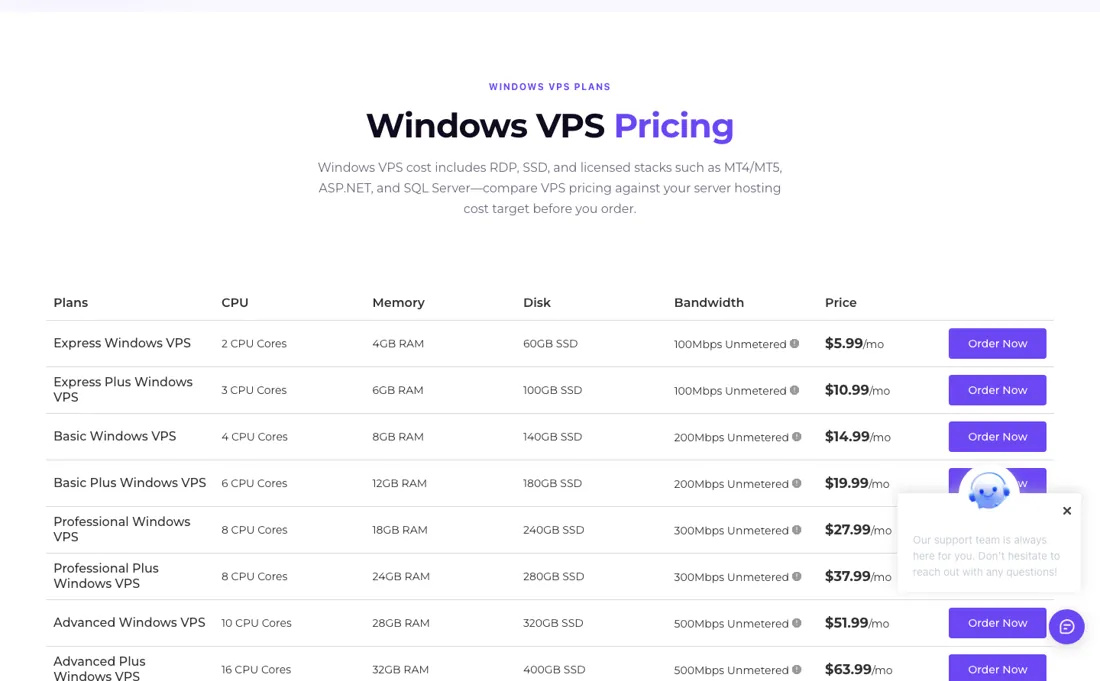
Most GPU and dedicated rows pair the card with Xeon E3 and E5 processors, and even the $2,099-a-month H100 server lists two E5-2697v4 CPUs from 2016 and a 100Mbps port, which is slow for moving model weights or datasets. Every server is in Dallas, Texas, so there is no second region for European or Asian users. Many rows carry 26% to 54% discounts, which makes the table hard to compare: some smaller plans cost more than larger ones.
The trust signals on the home page, 500K+ customers and 21 years in business, are the company's own and we could not check them, and we found no independent benchmark. Some dedicated and GPU builds may add a one-time provisioning fee that the table does not show.
What Database Mart does
US hosting company running its own servers in Dallas: Linux and Windows VPS, dedicated servers and NVIDIA GPU servers from entry cards to A100 and H100, with root access, a 24-hour trial on request and round-the-clock human support.
The GPU decides the bill, the CPU underneath does not change
For a plain VPS the ladder is cheap and roughly linear: a few dollars a month buys 2 to 4 cores, and $30 buys 10 to 16 cores with 28 to 32GB. Windows costs about twice as much as Linux at each size because of the licence. Read the rows rather than the order: discounts mean the 4-core Basic Linux VPS ($5.85) is cheaper than the 3-core Express Plus ($7.99).
On GPU servers the price follows the card and nothing else. An RTX 4090 box is $409 a month, an RTX 5090 $479, an 80GB A100 $1,559 and an H100 $2,099. Underneath most of the large cards sits the same host: two Xeon E5-2697v4 processors with 256GB RAM and, on the single-card rows, a 100Mbps port. Those are 2016-generation server CPUs, so the upgrade buys the GPU, not a faster machine around it, and a 100Mbps port is slow for moving large datasets or model weights in and out.
The reason to pay monthly here rather than hourly elsewhere is a card that runs all month. If your GPU sits idle most of the day, a monthly server is the expensive way to rent it.
How to actually use Database Mart
Ask for the 24-hour free trial before paying: the GPU page explains that you submit a trial request, or write '24-hour free trial' in the order notes, and receive login details within 30 minutes to 2 hours with no payment required. Use it to check the things the price table cannot show you: real disk and network throughput, and the latency from where your users are to Dallas, since every server sits in Database Mart's Dallas, Texas facility.
Pick the operating system early. Linux plans include no licence; Windows plans include Windows Server and RDP and cost roughly double. For trading or emulator work the Windows rows are what the company builds for; for containers, databases and AI inference, Linux is the cheaper start. Before you commit to a GPU row, note the port speed and the CPU in the table, not just the card: most single-GPU dedicated rows list a 100Mbps port, and the multi-GPU rows list 1000Mbps.
Add backups and extra IPs at order time, because the FAQ says add-ons are billed monthly on top of the plan.
Where this section comes from: our research notes (119 words)
Database Mart's own pages, read in a headless browser on 2026-10-06: databasemart.com/pricing (every Windows VPS, Linux VPS, GPU VPS, GPU dedicated and dedicated server row with CPU, RAM, disk, port speed and monthly price, plus the pricing FAQ on billing, setup fees and add-ons), databasemart.com/gpu-server (the 24-hour free trial procedure, the 99.9% uptime SLA and 24/7 support claims), the Linux VPS and dedicated hosting pages (USA data centre in Dallas, owned hardware, the recurring label on dedicated discounts) and the home page (hosting since 2005, the 500K+ customers claim, which we cannot verify).
Database Mart is an Awin partner of ours. We have not run a Database Mart server ourselves, and we found no independent benchmark we could weigh.
Database Mart vs Runpod, side by side
Where a vendor publishes a price, its column shows the entry price we read and when; where it does not, the column says so rather than filling in a figure from elsewhere. We do not average them into a score.
Both names above are affiliate links: we may earn a commission if you sign up, at no extra cost to you. Neither changes what this table says.
The natural comparison is Runpod — Runpod is in our dossiers too, and it rents the same top cards by the hour instead of by the month. Read on 24 September 2026, an H100 PCIe pod on Runpod's Secure Cloud is $2.89 an hour, about $2,080 for a full 720-hour month, and $1.99 an hour on Community Cloud, about $1,433; serverless bills only while it computes. Database Mart's dedicated H100 is $2,099 a month whether it is busy or not. Run around the clock, the two land within a few dollars of each other on Secure Cloud; used part-time, Runpod is far cheaper, because you stop paying when the pod stops. Database Mart's case is a whole server with root access, its own disks and a fixed bill, plus much cheaper entry options (an RTX 4090 box at $409 a month) for teams that want one machine they keep..
Frequently asked questions
What does an H100 or RTX 4090 server cost at Database Mart?
Read on 6 October 2026: a dedicated H100 server is $2,099 a month, an 80GB A100 $1,559, a 40GB A100 $639, an RTX 5090 $479 and an RTX 4090 $409. GPU VPS plans start at $21 a month for a 2GB entry card. Prices are flat monthly, billed in advance.
Where are Database Mart servers located?
In the United States: the Linux VPS and dedicated pages name Database Mart's own facility in Dallas, Texas, and every row in the price table lists the location as USA. If your users are in Europe or Asia, test the latency with the free trial first.
Is there a free trial?
Yes, 24 hours, on request. The GPU page says you submit a trial request (or write "24-hour free trial" in the order notes) without payment, and receive login details within 30 minutes to 2 hours; a request can be refused.
What should I weigh before buying IT & Productivity software?
Judge it on evidence rather than adjectives. Look for a published security page, single sign-on and role controls on the plan you would actually buy (they are often gated to higher tiers), a status page with real incident history, and a clear answer on where your data is stored. If the tool will hold anything sensitive, those four answers matter more than any feature comparison.
Is this a hands-on review of Database Mart?
This is a researched assessment, not a hands-on test — where we've used a tool ourselves, we say so explicitly. We name what each tool is good and bad at, and we earn a commission only if you sign up, at no cost to you.
- Read 2026-10-06 on databasemart.com/pricing, which lists every server row with its monthly price, and on databasemart.com/gpu-server.
- A dated screenshot of that pricing page, kept on this site as the receipt.
Others in this category
Reviewed it & productivity tools that share ground with Database Mart — comparable in what they do, not drop-in swaps:
New reviews, price changes we recorded, and the cost conditions we found. No sponsored placements. Unsubscribe anytime.
This is our researched assessment — not a paid placement. The “Visit” links on this page are affiliate links: we may earn a commission if you sign up, at no extra cost to you, and it never changes our take. How we review →