 Foxit Review (2026)Editor+ Now Bundles the E-Signing
Foxit's pitch is being the honest fraction of Acrobat's price, and on the headline numbers it delivers. Throughout this review we weigh it against Adobe Acrobat.
Visit Foxit → 🎟️ Code CP366-B4dCXGN5 — 20% off Affiliate link — the rest of this page is the honest version, including who should skip it.
Watch the 2-minute review
Same honest take, in video form — from our YouTube channel.
⚡ Short on time? Watch the 30-second verdict Short.
Pricing (2026)
✓ Pricing re-verified 22 Sep 2026
PDF Editor is $129.99 per user per year, or $10.99 per user per month, with a 14-day free trial that asks for no card. PDF Editor+ is $159.99 per user per year or $13.99 per user per month, and bundles what used to be a second bill: mobile apps for iOS and Android, AI Smart Redact, cloud storage and Foxit eSign Essentials with 150 envelopes a year plus pooled eSign licensing.
BILLING NOTE, first recorded 22 Sep 2026: the two price columns are not annual against monthly. The toggle reads 'Annual plan, paid in full' and 'Annual plan, billed monthly' - both are twelve-month plans, and no month-to-month option exists on the page. Paying by the month therefore costs $131.88 a year on Editor ($1.89 more) and $167.88 on Editor+ ($7.89 more) without shortening the commitment.
A perpetual licence, Foxit PDF Editor 14, is $209.99 once per user for Windows or macOS, covering editing, conversion, OCR, forms, security and fill-and-sign but not the web app, the AI Assistant, Smart Redact, the document management system or any cloud feature; Foxit's own FAQ argues the subscription is better value because it unlocks AI, cloud integrations, unlimited cloud storage, the full DMS and eSign integration, and notes that Adobe no longer sells perpetual Acrobat licences to new customers.
Every Editor and Editor+ seat carries 300 free AI credits per user per month; the paid AI Assistant tier is $49.99 a year for 2,000 credits a month per user, also offered at 'early access pricing' of $4.99 a month, which is $59.88 a year - $9.89 more for the same allowance. Credits reset monthly and do not roll over, and the add-on is not sold for perpetual licences.
Standalone eSign still exists: Essentials $120.00 a year with 250 envelopes and 10 templates, Business $300.00 per licence a year with unlimited envelopes and templates; Foxit Agreements is $359.88 per user a year paid in full ($29.99 a month) or $34.99 a month billed monthly. Volume discounts of up to 30% apply to orders of 30 or more licences across PDF Editor, PDF Editor+ and eSign, on subscription and perpetual alike, consolidating deployment into a single purchase order with one renewal date, standardised installation images and coverage for divisions and subsidiaries.
An education discount is applied automatically at checkout when you register with a school email address; Foxit does not publish the rate. Reading note: the page's own translation table still carries superseded strings ('20GB cloud storage included', 'AI Assistant with 20 free credits/month') beside the rendered card text of unlimited cloud storage and 300 free credits a month. (2026) Plans change — always verify the live price on their site.
CP366-B4dCXGN5 — 20% off, created for AIBuilder Marketplace readers and supplied by Foxit on 28 Jul 2026. Read the three limits before you count on it: it is valid for the first 10 licences, the discount applies to the first billing cycle only — that is your first month or your first year, depending on which plan you pick, with the normal rate from the next cycle on — and the code itself expires on 31 December 2028. for referrals, verified in the partner dashboard. Claim the deal →What the pricing page doesn’t say
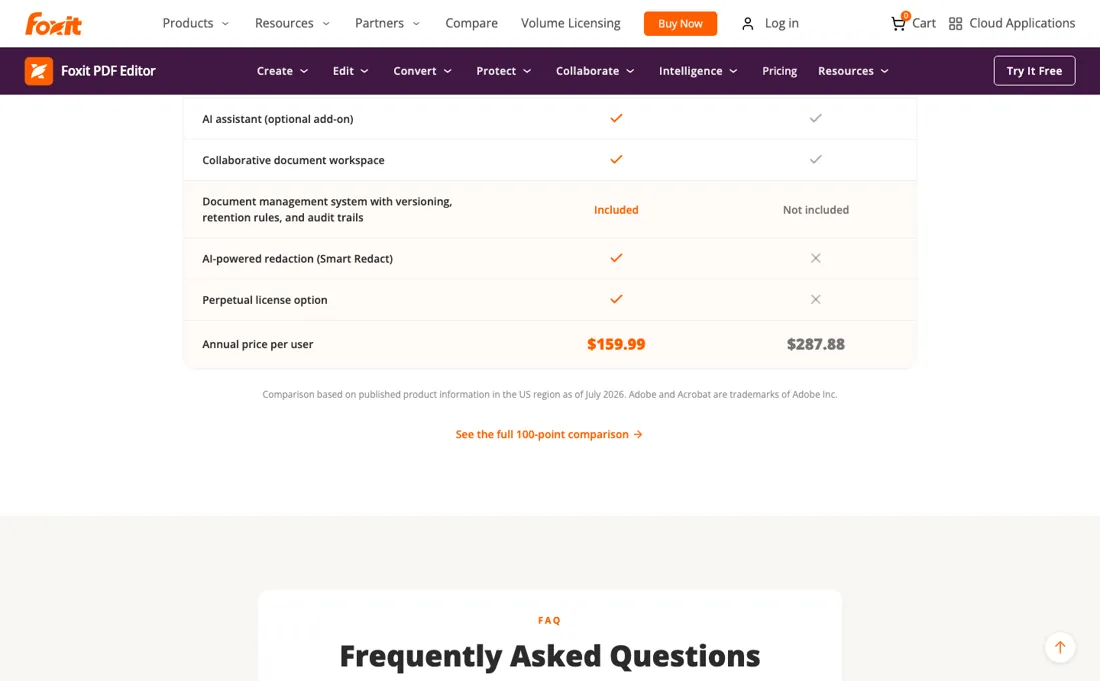
The catch used to be that e-signing was always a second subscription. As of our 28 August 2026 reading that is only true below Editor+, which now includes Foxit eSign with 150 envelopes a year. The trap has moved rather than gone: buy the $129.99 Editor, then find you need signatures, and Editor plus standalone eSign Essentials is $249.99 a year against $159.99 for the Editor+ that bundles it. AI is still an add-on at $49.99 a year beyond the 300 monthly credits, and it is not sold for perpetual licences at all. Price the basket, not the first line.
What Foxit does
PDF editing, OCR and organising priced under Acrobat: $129.99 per user per year for the desktop editor, or $159.99 for Editor+, which now bundles Foxit eSign with 150 envelopes a year. A perpetual licence is $209.99 once, and the AI Assistant stays a $49.99/year add-on.
What buyers report about Foxit
Recurring themes from the buyer-review sites listed at the foot of this page, read in August 2026; SourceForge read September 2026. We have not run Foxit ourselves, so this is other buyers' experience rather than ours. We summarise it here because the complaints are usually the part a vendor page leaves out.
- • Price is the single most-cited reason people choose it — reviewers quantify savings of 40-60% against Adobe Acrobat, and there is a perpetual licence option that escapes subscriptions entirely.
- • From $10.99, faster than Adobe for common tasks, and 700 million users globally.
- • SourceForge reviewers (read September 2026, 172 reviews and ratings on the listing) repeat the Adobe comparison in their own words - a small-business owner writes that it fits the budget where Adobe did not, another that it does everything needed at a fraction of the cost - and add two practical wins the other platforms do not name: it integrates with MS Word for bulk export of 100+ files, and pages can be dragged and dropped straight into an email.
- • Buyer reviews report the Mac build lagging Windows, specifically that OCR was disabled in native Apple Silicon mode and that Rights Management tools were unavailable on M1 and M2. Foxit told us on 28 August 2026 that this no longer describes the current product, and its own pages now list OCR for the macOS build and Microsoft Rights Management integration without a platform carve-out. We have not run it on a Mac ourselves, so treat this as resolved on the vendor's word and check it inside your refund window.
- • Pop-ups pushing additional features and upgrades irritate reviewers.
- • OCR struggles with unusual fonts and poor scans.
- • The basic versions are quite limited and the full version is expensive for occasional use — advanced features and multiple logins both need higher tiers.
- • Concrete, small complaints dominate on SourceForge (read September 2026): the eraser tool that does not erase, menus and the open-file flow described as clumsy, occasional crashes and slow opening, difficulty syncing with the cloud, no rendering of Flash animations or CAD drawings in the Reader, and drag-and-drop failing between documents on two monitors. Several reviewers also ask for more tutorial videos to get past the learning curve.
Where the ratings disagree. On G2, Capterra and Software Advice the gripes are structural - the Mac build, upgrade pop-ups, OCR on poor scans, feature gating between tiers. On SourceForge (read September 2026) they are small and mechanical, and a large share of the Cons fields say there are none. Read the two together rather than either alone: the platform that collects buyers who already chose the cheap alternative to Acrobat is unlikely to surface the price-tier complaints.
When the paid plan is worth it
The monthly price is not a monthly plan, and that reverses the obvious advice. Read 22 September 2026, the toggle above the cards reads 'Annual plan, paid in full' and 'Annual plan, billed monthly' - both are twelve-month commitments, and no month-to-month option appears anywhere on the page. So the $10.99 beside PDF Editor's $129.99 a year buys no exit: it comes to $131.88 over the same twelve months, $1.89 for the privilege of paying in instalments, and Editor+ charges $13.99 a month against $159.99 up front, which is $167.88 and a $7.89 premium.
The only way out of a Foxit decision is to take it before you pay - the 14-day trial asks for no card. The upgrade to Editor+ at $159.99 a year is the one that changed. It used to buy mobile access and AI redaction for $30 more; it now also carries Foxit eSign with 150 envelopes a year, where buying eSign on its own starts at $120 a year for the 250-envelope Essentials plan.
If you sign anything at all, that $30 step is the cheapest signature capability on the price list, and the question of whether you edit on a phone barely matters any more. Beyond 150 envelopes the separate products are still where the money is. eSign Essentials is $120 a year for 250 envelopes; eSign Business is $300 per licence a year and carries a five-licence minimum, so a two-person firm cannot spend less than $1,500.
The AI Assistant is $49.99 a year for 2,000 credits a month, on top of the 300 free credits every Editor seat already carries, and it cannot be added to a perpetual licence. That last restriction is the real cost of buying once at $209.99: you are choosing the 2026 feature set permanently.
How to actually use Foxit
Decide whether you will ever need a signature before you pick a tier, because that one answer is worth more than any feature comparison here. PDF Editor is $129.99 per user per year and covers editing, conversion and OCR on desktop and web. Editor+ is $159.99 and adds the mobile apps, AI Smart Redact and Foxit eSign with 150 envelopes a year. Buying the cheaper tier and adding standalone eSign Essentials later costs $249.99 a year for 250 envelopes, so unless you genuinely sign more than 150 documents a year, the $30 step up is the cheaper route to the same capability.
Take the monthly option at $10.99 per user if you are replacing Acrobat rather than adding to it. Converting a working document habit is where these switches fail, and a month is enough to find the one feature you use daily that behaves differently. Twelve monthly payments come to $131.88 against $129.99 for the year, so the annual commitment buys you almost nothing. If you know you want this for years and can live without the cloud, buy it once: the perpetual Foxit PDF Editor 14 is $209.99 per user for Windows or macOS, which pays for itself against the annual subscription in about twenty months.
Read what it leaves out first, because it is a real list: no AI Assistant, no Smart Redact, no document management system and no cloud features. And if you are in education, register with your school email address before you buy anything at all, because the discount is applied at checkout.
Distilled from Re-read 22 Sep 2026 from a Dutch exit: foxit.com/pdf-editor/pricing/ - the 'Annual plan, paid in full' / 'Annual plan, billed monthly' toggle, the PDF Editor and PDF Editor+ cards ($129.99 / $10.99 and $159.99 / $13.99 per user), the feature comparison, the volume-licensing block, and the FAQ entries on cost, the Editor/Editor+ difference, volume discounts, the perpetual licence and buying the AI Assistant separately ($49.99 a year, 2,000 credits a month, $4.99 'early access' monthly). The eSign and Foxit Agreements figures ($120.00, $300.00, $359.88 / $29.99 / $34.99) come from the same page's product payload. Foxit pricing pages, read 1 September 2026 from a Dutch exit: foxit.com/pdf-editor/ (JSON-LD Offers for Editor $129.99, Editor+ $159.99 and the perpetual licence $209.99, plus the 300-free-AI-credits line and the Acrobat comparison table), foxit.com/pdf-editor/pricing/ (monthly $10.99, 14-day trial, volume discount up to 30% at 30+ licences) and foxit.com/esign-pdf/pricing/ (AggregateOffer JSON-LD: eSign Essentials $120.00 and eSign Business $300.00 USD; the rendered cards carry 250 envelopes, 10 templates and the 5+ licence minimum). The rendered eSign cards print no amount, so the two eSign figures come from the structured data on that page.
The natural comparison is Adobe Acrobat or PDF-XChange — Acrobat is the incumbent at 2-3x the price; PDF-XChange undercuts further on Windows — Foxit balances polish, platform breadth and price. Weigh it against Adobe Acrobat on the job you actually need done.
More on Foxit
Everything we publish about Foxit links back here — the review stays the honest hub:
The ex-banker filter — the same yardstick on every review (how we review): My ex-banker filter is simple: does Foxit remove a real cost — time, errors, missed revenue — bigger than what it charges?
Frequently asked questions
Can I pay $10.99 a month and cancel when I am done?
No - and this is the single most misread line on the page. Read 22 September 2026, the toggle above the plan cards offers 'Annual plan, paid in full' and 'Annual plan, billed monthly'. Both are twelve-month plans. There is no month-to-month option on Foxit PDF Editor at all, so the $10.99 does not buy an exit, it buys instalments: $131.88 across the year against $129.99 paid up front, which is $1.89 more for the same twelve months. Editor+ does the same at $13.99 a month, $167.88 against $159.99, a $7.89 premium. The practical advice inverts as a result. Pay in full if you are staying, because paying by the month costs more and commits you just as long, and do your deciding inside the 14-day free trial, which asks for no credit card and is the only genuinely cancellable part of this price list.
We only want the AI features. What is the cheapest route to them?
Not the upgrade. Read 22 September 2026, every Foxit subscription already includes 300 free AI credits per user per month - PDF Editor and PDF Editor+ alike - and stepping up to Editor+ for $30 a year adds mobile apps, Smart Redact and eSign with 150 envelopes, but not one extra credit. More credits are a separate line: the AI Assistant add-on is $49.99 a year for 2,000 credits a month, and the same add-on is advertised at 'early access pricing' of $4.99 a month, which is $59.88 over a year, so the monthly route costs $9.89 more for an identical allowance. Two limits are worth knowing before you plan around it. Credits reset every month and unused ones do not roll over, so the 2,000 is a ceiling rather than a budget. And the add-on cannot be attached to the $209.99 perpetual licence at all, which is the quiet cost of buying once: no AI, no DMS, no cloud, and no web app.
We are buying about thirty seats. Perpetual licences or subscriptions?
Thirty is exactly where the discount starts, so ask for it either way. Read 22 September 2026, Foxit publishes volume discounts of up to 30% on orders of 30 or more licences, across PDF Editor, PDF Editor+ and eSign, and explicitly on perpetual as well as subscription - with a single purchase order, one renewal date, standardised installation images for IT deployment and coverage for divisions and subsidiaries. On list price the perpetual licence at $209.99 overtakes the $129.99 subscription after about nineteen months, which looks decisive until you read what it leaves out: the perpetual Foxit PDF Editor 14 covers Windows and macOS only, with editing, conversion, OCR, forms, security and fill-and-sign, and no web app, no AI Assistant, no document management system and no cloud storage. Foxit's own FAQ makes that argument for you, and adds the detail that matters for a thirty-seat comparison against the incumbent: Adobe no longer sells perpetual Acrobat licences to new customers. So the decision is not really cost per year, it is whether your thirty people need the browser and the AI at all.
What should I weigh before buying IT & Productivity software?
Judge it on evidence rather than adjectives. Look for a published security page, single sign-on and role controls on the plan you would actually buy (they are often gated to higher tiers), a status page with real incident history, and a clear answer on where your data is stored. If the tool will hold anything sensitive, those four answers matter more than any feature comparison.
Is this a hands-on review of Foxit?
This is a researched assessment, not a hands-on test — where we've used a tool ourselves, we say so explicitly. We name what each tool is genuinely good and bad at, and we earn a commission only if you sign up, at no cost to you.
- Buyer reviews on G2, Capterra, Software Advice and SourceForge, read August 2026; SourceForge read September 2026.
- Re-verified 2026-09-22 on the Foxit PDF Editor pricing page; every figure identical to the 1 Sep 2026 reading.
- A dated screenshot of that pricing page, kept on this site as the receipt.
Others in this category
Reviewed it & productivity tools that share ground with Foxit — comparable in what they do, not drop-in swaps:
New dossiers, cost-traps we found, and tools that earned a keep — no hype, no sponsored-disguised-as-advice. Unsubscribe anytime.
This is our researched assessment — not a paid placement. The “Visit” links on this page are affiliate links: we may earn a commission if you sign up, at no extra cost to you, and it never changes our take. How we review →