 DocSend Review (2026)$10 to Share, $150 for a Data Room
The cheap plan is not the product people buy DocSend for.
Visit DocSend → Affiliate link — the rest of this page is the honest version, including who should skip it.
Pricing (2026)
✓ Pricing re-verified 25 Sep 2026
| This tool | $10 | 2nd cheapest of 4 |
| Cheapest | $3.99 | Proton |
| Median | $15 | |
| Most expensive | $29 | Freshservice |
Entry price per seat, per month, USD. Our own dated readings of 4 it & productivity tools — not a market survey, and cheapest is not best.
Personal is $10 per user a month billed yearly or $15 billed monthly, one user, basic link controls (email to view, passcode, expiry, download on or off), document-level analytics, 4 eSignatures a month, unlimited visitors and 10 GB of storage. Standard is $45 per user a month yearly or $65 monthly and adds multi-file sharing through data rooms (Spaces) of up to 200 assets each, video analytics, file requests, custom branding with a branded subdomain, unlimited eSignature and 50 GB per user.
Advanced is $150 a month yearly or $250 monthly for three users, with extra users at $60 a month yearly or $90 monthly, and adds folder structure in Spaces, visitor email authentication, allow and block lists, folder and file permissions, dynamic watermarking and NDA gating, with 2,000 assets per data room. Advanced Data Rooms is $180 a month yearly or $300 monthly for three users on the same extra-user rate, and adds group visitor permissions, due diligence tracking, a data room audit log, automatic file indexing, data room analytics, priority email support and 4,000 assets per data room.
Yearly billing saves 33% on Personal, 31% on Standard and 40% on the two team plans. Salesforce is a paid add-on from Standard up, SSO (Okta, OneLogin, Azure) and sub-teams are paid add-ons on the two team plans, all priced only through sales. Data rooms and visitors are unlimited on every plan that has them; uploads are capped at 2 GB per file.
The free trial is 14 days of Advanced Data Rooms, and unlimited visitors are not available during it. Sales tax is added in jurisdictions where Dropbox is registered. Separately, the DocSend startups page offers new customers one year at 90% off an annual Standard or Advanced plan with up to $2 million raised, 50% off with up to $10 million, and 20% off annual Advanced with up to $20 million. Plans change — always verify the live price on their site.
What the pricing page doesn’t say
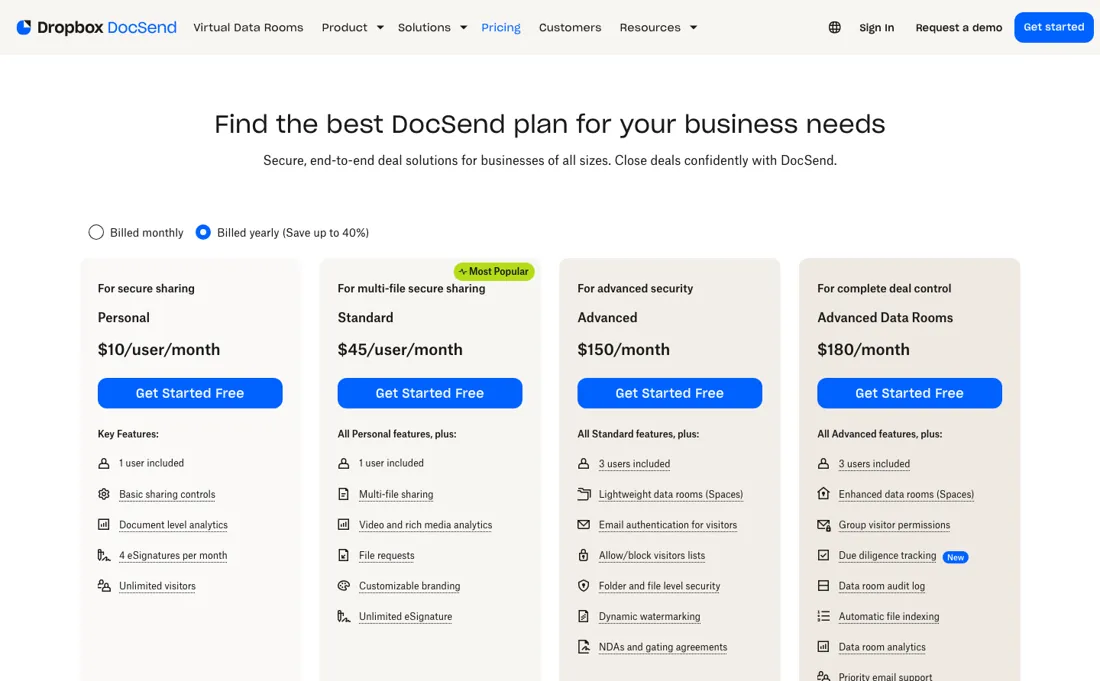
Personal at $10 a month tracks who opened a single document and for how long, but it has no data rooms at all. Sharing several files behind one link starts on Standard at $45 per user a month, and the controls that make a data room safe for a fundraise or a sale (visitor email authentication, watermarking, NDA gating, folder permissions) start on Advanced at $150 a month. Price the plan for the job you actually have, not the entry price on the page.
Monthly billing is expensive. The same Advanced plan costs $250 a month without a yearly commitment, two-thirds more than the $150 yearly rate, and Advanced Data Rooms goes from $180 to $300. A company that needs a data room for one four-month deal pays $1,000 on monthly billing, against $1,800 for a year it may not use. Work out that sum before you pick a toggle. Several things a larger team will want are priced only through sales: the Salesforce integration, single sign-on and sub-teams.
The trial is 14 days of the top plan, but visitors are capped during it, so a trial is not the place to run the real fundraise. We have not used DocSend ourselves; everything here comes from its pricing page and plan tooltips.
What DocSend does
Dropbox's secure document sharing and data room tool: send a deck or a data room as a tracked link, see page-by-page who read what, and gate access with email authentication, NDAs and watermarks. Personal $10/user/mo yearly, Standard $45/user with data rooms, Advanced $150/mo for 3 users, Advanced Data Rooms $180; monthly billing costs up to 67% more. Read 25 Sep 2026.
For three people, Advanced costs $15 more than Standard
The two per-user plans and the two team plans cross over at three people. Three Standard seats cost $135 a month on yearly billing; Advanced costs $150 a month and already includes three users. For $15 a month you get visitor email authentication, allow and block lists, folder and file permissions, dynamic watermarking and NDA gating, and ten times the room size, 2,000 assets per data room instead of 200.
On monthly billing the gap is wider in money but the same in direction: $195 for three Standard seats against $250 for Advanced. From four users, Standard is cheaper again only if you do not need those controls: four seats are $180 a month yearly, Advanced with one extra user is $210. The step from Advanced to Advanced Data Rooms is $30 a month on yearly billing, $360 a year.
It buys the features that matter once a buyer or investor is doing due diligence: group visitor permissions, due diligence tracking, a data room audit log, automatic file indexing, room-level analytics, priority email support and 4,000 assets per room. For a fundraise with a deck and a few supporting files, Advanced is enough. For a company sale, where dozens of people open hundreds of files and you need to show who saw what, the audit log alone is the reason to pay the difference.
What no plan changes: the tracking only helps if you act on it. Knowing that an investor spent four minutes on the financials page is worth $150 a month if you follow up on it that day.
How to actually use DocSend
Check the startups offer before you pay anything. The page our partner link opens says new customers who have raised up to $2 million get 90% off an annual Standard or Advanced plan for a year, up to $10 million 50%, and up to $20 million 20% off annual Advanced. The discount is for new customers only and for one year, so apply for it when you sign up, not after.
Use the 14-day trial of Advanced Data Rooms to build the room you will actually send: upload the deck and the supporting files, set the folder structure, and turn on email authentication and an NDA if you plan to use them. Then send the link to a colleague and to yourself on a phone and look at what the visitor sees and what the analytics record. Do not send it to real investors during the trial, because visitors are capped until you pay.
If your files already live in Box, Dropbox, Google Drive or OneDrive, import them instead of uploading copies, and install the Gmail or Outlook extension so links get created where you write the email. Decide on yearly or monthly billing last, once you know how long the deal will run.
Distilled from The DocSend pricing page at docsend.com/pricing read in a headless browser on 25 September 2026, including both billing toggles, the plan tooltips (extra-user rates), the full comparison table and the FAQ answers; the homepage and the How it works page on docsend.com; and the startups page at experience.dropbox.com/docsend/startups, where our partner link lands, for the startup discount terms. Vendor sources only. We have not used DocSend ourselves and did not consult third-party reviews or ratings.
The natural comparison is a shared Google Drive or Dropbox link — the free default most people start with. A drive link gets the file to the reader and can be switched off, but it does not tell you which pages an investor read, for how long, or whether they forwarded it, and it cannot put an NDA or a per-viewer watermark in front of the document. That tracking and gating is what DocSend charges for, from $10 a month for one document owner to $150 a month for a three-person deal team. If you would not act on the page-by-page data, the drive link is enough..
More on DocSend
Everything we publish about DocSend links back here — the review stays the honest hub:
The ex-banker filter — the same yardstick on every review (how we review): My ex-banker filter is simple: does DocSend remove a real cost — time, errors, missed revenue — bigger than what it charges?
Frequently asked questions
What does DocSend cost?
Four plans, read on its pricing page on 25 September 2026. Personal is $10 per user a month billed yearly or $15 monthly, for one person tracking single documents. Standard is $45 per user yearly or $65 monthly and adds data rooms. Advanced is $150 a month yearly or $250 monthly for three users, with extra users at $60 or $90. Advanced Data Rooms is $180 or $300 for three users. Yearly billing saves between 31% and 40%. The trial is 14 days of the top plan.
We are three people. Standard or Advanced?
Advanced, unless you are certain you will never need the security controls. Three Standard seats cost $135 a month on yearly billing; Advanced costs $150 and includes three users, and adds visitor email authentication, watermarking, NDA gating, folder permissions and rooms of 2,000 files instead of 200. From the fourth person the sums change: four Standard seats are $180, Advanced plus one extra user $210. Figures read 25 September 2026.
Is there a discount for startups?
Yes, for new customers and for one year, on DocSend's startups page as read on 25 September 2026: 90% off an annual Standard or Advanced plan if you have raised up to $2 million, 50% off up to $10 million, and 20% off annual Advanced up to $20 million. It applies to the yearly price, so a seed company would pay $180 for its first year of Advanced instead of $1,800. Apply at signup; the offer is one-time.
What should I weigh before buying IT & Productivity software?
Judge it on evidence rather than adjectives. Look for a published security page, single sign-on and role controls on the plan you would actually buy (they are often gated to higher tiers), a status page with real incident history, and a clear answer on where your data is stored. If the tool will hold anything sensitive, those four answers matter more than any feature comparison.
Is this a hands-on review of DocSend?
This is a researched assessment, not a hands-on test — where we've used a tool ourselves, we say so explicitly. We name what each tool is genuinely good and bad at, and we earn a commission only if you sign up, at no cost to you.
- Read 2026-09-25 on docsend.com/pricing, both billing toggles.
- A dated screenshot of that pricing page, kept on this site as the receipt.
Others in this category
Reviewed it & productivity tools that share ground with DocSend — comparable in what they do, not drop-in swaps:
New dossiers, cost-traps we found, and tools that earned a keep — no hype, no sponsored-disguised-as-advice. Unsubscribe anytime.
This is our researched assessment — not a paid placement. The “Visit” links on this page are affiliate links: we may earn a commission if you sign up, at no extra cost to you, and it never changes our take. How we review →