accessiBe Review (2026)
 By Daan Haket · Tested hands-on · written with an AI assistant · who does what
The thing you most need to know about this product is not on its pricing page, it is on the FTC’s.
small and medium sites on ordinary CMS templates whose owners want a visible, cheap first step — contrast, text sizing, keyboard hints and an accessibility statement — and who understand they are buying an aid rather than conformance. The visit-based tiers are honest for that use: at 5,000 visits a month $490 a year is real money but not a project budget, and the Scale tier is the only one that includes any human testing at all.
you need actual WCAG conformance, are responding to a demand letter, or run a complex web app with custom components — in all three the money belongs in an audit and code fixes, and an overlay will not stand in for either. Skip it too if you are shopping on the promise of automatic compliance. That promise is what the FTC ordered the company to stop making without evidence, so treat any version of it you still see as a reason to look harder, not to buy.
Transparency: the “Visit” links on this page are affiliate links — we may earn a commission if you sign up, at no extra cost to you. No vendor can pay for a better review or verdict. How we make money →
accessiBe's free accessScan scanner, not the paid accessWidget overlay this review prices. We built two versions of the same small landing page: one with 20 accessibility errors we placed on purpose and wrote down beforehand (missing page language and title, images without text alternatives, unlabelled form fields, low contrast, a skipped heading level, a table without header cells, a clickable div, a positive tabindex, an unlabelled iframe and more), and a twin with all 20 fixed. We scanned both and, as a reference, ran the free open-source checker axe-core 4.10.2 over the same two pages.
- The verdict was right both ways. The broken page came back 'Non-compliant' with 14 issues (10 critical, 3 serious, 1 moderate); the fixed twin came back 'Accessible'.
- Of our 20 planted errors, the full report identified 7 correctly: the missing language, the empty title, the unlabelled button, the unlabelled iframe, aria-hidden on a link, the missing main landmark and the clickable div. An eighth, a link containing only an image without alt text, was flagged under the wrong diagnosis: the report called the image decorative and advised hiding it, which would leave the link with no name at all. axe-core found 13 of the same 20.
- What it missed: the form had an email field and a dropdown without labels and a phone field labelled only by its placeholder, and the report's Forms category read 0. It also missed the image with no alt text, the alt text that was a filename, the low-contrast text, the skipped heading level, the table without header cells and the positive tabindex. For the filename alt text and the 'click here' link the report has a rule, but marked it 'Relevant: No'.
Pricing (2026)
✓ Pricing re-verified 10 Sep 2026
| Plan | Price | What you get |
|---|---|---|
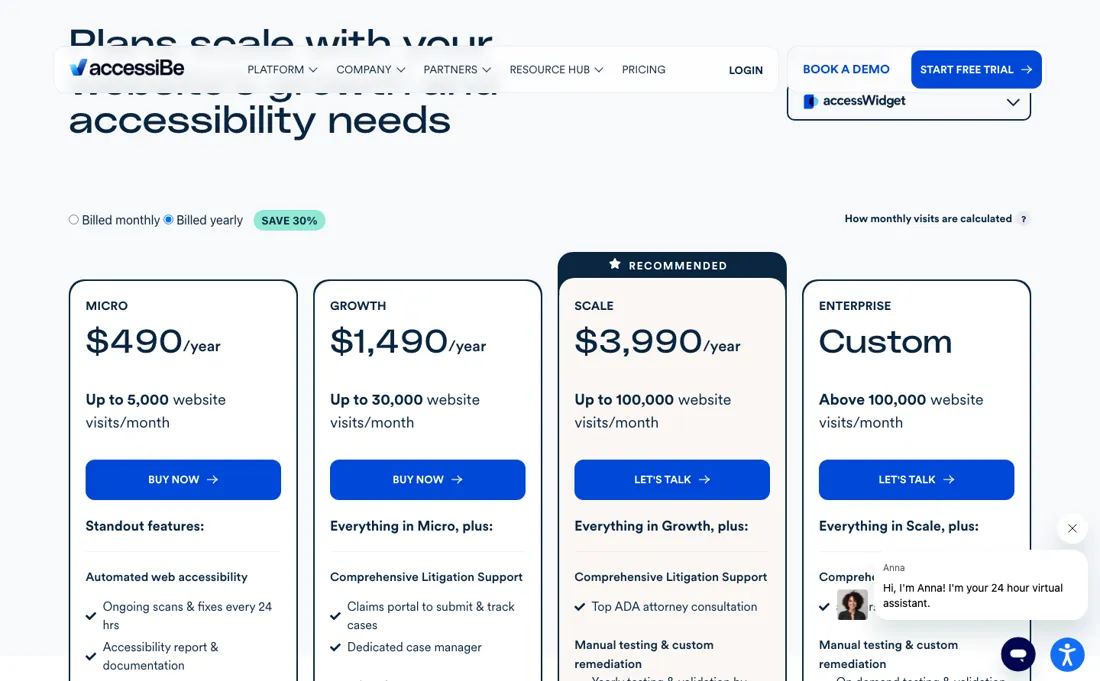
| Micro | $59/month or $490/year | Up to 5,000 visits/month; automated scans and fixes every 24 hours, accessibility statement and report, email plus live chat |
| Growth | $179/month or $1,490/year | Up to 30,000 visits/month; adds dedicated case manager, Google Analytics integration, multi-account and team management, two-day response target |
| Scale | $479/month or $3,990/year | Up to 100,000 visits/month; adds one hour with ADA attorney, yearly manual testing and validation, custom fixes |
| Enterprise | no published price | Above 100,000 visits/month; adds 5 to 10 attorney hours, on-demand testing, SSO, dedicated account manager |
Summarised from the pricing notes below; the notes carry the conditions.
(2026-09-10, read on their own pricing page) Four tiers for accessWidget, priced per monthly website visits, with both a monthly and a yearly rate on every tier: Micro $59/month or $490/year up to 5,000 visits a month, Growth $179/month or $1,490/year up to 30,000, Scale $479/month or $3,990/year up to 100,000, and Enterprise on quote above that. Micro covers automated scans and fixes every 24 hours, an accessibility statement and report, and email plus live chat.
Growth adds a dedicated case manager, Google Analytics integration, multi-account and team management, and a two-day response target. Scale adds one hour with an ADA attorney, a yearly round of manual testing and validation by their experts, and custom fixes. Enterprise adds 5 to 10 attorney hours, on-demand testing, SSO and a dedicated account manager. The page opens on the yearly toggle, so $490 is the first figure a visitor sees; switching it to 'Billed monthly' shows the monthly rates above.
Paying yearly saves about 30% against twelve monthly payments, which is what the toggle's own SAVE 30% label claims. No free plan and no trial is listed. Plans change — always verify the live price on their site.
Category context: IT & Productivity. Across the 35 tools in this category that we researched with a public US-dollar price, the median entry price is $14 a month (lowest paid plan as listed, per seat where the vendor prices per seat). accessiBe’s entry price of $59 a month sits above that median. Compare pricing conditions in the Software Cost Atlas →
What the pricing page doesn’t say
In January 2025 the Federal Trade Commission ordered accessiBe to pay $1 million to settle allegations that it misrepresented what accessWidget does; the Commission approved the order as final in April 2025. The FTC’s position was that accessiBe’s claim that its AI plug-in could make any website conform to WCAG was false, misleading or unsubstantiated — the widget did not make all customer sites WCAG-compliant. The order now bars the company from claiming its automated products make a site WCAG-compliant, or keep it compliant over time, unless it holds evidence to back that up.
It also requires disclosing the domain limitations of those products before you incur a financial obligation. There is a second finding that belongs on a page like this one. The FTC also alleged accessiBe formatted third-party articles and reviews so they read as independent opinion while failing to disclose the company’s material connections to those reviewers; the order requires it to disclose such connections from here on. We are an affiliate of accessiBe and we get paid if you sign up through our link — which is exactly the sort of connection that case was about, and exactly why it is stated here rather than in a footnote.
What that means in practice: price this as a partial aid, not as legal cover. An overlay sits on top of a site and adjusts it in the browser. It cannot rewrite bad markup, fix an inaccessible custom component or make a keyboard trap go away, and no vendor’s automated layer can promise the conformance a real audit and remediation deliver. If you are buying to reduce the chance of a demand letter, buy the audit — the widget is not that.
And the structural point behind the FTC order: accessWidget adjusts the page in the browser at load time rather than fixing the underlying markup, so the remediation exists only while the widget is being served. Stop paying and the site is exactly as accessible as it was before you started — which is the difference between renting a compliance layer and fixing a site.
What accessiBe does
Web-accessibility widget (accessWidget) that scans a site every 24 hours and adjusts it in the browser — contrast, text sizing, keyboard hints — plus an accessibility statement. An aid, not WCAG conformance — for that the same vendor sells accessFlow (developer audits with ready-to-commit code fixes) and accessServices (VPATs, file remediation, expert audits), both quoted rather than priced publicly.
What buyers report about accessiBe
Hands-on: tested 2026-10-08Reported by buyers: Capterra, read August 2026
Themes from the buyer-review sites listed at the foot of this page, read in August 2026. We tested accessiBe ourselves on 2026-10-08, but one test is a narrow sample, so here is what other buyers report. We summarise it here because the complaints are usually the part a vendor page leaves out.
- • Installation is genuinely one line and reviewers keep saying so — a trial installed on WordPress in about a minute and worked immediately, and the widget can be styled to match the site rather than sitting on top of it (Capterra, October 2021).
- • Live support is rated quick and knowledgeable by a retail e-commerce director who had worked through several other ADA compliance products first (Capterra, April 2025).
- • Site owners without a development budget value what it replaces: a speech-language pathologist building sites for other practitioners describes it as achieving in a tool what would otherwise be backend work (Trustpilot, January 2023).
- • Cancellation and auto-renewal dominate the recent record. Reviewers describe a 30-day cancellation window they say was introduced without their agreement (June 2026), a cancellation sent on the stated deadline date but refused because it arrived after 5pm Eastern (August 2026), and a renewal charge pursued weeks after cancelling (August 2026).
- • Agency billing goes wrong in ways that are hard to unwind: a partner reports a client licence being moved to the client's own account while the payment method stayed attached to the agency, so the agency's card was charged months later for a licence it did not hold (August 2026).
- • Compliance claims are questioned by reviewers who tested them. A free-trial reviewer writes that despite claims on the website and in a sales call the product will not guarantee full WCAG 2.1 AA compliance (Capterra, April 2023), and another found their site passing accessiBe's own audit tool while other audit tools reported failures.
- • Pricing transparency and surprise charges: a reviewer was billed $389 for renewal of a licence on a site that no longer exists (Capterra, March 2026), and another calls the pricing untransparent and the subscription difficult to cancel (Capterra, December 2024).
Where the ratings disagree. The two platforms are measuring different moments. Capterra sits at 4.6 from 53 reviews and is dominated by installation and day-to-day use; Trustpilot sits at 2.5 from 248 and is dominated by what happens at renewal — 86% of those reviews are five stars, but the score is time-weighted and the recent fifteen are mostly about cancellation. Trustpilot also flags on the profile that the company has received regulatory attention. The practical reading: the widget installs as advertised and the disputes are about contract terms and compliance claims, so settle the cancellation notice period and what compliance is actually guaranteed, in writing, before the first renewal.
Pages read (August 2026): Trustpilot
When the paid plan is worth it
The ladder is priced on monthly website visits, and every tier carries both a monthly and a yearly rate: Micro $59 a month or $490 a year up to 5,000 visits, Growth $179 or $1,490 up to 30,000, Scale $479 or $3,990 up to 100,000. Paying yearly saves about 31 per cent on every tier. Per thousand monthly visits that works out at about $98 a year on Micro, $50 on Growth and $40 on Scale, so the rate improves as you climb -- but the steps are large in absolute terms and the ceilings are what force the move.
The more useful way to read the upgrades is that you are buying legal cover, not software. Micro is the automated product: scans and fixes every 24 hours, an accessibility statement and report, email and chat. Growth adds a dedicated case manager, Google Analytics integration, multi-account management and a two-day response target. Scale is where the human expertise starts -- one hour with an ADA attorney, a yearly round of manual testing and validation by their experts, and custom fixes.
Enterprise adds 5 to 10 attorney hours, on-demand testing and SSO. If your reason for buying is exposure to a demand letter rather than compliance in principle, the automated tiers are not the ones that answer it. Two things to plan around. The pricing page opens on the yearly toggle, so the first figure you see is the annual one; the monthly rate sits behind the 'Billed monthly' switch, and paying yearly saves about 30% against twelve monthly payments.
And the pricing page lists no free plan and no trial, although their help centre documents a free 7-day trial on each newly registered site -- so ask for it rather than assuming either way.
What we found running accessiBe ourselves
The first findings are at the top of this page. The rest:
- The report contradicts itself on the title: the empty <title> fails one rule ('titles aren't descriptive') and passes another ('missing page title'). It also flagged the correctly hidden icon inside our button and the page's <body> element.
- The scan itself is free, but the breakdown sits blurred behind a form. To see it you give your name and a business email and tick: 'I agree to enter into a contract with accessiBe under its Terms of Service, under which accessiBe will process my personal data for marketing purposes, for 6 months'. The same page says 'Always free'. The report arrived by email within a minute, with buttons to sign up and to install the widget.
- It would not scan W3C's own before-and-after accessibility demo ('The scanner doesn't have permission to access this URL'), which is why we used pages of our own.
- Not tested: accessWidget itself, any paid tier, accessFlow, multi-page scans and real sites. One page pair is a spot check of the free scanner, not a verdict on the product line.
Most of our reviews are researched rather than run — how we review explains which is which, and why we do not pretend otherwise.
How to actually use accessiBe
Installation is per licence rather than per account. Log in, open My Licenses, select the site, then Install and customize widget, and either Copy to Clipboard or Send to developer — accessiBe's own two options — and paste the snippet inside your builder's footer menu or just before the closing body tag. Dedicated guides cover WordPress, Shopify, Wix, Squarespace and Webflow among others, if you would rather not touch code, and their help centre puts a free 7-day trial on each newly registered site.
What to expect afterwards is worth setting straight. accessiBe says accessWidget improves accessibility and usability in as little as 48 hours, then rescans and remediates every 24 hours. Before you assume coverage, read the excluded-issues article their pricing page links to: it lists what the widget does not remediate. Plans are sold on monthly website visits, so have that number to hand — the tier you need is decided by traffic, not by the size of the site.
Distilled from accessiBe's help centre article 'How to install accessWidget on your website' at support.accessibe.com, plus the accessWidget product page and the accessWidget pricing page at accessibe.com, all read 20-21 August 2026.
The natural comparison is UserWay or a manual WCAG audit — the two honest comparisons, and they are not the same choice. UserWay is the other large overlay vendor and the like-for-like alternative; we have not read its price list ourselves, so verify it rather than taking a number from a comparison site — including ours. The real comparison, though, is against paying an accessibility specialist to audit and fix the site. That costs more up front and produces no widget, but it is the only route that changes what a screen-reader user actually encounters and the only one that stands up if conformance is ever tested. Worth knowing before you look elsewhere for it: accessiBe sells that work itself, under two names the widget tiers above do not cover. accessFlow is the developer-side product — it crawls pages and user flows, hands back prioritised issues with code examples and auto-resolves the ones it can, with an IDE integration and an SDK for catching issues before production. accessServices is the human side: VPATs, PDF and document remediation, litigation support, expert audits and manual testing by testers with disabilities. Neither prints a price; both pages route you to a product tour or an expert call, so treat that cost as unknown until you have it in writing. Our widget figures here were re-read on 2026-09-10, the other two lines on their own pages on 2026-08-17..
Frequently asked questions
Is there a free plan or trial for the widget?
No. The pricing page, read 10 September 2026, lists no free plan and no trial for accessWidget; Micro starts at $59 a month or $490 a year for up to 5,000 visits a month, and the page opens on the yearly figure. The free tool is accessScan, a scanner, and seeing its full report means agreeing to marketing processing of your data for 6 months (our test, 8 October 2026).
How much does the free scanner catch?
Some. In our 8 October 2026 test on a page with 20 accessibility errors we planted, the report identified 7 correctly and misdiagnosed an eighth; the free open-source checker axe-core found 13. It missed every unlabelled form field, low-contrast text and a missing image text alternative, but got the overall verdict right on both the broken page and its fixed twin.
Is this a hands-on review of accessiBe?
Yes. We tested accessiBe ourselves on 2026-10-08; the section above says what we tested, what we found and what we did not test, and where a figure comes from the vendor's own documentation instead. Most of our reviews are researched rather than run; we say which is which. We name what each tool is good and bad at, and we earn a commission only if you sign up, at no cost to you.
- Buyer reviews on Capterra (4.6 from 53 reviews) and Trustpilot (2.5 from 248), read August 2026.
- 2026-09-10, read on their own pricing page.
- A dated screenshot of that pricing page, kept on this site as the receipt.
- Our own hands-on session with accessiBe (2026-10-08), written up in full further down this page.
Others in this category
Reviewed it & productivity tools that share ground with accessiBe — comparable in what they do, not drop-in swaps:
New reviews, price changes we recorded, and the cost conditions we found. No sponsored placements. Unsubscribe anytime.
This is our researched assessment — not a paid placement. The “Visit” links on this page are affiliate links: we may earn a commission if you sign up, at no extra cost to you, and it never changes our take. How we review →