Planday Review (2026)
 By Daan Haket · Tested hands-on · written with an AI assistant · who does what
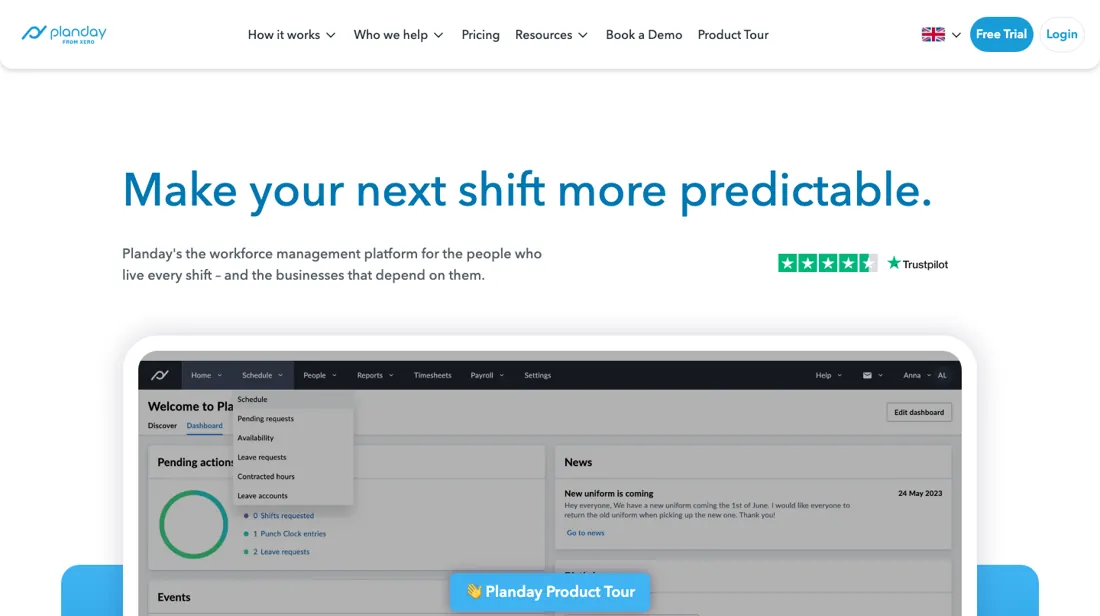
The €25 monthly platform fee on Plus is the line most comparisons miss.
- Best for Restaurants and shops with 10 or more shift staff
From €2.99 · Starter · per user per month with a 5-user minimum, so the real floor is EUR 14.95 · read 2026-10-05
Try Planday →Affiliate link: we may earn a commission if you sign up, at no extra cost to you. It never changes our verdict.
Is Planday right for you?
Your pain“Staff clock in for each other, and checking hours before payroll takes far too long.”
Does Planday solve it?YesBuyer reports (Capterra, Aug 2026): reviewers credit it most for payroll, and clock-in tied to location is said to stop buddy-punching.
Your planPlus, €4.99 per user a month plus a €25 monthly fee, 10-user minimum (euro price list)
Try Planday →
Your pain“All we need is a rota and a time clock, and the next plan up looks far too big.”
Does Planday solve it?PartlyPricing page, read 5 Oct 2026: anyone with a login counts as a user, and billing runs in bundles of five.
Your planStarter, €2.99 per user a month, 5-user minimum, no monthly platform fee
Try Planday →
Your pain“My team does everything on their phones, and the app is slow for them.”
Does Planday solve it?PartlyBuyer reports (Capterra, Aug 2026): one restaurant-chain manager saw load times of 30 to 45 seconds, and holiday requests work only on the web.
Your planPlus, same price as above
Try Planday →
- you are a team of five or six who only need a rota and a clock: Starter covers that, and paying for Plus at that size means the flat fee is a third of your bill.
The “Try” buttons are affiliate links: we may earn a commission if you sign up, at no extra cost to you, and it never changes our verdict.
Exit test (measured 2026-10-31)
- Export route
- People > Employees > Tools > Export data > Employee details > Create report
- Formats
- CSV
- Attachments included
- Not tested
- Re-import tested
- No
- Lost on export
- Nothing we checked
Formats describe this export route; offered formats may not have been inspected. Full exit test and scope ↓
Transparency: the “Visit” links on this page are affiliate links: we may earn a commission if you sign up, at no extra cost to you. No vendor can pay for a better review or verdict. How we make money →
Which Planday plan do you need?
3 plans, 3 questions, no signup.
Answer three quick questions to see your plan.
Your plan
Starter
€2.99 per user per month, 5-user minimum
Rota and clock; no monthly platform fee
Your plan
Plus
€4.99 per user per month plus €25.00 monthly subscription fee
10-user minimum; advanced features
Prices as we read them on 2026-10-05; check the checkout before you pay. The plan button is an affiliate link: we may earn a commission, at no extra cost to you.
Tested by our team on 31 October 2026 on the free trial: Daan created the account and our AI assistant ran the test in Daan's browser. We added two made-up employees without inviting them and exported the employee details.
How we tested
- Added two made-up employees without an invitation
- Exported the employee details as CSV in two encodings
- Compared both files with what we entered
- The trial showed 30 days, with no card. The sign-up form requires a phone number.
- Creating an employee does not send an invitation; you invite people separately later. Our two showed as 'Not invited'.
- The quick form asks only for first name, surname and an employee group, which is required.
Pricing (2026)
✓ Pricing re-verified 5 Oct 2026
| Plan | Price | What you get |
|---|---|---|
| Starter | €2.99 per user per month | 5-user minimum |
| Plus | €4.99 per user per month plus €25.00 monthly subscription fee | 10-user minimum; monthly fee covers advanced features access |
| Pro | no published price | custom-priced, demo button instead of price |
Summarised from the pricing notes below; the notes carry the conditions.
Three tiers, two of them priced. On the euro page, planday.com/de/preise, Starter is €2.99 per user per month with a 5-user minimum, Plus is €4.99 per user with a 10-user minimum plus a €25.00 monthly subscription fee on top of the per-user cost, and Pro is custom-priced with a demo button rather than a figure. The English page at planday.com/pricing now serves the UK list in its own pricing data, £2.99 Starter, £3.99 Plus and a £30.00 monthly subscription fee, same 5- and 10-user minimums, and carries a separate US and Canada column of $2.99 and $4.49 per user.
The three columns are not conversions of one another: Plus is €4.99 against £3.99 against $4.49, and the platform fee is €25 against £30, with no separate US figure published for it. The trial is 30 days on the Plus package and takes no credit card. The monthly fee is not charged on Starter; Planday’s FAQ says it applies to Plus and Pro alike and covers system access to advanced features, their development and maintenance.
Billing is monthly or quarterly, by major credit card or direct debit. Plans change, so check the live price on their site before you buy.
Category context: HR & People. Across the 15 tools in this category that we researched with a public US-dollar price, the median entry price is $49 a month (lowest paid plan as listed, per seat where the vendor prices per seat). Compare pricing conditions in the Software Cost Atlas →
What the price did
We read Planday’s own pricing page on a schedule and keep every reading, so this is our record of the page. It is not a forecast, and not someone else’s summary. A change appears here only after we confirmed the new price on the page itself.
Unchanged. Every price on Planday’s pricing page was identical across our 9 reads from 18 Aug 2026 to 1 Nov 2026 (75 days).
Three dated readings of the euro list, no movement. On 20 August, 17 September and 5 October 2026 planday.com/de/preise read Starter at €2.99 per user with a 5-user minimum, Plus at €4.99 per user with a 10-user minimum plus a €25.00 monthly subscription fee, and Pro custom-priced. On 17 September and 5 October the English page carried the UK list, £2.99, £3.99 and a £30.00 monthly fee, beside a US and Canada column of $2.99 and $4.49 per user.
What the pricing page doesn’t say
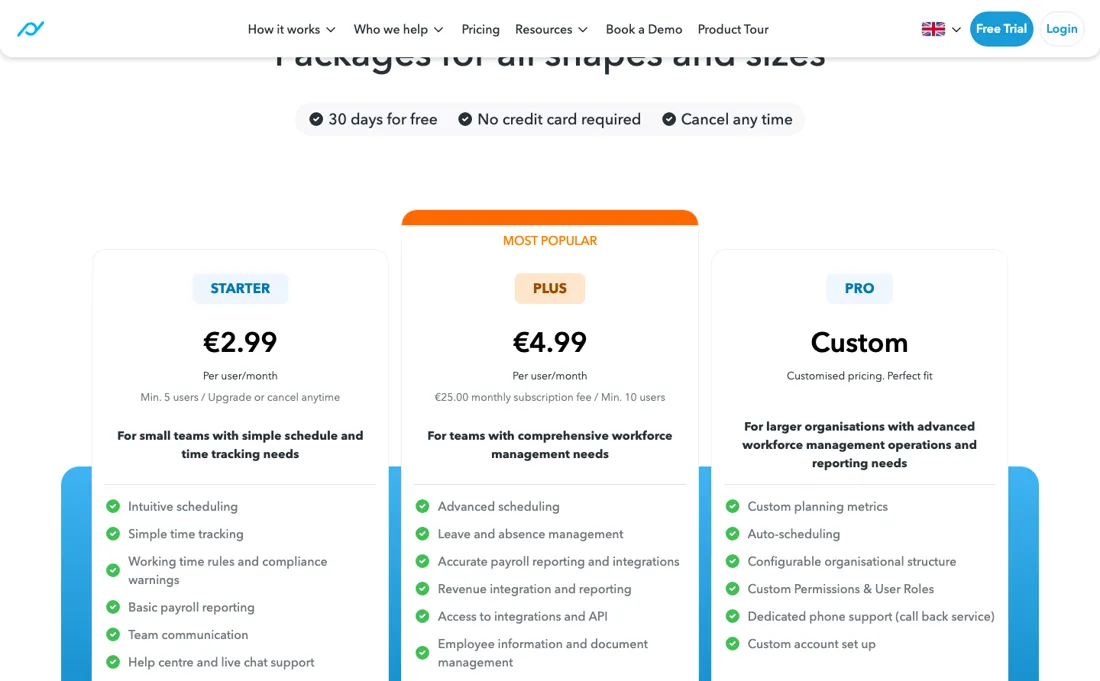
At the 10-user minimum, Plus is €49.90 in seats plus €25 flat, so €74.90 against €14.95 for five users on Starter: the jump is not from €2.99 to €4.99, it is roughly five times the bill. That fee also does not scale down, so the smaller your team, the larger a share of it you carry. Work out your real per-head cost at your actual headcount before choosing, and check which side of the line leave management and payroll integrations fall on, because those are the two features that usually force the upgrade.
Watch the video review
What Planday does
Employee scheduling and time tracking for shift businesses, owned by Xero. 30-day trial, no card.
What buyers report about Planday
Hands-on: tested 2026-10-31Reported by buyers: Capterra, read August 2026
Themes from the buyer-review sites listed at the foot of this page, read in August 2026. We tested Planday ourselves on 2026-10-31, but one test is a narrow sample, so here is what other buyers report. We summarise it here because the complaints are usually the part a vendor page leaves out.
- • The strongest reviews are about payroll rather than scheduling: a medical practice reports cutting payroll time by more than half and scheduling time by about a third after replacing a practice-management system with no real HR functions, and a 2026 reviewer says pulling the payroll reports is straightforward.
- • Location-aware clock-in is singled out as the thing that stops buddy-punching, and the QuickBooks time-clock sync is named repeatedly.
- • Reviewers who compared several rota tools describe Planday as the one with the widest functional coverage in the category.
- • The mobile app is the recurring complaint. A restaurant-chain manager describes 30 to 45 second load times, improved after contacting support but still slow enough that staff complain.
- • The app also carries less than the desktop site: requesting holiday is named as a web-only task.
- • Reporting is described as basic, without the dashboards larger operators expect, and timesheets are not converted for payroll automatically.
- • Some reviewers say they found themselves in a twelve-month commitment with no warning before renewal.
Where the ratings disagree. That last gripe is the one worth carrying into the sales call: Planday's pricing page says 'Cancel any time' directly under the plan table, while reviewers describe an annual commitment they were not expecting. Ask for the term in writing rather than reading it off the pricing page. One Capterra reviewer switched to Planday from Parim and rated its functionality higher, the two come up against each other regularly in shift-heavy businesses.
When the paid plan is worth it
The headline gap between Starter and Plus is two euros a user, and that is not what the step costs. These are the euro figures, and they are the ones to check against your own market first: the English-language page prices the same tiers in pounds and carries a separate US and Canada column, and the three lists are not conversions of one another. Starter is EUR 2.99 per user with a five-user minimum.
Plus is EUR 4.99 per user with a ten-user minimum AND a EUR 25 monthly subscription fee on top of the per-user charge, a fee Starter does not carry. Planday's own FAQ says the subscription fee applies to Plus and Pro alike, though Pro's figure is not published. Run it at the minimum and the difference is stark: ten people on Starter costs EUR 29.90 a month, the same ten on Plus costs EUR 49.90 plus EUR 25, which is EUR 74.90.
That is two and a half times the price, not the 67% the per-user rates suggest. The flat fee also means the effective per-user cost falls as you grow: EUR 7.49 a head at ten users, EUR 5.99 at twenty-five, EUR 5.49 at fifty. Plus is therefore disproportionately expensive for exactly the small team most likely to be choosing between the two. Pro carries no figure at all, the button books a demo, so treat the ladder as two published prices and a conversation.
The trial is 30 days and takes no card, which is long enough to run a full rota cycle rather than a demo.
Our monthly capture read this vendor's pricing page every month from August 2026 to October 2026, and the amounts were the same all 3 times, including £2.99 from the pricing above. We keep watching, and the registry records what moves.
What we found running Planday ourselves
The first findings are at the top of this page. The rest:
- The export defaults to Excel. As CSV it defaults to ISO-8859; UTF-8 is an option. The file has no header row and uses semicolons.
- The export kept each employee's Planday ID and the names with accents, when read in the chosen encoding.
- Every employee in the export, the account owner included, was listed as 'Female' though we never set a gender.
Claim vs. what we measured
We set a claim from Planday's own pages next to what we saw in our test, on the plan named. The status says whether the two describe the same thing and match; it is not a verdict on the product. Confirmations are listed too.
| What the vendor says | What we measured | Status | What it means if you buy |
|---|---|---|---|
| 30-day free trialSource: help.planday.com, read 25 Oct 2026 | Measured 2026-10-31: The roster banner showed 30 trial days left; the account was usable without a card.Our test, 31 Oct 2026; 30-day trial | ConfirmedPlanday trial duration is compared with the thirty-day roster banner in this new account. | Thirty-day trial access supported employee creation and direct export. |
| no credit card requiredSource: help.planday.com, read 25 Oct 2026 | Measured 2026-10-31: The recorded session proceeded without payment details; complete registration screens were not counted.Our test, 31 Oct 2026; 30-day trial | ConfirmedPlanday card-free wording is checked against its recorded post-registration session without payment entry, while full signup screen counting remains unknown. | The observed work required no card; paid features may have separate requirements. |
| 30-day free trialSource: help.planday.com, read 25 Oct 2026 | Measured 2026-10-31: Pricing and checkout not tested; preparation is not a session price observation.Our test, 31 Oct 2026; 30-day trial | Not testablePlanday paid-price comparison is unavailable because neither prices nor checkout were opened and no matching cost-rule basis was observed; the quoted access offer is context only. | Payable total, tax, fees, term and seat minimums remain unknown. |
| Not invited 2Source: planday.com, read 31 Oct 2026The vendor's page no longer shows this wording (checked 2026-11-13), original claim: “Not invited 2” | Measured 2026-10-31: Both manually created test employees were listed as not invited; Send invitations is a separate unused action.Our test, 31 Oct 2026; 30-day trial | ConfirmedPlanday invitation status is compared with the two created employees and the separate unused invitation action. | Employee creation can precede a separate invitation action in this observed route. |
| FemaleSource: planday.com, read 31 Oct 2026The vendor's page no longer shows this wording (checked 2026-11-13), original claim: “Female” | Measured 2026-10-31: Both supplied test rows contain Female although gender was not entered; the notes report the same value for the administrator, whose row was removed.Our test, 31 Oct 2026; 30-day trial | ConfirmedPlanday gender export is checked against the untouched gender field in the quick creation route and the two supplied test rows; the owner observation remains note-based. | Review automatically populated gender before using this export for HR records. |
Exit test: can you take your data out?
Two manually created employees; no shifts scheduled. Test date: 31 Oct 2026. We describe the friction rather than score it; this is one run with synthetic records, not a verdict on Planday.
| What we checked | What we saw |
|---|---|
| Came along in the export |
|
| Lost in the export | Nothing we could show was lost in this check. |
| Awkward but not lost | Creating employees sends no invitation: the form directs users to invite later, and the list showed Not invited 2. The quick form required an employee group; Manager was the only existing choice, not a measured access role. The second creation spinner hung for over fifteen seconds; both employees existed after reload. Export defaults to Excel; CSV defaults to ISO-8859, with UTF8 and Unicode choices. Both saved exports have no header and use semicolons. All employees were assigned Female without us entering gender, including the administrator according to the notes. The administrator row was removed before the supplied files were saved. The supplied UTF-8 file has no BOM, contrary to the raw note; the original download cannot be checked. No shifts, pricing or reimport tested. |
| Export route | People > Employees > Tools > Export data > Employee details > Create report; immediate download. |
| Export format | Saved ISO-8859-compatible Latin-1 and UTF-8 CSV files; no header, semicolons and CRLF; saved UTF-8 has no BOM. |
| Re-importing the export | Employee import via template was visible but not used; update-only restoration not tested. |
| Cancelling | No cancellation, expiry or deletion action tested. |
What the exit test does not show:
- Complete signup screen count and human first-result setup speed.
- Actual cancellation, expiry, deletion and follow-up mail.
- Kit fields not entered and application record reimport.
Kit check counts
Kit hr-schedules 1.0.0; run planday-2026-10-31; observed 2026-10-31.
- export / AIBM-001: Of 10 checks: 2 kept, 0 changed, 0 lost, 0 not offered, 8 not tested
- export / AIBM-002: Of 10 checks: 2 kept, 0 changed, 0 lost, 0 not offered, 8 not tested
- reimport / AIBM-001: Of 10 checks: 0 kept, 0 changed, 0 lost, 0 not offered, 10 not tested
- reimport / AIBM-002: Of 10 checks: 0 kept, 0 changed, 0 lost, 0 not offered, 10 not tested
Each record and phase uses this kit’s checks. Counts describe this run; they are not a score or a comparison between kits.
How this compares: across our exit tests of 102 tools, 57 gave us an export file. Planday gave us an export file in which no test data was missing or changed. Report 08: can you get your data out?
Mail in the first 14 days
Measurement running until 2026-11-13T23:00:00Z (last observed 2026-11-13T02:18:02.597303Z).
8 emails in the 14-day window so far; first email after signup: unknown (exact signup time not recorded); 0 with an explicit offer.
Retained inbox and junk only; removed or archived mail is outside this observation. Ambiguous supplier attribution is excluded. Day numbers use elapsed 24-hour periods since the recorded signup date at midnight Europe/Amsterdam; the signup hour is unknown. Offer flags quote literal subject/body text. Replies in our own correspondence (support tickets, our comment requests) are excluded; one-time codes, our own address, our account name and our name are replaced in brackets.
| Day | Time (UTC) | Sender | Literal subject | Folder | Offer evidence |
|---|---|---|---|---|---|
| Day 0 | 2026-10-31 13:41:34 UTC | Planday team / planday.com | [our name], Welcome to Planday – your trial is ready 🎉 | inbox | |
| Day 1 | 2026-11-01 02:02:05 UTC | Planday team / planday.com | [our name], see how easy it is to create shifts 🗓️ | inbox | |
| Day 1 | 2026-11-01 14:24:58 UTC | Planday team / planday.com | [our name], have you added all your team members? 👩💻👨💻 | inbox | |
| Day 3 | 2026-11-03 14:42:37 UTC | Planday team / planday.com | [our name], invite your teammates to Planday 🚀 | inbox | |
| Day 5 | 2026-11-05 14:02:43 UTC | Planday team / planday.com | [our name], do you need help setting up your Planday account? 🤔 | inbox | |
| Day 5 | 2026-11-05 15:10:16 UTC | Planday team / planday.com | [our name], Planday goes wherever you go 📱 | inbox | |
| Day 7 | 2026-11-07 14:12:25 UTC | Planday team / planday.com | [our name], before we close your trial, could you share one quick thing? | inbox | |
| Day 10 | 2026-11-10 15:42:06 UTC | Planday team / planday.com | [our name], almost there! Complete your setup in minutes | inbox |
What this test does not show:
- Scheduling and publishing shifts
- Payroll and wages
- Prices and paying for a plan
- Contacting support
Most of our reviews are researched rather than run. How we review explains which is which, and why we do not pretend otherwise.
How to actually use Planday
Planday's setup guide is four tasks and it insists on the order: departments first, so shifts and staff group correctly; then employee groups by role or responsibility; then staff, with their personal details and pay rates; then your first schedule. A separate 'finalise your setup' list follows for punch clock, payroll and integrations. You need administrator access, and the same steps apply on any plan. The trial is 30 days on the Plus package and takes no card, which is long enough to run a full rota cycle rather than a demo.
Where this section comes from: our research notes (109 words)
Planday's own help centre ('Tasks to get started with Planday' and the admin setup collection) plus the pricing-page FAQ read in a live browser, help.planday.com and planday.com/pricing, read 20 August 2026. Both pricing pages re-read 5 October 2026 (served HTML and the pricing data behind it): euro 2.99/4.99 with a 25.00 monthly subscription fee, pounds 2.99/3.99 with 30.00, US and Canada 2.99/4.49, minimums 5 and 10; FAQ unchanged on bundles of five users (23 billed as 25), a fee per SMS, paid onboarding, monthly or quarterly billing.
For the cancellation and data-retention questions: Planday's help article on how to cancel your Planday subscription (help.planday.com/en/articles/30211), read on 23 October 2026.
Common Planday setup mistakes
Where Planday setups actually go wrong, and what it costs you when they do. Same sources as the setup notes above.
The thing buyers miss is how a user is counted.
- Anyone with a login is a user, and Planday bills in bundles of five, its own worked example is 23 users billed as 25, so sitting just above a multiple of five is the expensive place to be.
- Setup help is a paid extra rather than part of the plan, and every SMS sent from Planday is charged on top, though the in-app messaging is included.
Planday vs Deputy, side by side
Where a vendor publishes a price, its column shows the entry price we read and when; where it does not, the column says so rather than filling in a figure from elsewhere. We do not average them into a score.
Both names above are affiliate links: we may earn a commission if you sign up, at no extra cost to you. Neither changes what this table says.
The natural comparison is Deputy: the closest like-for-like in shift scheduling, and the comparison hinges on Planday's €25 monthly platform fee on Plus. At ten users that fee is a third of the bill; at fifty it is noise. Work out your real per-head cost at your actual headcount on both before choosing, rather than comparing the per-seat headlines.
Frequently asked questions
Can you export your data from Planday?
Exit check 2026-10-31; route excerpt: People > Employees > Tools > Export data > Employee details > Create report; came along (excerpts): Both employee names returned / Native IDs 91748 and 91749 kept / Unicode kept with correct encoding; lost (excerpts): none recorded in this test; re-import: not tested.
Which price list applies to me: euros, pounds or dollars?
Check before you budget, because Planday publishes three columns and they are not conversions of each other. Read on 17 September and again on 5 October 2026: the euro page (planday.com/de/preise) prices Starter at €2.99 per user per month and Plus at €4.99 plus a €25.00 monthly subscription fee. The English page at planday.com/pricing carries the UK list in its own pricing data: £2.99 and £3.99, with a £30.00 monthly fee, and a separate United States and Canada column of $2.99 and $4.49 per user. So the Plus seat is €4.99, £3.99 or $4.49 depending on where you buy, and the flat fee is €25 in euros against £30 in pounds, with no separate US figure published for it. The tier structure is identical everywhere: 5-user minimum on Starter, 10 on Plus, Pro quoted. Quote the currency alongside the number in any internal comparison.
Why is the step from Starter to Plus so much bigger than it looks?
Because two things change at once and only one of them is in the headline. Read 17 September and 5 October 2026 on the euro page: Starter is €2.99 per user with a five-user minimum and no platform fee; Plus is €4.99 per user with a ten-user minimum and a €25.00 monthly subscription fee on top. Run it at the minimums and the difference is not the two euros a seat it appears to be: five people on Starter is €14.95 a month, ten on Plus is €49.90 plus €25, which is €74.90. The flat fee does not scale down, so it weighs heaviest on exactly the small team most likely to be choosing between the two: €7.49 a head at ten users against €5.49 at fifty. Planday’s own FAQ says the fee covers system access to advanced features, their development and maintenance. The 30-day Plus trial takes no card, which is long enough to run a real rota cycle.
What gets billed on top of the per-user price?
Three things, and the first one catches people out. Planday’s FAQ, read 17 September and again 5 October 2026, defines a user as anyone with a login to your account and says billing runs in bundles of five: their own example is 23 users billed as 25. So sitting just above a multiple of five is the expensive place to be, and every manager, every casual and every leaver who still has an account is counted. Second, every SMS sent from Planday carries a fee; the in-app messaging is included in the subscription. Third, setup help is a paid onboarding service rather than part of the plan. On the euro page the Plus tier also carries the €25.00 monthly subscription fee on top of the seats, which the FAQ says applies to Pro as well. Billing itself is monthly or quarterly, by major card or direct debit.
Can I cancel Planday halfway through my contract term?
Generally not. Planday's help article on cancelling a subscription, read on 23 October 2026, says subscriptions generally do not support mid-term cancellations, so you pay out the current term. Check the term length before you sign, especially if you are trialling Planday for one season.
How long is my scheduling data kept after I cancel?
Up to 120 days. The same help article, read on 23 October 2026, says workspace data is deleted within 120 days unless the subscription is resumed before then. Save anything you need to keep, such as timesheets for payroll records, before that window closes.
Is this a hands-on review of Planday?
Yes. We tested Planday ourselves on 2026-10-31; the section above says what we tested, what we found and what we did not test, and where a figure comes from the vendor's own documentation instead. Most of our reviews are researched rather than run; we say which is which. We name what each tool is good and bad at, and we earn a commission only if you sign up, at no cost to you.
- Buyer reviews on Capterra, read August 2026.
- Re-read 2026-09-17 and again on 2026-10-05; the euro list is unchanged since 20 August 2026, but which list you see depends on the page you open.
- A dated screenshot of that pricing page, kept on this site as the receipt.
- Our own hands-on session with Planday (2026-10-31), written up in full further down this page.
Bottom line
Best for: restaurants and shops with 10 or more shift staff.
The Try button is an affiliate link; we may earn a commission at no extra cost to you.
Others in this category
Reviewed hr & people tools that share ground with Planday. They are comparable in what they do, not drop-in swaps:
New reviews, price changes we recorded, and the cost conditions we found. No sponsored placements. Unsubscribe anytime.
This is our researched assessment, not a paid placement. The “Visit” links on this page are affiliate links: we may earn a commission if you sign up, at no extra cost to you, and it never changes our take. How we review →