Mera Work Review (2026)$3 a User, 90 Days of Data
 By Daan Haket · Researched and written with an AI assistant · who does what
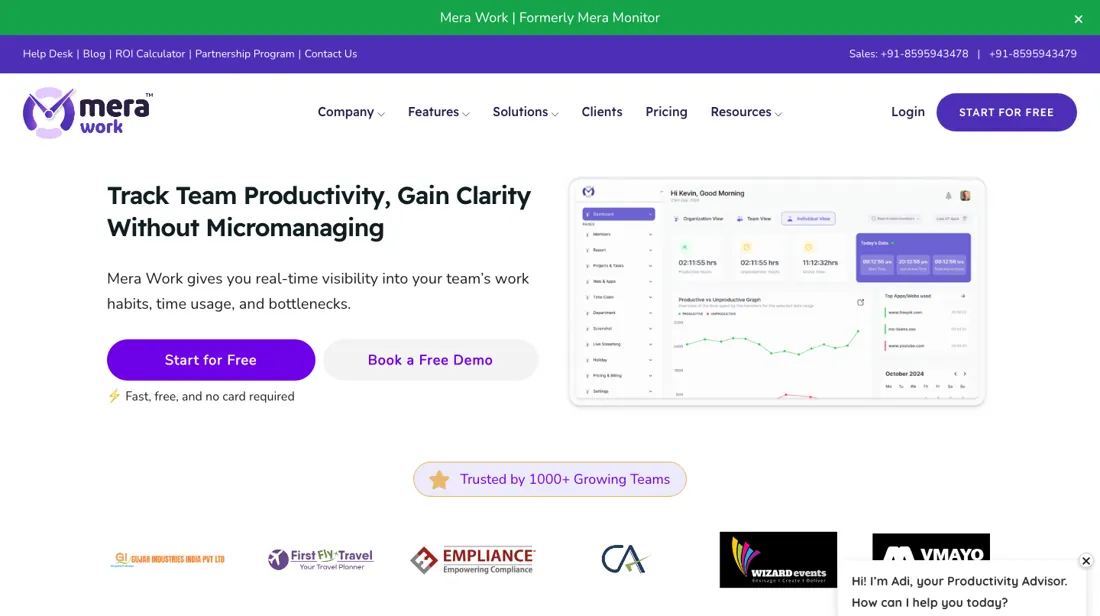
The price is low and the feature list is long; the catch sits in the data rather than the bill.
- Best for Remote support or back-office teams on a budget
- Not for teams that want a simple self-started timer
From $4 · per month · read 2026-09-30
Try Mera Work →Affiliate link: we may earn a commission if you sign up, at no extra cost to you. It never changes our verdict.
Is Mera Work right for you?
Your pain“I want time tracking, attendance and activity monitoring for my remote team under one low per-user price.”
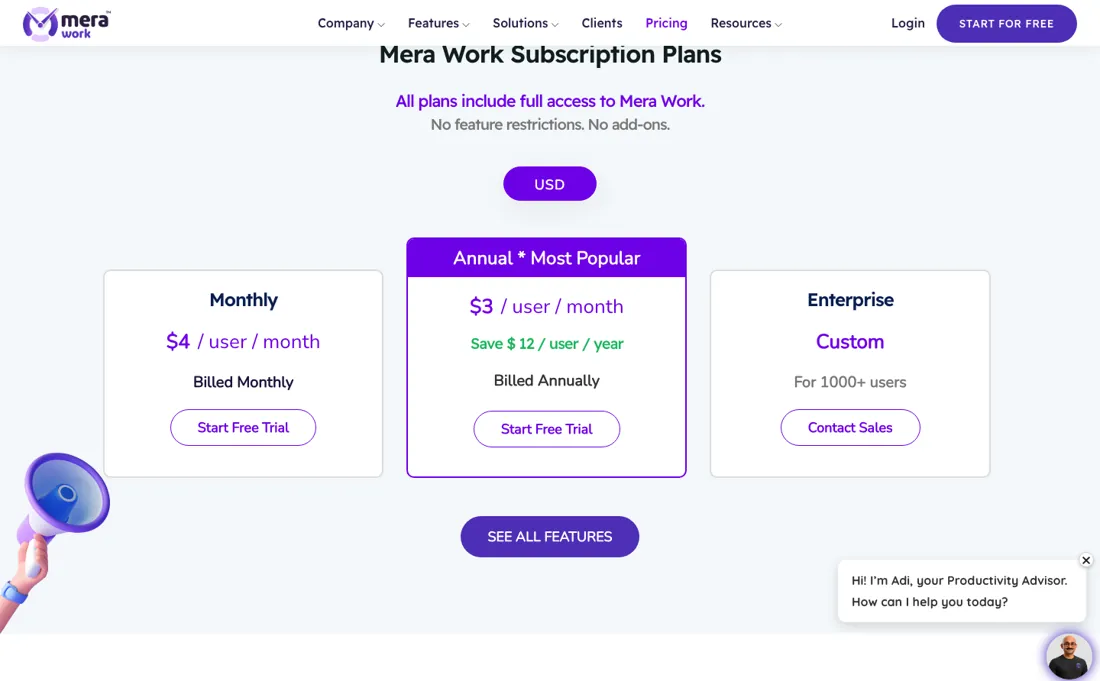
Does Mera Work solve it?YesPricing page, read 30 Sep 2026: one plan with every feature and no add-ons, including screenshots and live screen streaming, plus a 14-day trial with no credit card.
Your planSingle plan, $3 per user a month billed annually ($4 billed monthly); Enterprise by quote for 1,000 or more users
Try Mera Work →
Your pain“A client disputes hours from last spring, and the tool only keeps about three months.”
Does Mera Work solve it?PartlyPricing page and privacy policy, read 30 Sep 2026: data retention is up to three months, a rolling 90 days unless your order form says otherwise.
If that catch rules it out: Hubstaff.
Your planSingle plan, $3 per user a month billed annually ($4 monthly); export timesheets monthly or get a longer retention period in the order form
Try Mera Work →
- Teams that want a simple self-started timer. Pricing page, read 30 Sep 2026: the feature table lists screenshots, live screen streaming, keyboard and mouse activity tracking and a stealth mode; it is monitoring software, not only a timer. Better fit: Jibble.
The “Try” buttons are affiliate links: we may earn a commission if you sign up, at no extra cost to you, and it never changes our verdict.
Also in: Software for agencies
Transparency: the “Visit” links on this page are affiliate links: we may earn a commission if you sign up, at no extra cost to you. No vendor can pay for a better review or verdict. How we make money →
What Mera Work costs at your size
What each plan costs a month on annual billing (monthly billing below it), per user from Mera Work’s own pricing page. The cheapest plan at each size is marked. Enterprise starts at 1,000 users; Enterprise is quote only.
| Users | Pro | Enterprise |
|---|---|---|
| 1 user | $3Best value at this size $4 monthly | not available |
| 3 users | $9Best value at this size $12 monthly | not available |
| 5 users | $15Best value at this size $20 monthly | not available |
| 10 users | $30Best value at this size $40 monthly | not available |
| 25 users | $75Best value at this size $100 monthly | not available |
| 50 users | $150Best value at this size $200 monthly | not available |
Prices read 2026-10-11; tax excluded unless the vendor says otherwise. Calculated by our cost engine; the same numbers are in our open data.
See current prices on Mera Work →Pricing (2026)
✓ Pricing re-verified 30 Sep 2026
| This tool | $3 | 1st cheapest of 5 |
| Cheapest | $3 | this one |
| Median | $4.99 | |
| Most expensive | $8 | eBillity |
Lowest paid entry price per seat a month, billed annually, in USD, among the 5 time-tracking & scheduling tools we have researched (read between 2026-07-31 and 2026-10-15). Only tools priced in the same unit and on the same billing are compared. This is not a market survey, and cheapest is not best.
One plan, priced per user, with every feature included: the page states there are no feature restrictions and no add-ons. In US dollars it is $4 per user a month billed monthly or $3 per user a month billed annually, which the page describes as saving $12 per user a year. In rupees the same plan is ₹325 per user a month billed monthly or ₹250 billed annually, saving ₹900 per user a year.
Enterprise is a custom quote for 1,000 or more users. The sign-up page offers a 14-day free trial of the Pro plan with no credit card and says the subscription starts only if you choose to continue. The feature table lists data retention of up to three months, and the privacy policy puts that into practice: unless your order form says otherwise, customer data is kept on a rolling 90-day basis and older data may be deleted automatically.
A 50% inaugural discount for July that appeared in earlier readings is no longer shown. Plans change, so check the live price on their site before you buy.
Category context: HR & People. Across the 15 tools in this category that we researched with a public US-dollar price, the median entry price is $49 a month (lowest paid plan as listed, per seat where the vendor prices per seat). Mera Work’s entry price of $4 a month sits below that median. Compare pricing conditions in the Software Cost Atlas →
What the pricing page doesn’t say
Mera Work keeps your records for 90 days. The pricing table says data retention up to three months, and the privacy policy spells it out: unless your order form says otherwise, customer data is held on a rolling 90-day basis and anything older may be deleted automatically from production. That rules it out as the place you look back from over a year: an annual review, a client disputing hours billed last spring, a payroll audit.
Export the timesheets and attendance you need every month, or get a longer retention period written into the order form before you roll it out. This is monitoring software, not only a timer. The feature table lists screenshots, live screen streaming, keyboard and mouse activity tracking and a stealth mode. Mera Work's own pages are more careful than the word keystroke suggests: its keystroke feature records how much typing happened and when, not the keys or words themselves, and screenshots can be blurred and limited by role.
But whether you may run screenshots, live view or a hidden agent on your staff's computers is a question for your employment adviser, not the vendor, and data-protection rules in Europe generally expect employees to be told what is recorded. Decide the policy first and tell people what the agent captures. Two practical points. The company behind it, Aapna Infotheek Private Limited, is based in New Delhi, and its privacy policy says data may be hosted or processed in India; if you need it kept elsewhere, ask about the private cloud configuration the feature table lists and put it in the contract.
And the review sites we normally read, Capterra and G2, blocked our reader on 30 September 2026. The one we could read, SoftwareSuggest, shows six reviews from 2025 under the old name Mera Monitor, and one of the three visible there also runs as a testimonial on Mera Work's own pricing page, so we found no clearly independent account of reliability or support to weigh. We have not run Mera Work ourselves.
Watch the video review
The video version of this review, from our YouTube channel.
What Mera Work does
Employee monitoring and time tracking for remote, hybrid and office teams: automatic timesheets, attendance and shifts, app and website usage, screenshots and live screen view, all in one per-user plan.
What buyers report about Mera Work
Hands-on: not tested by usReported by buyers: SoftwareSuggest, read September 2026
Themes from the buyer-review sites listed at the foot of this page, read in September 2026. We have not run Mera Work ourselves, so this is other buyers' experience rather than ours. We summarise it here because the complaints are usually the part a vendor page leaves out.
- • The concrete praise is about the time model rather than the screenshots: a business development manager at an 11-50 person company (April 2025) singled out the split of active time into productive and unproductive time, set against idle and away time, plus the time tracker and activity monitoring.
- • A consultant at a 51-200 person company (May 2025, under six months of daily use) named real-time tracking, activity logs and productivity reports, and said it ran without slowing their machines down.
- • The same consultant wanted deeper integrations with project management tools, missed a mobile app for monitoring and alerts on the go, and warned that the software may feel invasive to employees if it is not explained well.
- • In April 2025 screen recording was still missing and was described as coming soon; Mera Work's feature table now lists live screen streaming and its FAQ describes a live recording setting, so that gripe dates from before the current build.
Where the ratings disagree. Treat this as thin evidence. Every review on SoftwareSuggest dates from 2025 and predates the rename, and the consultant's review, under the same name and headline, also runs as a testimonial on Mera Work's own pricing page, so at least part of this record was gathered by the vendor rather than found independently. No platform we could read gave a critical account of reliability, support or billing.
When the paid plan is worth it
Mera Work sells one plan, so the paid decision is about billing, not tiers. Every feature on the table, screenshots and live screen streaming included, costs $4 per user a month billed monthly or $3 billed annually (₹325 or ₹250 in rupees), read on 30 September 2026. For a 25-person team that is $1,200 a year on monthly billing against $900 on annual. The annual rate only saves money if your headcount holds: the cancellation and refund policy (last updated August 2026) says refunds are not automatic, SaaS cancellation generally takes effect at the end of the current billing term, and no refund is given for unused user licences during an active billing period.
Run the 14-day trial on your real team, then commit to annual for the seats you are sure of. If a renewal slips, the help desk FAQ describes a 7-day grace period before the account is suspended. Enterprise is a custom quote for 1,000 or more users, so most buyers never reach that step. What paying more does not fix is data retention. The plan's feature table caps it at three months, and the privacy policy describes a rolling 90-day window unless your order form says otherwise, so a longer history is a contract negotiation, not a billing choice.
Annual billing also does not settle whether you may run screenshots, live view or stealth mode on your staff; that stays your legal question.
Our monthly capture read this vendor's pricing page in September 2026 and again in October 2026, and the amounts were the same both times, including $3, $4 and $12 from the pricing above. We keep watching, and the registry records what moves.
How to actually use Mera Work
Setup is admin-first, and the order matters. Sign up through the Start for Free form, confirm the activation email and you land in the admin web app at app.mera.work. The help desk FAQ has you open Configuration > Setting > User Default Settings, enable the features you want and save before you press '+ Add Member', so decide there what the agent records and tell your staff before anyone is invited.
Add people one at a time (name, email and role) or by bulk upload from the sample file. New members sit in an inactive list until you activate them; they then get an activation email and set a password. Each person installs the desktop agent from the Download page (Windows 10 or later, macOS 10.11 or later, RHEL and Ubuntu-based Linux; Fedora and CentOS are untested) and logs in, and the timer starts automatically whenever the machine is active.
Three settings decide whether the reports mean anything: your organisation's time zone (daily email reports go out before 09:30 local time), the idle-time interval, and the list of apps and websites you class as productive, which can be set per organisation, department or user. The agent syncs every 10 minutes, so a fresh install looks empty at first.
Distilled from Mera Work's own onboarding walkthrough (https://mera.work/onboarding/), Windows installation guide (https://mera.work/installation-guide-window/) and help desk FAQ (https://helpdesk.mera.work/frequently-asked-questions/) for the admin sign-up, default settings, member invitation and activation, supported operating systems, idle-time, productive-app, sync and daily-report behaviour and the 7-day grace period; the cancellation and refund policy (https://mera.work/cancellation-and-refund-policy/) and service level agreement (https://mera.work/service-level-agreement/, 99% monthly availability for SaaS) for the billing terms; plan prices from https://mera.work/pricing/. All read 2026-09-30. For the offline and pause questions: Mera Work's offline time tracking page (https://mera.work/features/offline-time-tracking-software/) and homepage (https://mera.work/), read on 22 October 2026.
Mera Work vs Hubstaff, side by side
Each column shows the vendor’s own published entry price, read on the date shown. Entry prices can cover different services or units, so check what each one buys. We do not average them into a score.
Both names above are affiliate links: we may earn a commission if you sign up, at no extra cost to you. Neither changes what this table says.
The natural comparison is Hubstaff: Hubstaff is the closest comparison in our own dossiers. On our reading of 29 August 2026 Hubstaff's Starter was $4.99 per seat a month billed annually or $7 billed monthly, with a two-seat minimum, and its Grow and Team tiers were $7.50 and $10 billed annually. Mera Work, read on 30 September 2026, is $3 per user a month billed annually or $4 monthly for a single plan that already includes screenshots, live screen streaming, attendance and shift tools. On price Mera Work is lower at every team size. What you give up is history and outside evidence: Mera Work keeps 90 days of data by default, and the only review site we could read holds six reviews from 2025. A team that mainly wants to see who is working today can start with Mera Work's trial; one that needs a year of records in the tool should price Hubstaff's tiers first.
Not a fit for you?
Mera Work is not the pick for teams that want a simple self-started timer. In that case, look at Jibble, built for teams that need clock-ins, overtime calculations and payroll exports for unlimited people at no cost, and can live with one admin and no approval step: for them it is free, which nothing else in this category offers.
Jibble price: Free for unlimited users; paid plans from €1.79 per user a month billed annually (€2.99 monthly) (read 2026-09-25)
The Visit link is an affiliate link: we may earn a commission, at no extra cost to you. We picked this alternative for fit first; commission only decides between equal fits.
Frequently asked questions
What does Mera Work cost per user?
$3 per user a month billed annually or $4 billed monthly, read on 30 September 2026; in rupees ₹250 or ₹325. That is one plan with every feature, and the pricing page says there are no add-ons. Enterprise is a custom quote for 1,000 or more users, and the sign-up page offers a 14-day trial without a card.
How long does Mera Work keep our data?
Three months by default. The feature table lists data retention up to three months, and the privacy policy describes a rolling 90-day window unless your order form says otherwise. If you need timesheets or attendance for a year-end review, payroll audit or client dispute, export them monthly or get a longer period written into the order form.
Can we cancel or drop seats partway through an annual plan?
Usually not with money back. Under Mera Work's own cancellation terms a SaaS subscription runs to the end of the term you paid for, a refund is something the company may consider rather than something you are owed, and seats you stop using mid-term are not refunded. Put on annual billing only the headcount you are sure of and keep the uncertain seats monthly.
Does Mera Work keep tracking hours when the internet drops?
Yes, according to Mera Work's page on offline time tracking, read on 22 October 2026: it says the app captures work hours without internet and syncs the data afterwards. The page does not say how long a device can stay offline before data is lost, so treat long offline stretches as not confirmed.
Can staff pause tracking for confidential or personal work?
Yes. Mera Work's homepage, read on 22 October 2026, describes disabling tracking while working on confidential tasks or doing personal activities. The page does not say whether an admin can restrict or audit those pauses, so check that in the trial if it matters for your policy.
Is this a hands-on review of Mera Work?
This is a researched assessment, not a hands-on test. Where we've used a tool ourselves, we say so explicitly. We name what each tool is good and bad at, and we earn a commission only if you sign up, at no cost to you.
- Buyer reviews on SoftwareSuggest (listing now titled Mera Work; six reviews, three shown on the page, all written in 2025 under the old name Mera Monitor). Capterra, GetApp and SourceForge refused our reader, and G2 blocked it. Read September 2026.
- Read 2026-09-30 on mera.work/pricing, INR and USD tabs, and on mera.work/signup.
- A dated screenshot of that pricing page, kept on this site as the receipt.
Bottom line
In one line: Mera Work keeps your records for 90 days: unless your order form says otherwise, older data may be deleted automatically, which rules it out for an annual review or a payroll audit.
Best for: remote support or back-office teams on a budget.
The Try button is an affiliate link; we may earn a commission at no extra cost to you.
Others in this category
Reviewed hr & people tools that share ground with Mera Work. They are comparable in what they do, not drop-in swaps:
New reviews, price changes we recorded, and the cost conditions we found. No sponsored placements. Unsubscribe anytime.
This is our researched assessment, not a paid placement. The “Visit” links on this page are affiliate links: we may earn a commission if you sign up, at no extra cost to you, and it never changes our take. How we review →