Modge Review (2026)$4 a Seat, Screenshots Off by Default
 By Daan Haket · Researched and written with an AI assistant · who does what
The numbers on Modge's own pages do not agree with each other.
desk-bound remote or hybrid teams of a few to a few hundred people who want time tracking, app classification, shift adherence, leave and payroll-ready timesheets in one seat priced between $4 and $7 a month, and who are happy to run screenshots as an opt-in rather than a default.
you need SSO or a SOC 2 report today, both are marked soon; your people work in the field, since the agent is desktop-only with no mobile or GPS on the page; or your security team will not accept a compliance claim without a document.
Transparency: the “Visit” links on this page are affiliate links — we may earn a commission if you sign up, at no extra cost to you. No vendor can pay for a better review or verdict. How we make money →
Pricing (2026)
✓ Pricing re-verified 16 Oct 2026
| Plan | Price | What you get |
|---|---|---|
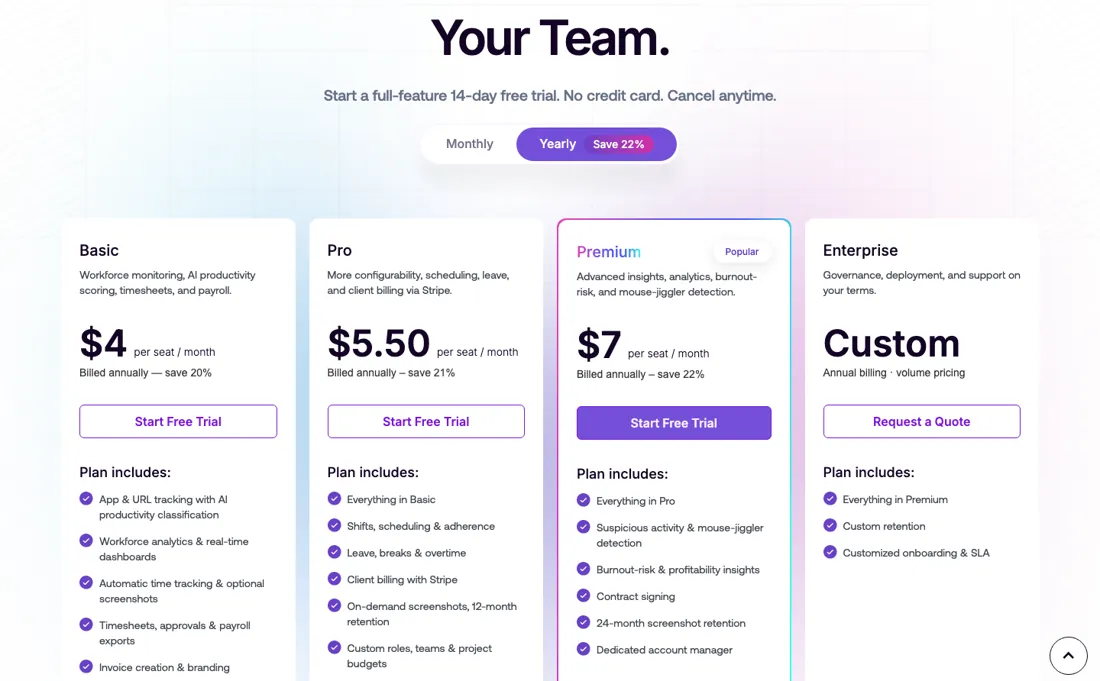
| Basic | $4/seat/month annual, $5 monthly | app and URL tracking with AI classification, dashboards, automatic time tracking, optional screenshots (3-month retention), timesheets and payroll exports, invoicing, email and chat support |
| Pro | $5.50/seat/month annual, $7 monthly | everything in Basic plus shifts, scheduling and adherence, leave, breaks and overtime, Stripe client billing, on-demand screenshots with 12-month retention, custom roles, teams and project budgets |
| Premium | $7/seat/month annual, $9 monthly | everything in Pro plus automated project and task tracking, workflow analysis, suspicious-activity and mouse-jiggler detection, burnout-risk and profitability insights, contract signing, 24-month retention, dedicated account manager |
| Enterprise | custom, annual billing with volume pricing | everything in Premium plus custom retention, customised onboarding and an SLA |
| This tool | $4 | 2nd cheapest of 4 |
| Cheapest | $3 | Mera Work |
| Median | $4.50 | |
| Most expensive | $5 | Deputy |
Lowest paid entry price per seat a month, billed annually, in USD, among the 4 time-tracking & scheduling tools we have researched (read between 2026-07-31 and 2026-09-30). Only tools priced in the same unit and on the same billing are compared — not a market survey, and cheapest is not best.
Per-seat plans with a full-feature 14-day trial and no card. Basic is $5 per seat per month billed monthly or $4 billed annually: app and URL tracking with AI productivity classification, workforce dashboards, automatic time tracking with optional screenshots, timesheets, approvals and payroll exports, invoice creation, email and chat support. Pro is $7 monthly or $5.50 annually and adds shifts, scheduling and adherence, leave, breaks and overtime, client billing through Stripe, on-demand screenshots with 12-month retention, and custom roles, teams and project budgets.
Premium, marked popular, is $9 monthly or $7 annually and adds automated project and task time tracking, workflow analysis, suspicious-activity and mouse-jiggler detection, burnout-risk and profitability insights, contract signing, 24-month screenshot retention and a dedicated account manager. Enterprise is custom, on annual billing with volume pricing, custom retention, customised onboarding and an SLA. Two add-ons are priced per seat: More Screenshots at $2 a month lifts capture from 18 to 60 an hour on Basic, Pro and Premium; Extended Data Retention at $2 a month or $1.67 annually keeps records for six years on every tier.
The comparison table lists screenshot retention as 3 months on Basic, 12 on Pro and 24 on Premium, and marks SSO (SAML 2.0), SOC 2 Type II and ISO 9001 as soon. The FAQ's blanket 'Annual billing saves 22% over monthly' holds only for Premium ($9 to $7, 22.2%); Basic saves 20% ($5 to $4) and Pro 21.4% ($7 to $5.50), as the plan cards themselves say. Plans change — always verify the live price on their site.
Category context: HR & People. Across the 14 tools in this category that we researched with a public US-dollar price, the median entry price is about $32 a month (lowest paid plan as listed, per seat where the vendor prices per seat). Modge’s entry price of $4 a month sits below that median. Compare pricing conditions in the Software Cost Atlas →
What the pricing page doesn’t say
The homepage says trusted by 1,000+ teams, the affiliate page says 1,800+ teams, the pricing page says over 2,000 users; the pricing page also shows three star ratings, 4.6 from 1,500 reviews, 4.8 from 2,000 and 4.2 from 800, without naming a single platform they come from. None of that touches the product, but it is the kind of copy a buyer should not repeat in a business case. What does touch the product is the comparison table: SSO through SAML 2.0, SOC 2 Type II and ISO 9001 are all marked soon, and HIPAA compliant appears with no report behind it.
If your security review needs a document today, there is none to hand over. The desktop agent is macOS and Windows only, and the pricing page mentions no mobile app or GPS, so field teams are out of scope.
Watch the video review
The video version of this review, from our YouTube channel.
What Modge does
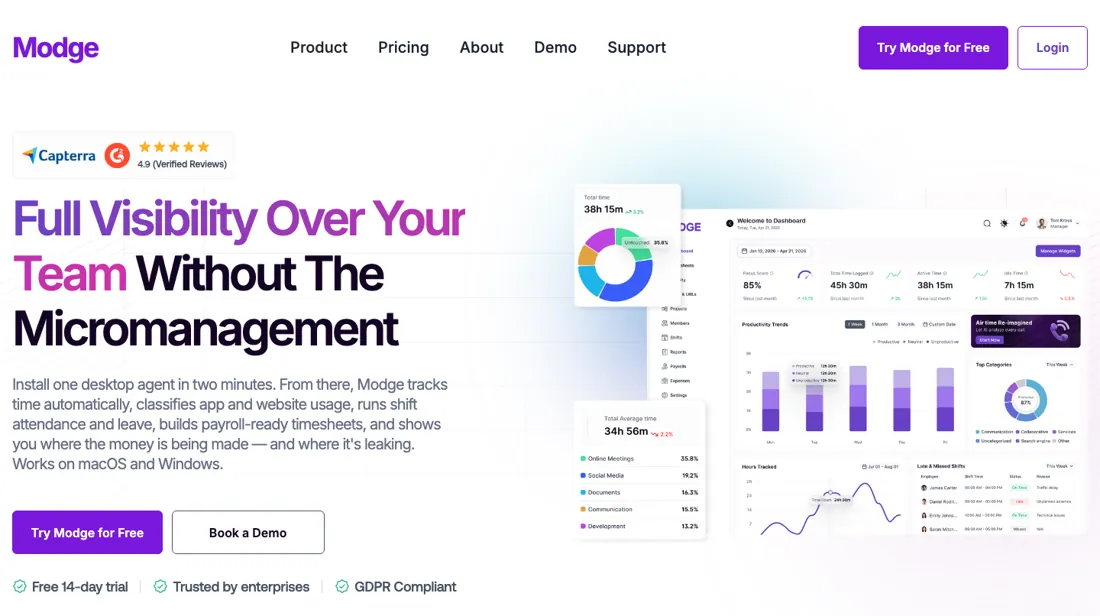
Desktop time tracking and workforce analytics for remote and hybrid teams: automatic hours, app and URL classification, shift adherence, leave, payroll-ready timesheets and Stripe invoicing. 14-day trial, no card.
Pro is the scheduling tier, Premium is the suspicion tier
The $1.50 step from Basic to Pro on annual billing buys the operational layer: shifts and adherence, leave and break policies, overtime flags, client billing through your own Stripe account, and screenshots you can request on demand and keep for twelve months instead of three. If you run rotas or bill clients by the hour, that is your tier. A team that only wants to know where the day went can stay on Basic.
The further $1.50 to Premium is a different kind of purchase. Its headline features are suspicious-activity and mouse-jiggler detection, burnout-risk scoring, a profitability report, 24-month screenshot retention and a named account manager. Buy it when you bill on proof of work or manage contractors you never see; do not buy it for the automated project tracking alone, because Basic already tags every session to a project. Two add-ons change the sums.
More Screenshots at $2 a seat lifts capture from 18 to 60 an hour and costs half a Basic seat on its own; Extended Data Retention at $2 keeps records for six years. On a 20-seat Basic plan, taking both doubles the bill.
Questions we checked
Facts about Modge that would change a buying decision, and where we stand on each. An unanswered question does not mean the feature is missing; it means we have not confirmed it yet.
- Are screenshots deleted after 3, 12 or 24 months depending on the plan, or kept for as long as the subscription runs? Sources disagree
Applies to: screenshot retention on Basic, Pro and Premium.
Why it matters: retention decides the privacy exposure of monitoring and whether the $2-a-seat Extended Data Retention add-on is needed at all.
Answer: The comparison table on modge.com/pricing (read 16 October 2026) lists auto-retention policies of 3, 12 and 24 months by tier. The help-center article 'Data retention and deletion' (dated 2 September 2026) states that during an active subscription Modge retains all organisation data, screenshots included, indefinitely. Neither page says which rule governs.
Checked: Modge pricing: feature comparison table (2026-10-16); Modge help center: Data retention and deletion (2026-10-16) - Does Modge hold a SOC 2 Type II report today? Sources disagree
Applies to: security review before purchase.
Why it matters: a security team will ask for the report, and the answer decides whether Modge can pass procurement now.
Answer: On the same pricing page (read 16 October 2026) the comparison table marks 'SOC 2 Type II certified' as soon, while the security section further down calls Modge SOC 2 Type II certified, ISO 9001 certified and HIPAA compliant. No report or certificate is linked.
Checked: Modge pricing: comparison table and security section (2026-10-16)
Have a public source that answers one of these? How we review explains how we check and correct.
How to actually use Modge
Install the desktop agent on two or three machines first, not across the company. The pricing page says it takes about two minutes on macOS or Windows and that screenshots stay off until you switch them on, so the first week can be time and app data only. Spend that week on the classification rules: every app and site is scored productive, neutral or unproductive, with an organisation default and overrides per job title, and those rules decide what the productivity score means before anyone is judged on it.
Write the screenshot policy down before you enable capture. Interval, blur, retention and how far back each role can look are all settings; the defaults let members see 30 days, managers 90 and owners everything. Then run one pay period end to end: approve it, export the CSV in generic, Wise or PayPal format, and check that approved leave landed in the right period. The trial is 14 days without a card, which is enough for exactly one cycle.
Distilled from modge.com/pricing (both billing toggles and the feature-comparison table), modge.com/employee-monitoring and modge.com/about-us, all read 3 September 2026; no hands-on test, this is synthesis from the vendor's own pages. Re-verified 16 October 2026 on modge.com/pricing (both toggles, comparison table and FAQ), plus the Modge help center articles Changing your plan, Understanding seats and who consumes one, Adding or removing seats, Pausing, canceling and reactivating your subscription, and Data retention and deletion (help.modge.com, all dated 2 September 2026).
Modge vs Hubstaff, side by side
Each column shows the vendor’s own published entry price, read on the date shown. Entry prices can cover different services or units, so check what each one buys. We do not average them into a score.
Both names above are affiliate links: we may earn a commission if you sign up, at no extra cost to you. Neither changes what this table says.
The natural comparison is Hubstaff — The obvious comparison. Hubstaff's annual column starts at $4.99 a seat with a two-seat minimum and its monthly column at $7; Modge starts at $4 annual or $5 monthly with no minimum on the page. Hubstaff has the longer record, a mobile app with GPS and a far larger integration list; Modge's pitch is shift adherence, leave policies and Stripe invoicing built into a cheaper seat, with screenshots off by default. Pick Hubstaff for field teams, Modge for desk-bound teams that also need rotas..
Frequently asked questions
How much does Modge cost?
Per seat, per month: Basic $4 on annual billing or $5 monthly, Pro $5.50 or $7, Premium $7 or $9, Enterprise on quote. Every plan has a 14-day trial without a card, and two $2-a-seat add-ons cover extra screenshots and six-year data retention (read 3 September 2026).
Does Modge take screenshots of employees?
Only if you turn it on. The pricing page states screenshots are optional, enabled per organisation or per person, only during tracked sessions, with configurable interval and blur. Default capture is up to 18 an hour; the More Screenshots add-on raises that to 60. Retention is 3, 12 or 24 months by tier.
Is Modge a keylogger?
The comparison table says keyboard and mouse activity is recorded as aggregated intensity counts only, never what was typed, and calls that out explicitly as not a keylogger. App and URL tracking does record the exact URL open in the browser during a tracked session.
Does Modge work on mobile or track GPS?
Not according to its pricing page. The agent is described as a desktop app for macOS and Windows; mobile tracking and GPS are not mentioned, so hourly field teams should look at Hubstaff or a time-clock product instead.
Do admins and managers need a paid seat on Modge?
Modge's own pages disagree. The pricing FAQ (modge.com/pricing, read 16 October 2026) says only people whose time the desktop agent tracks are billable, and that admins, managers and viewers without the agent are not billed. The help-center article 'Understanding seats and who consumes one' (help.modge.com, dated 2 September 2026) says every Owner, Admin, Manager and Member consumes a seat, as does a pending invite for those roles, and that you cannot invite past your seat count. Only Viewer-type roles are free, with no limit on how many. Budget managers as seats until Modge confirms otherwise in writing.
What happens to the bill when I remove people, downgrade or cancel?
Per Modge's help center (articles dated 2 September 2026, read 16 October 2026), plan changes take effect immediately and are prorated, so a downgrade becomes a credit on the next bill rather than a refund. Removing seats works the same way, but only after you delete the member or switch them to Viewer and then lower the seat count yourself; a deleted member whose seat you leave in place is still billed. Cancelling keeps full access to the end of the paid period. After that the organisation goes inactive: data is kept for 90 days, queued for deletion from day 91 and permanently deleted from day 181, so export first.
Is this a hands-on review of Modge?
This is a researched assessment, not a hands-on test — where we've used a tool ourselves, we say so explicitly. We name what each tool is good and bad at, and we earn a commission only if you sign up, at no cost to you.
- Read 2026-09-03 and re-verified 2026-10-16 on modge.com/pricing, both billing toggles and the comparison table; every amount unchanged.
- A dated screenshot of that pricing page, kept on this site as the receipt.
Others in this category
Reviewed hr & people tools that share ground with Modge — comparable in what they do, not drop-in swaps:
New reviews, price changes we recorded, and the cost conditions we found. No sponsored placements. Unsubscribe anytime.
This is our researched assessment — not a paid placement. The “Visit” links on this page are affiliate links: we may earn a commission if you sign up, at no extra cost to you, and it never changes our take. How we review →