Leavo Review (2026)
 By Daan Haket · Researched and written with an AI assistant · who does what
The tidy per-user numbers are annual-billed, and it's priced per seat — every employee you track adds to the bill, with no volume break published (large teams are told to ask sales). And the “free” is a 30-day trial, not a permanent free tier: budget for the paid plan from day 31.
teams that want straightforward time-tracking, attendance and overtime banking with transparent per-user pricing.
you need a permanent free plan (this is a 30-day trial), or you're a tiny team where a shared spreadsheet already covers hours.
Transparency: the “Visit” links on this page are affiliate links — we may earn a commission if you sign up, at no extra cost to you. No vendor can pay for a better review or verdict. How we make money →
Pricing (2026)
✓ Pricing re-verified 7 Oct 2026
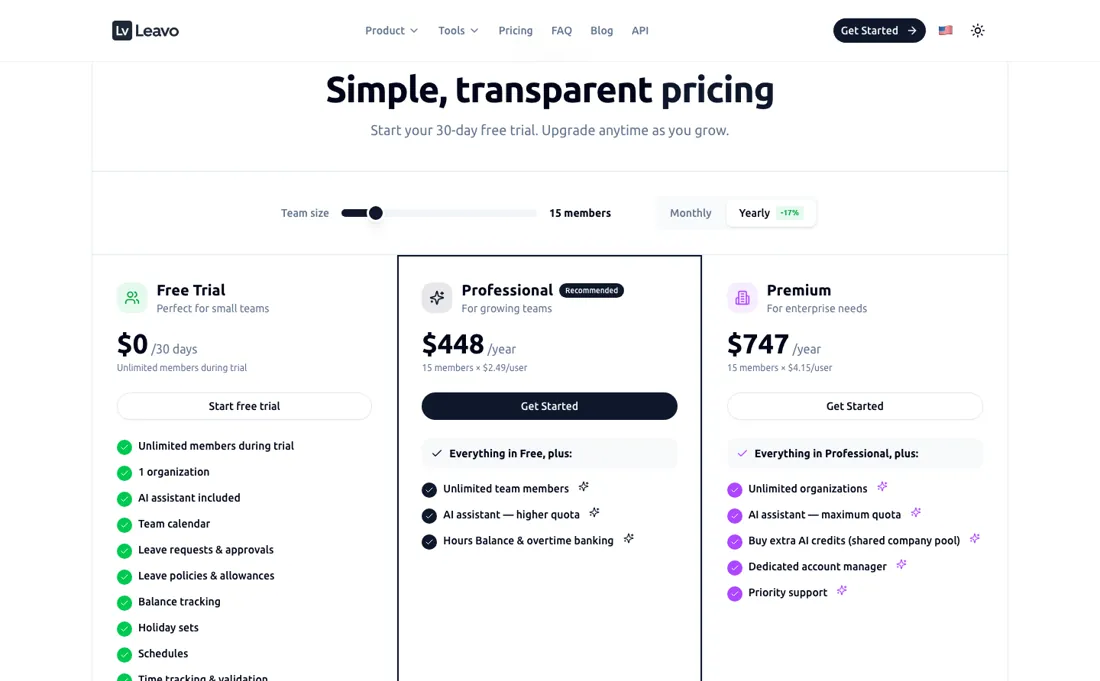
(2026) 30-day free trial with unlimited members (a trial, not a permanent free plan). Professional $2.49/user/mo billed yearly (about $448/yr for 15 users) adds unlimited features and overtime banking; Premium $4.15/user/mo yearly (about $747/yr for 15). Priced per user, annual billing. Plan changes take effect immediately and are prorated, and adding a member raises the subscription quantity automatically at a prorated charge.
Professional and Premium can also be paid by bank transfer against a monthly invoice; volume pricing for large teams goes through sales. Leavo's own llms.txt still describes a free plan for up to 9 members at $2.50 and $4.17 per user; the pricing page, which we follow, shows only the 30-day trial and $2.49 and $4.15 (both read 7 October 2026). Plans change — always verify the live price on their site.
Category context: HR & People. Across the 13 tools in this category that we researched with a public US-dollar price, the median entry price is $14 a month (lowest paid plan as listed, per seat where the vendor prices per seat). Leavo’s entry price of $2.49 a month sits below that median. Compare pricing conditions in the Software Cost Atlas →
Leavo’s pricing page, as we read it
Watch the video review
The video version of this review, from our YouTube channel.
⚡ Short on time? Watch the 30-second verdict Short.
What Leavo does
Team time-tracking, attendance and overtime banking with transparent per-user pricing and a 30-day free trial.
What buyers report about Leavo
Hands-on: not tested by usReported by buyers: vendor documentation and user testimonials, read August 2026
Themes from the buyer-review sites listed at the foot of this page, read in August 2026. We have not run Leavo ourselves, so this is other buyers' experience rather than ours. We summarise it here because the complaints are usually the part a vendor page leaves out.
- • Leave, time tracking, shift planning and overtime banking connected properly — the schedule fills the timesheet, hours bank as overtime, and overtime converts to paid days off automatically.
- • Swiss CCT and French CCN sector presets built in, with the ability to build your own agreement for any country. Audit logs that reviewers say settle payroll disputes.
- • A 30-day free trial, with bank transfer as well as card on the higher plans.
- • We found no independent reviews on G2, Capterra or Trustpilot. What exists is testimonials on the vendor's own site — treat it accordingly and use the trial.
- • The compliance presets currently cover Switzerland and France, with other countries described as coming. Check yours is actually supported before you build a process on it.
When the paid plan is worth it
Leavo's paid tiers differ mainly in AI quota and multi-organization support, not core leave-management functionality. Most single-organization teams that already know their headcount are well served by Professional, at $448 per year — $2.49 per user, on a 15-member example. It includes unlimited team members, hours balance and overtime banking, and a higher AI assistant quota than the 30-day trial's standard allocation. The concrete push toward Premium ($747 per year, $4.15 per user, same 15-member example) is operating multiple legal entities or brands, since Premium is the only tier with unlimited organizations.
The other push is exhausting the AI assistant's monthly quota often enough that the "maximum AI quota" plus purchasable extra credit packs matter. What upgrading to Premium does not solve: neither tier adds Slack, calendar-sync, payroll, or HRIS integrations — Leavo's own documentation lists none of these, even though the same documentation separately describes a REST API for members, leave requests, policies, and schedules. A dedicated account manager and priority support come with Premium, but they don't substitute for connections to the systems your leave data already lives in.
Questions we are still checking
Facts about Leavo that would change a buying decision, and where we stand on each. An unanswered question does not mean the feature is missing; it means we have not confirmed it yet.
- Does a suspended member still count as a paid seat? Still checking
Applies to: per-user billing; the Members page lets admins suspend a member while keeping data and balances.
Why it matters: decides whether seasonal staff or leavers can be parked without paying for them.
Checked: Leavo pricing FAQ (2026-10-07); Leavo Docs: Members (2026-10-07)
Have a public source that answers one of these? How we review explains how we check and correct.
How to actually use Leavo
Getting a working setup on Leavo means completing three steps documented under Getting Started. First, create the company profile and invite at least one team member with name and email. Second, set the Holidays Allowance, where the default paid-leave figure is 25 days per year, plus an accrual type and carry-over rule. Third, define the standard weekly schedule that balances are calculated against. An account with a verified email is the only prerequisite — no domain verification, API key, or third-party connection is needed, since Leavo's documentation lists no Slack, calendar, payroll, or HRIS integrations at all.
Where setups actually go wrong, per Leavo's own administration troubleshooting page, is after this initial pass: changing a member's schedule or holiday set later does not update already-approved future requests, whose stored values stay as they were until each one is edited and re-saved, and mismatched holiday sets, work schedules, or leave-policy assignments are the stated cause of wrong balances. Approval also silently fails if a member is left on the default role instead of Admin, HR, or Approver.
Distilled from vendor pricing (leavo.com/en/pricing), developer docs (leavo.com/en/developers) and help.leavo.com/en/getting-started/onboarding, re-read 6 Aug 2026. Re-verified 7 October 2026: https://www.leavo.com/en/pricing (plans, AI-credit rules, payment and billing FAQ), https://www.leavo.com/llms.txt, and the docs pages Members https://help.leavo.com/en/administration/members, Multi-Company https://help.leavo.com/en/multi-company, Troubleshooting https://help.leavo.com/en/administration/troubleshooting and the developer page https://www.leavo.com/en/developers.
Leavo vs Toggl, side by side
Each column shows the vendor’s own published entry price, read on the date shown. Entry prices can cover different services or units, so check what each one buys. We do not average them into a score.
Both names above are affiliate links: we may earn a commission if you sign up, at no extra cost to you. Neither changes what this table says.
The natural comparison is Toggl — Toggl is the established time-tracker with a genuinely free tier for small teams; Leavo leans into attendance and overtime banking — richer there, but per-seat and trial-only at the free end.
Frequently asked questions
Who can see billing and other people's leave?
The Workspace Owner is created with the workspace, is always an Admin and holds full administrative and billing permissions; HR users manage requests, calendar and allowances but have no access to billing or subscription settings, and employees see only their own profile. Seeing colleagues' absences is a per-member switch ("Can see team leaves"). The owner cannot be changed from the Members page; a transfer goes through Leavo support (Members and Troubleshooting pages of the Leavo docs, read 7 October 2026). Roles are set per company, so someone can be an Admin in one workspace and an employee in another.
What can I take with me if I leave?
Admins and HR can export the Members table as a .csv or .xlsx file; the export holds the visible columns and respects active filters, and Leavo suggests it for payroll reconciliation and audits. There is also a REST API covering members, leave requests, policies and schedules, with keys created under Settings, API Keys. A one-click export of the full leave-request history is not described in the docs: not confirmed (Members page and developer page, read 7 October 2026).
What happens to the bill when headcount changes?
Every tracked member is a paid seat. Adding one updates the subscription quantity automatically and you pay the prorated remainder of the period; upgrades and downgrades take effect at once, also prorated. You can cancel from the billing settings at any time, and yearly plans are billed annually but can still be cancelled; whether part of a yearly payment is returned on cancellation is not stated: not confirmed. Suspending a member stops them requesting leave but keeps their data and balances (pricing FAQ and Members page, read 7 October 2026).
Is this a hands-on review of Leavo?
This is a researched assessment, not a hands-on test — where we've used a tool ourselves, we say so explicitly. We name what each tool is good and bad at, and we earn a commission only if you sign up, at no cost to you.
- Buyer reviews on vendor documentation and user testimonials, read August 2026.
- Price re-verified 2026-08-17 and 2026-10-07 against leavo.com.
- A dated screenshot of that pricing page, kept on this site as the receipt.
Others in this category
Reviewed hr & people tools that share ground with Leavo — comparable in what they do, not drop-in swaps:
New reviews, price changes we recorded, and the cost conditions we found. No sponsored placements. Unsubscribe anytime.
This is our researched assessment — not a paid placement. The “Visit” links on this page are affiliate links: we may earn a commission if you sign up, at no extra cost to you, and it never changes our take. How we review →