Parim Review (2026)
 By Daan Haket · Researched and written with an AI assistant · who does what
Unlimited users sounds like the generous part, and it is — until you notice what replaces per-seat pricing: a bill that scales with shifts scheduled.
staffing agencies, security firms and event operators with large rosters of shift workers, where per-seat pricing from competitors would be punishing and the specialised modules (checkpoints, check calls, incident reporting) match the work.
you have a stable team on fixed rotas, where a per-user tool with a published price will be cheaper and far easier to budget; also skip it if you need a firm number today, because you will be getting a quote.
Transparency: the “Visit” links on this page are affiliate links — we may earn a commission if you sign up, at no extra cost to you. No vendor can pay for a better review or verdict. How we make money →
Pricing (2026)
✓ Pricing re-verified 5 Oct 2026
| Plan | Price | What you get |
|---|---|---|
| Starter | no published price | Employee scheduling, configurable shift list, locations/roles, time off requests, shift reminders, staff/management apps |
| Pro | no published price | Adds time and attendance: scheduling patterns, timesheet/people lists, pay run report, CSV exports |
| Premium | no published price | Adds shift cancellation tracking, timesheet analytics, payroll export, invoicing report, pay lock, client requests |
Summarised from the pricing notes below; the notes carry the conditions.
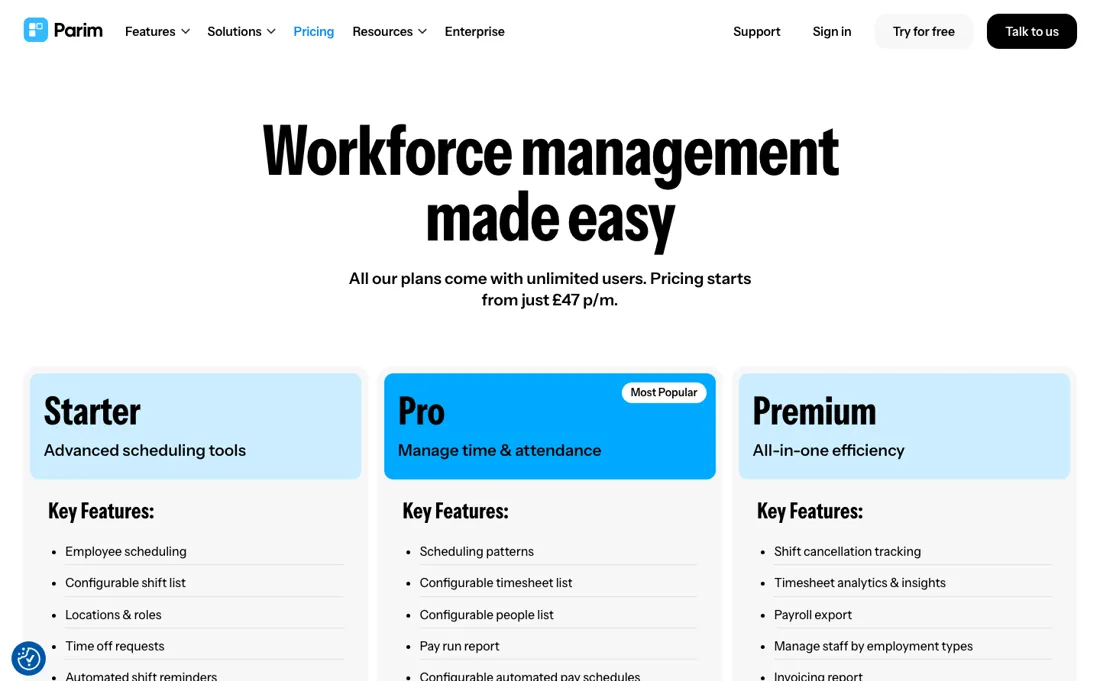
One number is published and the rest is not. The page says pricing starts from £47 per month with unlimited users on every plan, but each of the three tiers — Starter, Pro, Premium — carries a ‘Request Pricing’ button rather than a figure. Their own explanation: they price on the functionality you need and the number of shifts you schedule each month.
So the £47 is a starting point, not a plan price. What the tiers contain is published even though the prices are not. Starter is scheduling: employee scheduling, a configurable shift list, locations and roles, time off requests, automated shift reminders, separate staff and management apps, shift creation from the app, and SIA badge expiry reminders. Pro adds time and attendance: scheduling patterns, configurable timesheet and people lists, a pay run report, configurable automated pay schedules and CSV exports.
Premium adds shift cancellation tracking, timesheet analytics, payroll export, staff management by employment type, an invoicing report, a position coverage report, pay lock and client shift requests. Five modules sit outside the three tiers with no price attached — events manager, checkpoints (NFC and iBeacon), incident reporting, check calls and asset tracking. The quote form asks for a number of employees, not a number of shifts. Plans change — always verify the live price on their site.
Category context: HR & People. Across the 13 tools in this category that we researched with a public US-dollar price, the median entry price is $14 a month (lowest paid plan as listed, per seat where the vendor prices per seat). Compare pricing conditions in the Software Cost Atlas →
What the price did
We capture Parim’s own pricing page every month and keep the figures, so this is our record of the page — not a forecast, and not someone else’s summary.
Three dated readings, no movement. On 20 August, 17 September and 5 October 2026 parim.co/pricing published one figure, from £47 a month with unlimited users on every plan, and a Request Pricing button in place of a price on each of Starter, Pro and Premium. The stated quote basis, the functionality you need plus the number of shifts scheduled each month, read the same each time.
What the pricing page doesn’t say
For a staffing agency or an events business, shift volume is the one number that swings hardest month to month, which makes this the least predictable pricing model in the category. Before you commit, ask for the price at your busiest month rather than your average, and ask what happens when you cross a threshold.
Watch the video review
The video version of this review, from our YouTube channel.
What Parim does
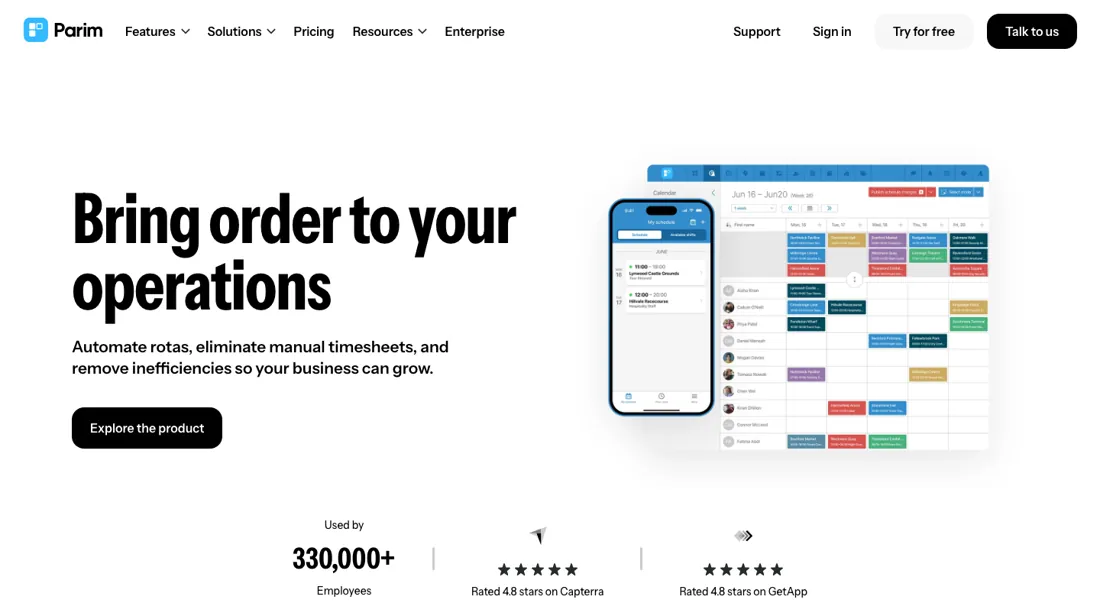
Workforce management for shift-heavy operations — staffing agencies, security, events — with unlimited users on every plan.
What buyers report about Parim
Hands-on: not tested by usReported by buyers: Capterra, read August 2026
Themes from the buyer-review sites listed at the foot of this page, read in August 2026. We have not run Parim ourselves, so this is other buyers' experience rather than ours. We summarise it here because the complaints are usually the part a vendor page leaves out.
- • Reviewers in security, healthcare and events keep naming the same field-facing details: staff see their own schedule with site maps, directions and site-specific instructions, and the system prompts workers who are running late or have not clocked in.
- • Open shifts are the other repeated win -- schedule the core team, then let the rest apply -- which is why the reviews cluster around agencies and event caterers rather than fixed-rota employers.
- • Support and the development team are described as responsive to feature requests, and several reviewers say training took almost no time.
- • The sharpest review comes from a healthcare CEO who says what was demonstrated during the sale turned out not to be included: the capability was there, but only at considerably more money. Parim publishes only a starting price and quotes each tier on the functionality you need, so that is the failure mode to guard against.
- • Integrations are the practical limit: reviewers can export everything to CSV but want automatic synchronisation into invoicing and accounting instead of a manual import.
- • Add-on modules such as SMS messaging are billed on top of the plan.
- • Visibility between employees is described as all-or-nothing rather than configurable per team.
Where the ratings disagree. The Capterra gripes line up with the pricing model rather than the feature list. Unlimited users removes the seat arithmetic, so the levers left are shift volume and which modules are switched on -- and the one review that describes real regret is about exactly that: functionality that was scoped in the demo and priced later. Get the module list into the quote in writing.
When the paid plan is worth it
There is no tier comparison to make here, and saying so plainly is more use than inventing one. Parim publishes exactly one number -- from GBP 47 a month, with unlimited users on every plan -- and each of the three named tiers, Starter, Pro and Premium, carries a Request Pricing button instead of a figure. So the GBP 47 is a floor rather than a plan price, and nobody can tell you what the tiers cost relative to each other.
What that means practically: the quote you get is built around your shift volume, so go into the conversation with that number ready and ask for the price at your current volume AND at the volume you expect in a year. Unlimited users on every plan is the genuinely useful part of the model, because it removes the per-seat arithmetic that dominates most rota tools. But it also means shift count is the only lever they have, and that is the one to pin down in writing.
How to actually use Parim
Parim publishes a key-steps guide and the order in it is not cosmetic. Add employees first -- individually, by CSV import where you match the fields by dragging them onto the columns, or by email invite -- and grant access at the same time so staff can log in and see their own shifts. Then set up positions, under System Settings, People Settings, Positions. Give each a colour that becomes how it reads on the calendar, and assign them in bulk from the People page using 'With Selected'.
Two optional settings are worth doing before go-live rather than after. Pay and charge rules can be scoped to a person, position, employment type, location, client, event or subcontractor. Employment types carry pay rates, work and rest rules and pay schedules.
Distilled from Parim's own help centre, chiefly the 'Getting started: key steps' article and the System Settings overview at support.parim.co, read 20 August 2026. parim.co/pricing re-read 5 October 2026 (served HTML): "Pricing starts from just £47 p/m", unlimited users on all plans, Request Pricing on Starter, Pro and Premium, quote basis functionality plus shifts per month, five add-on modules without a price, quote form asking for number of employees.
Common Parim setup mistakes
Where Parim setups actually go wrong, and what it costs you when they do. Same sources as the setup notes above — not from a walkthrough we ran ourselves.
The step teams skip is clients.
- Parim's own guide says to add at least one client even if you have no external clients at all, and both clients and locations have to exist before a shift can be scheduled.
- Create them empty rather than discovering the dependency at the rota.
Parim vs Deputy, side by side
Each column shows the vendor’s own published entry price, read on the date shown. Entry prices can cover different services or units, so check what each one buys. We do not average them into a score.
Both names above are affiliate links: we may earn a commission if you sign up, at no extra cost to you. Neither changes what this table says.
The natural comparison is Deputy — the comparison that exposes the pricing model rather than the feature list. Deputy charges per user with published rates; Parim gives unlimited users and prices on shift volume, quote-only. For a large roster working occasional shifts Parim can win outright; for a stable team it is the more expensive and far less predictable of the two.
Frequently asked questions
What will Parim actually cost?
Nobody outside a sales call can tell you, and the page is honest about why. Read on parim.co/pricing on 17 September and again on 5 October 2026, unchanged since 20 August: one figure is published — from £47 a month, with unlimited users on every plan — and each of the three tiers carries a ‘Request Pricing’ button instead of a price. Their stated basis is the functionality you need and the number of shifts you schedule each month. That combination is unusual and it cuts both ways: unlimited users removes the per-seat arithmetic that dominates rota software, but it leaves shift volume as the only lever they have, and for a staffing agency or an events business that is the number that swings hardest month to month. Go into the call with your shift count ready and ask for the price at your busiest month rather than your average, plus what happens when you cross a threshold. One oddity to raise: the quote form asks for a number of employees, not shifts.
What separates Starter, Pro and Premium?
The prices are hidden but the contents are not, and the split is clean. Read 17 September and 5 October 2026. Everything on the entry tier is about getting people onto a rota: you get the schedule itself, roles and locations, time off requests, automatic reminders, separate apps for staff and managers, and a licence-expiry warning for SIA badges, which is the UK security industry’s. Time and attendance is what the middle tier adds — recurring shift patterns, timesheets you can configure, a pay run report, automated pay schedules and CSV export — so if you are paying people from what the rota says they worked, that is your floor. The top tier is the money and client layer: cancellations tracked, timesheet analytics, an export built for payroll, employment types, invoicing and coverage reports, pay lock, and clients requesting shifts themselves. Ask where payroll export and client requests sit in your quote; those two are what usually force the jump.
What sits outside the plans entirely?
Five modules, and none of them carries a price on the page. Read 17 September and 5 October 2026, Parim lists them separately from the three tiers as ‘smart modules for specialised needs’: an events manager for multi-day events with templates, checkpoints using NFC tags and iBeacon devices for physical confirmation on site, incident reporting with real-time logs and alerts, check calls with a bespoke alarm policy and automated phone calls, and asset tracking for equipment and uniforms assigned to staff. That is precisely the list a security or events operator came for, which makes it the part to price first rather than last. Ask whether each module is included in a tier or billed on top, and get the answer in the same written quote as the shift volume, because the published £47 floor covers none of it explicitly.
Is this a hands-on review of Parim?
This is a researched assessment, not a hands-on test — where we've used a tool ourselves, we say so explicitly. We name what each tool is good and bad at, and we earn a commission only if you sign up, at no cost to you.
- Buyer reviews on Capterra, read August 2026.
- Re-read 2026-09-17 and again on 2026-10-05 on parim.co/pricing; unchanged since 20 August 2026.
- A dated screenshot of that pricing page, kept on this site as the receipt.
Others in this category
Reviewed hr & people tools that share ground with Parim — comparable in what they do, not drop-in swaps:
New reviews, price changes we recorded, and the cost conditions we found. No sponsored placements. Unsubscribe anytime.
This is our researched assessment — not a paid placement. The “Visit” links on this page are affiliate links: we may earn a commission if you sign up, at no extra cost to you, and it never changes our take. How we review →