Team Pulse Review (2026)
 By Daan Haket · Tested hands-on · written with an AI assistant · who does what
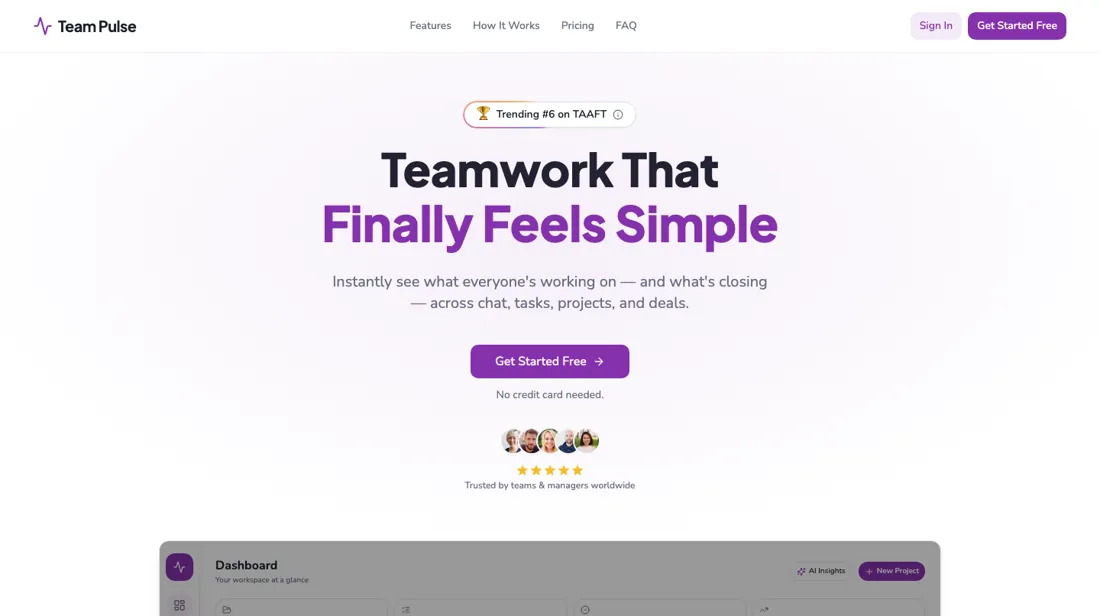
The tiers gate on TWO axes at once (member count and project/pipeline count) so you can hit a wall on either.
- Best for Solo operators tracking clients and tasks together
- Not for teams of more than three people
From $29 · per month billed annually ($39 monthly) · read 2026-11-18
Try Team Pulse free →Affiliate link: we may earn a commission if you sign up, at no extra cost to you. It never changes our verdict.
Is Team Pulse right for you?
Your pain“My deals live in one app and my tasks in another, and follow-ups slip between them.”
Does Team Pulse solve it?Vendor says yesPlan data on the vendor site, read 22 September 2026: Growth is the first plan with a CRM pipeline, alongside tasks and chat.
Your planGrowth, $79 a month billed annually ($99 monthly)
Try Team Pulse →
Your pain“I'd like to run my own tasks and chat for a while before I put any money in.”
Does Team Pulse solve it?PartlyOur test (13 Nov 2026): on the free plan the AI built a five-column client onboarding board with five starter tasks in about a minute, but the pipeline tab stayed locked and only two projects were allowed.
Your planFree, one member and 2 projects
Try Team Pulse →
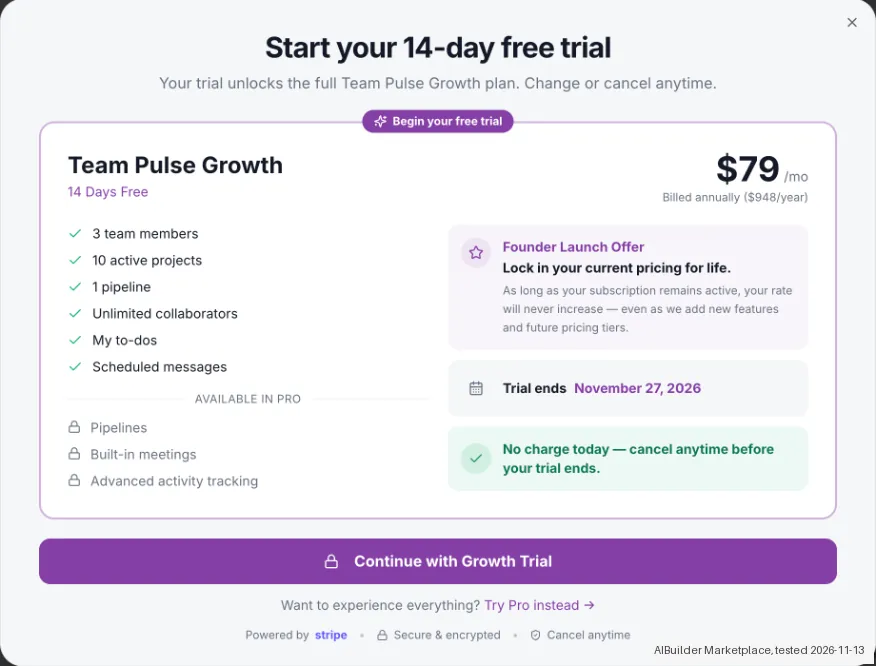
- Teams of more than three people. Our test (13 Nov 2026): Add Teammates on the free plan opened the Growth trial, which lists 3 team members at $79 a month billed annually, so a fourth colleague needs a higher tier. Better fit: ClickUp.
The “Try” buttons are affiliate links: we may earn a commission if you sign up, at no extra cost to you, and it never changes our verdict.
Also in: Software for freelancers and solo businesses
Transparency: the “Visit” links on this page are affiliate links: we may earn a commission if you sign up, at no extra cost to you. No vendor can pay for a better review or verdict. How we make money →
Which Team Pulse plan do you need?
4 plans, 3 questions, no signup.
Answer three quick questions to see your plan.
Your plan
Free
$0/mo
1 member, 2 projects, chat, tasks, files, 15 AI credits
Your plan
Starter
$39/mo monthly or $29/mo annually ($348/yr)
1 member, 5 projects, no pipelines
Your plan
Growth
$99 monthly or $79 annually ($948/yr)
3 members, 10 projects, 1 pipeline, AI Assist
Your plan
Pro
$199 monthly or $159 annually ($1,908/yr)
10 members, 20 projects, 2 pipelines; Scale is $299/mo annually
Probably not Team Pulse
From your answers, look at ClickUp instead. Why ↓
Prices as we read them on 2026-11-18; check the checkout before you pay. The plan button is an affiliate link: we may earn a commission, at no extra cost to you. The ClickUp link is an affiliate link too.
We ran Team Pulse's AI project builder on the Free plan on 13 November 2026, then followed the Growth trial window up to its payment step. The account is ours, and our AI assistant did the clicking. We stopped at the Stripe step that asks for payment details and entered no card. The Pipeline feature sits behind that trial, so we did not test it.
How we tested
- Used a Free account without adding a card
- Generated one project board and its starter tasks with the built-in AI
- Opened the Growth trial window from the invite button and read it
- Stopped at the Stripe payment step
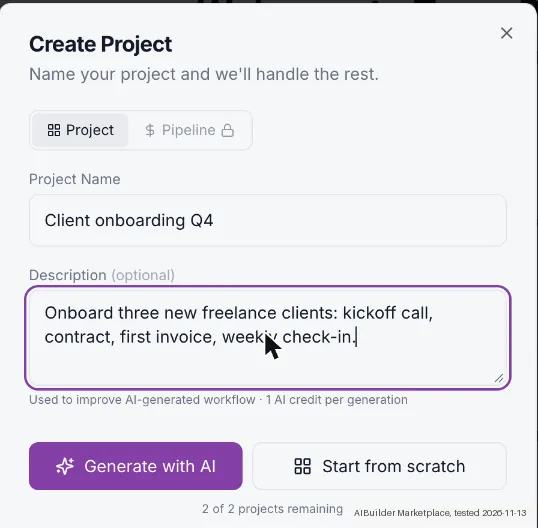
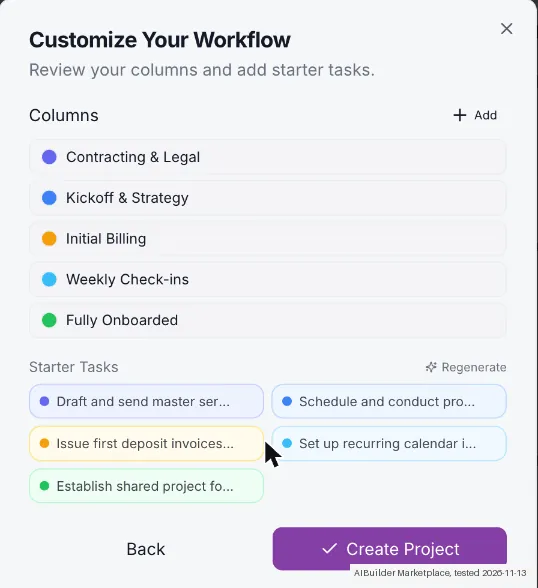
- We created a project called 'Client onboarding Q4' with the description 'Onboard three new freelance clients: kickoff call, contract, first invoice, weekly check-in'. The AI step took about 10 seconds and proposed five columns that run from contracting and legal through kickoff and billing to a fully onboarded client.
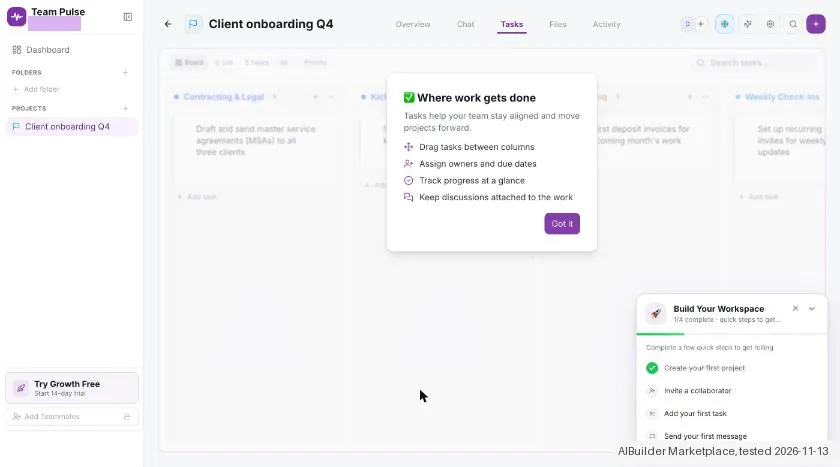
- The starter-task step returned five tasks in about 10 seconds, the first one a draft of service agreements for all three clients. Creating the project then gave a board with five columns and five tasks, and the tabs Overview, Chat, Tasks, Files and Activity. The whole run took about a minute (our approximate timing), was free and needed no card.
- Each AI generation costs 1 AI credit. We did not read the credit balance, so we cannot say how many generations Free allows.
Pricing (2026)
✓ Pricing re-verified 18 Nov 2026
Genuinely free tier: $0/mo for 1 member, 2 projects, unlimited collaborators, chat/tasks/files, 3 private notes, 15 AI credits and 1GB storage. The paid tiers now publish both rates. Starter $39/mo monthly or $29/mo annually ($348/yr), 1 member, 5 projects, NO pipelines; Growth $99 or $79 ($948/yr), 3 members, 10 projects, 1 pipeline, AI Assist and AI workflow generation; Pro $199 or $159 ($1,908/yr), 10 members, 20 projects, 2 pipelines; Scale $379 or $299 ($3,588/yr), 40 projects, 4 pipelines, 1,500 AI credits, and no member count published.
Paying monthly costs 34% more on Starter and 25-27% more on the rest. The terms page offers a 14-day free trial to new registrants, after which the subscription is suspended until it is upgraded to a paid plan. Plans change, so check the live price on their site before you buy.
Category context: Operations & Workflow. Across the 56 tools in this category that we researched with a public US-dollar price, the median entry price is about $23 a month (lowest paid plan as listed, per seat where the vendor prices per seat). Team Pulse’s entry price of $29 a month sits above that median. Compare pricing conditions in the Software Cost Atlas →
What the pricing page doesn’t say
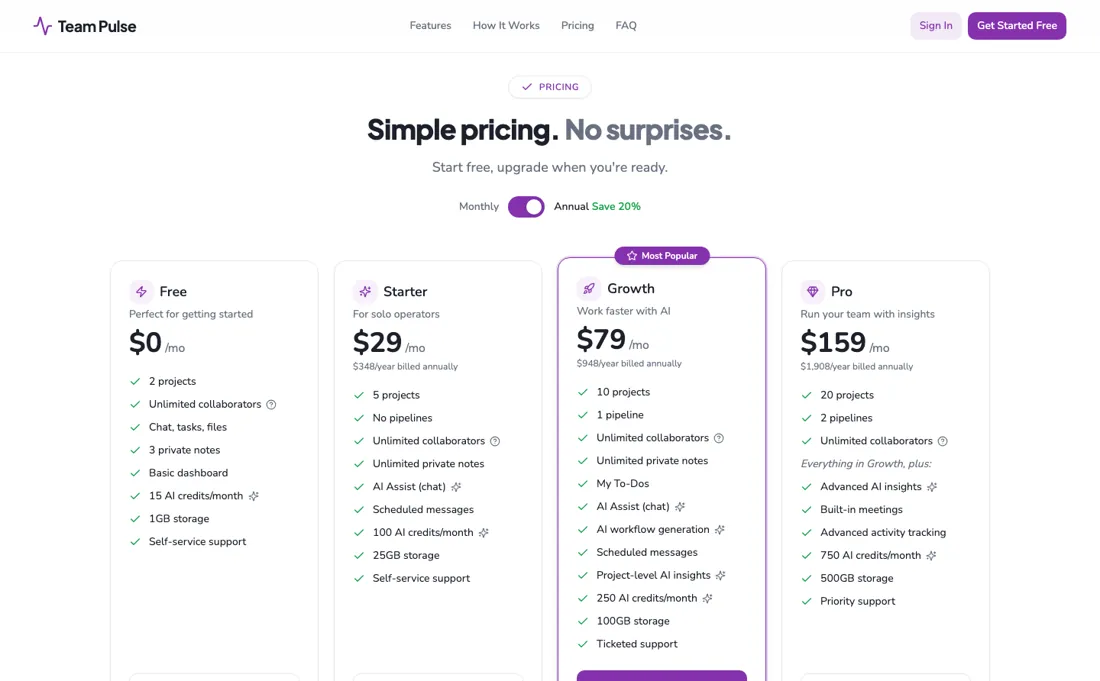
The CRM pipeline is a big part of the pitch, but it doesn't exist below the $79 Growth plan (Free and Starter have none), and member limits are tight: Starter is a single seat, Growth just three. The headline rates are the annual ones; month-to-month costs 25 to 34% more ($39 against $29 on Starter, $99 against $79 on Growth).
Watch the video review
The video version of this review, from our YouTube channel.
⚡ Short on time? Watch the 30-second verdict Short.
What Team Pulse does
Projects, tasks, chat, files and a light CRM pipeline in one tool. The listed rates assume annual billing.
What buyers report about Team Pulse
Hands-on: tested 2026-11-13Reported by buyers: Capterra, Software Advice and ITQlick, read August 2026
Themes from the buyer-review sites listed at the foot of this page, read in August 2026. We tested Team Pulse ourselves on 2026-11-13, but one test is a narrow sample, so here is what other buyers report. We summarise it here because the complaints are usually the part a vendor page leaves out.
- • Reminders, task management and seeing who is clocked in work well, and reviewers use the mobile app daily for exactly that.
- • Support is described as exceptional.
- • Several employees find it too complicated and prefer other tools: adoption is the risk, not the feature list.
- • Sequencing needs drag-and-drop; reviewers ask for it directly.
- • The iOS and Android apps behave differently, and reviewers want them identical.
When the paid plan is worth it
The paid tiers raise volume limits at every step, but Starter and Pro also add features Free and Growth respectively lack, not just more room. Free gives 15 AI credits, 1GB storage and 3 private notes a month, with no AI Assist chat. Starter adds AI Assist chat, unlimited private notes and scheduled messages alongside 100 AI credits and 25GB storage. Growth is the first plan with a pipeline: Starter's own feature list states "No pipelines", and it also adds My To-Dos, AI workflow generation, and project-level AI insights, at 250 AI credits and 100GB storage.
Pro adds advanced AI insights, built-in meetings, and advanced activity tracking on top of Growth's feature set, reaching 750 AI credits and 500GB storage. Support climbs with the money too: self-service on Free and Starter, ticketed on Growth, priority on Pro. Scale pushes AI credits to 1,500 a month and projects to 40 with 4 pipelines, but it no longer publishes a member count at all: the 20-member ceiling we recorded in August is absent from the plan data read on 22 September 2026, and nothing has replaced it.
So each tier above Free buys either more headroom or a specific new capability (chat, workflow generation, meetings, activity tracking) rather than a fundamentally different tool, and the one limit a growing team most needs to know is the one the top tier stopped stating.
What we found running Team Pulse ourselves
The first findings are at the top of this page. The rest:
- The Pipeline tab was locked on Free. Inviting a teammate on Free did not open an invite form. It opened the Growth trial window, which lists 3 team members for Growth.
- The same window lists 1 pipeline for Growth and also names Pipelines as 'Available in Pro'. We did not continue the trial, so we do not know whether Growth includes a working pipeline.
- The window shows Growth at $79 a month billed annually ($948 a year) and a 'Founder Launch Offer' to lock in the current price for life while the subscription stays active. We did not see monthly billing, tax or the Pro price, and bought nothing, so the lock-in and the payable total are unknown.
Claim vs. what we measured
We set a claim from Team Pulse's own pages next to what we saw in our test, on the plan named. The status says whether the two describe the same thing and match; it is not a verdict on the product. Confirmations are listed too.
| What the vendor says | What we measured | Status | What it means if you buy |
|---|---|---|---|
| 1 pipelineSource: our test notes, read 13 Nov 2026 | Measured 2026-11-13: The Growth trial window lists 1 pipeline for Growth and also lists Pipelines under Available in Pro. The Pipeline tab was locked on Free and the Growth trial was not continued, so whether Growth includes a working pipeline was not tested.Our test, 13 Nov 2026; Free plan; Growth trial window viewed, not continued | Not testableOne trial window, two statements; blocked by a Stripe step, so no pipeline was opened. | Confirm whether Growth includes a working pipeline before buying it for client tracking; the window contradicts itself. |
| Founder Launch OfferSource: our test notes, read 13 Nov 2026 | Measured 2026-11-13: The trial window shows a Founder Launch Offer to lock in the current pricing for life, as long as the subscription remains active. Nothing was bought, so the lock in was not tested.Our test, 13 Nov 2026; Free plan; Growth trial window viewed, not continued | Not testableVendor offer text only; no purchase and no later price observation. | The offer applies to a paid subscription; it was not checked against a later price change. |
| $79 /mo Billed annually ($948/year)Source: our test notes, read 13 Nov 2026 | Measured 2026-11-13: The trial window shows Growth at 79 dollars a month billed annually (948 dollars a year). Monthly billing, tax and the Pro price were not seen and the Stripe checkout was not opened, so the payable total is unknown.Our test, 13 Nov 2026; Free plan; Growth trial window viewed, not continued | Not testableTrial window price versus an unopened Stripe checkout; the stored cost rule has no matching checkout basis. | Check the billing basis, tax and renewal terms at checkout before buying; the window shows a yearly total, not a payable total. |
Exit test: can you take your data out?
We created the account and our AI assistant ran the test in our browser. On 13 November 2026 the session tested Team Pulse on the Free plan: an AI generated project board. Blocked part: the Growth trial goes through a Stripe step that asks for payment details, so it was not continued and no card details were entered. The Pipeline tab, the pipeline feature and anything else behind the Growth trial are therefore not tested. Project Client onboarding Q4 was created with the description Onboard three new freelance clients: kickoff call, contract, first invoice, weekly check-in. Generate with AI returned five columns after about 10 seconds: Contracting & Legal, Kickoff & Strategy, Initial Billing, Weekly Check-ins and Fully Onboarded. Generate starter tasks returned five tasks after about 10 seconds, for example Draft and send master service agreements (MSAs) to all three clients. Create Project then showed Workflow created and a board with five columns and five tasks, with tabs Overview, Chat, Tasks, Files and Activity. The whole run took about 1 minute, was free and needed no card. Each AI generation costs 1 AI credit; the credit balance was not read. Tracking clients and tasks together in a pipeline was not tested because of the Stripe block. Inviting teammates on Free opens the Growth trial window, and Growth lists 3 team members; teams of more than three people were not tested. No kit records were entered. Test date: 13 Nov 2026. We describe the friction rather than score it; this is one run with synthetic records, not a verdict on Team Pulse.
| What we checked | What we saw |
|---|---|
| Fields offered by the export dialog | |
| Not offered in the field selector | None noted. |
| The exported file | We did not inspect the file, so data retention and loss remain unverified. |
| Awkward but not lost | Inviting a teammate on Free opens the Growth trial window instead of an invite form, and that window lists 1 pipeline for Growth while naming Pipelines as Available in Pro. |
| Export route | No export or reimport was performed; no file was downloaded or examined. The two categorised kit records were not entered; the object tested was one AI generated project board, not the kit records. |
| Export format | No downloaded bytes examined. |
| Re-importing the export | No reimport performed. |
| Cancelling | No cancellation or downgrade performed. |
What the exit test does not show:
- Original account registration and signup screen count.
- Pipeline and the Growth trial, blocked by a Stripe step that asks for payment details.
- Support, invitations, checkout, export and reimport.
- Roles, API entitlement, downgrade, cancellation and passive follow up.
- Teams of more than three people, Pro prices and the AI credit balance.
- Session and source-reading date: 13 November 2026. Times are CET. The session started at about 17:02 CET and the project run took about 1 minute. These are approximate tester observations, not benchmark timings. Midnight timestamps are required date anchors, not measured event times.
How this compares: across our exit tests of 330 tools, 60 gave us an export file. For Team Pulse no usable export file reached us during the test session. Report 08: can you get your data out?
Mail in the first 14 days
Measurement running until 2026-11-26T23:00:00Z (last observed 2026-11-22T02:18:03.748287Z).
7 emails in the 14-day window so far; first email after signup: unknown (exact signup time not recorded); 0 with an explicit offer.
Retained inbox and junk only; removed or archived mail is outside this observation. Ambiguous supplier attribution is excluded. Day numbers use elapsed 24-hour periods since the recorded signup date at midnight Europe/Amsterdam; the signup hour is unknown. Offer flags quote literal subject/body text. Replies in our own correspondence (support tickets, our comment requests) are excluded; one-time codes, our own address, our account name and our name are replaced in brackets.
| Day | Time (UTC) | Sender | Literal subject | Folder | Offer evidence |
|---|---|---|---|---|---|
| Day 0 | 2026-11-13 15:59:58 UTC | Team Pulse team / notify.goteampulse.io | Confirm your email | inbox | |
| Day 0 | 2026-11-13 16:05:30 UTC | Team Pulse team / notify.goteampulse.io | Confirm your email | inbox | |
| Day 0 | 2026-11-13 17:00:13 UTC | Team Pulse team / send.goteampulse.io | Get your first project set up | inbox | |
| Day 1 | 2026-11-14 16:00:09 UTC | Team Pulse team / send.goteampulse.io | This is where it all clicks | inbox | |
| Day 3 | 2026-11-16 16:00:21 UTC | Team Pulse team / send.goteampulse.io | One workspace instead of five tools | inbox | |
| Day 5 | 2026-11-18 16:00:12 UTC | Team Pulse team / send.goteampulse.io | Your project is already being analyzed | inbox | |
| Day 7 | 2026-11-20 16:00:15 UTC | Team Pulse team / send.goteampulse.io | Ask your workspace anything | inbox |
Screenshots from our test (click to enlarge)
What this test does not show:
- Sign-up on a fresh account (we joined an existing one)
- The Pipeline feature and the Growth trial, which needs payment details at a Stripe step
- Teams above three people, what Pro costs, and how many AI credits are left
- Checkout, support, export, roles, API use, downgrade and cancelling
Most of our reviews are researched rather than run. How we review explains which is which, and why we do not pretend otherwise.
How to actually use Team Pulse
Team Pulse documents a three-step setup on its own marketing site: create a first project or pipeline, invite your team, then start adding tasks or deals, with no complex configuration or training sessions required, per the vendor's FAQ. That same FAQ states most teams are up and running in under two minutes. There is no separate docs site, help center, changelog, or status page: the help. Docs. Status. Support. And changelog.
subdomains on goteampulse.io do not resolve. And no public bug reports or user discussion threads turn up for the product, so friction points aren't documented outside the vendor's own tier limits. The clearest one is on the pricing page. Pipelines, the CRM piece of the pitch, aren't listed among Free's or Starter's features: Starter's tier explicitly states "No pipelines," and Growth is the first to list one. So testing that angle before upgrading to Growth hits a dead end.
And Free's 15 AI credits a month is the tightest allotment on the pricing page, with AI Assist chat itself withheld until Starter.
Where this section comes from: our research notes (275 words)
Prices, plan limits and FAQ answers come from goteampulse.io's own pricing page and homepage, read 11 August 2026. The page itself only serves a bare fallback, so we read the plan data (prices, member, project and pipeline caps, AI credits and storage per plan, feature lists and FAQ answers) in the JavaScript the site loads. The same code carries Team Pulse's own “Team Pulse vs Asana” table, which we used to check the custom-fields claim.
On pipelines: Free lists none, Starter says “No pipelines”, Growth “1 pipeline” and Pro “2 pipelines”. We found no help centre, docs, status page or changelog (help. Docs. Status. Support. and changelog.goteampulse.io do not resolve, 11 August 2026), and no Reddit discussion. Re-read 22 September 2026: the plans now show a monthly and an annual price ($39/$29, $99/$79, $199/$159, $379/$299); Scale lists 4 pipelines, 40 projects and 1,500 AI credits but no member cap; Free has 3 private notes against unlimited on Starter; support runs self-service, self-service, ticketed, priority.
The terms state a 14-day free trial and say user content goes to third-party AI providers (OpenAI, Google) that do not train on it. Re-read 18 November 2026 in the JavaScript goteampulse.io loads: every plan price ($39/$29, $99/$79, $199/$159, $379/$299 and the annual totals) and limit is unchanged; the seat tooltip on the plan cards (members create projects and use all features, collaborators view and participate without a seat); the FAQ on pipeline limits; and the terms (last updated March 2026) for the non-refundable purchases, cancellation at the end of the paid term, the 14-day trial and staff access to accounts for support. goteampulse.io/llms.txt (read the same day) carries no price.
Team Pulse vs ClickUp, side by side
Each column shows the vendor’s own published entry price, read on the date shown. Entry prices can cover different services or units, so check what each one buys. We do not average them into a score.
Both names above are affiliate links: we may earn a commission if you sign up, at no extra cost to you. Neither changes what this table says.
The natural comparison is ClickUp: ClickUp is the established work platform with generous free seats; Team Pulse bundles a CRM pipeline plus AI in a simpler package: cleaner to start, but the member and project caps are tighter as you grow.
Not a fit for you?
Team Pulse is not the pick for teams of more than three people. In that case, look at ClickUp, built for teams that want one highly customizable app for tasks, docs, goals and reporting and will invest in setting it up.
ClickUp price: Free Forever; paid from $9 per user per month billed yearly (Core; $12 shown as the regular price) (read 2026-11-21)
The Visit link is an affiliate link: we may earn a commission, at no extra cost to you. We picked this alternative for fit first; commission only decides between equal fits.
Frequently asked questions
Can you export your data from Team Pulse?
Exit check 2026-11-13; route excerpt: No export or reimport was performed; came along (excerpts): not tested; lost (excerpts): not tested; re-import: not tested.
The prices look like monthly rates: what do I pay if I don't commit to a year?
Between 25 and 34 percent more, and the page now says so itself. Until recently the plan cards published only the annual-billing figure; the plan data read on 22 September 2026 carries both a monthly and an annual price for every tier. Starter is $39 a month month-to-month against $29 on annual billing ($348 a year): a 34% premium, the steepest on the ladder. Growth is $99 against $79 ($948 a year), Pro $199 against $159 ($1,908) and Scale $379 against $299 ($3,588), each about 25 to 27% more. In cash the Growth gap is $240 a year and the Pro gap $480. That matters more here than at most vendors because the tiers are tight on seats (Starter is one member, Growth three) so a team that grows mid-year may want the freedom to move up rather than a locked annual term on a plan it outgrows. Read the other way: if you already know Growth fits, the annual commitment pays for three months of Starter.
Can I try the paid features before paying?
Yes, for 14 days, though you have to go to the terms to learn that. The pricing cards for Starter, Growth, Pro and Scale all read Start Free Trial (the free tier reads Start Free), and the site's own terms text, read 22 September 2026, states that Team Pulse offers a 14-day free trial to new users who register, that the account will not be charged, and that the subscription is suspended at the end of the trial until it is upgraded to a paid version. Suspended is the word worth noticing: the terms do not say the account drops back to the free tier, so do not assume your trial workspace keeps running on Free when the fortnight ends. The trial matters most for one specific question. Pipelines, the CRM half of the pitch, do not exist on Free or Starter, whose feature list says "No pipelines" in those words, so a trial is the only way to see the pipeline before committing to Growth at $79 a month annually or $99 monthly.
The AI features are the reason to upgrade. Where does the data behind them go?
To OpenAI and Google, by the vendor's own account. The terms text in Team Pulse's own bundle, read 22 September 2026, states that to deliver the AI features it transmits data you provide (project names, task descriptions, prompts, team context and other user-generated content) to third-party AI model providers, naming OpenAI and Google as examples, and that those providers process it only to generate responses and do not use it to train their models. It adds that only the minimum data needed is shared and that billing information, passwords and account credentials are not sent. Two caveats sit in the same terms. The AI features depend on those third parties and may be modified, suspended or discontinued at any time without notice, with no liability, which is a real risk when AI credits are the main thing the upper tiers sell. And authorised Team Pulse staff may access your account, including logging in as a user to troubleshoot. Neither is unusual for a small SaaS; both are worth knowing before client work goes in.
Who needs a paid seat, and who can join for free?
Only workspace members count against the plan. The pricing tooltip in the site's plan data (read 18 November 2026) says a member can create projects, manage work and use all included features, while collaborators can view and participate without a seat. Every plan allows unlimited collaborators, but members are capped at 1 on Free and Starter, 3 on Growth and 10 on Pro, and Scale states no member number. Pipelines have their own limit and do not use up projects, per the FAQ. If two people need to create projects, Starter is already too small.
Can I get my money back if Team Pulse does not work out?
No. The terms (last updated March 2026, read 18 November 2026) say all purchases are non-refundable. You can cancel at any time from your account or by contacting Team Pulse, and the cancellation takes effect at the end of the current paid term. On an annual plan that means the whole prepaid year, so use the 14-day trial before choosing annual billing.
Can Team Pulse staff see what is in our workspace?
Yes, when they decide it is needed. The terms (read 18 November 2026) say authorized personnel may access your account and its data to diagnose technical issues, give support, prevent fraud or meet legal duties, including logging in as a user to troubleshoot, under internal safeguards and confidentiality obligations. AI features send content to third-party AI providers that, per the same terms, do not train on it. Keep data you cannot share that way out of the workspace.
Is this a hands-on review of Team Pulse?
Yes. We tested Team Pulse ourselves on 2026-11-13; the section above says what we tested, what we found and what we did not test, and where a figure comes from the vendor's own documentation instead. Most of our reviews are researched rather than run; we say which is which. We name what each tool is good and bad at, and we earn a commission only if you sign up, at no cost to you.
- Buyer reviews on Capterra, Software Advice and ITQlick, read August 2026.
- Re-verified 2026-09-22, 2026-10-13 and 2026-11-18 in the site's own plan-config array; goteampulse.io/pricing itself returns 404, the plans sit on the home page.
- A dated screenshot of that pricing page, kept on this site as the receipt.
- Our own hands-on session with Team Pulse (2026-11-13), written up in full further down this page.
Bottom line
Best for: solo operators tracking clients and tasks together.
The Try button is an affiliate link; we may earn a commission at no extra cost to you.
Others in this category
Reviewed operations & workflow tools that share ground with Team Pulse. They are comparable in what they do, not drop-in swaps:
New reviews, price changes we recorded, and the cost conditions we found. No sponsored placements. Unsubscribe anytime.
This is our researched assessment, not a paid placement. The “Visit” links on this page are affiliate links: we may earn a commission if you sign up, at no extra cost to you, and it never changes our take. How we review →