Zapier Review (2026)App Automation From $19.99 a Month
 By Daan Haket · Tested hands-on · written with an AI assistant · who does what
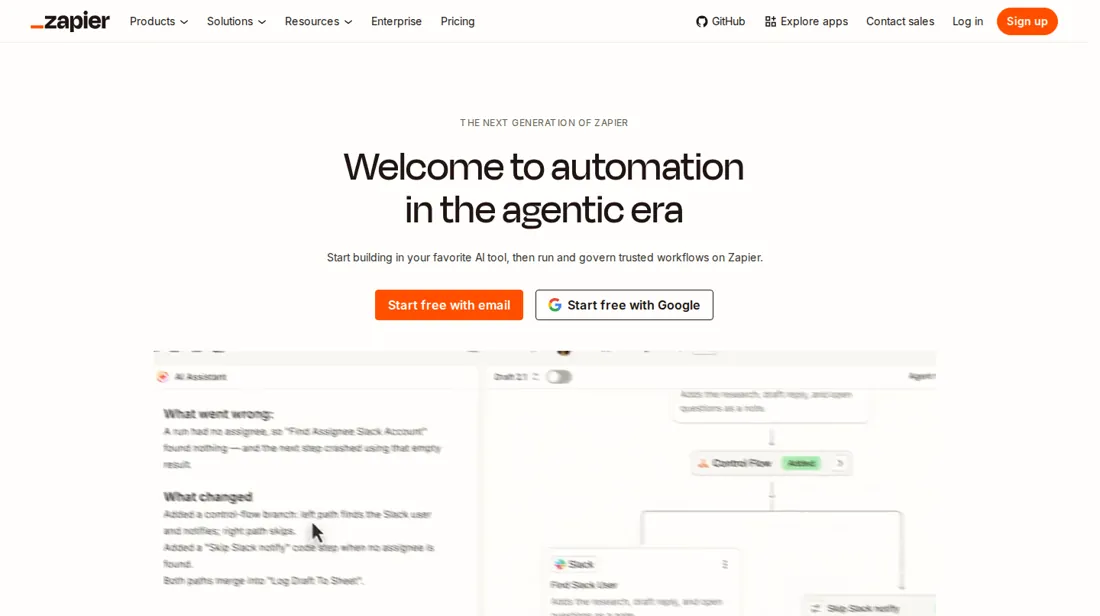
Pricing is based on tasks, so a busy month can cost more than the starting price suggests. Free allows only two-step Zaps. Since 15 June 2026 AI steps are priced by model tier and can use more tasks per run.
- Best for Small teams wiring together five or more apps
From $19.99 · Professional · Free $0 with 100 tasks a month and two-step Zaps · read 2026-11-16
Try Zapier free →Affiliate link: we may earn a commission if you sign up, at no extra cost to you. It never changes our verdict.
Is Zapier right for you?
Your pain“Every lead, invoice and form entry gets copied between tools by hand, and some slip through.”
Does Zapier solve it?Vendor says yesPricing page, read 16 Nov 2026: a Zap connects apps so a trigger starts actions, and every new account gets a 14-day trial of Professional with no card.
Your planProfessional, from $19.99 a month; multi-step Zaps and premium apps
Try Zapier →
Your pain“I only need one app to tell another when something happens, and I will not pay for that.”
Does Zapier solve it?PartlyOur test (18 Nov 2026): a Forms to Tables Zap ran 5 of 5 times in about 5 minutes and used 0 of 1,000 tasks, but under an automatic Pro trial, and the table record stayed empty.
Your planFree, $0 (100 tasks); Professional from EUR 18.62 a month billed yearly, EUR 27.93 monthly
Try Zapier →
Your pain“Automation bills grow with usage and I cannot tell what a busy month will cost.”
Does Zapier solve it?PartlyHelp center, read 16 Nov 2026: only successful actions count as tasks, but from 15 Jun 2026 AI steps are priced by model tier. The page shows starting prices only.
Your planProfessional, from $19.99 a month; check the task slider at your volume
Try Zapier →
- you only need a single two-step handoff, you want fixed costs that do not grow with usage, you need to self-host your data, or you want a tool we have tested ourselves.
The “Try” buttons are affiliate links: we may earn a commission if you sign up, at no extra cost to you, and it never changes our verdict.
Also in: Software for freelancers and solo businesses · Software for founders and early startups
Transparency: the “Visit” links on this page are affiliate links: we may earn a commission if you sign up, at no extra cost to you. No vendor can pay for a better review or verdict. How we make money →
- Checkout showed: What the checkout showed is in the claim table below
- Tax: Not shown before card details: the final amount with tax is unknown, not zero
What Zapier costs at your size
What each plan costs a month on annual billing (monthly billing below it), per user from Zapier’s own pricing page. The cheapest plan at each size is marked. On annual billing the cheapest plan changes from Professional to Team between 1 and 2 users. Professional stops at 1 user; Team stops at 25 users.
| Users | Professional | Team |
|---|---|---|
| 1 user | $19.99Best value at this size | $69 |
| 3 users | not available | $69Best value at this size |
| 5 users | not available | $69Best value at this size |
| 10 users | not available | $69Best value at this size |
| 25 users | not available | $69Best value at this size |
| 50 users | not available | not available |
Prices read 2026-11-18; tax excluded unless the vendor says otherwise. Calculated by our cost engine; the same numbers are in our open data.
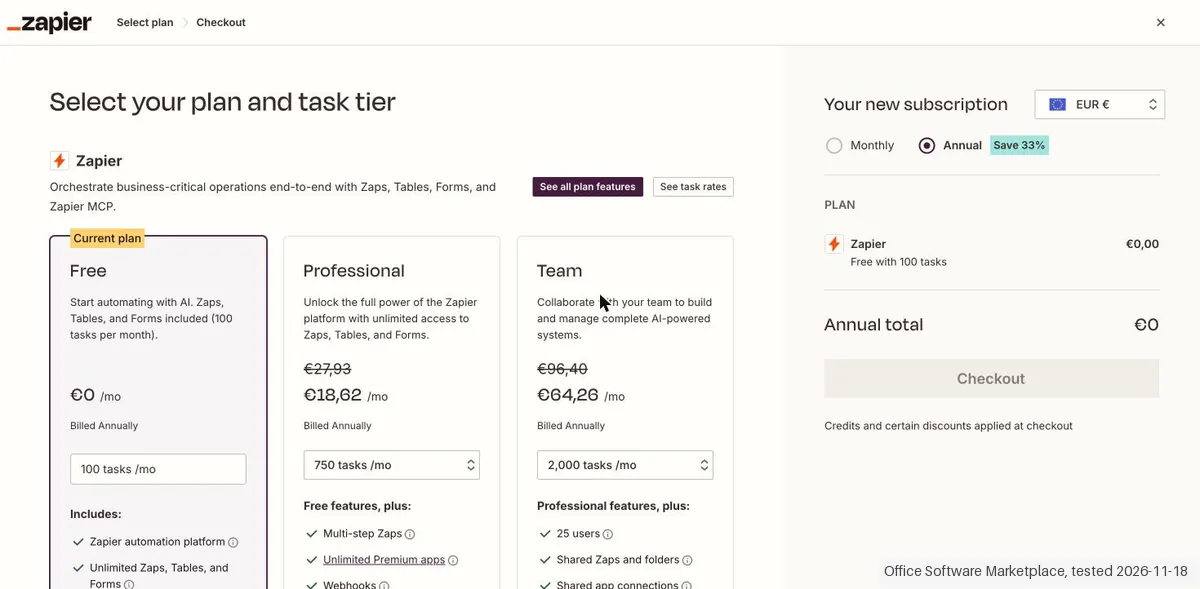
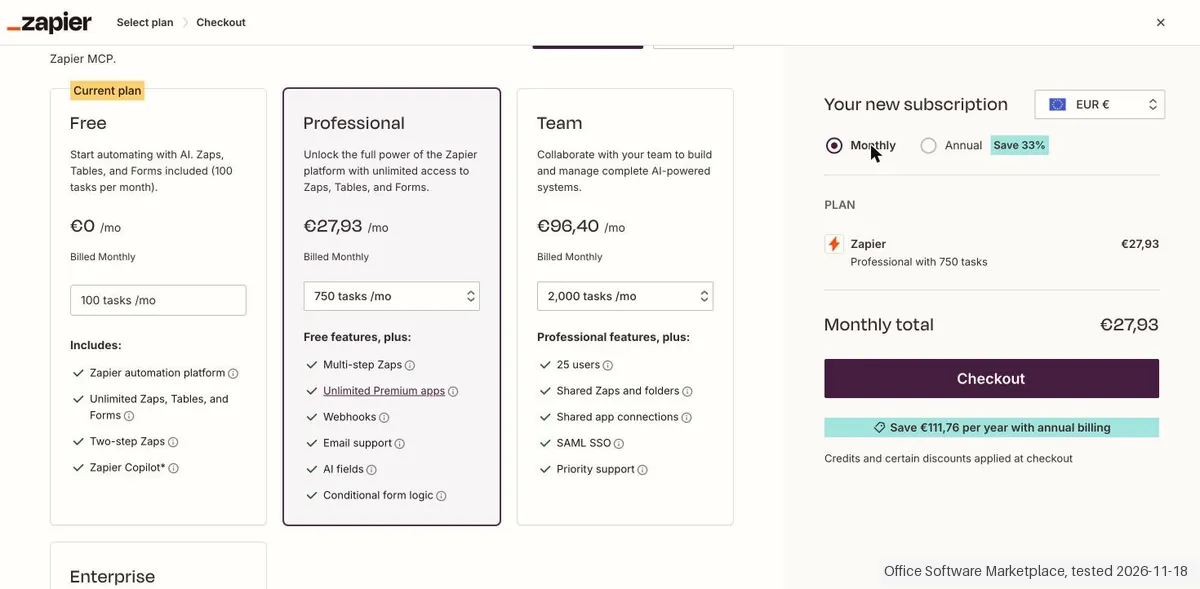
See current prices on Zapier →Daan created the account and our AI assistant ran the test in Daan's browser. On 18 November 2026 the session tested Zapier under the automatic 14 day Professional trial, which needs no card: a form feeding a table through a Zap went live a little over 5 minutes after the start, ran 5 times without a failure and used 0 tasks, but the table records stayed empty because the whole submission was mapped to one column, and the Copilot only titled the form without adding its fields. Because everything ran under the trial, what Free allows after it was not tested. The plan page shows euros: Professional €18,62 a month billed annually or €27,93 billed monthly; the public page in US dollars gives $19.99 and $29.99, so the $19.99 in our dossier is the yearly price. The checkout was opened and nothing was paid.
How we tested
- The test used an account Daan made, and our AI assistant ran it in Daan's browser; the automatic 14 day Professional trial, no card; a form feeding a table through a Zap was built and run 5 times; nothing was paid
- Evidence screenshots are in English with names and addresses masked
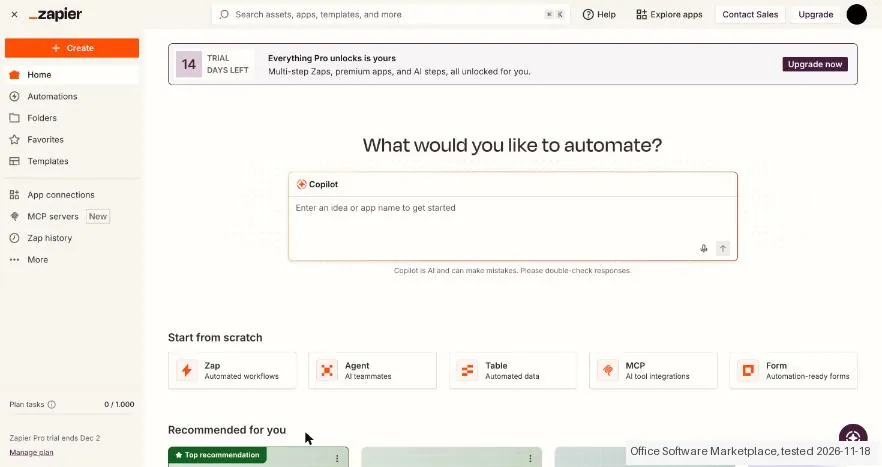
- Text we checked: "14 TRIAL DAYS LEFT". What we saw: After the onboarding the home page said 14 TRIAL DAYS LEFT, Plan tasks 0 / 1.000 and Zapier Pro trial ends Dec 2, with no card asked. The plan page still calls the account Current plan: Free.
- Text we checked: "Done! Your form is now titled Test Handoff with three required fields". What we saw: The Copilot said the form was titled with three required fields but only set the title. The fields name, email and type were added by hand, about 12 clicks with a few failed tries, because the label was only kept after Insert field.
- Text we checked: "Form submitted!". What we saw: Five test submissions through the public form page each showed Form submitted! and Zap history showed 5 runs, all Successful, between 14:12:29 and 14:12:49. Each run found 1 new Form Submission and sent 1 new Record to Zapier Tables.
Pricing (2026)
✓ Pricing re-verified 16 Nov 2026
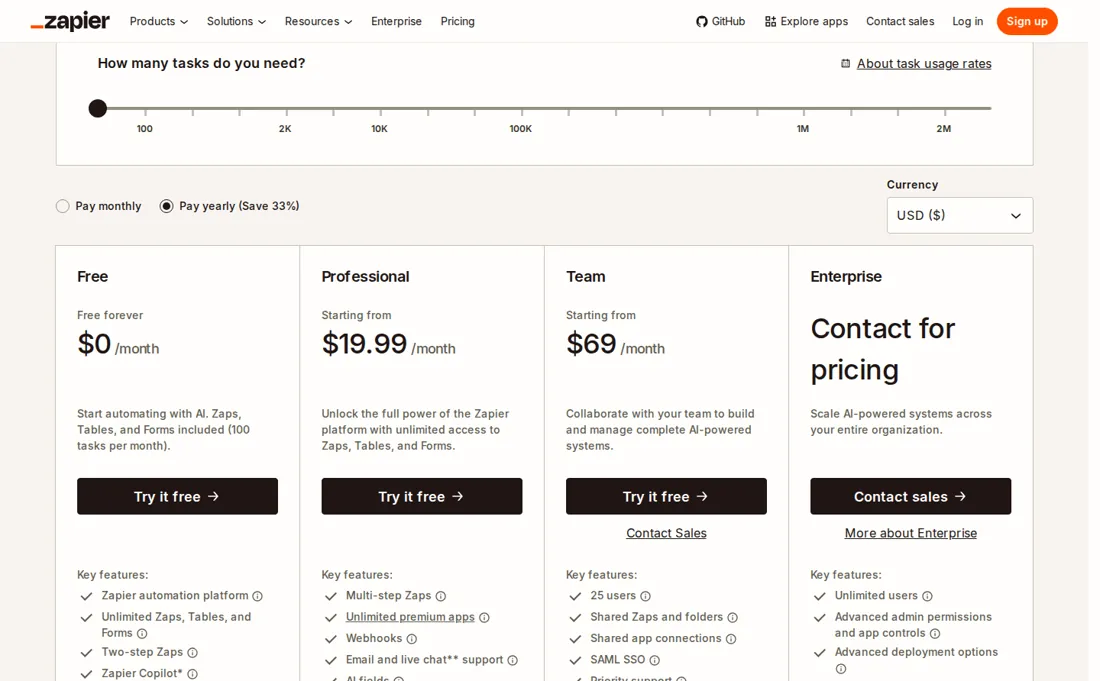
“Team Starting from $69 /month Collaborate with your team to build and manage complete AI-powered systems.”Source: zapier.com/pricing, read 12 Nov 2026
“Free forever $0 /month Start automating with AI. Zaps, Tables, and Forms included (100 tasks per month).”Source: zapier.com/pricing, read 12 Nov 2026
“Professional Starting from $19.99 /month Unlock the full power of the Zapier platform”Source: zapier.com/pricing, read 12 Nov 2026
“you're instantly enrolled in a free 14-day trial of the Zapier Professional plan. No credit card is required.”Source: zapier.com/pricing, read 12 Nov 2026
Zapier connects apps with automations called Zaps. Free costs $0 and includes unlimited Zaps, Tables and Forms, two-step Zaps and 100 tasks a month. Professional starts from $19.99 a month and Team from $69 a month, with 1 seat on Professional and 25 on Team. The page has a Pay yearly toggle that saves 33%, and its text does not say which billing period the starting prices assume.
A new account gets a 14-day trial of Professional with no card. You can cancel at any time and keep the plan until the billing cycle ends. A task is any successful action. We have not paid for a plan. Plans change, so check the live price on their site before you buy.
Category context: Operations & Workflow. Across the 55 tools in this category that we researched with a public US-dollar price, the median entry price is $25 a month (lowest paid plan as listed, per seat where the vendor prices per seat). Zapier’s entry price of $19.99 a month sits below that median. Compare pricing conditions in the Software Cost Atlas →
Zapier’s pricing page, as we read it
What Zapier does
No-code automation platform that connects apps so a trigger in one starts actions in others, with a free plan and paid tiers by task volume.
Professional adds multi-step Zaps; Team adds shared seats
Professional unlocks multi-step Zaps and premium apps, and Team raises the seat count to 25 for shared work. Free is enough only for simple two-step handoffs under 100 tasks a month. Upgrading buys capacity and collaboration. Three things stay the same on every paid tier. Pay-per-task billing is on by default for accounts opened after January 2024: a month that runs past the task tier keeps going at a higher per-task rate until it reaches three times the plan's tasks, and then the Zaps pause.
A bigger tier raises that ceiling along with the base allowance; it does not remove it. The help center guarantees only 60 days of Zap history, shown up to 10,000 runs, and names no plan that keeps more, so an audit trail means exporting it yourself. A downgrade to Free lands at the end of the billing cycle and holds every run that uses a premium app until you upgrade again.
Team is the first plan where admins see task usage for every Zap in the account; Professional is one person's account.
What we found running Zapier ourselves
The first findings are at the top of this page. The rest:
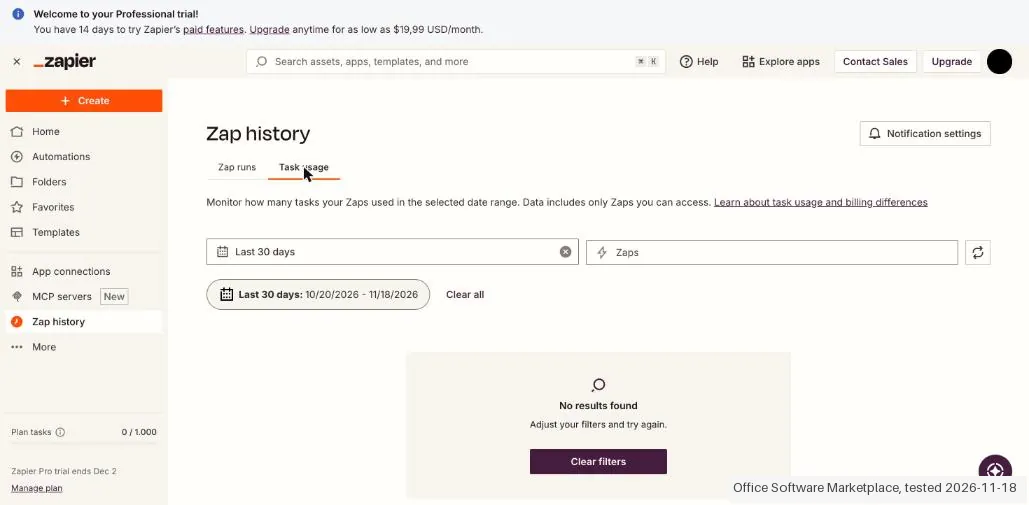
- Text we checked: "Plan tasks 0 / 1.000". What we saw: Zap history showed a dash for the tasks of each run and Plan tasks stayed 0 / 1.000 after 5 runs, also on Billing & usage; the tab Task usage said No results found. So Forms plus Tables used 0 tasks a run in this test.
- Text we checked: "Please add a payment method to edit your trial settings". What we saw: The trial started without a card, but the line Please add a payment method to edit your trial settings. appeared when the trial settings were opened.
Claim vs. what we measured
We set a claim from Zapier's own pages next to what we saw in our test, on the plan named. The status says whether the two describe the same thing and match; it is not a verdict on the product. Confirmations are listed too.
| What the vendor says | What we measured | Status | What it means if you buy |
|---|---|---|---|
| 14 TRIAL DAYS LEFTSource: our test notes, read 18 Nov 2026 | Measured 2026-11-18: After the onboarding the home page said 14 TRIAL DAYS LEFT, Plan tasks 0 / 1.000 and Zapier Pro trial ends Dec 2, with no card asked. The plan page still calls the account Current plan: Free.Our test, 18 Nov 2026; Automatic Professional trial without a card; the checkout was viewed up to the payment screen, nothing was paid | ConfirmedThe trial banner on the home page against the dossier line about a trial without a card and the Free plan on the plan page. | A new account gets a Professional trial of 14 days without a card, and for those days the page and the plan do not match, so you cannot tell what Free allows. |
| Solo founders automating one simple handoffSource: our test notes, read 18 Nov 2026 | Measured 2026-11-18: One handoff, a form submission into a table, was built and ran 5 times. It all ran under the automatic Professional trial, so it does not show that a solo founder can do this on Free after the trial.Our test, 18 Nov 2026; Automatic Professional trial without a card; the checkout was viewed up to the payment screen, nothing was paid | Not testableThe dossier audience against a test that ran under the trial; Free after the trial was not tried. | The test shows the handoff is possible on the trial, not on the Free plan that comes afterwards. |
| Done! Your form is now titled Test Handoff with three required fieldsSource: our test notes, read 18 Nov 2026 | Measured 2026-11-18: The Copilot said the form was titled with three required fields but only set the title. The fields name, email and type were added by hand, about 12 clicks with a few failed tries, because the label was only kept after Insert field.Our test, 18 Nov 2026; Automatic Professional trial without a card; the checkout was viewed up to the payment screen, nothing was paid | ContradictedThe Copilot message against the form that was actually made; no dossier figure exists for this step. | Do not count on the Copilot to build the form fields; plan to add them yourself. |
| Text FieldSource: our test notes, read 18 Nov 2026 | Measured 2026-11-18: Create Table inside the Zap step made a table with a generic name and one column Text Field, so the columns name, email and type were not made. The record in the run details had empty f1 and f2, so the 5 records were empty because the whole Form Submission Values block was mapped to one column.Our test, 18 Nov 2026; Automatic Professional trial without a card; the checkout was viewed up to the payment screen, nothing was paid | Not comparableThe run details of the Tables step against the form fields that were sent; separate columns were not built, so no comparison is possible. | The handoff ran but no data reached the table; map the fields one by one and add the columns yourself, which was not tried here. |
| Success! Your Zap is live!Source: our test notes, read 18 Nov 2026 | Measured 2026-11-18: The Zap went live at 14:12:16 and the first run was at 14:12:29, a little over 5 minutes after the start at 14:07, including the onboarding, the form and the Zap.Our test, 18 Nov 2026; Automatic Professional trial without a card; the checkout was viewed up to the payment screen, nothing was paid | Not comparableThe time stamps of the live message and the first run against our own start; the dossier gives no set-up time. | A first working handoff takes a few minutes when you know the steps; the time includes the onboarding and our own set-up. |
| Form submitted!Source: our test notes, read 18 Nov 2026 | Measured 2026-11-18: Five test submissions through the public form page each showed Form submitted! and Zap history showed 5 runs, all Successful, between 14:12:29 and 14:12:49. Each run found 1 new Form Submission and sent 1 new Record to Zapier Tables.Our test, 18 Nov 2026; Automatic Professional trial without a card; the checkout was viewed up to the payment screen, nothing was paid | ConfirmedThe count of submissions against the count of runs in Zap history; the empty records are a separate finding. | The form and the Zap ran every time without a failure, with a delay of a few seconds between runs. |
| Plan tasks 0 / 1.000Source: our test notes, read 18 Nov 2026 | Measured 2026-11-18: Zap history showed a dash for the tasks of each run and Plan tasks stayed 0 / 1.000 after 5 runs, also on Billing & usage; the tab Task usage said No results found. So Forms plus Tables used 0 tasks a run in this test.Our test, 18 Nov 2026; Automatic Professional trial without a card; the checkout was viewed up to the payment screen, nothing was paid | ConfirmedThe task counter and the run list against 5 runs of a two-step Zap; the help text on task counting was not checked and an outside app was not used. | Runs between the built-in apps did not use up tasks in this test, so the 100 tasks of Free were not touched; this is our reading of the counter. |
| 100 tasks /moSource: our test notes, read 18 Nov 2026 | Measured 2026-11-18: The plan page lists Free at €0 with 100 tasks /mo and Two-step Zaps. The test ran under the Professional trial, so the Free limits were never met or seen working.Our test, 18 Nov 2026; Automatic Professional trial without a card; the checkout was viewed up to the payment screen, nothing was paid | Not testableThe plan line on the page against a test that ran under the trial. | What happens on Free after the trial, for instance at the limit of 100 tasks, is not confirmed by this test. |
| WebhooksSource: our test notes, read 18 Nov 2026 | Measured 2026-11-18: The plan page lists Webhooks under Professional, Free features plus. Webhooks by Zapier (Catch Hook) was not built, because Forms was enough to start the Zap.Our test, 18 Nov 2026; Automatic Professional trial without a card; the checkout was viewed up to the payment screen, nothing was paid | Not testableThe feature list on the plan page against a Zap that did not use a webhook. | A handoff from an outside app that needs a webhook would need a paid plan according to the plan page; this was not tried. |
| Please add a payment method to edit your trial settings.Source: our test notes, read 18 Nov 2026 | Measured 2026-11-18: The trial started without a card, but the line Please add a payment method to edit your trial settings. appeared when the trial settings were opened.Our test, 18 Nov 2026; Automatic Professional trial without a card; the checkout was viewed up to the payment screen, nothing was paid | ConfirmedThe message in the app against the trial start without a card. | The trial itself needs no card, but changing its settings does. |
| €18,62 /mo Billed AnnuallySource: our test notes, read 18 Nov 2026 | Measured 2026-11-18: The plan page in euros shows Professional at €18,62 a month billed annually (€27,93 struck through) and €27,93 billed monthly at 750 tasks, and Team at €64,26 billed annually and €96,40 billed monthly. The dossier lists US-dollar starting prices, so the amounts are in a different currency; the public page in US dollars was read again and is in the README.Our test, 18 Nov 2026; Automatic Professional trial without a card; the checkout was viewed up to the payment screen, nothing was paid | Not comparableThe euro prices in the app against the dossier prices in US dollars; no conversion was made, and the live US-dollar page is compared in the README. | The monthly price is a third higher than the yearly one, so check which billing period a starting price assumes. |
| €0,0931 per additional taskSource: our test notes, read 18 Nov 2026 | Measured 2026-11-18: The checkout says that with pay-per-task billing enabled and the included tasks exceeded you are charged €0,0931 per additional task on monthly billing and €0,0311 on annual billing, plus applicable taxes. It can be switched off, and then the Zaps pause. It was not changed or switched.Our test, 18 Nov 2026; Automatic Professional trial without a card; the checkout was viewed up to the payment screen, nothing was paid | ConfirmedThe text on the checkout against the plan limits; no task was ever charged because the test stayed at 0 tasks. | Going above your tasks can cost money per task unless you switch pay-per-task billing off, in which case the Zaps pause. |
| Delete my accountSource: our test notes, read 18 Nov 2026 | Measured 2026-11-18: Settings, Security and data has Delete my account and Delete my data; the data option says it keeps the account. Neither was clicked. There is no paid plan to cancel.Our test, 18 Nov 2026; Automatic Professional trial without a card; the checkout was viewed up to the payment screen, nothing was paid | Not testableThe Security and data page against a test that did not delete or pay anything. | The way out of the account is a separate step in Settings; cancelling a paid plan was not seen because nothing was bought. |
| Total due today €27,93Source: our test notes, read 18 Nov 2026 | Measured 2026-11-18: The checkout for Professional with 750 tasks showed Total due today €27,93 monthly and €223,41 annually, equal to the plan sums on the plan page, with no separate tax amount; no card was entered and nothing was paid.Our test, 18 Nov 2026; Automatic Professional trial without a card; the checkout was viewed up to the payment screen, nothing was paid | ConfirmedThe plan page price against the checkout total before the address step; no tax line, fee or stored cost rule could be compared. | The checkout total equals the plan page, but tax may be added once your address and tax number are known. |
Exit test: can you take your data out?
Daan created the account and our AI assistant ran the test in Daan's browser. On 18 November 2026 the session tested Zapier under the automatic 14 day Professional trial, which needs no card: a form feeding a table through a Zap went live a little over 5 minutes after the start, ran 5 times without a failure and used 0 tasks, but the table records stayed empty because the whole submission was mapped to one column, and the Copilot only titled the form without adding its fields. Because everything ran under the trial, what Free allows after it was not tested. The plan page shows euros: Professional €18,62 a month billed annually or €27,93 billed monthly; the public page in US dollars gives $19.99 and $29.99, so the $19.99 in our dossier is the yearly price. The checkout was opened and nothing was paid. Account and start: the account was created by Daan, who was signed in; our AI assistant ran the test in its own tab of the Chrome of Daan, starting at 14:07. The interface was already on English. The profile page said that the current account address needed to be confirmed; the account worked anyway. Onboarding: the role Business Owner (the list had no Founder or Owner), the team size 1-49 (the smallest option; Just me does not exist) and Skip question for the apps. Right after that the home page said 14 TRIAL DAYS LEFT, Plan tasks 0 / 1.000 and Zapier Pro trial ends Dec 2: an automatic Professional trial of 14 days started without a card, while the plan page still calls the account Current plan: Free. Everything that was built therefore ran under the trial and does not prove what Free allows. The dossier name is Zapier and the review is on OSM (zapier-review). The pain that was tested: telling one app when something happens in another, without paying for it. No external app was connected, only the built-in apps Forms and Tables. Core action: a form was built with Home, Form, Blank form. The Copilot said Done! Your form is now titled Test Handoff with three required fields but only set the title; the fields name, email and type had to be added by hand (Add field, a label, Insert field), about 12 clicks and a few failed tries, because the label was only kept after Insert field. The Zap: Automate form, Build your own automation opened a new browser tab with the Zap editor: step 1 Zapier Forms, Form Submission Created, step 2 Zapier Tables, Create Record. Create Table inside the step made a table with a generic name and one column Text Field, so the columns name, email and type do not exist; Form Submission Values was mapped to Text Field. The trigger test found a sample Form Submission A; the test of the Tables step was skipped. Publish said Success! Your Zap is live! (version v1). Time: the Zap went live at 14:12:16 and the first run was at 14:12:29, a little over 5 minutes after the start at 14:07, including the onboarding, the form and the Zap. Five test submissions were sent through the public form page (made up names Test Lead 1 to 5, made up addresses on example.com, type trial), each answered Form submitted!. Zap history showed 5 runs, all Successful, between 14:12:29 and 14:12:49. The run details said Found 1 new Form Submission in Zapier Forms and Sent 1 new Record to Zapier Tables, but the record in the data out had only empty f1 and f2: the column Text Field stayed empty because the whole Form Submission Values block was mapped to one column. So the handoff ran and the data did not arrive in the table. Whether separate fields work with extra columns was not tried. Tasks: Zap history showed a dash for the tasks of each run, Plan tasks stayed 0 / 1.000 after 5 runs, also on Billing & usage, and the tab Task usage said No results found. That is 0 tasks a run for Forms plus Tables; the built-in apps do not seem to count as a task, which is our reading of the counter and was not checked in the help text. Nothing in this Zap needed a paid plan. The plan page lists Multi-step Zaps, Unlimited Premium apps, Webhooks, AI fields and Conditional form logic under Professional. Webhooks by Zapier (Catch Hook) was not tested because Forms worked. The form page showed Free next to the Forms name with View plans and Upgrade, but Forms worked under the trial without a prompt. A second tab of the Zap editor gave a warning about overriding current edits (UpdateBlocked). Plans: The plans were read by the tester on 18 Nov 2026 on the plan page in the app (euros, because the app detected the Netherlands) and the public page zapier.com/pricing was read again just before this delivery the same day with the currency set to USD. In euros: Free €0 with 100 tasks /mo; Professional €18,62 /mo billed annually (€27,93 struck through) or €27,93 /mo billed monthly at 750 tasks /mo; Team €64,26 billed annually or €96,40 billed monthly at 2,000 tasks /mo and 25 users; Enterprise on request; Save 33% for annual billing. In US dollars on the public page: Professional $19.99 a month with yearly billing and $29.99 with monthly billing, Team $69 with yearly billing and $103.50 with monthly billing. So the $19.99 in the dossier is the yearly price; the page does not say which billing period the starting price assumes unless the switch is used. Free lists unlimited Zaps, Tables and Forms, two-step Zaps and Copilot with a daily limit; Professional adds multi-step Zaps, unlimited premium apps, webhooks, AI fields and conditional form logic. Checkout: on the plan page Checkout was opened for Professional with 750 tasks. Monthly: Total due today €27,93 and Next monthly charge on december 18, 2026 €27,93 /mo. Annual: Total due today €223,41 and Next annual charge on november 18, 2027; Save 33% and Save €111,76 per year with annual billing. Pay-per-task billing: if it is enabled and the included tasks are exceeded, the checkout says €0,0931 per additional task plus applicable taxes on monthly billing and €0,0311 on annual billing; it can be switched off, and then the Zaps are paused. The checkout showed no separate tax amount: Total due today equalled the plan sum, and plus applicable taxes is only named at the pay-per-task line; the tax probably appears after an address and tax number are added, which was not done. The payment screen offered Card (number, date, CVC, Full name, Country or region Netherlands, Address) and Paypal. Nothing was filled in and nothing was paid. The line Please add a payment method to edit your trial settings. shows that the trial settings need a payment method, although the trial itself started without one. Cancelling: a paid plan can be left through Settings, Billing & usage, Compare plans or Upgrade; this was not tested because there was no paid plan. The trial ends by itself on 2 Dec 2026 without a card. Deleting the account is Settings, Security and data, Delete my account (and Delete my data, which keeps the account); neither was clicked. Not tested: a Zap of more than two steps, Webhooks by Zapier, premium apps, AI steps and their task price, what Free allows after the trial (100 tasks, two-step Zaps), a connection with an outside app, the payment, the tax rule, and cancelling or downgrading a paid plan. Clean up: the Zap is switched OFF (version v1 stays published); the form Test Handoff stays reachable on its public page, the generated table with 5 empty records, the Zap with its 5 runs and the Professional trial until 2 Dec 2026 stay; no card, no payment, no outside apps. Two tabs that the Zapier editor opened by itself fell outside our tab group and could not be closed. No kit records were entered. Test date: 18 Nov 2026. We describe the friction rather than score it; this is one run with synthetic records, not a verdict on Zapier.
| What we checked | What we saw |
|---|---|
| Fields offered by the export dialog | |
| Not offered in the field selector | None noted. |
| The exported file | We did not inspect the file, so data retention and loss remain unverified. |
| Awkward but not lost | The plan page calls the account Free while the trial gives the paid features, so a first Zap proves little about the Free plan. The Copilot only titled the form and left the fields to you, and the table that the Zap creates has one generic column, so map the fields one by one. The starting prices depend on yearly billing: monthly billing costs a third more. Pay-per-task billing can charge for tasks above the included number unless you switch it off, and then the Zaps pause. Editing the trial settings needs a payment method. |
| Export route | No export or reimport was performed; no file was downloaded or examined. The two categorised kit records were not entered; the objects tested were not kit records. |
| Export format | No downloaded bytes examined. |
| Re-importing the export | No reimport performed. |
| Cancelling | No cancellation or downgrade performed. |
What the exit test does not show:
- Session and source-reading date: 18 November 2026. Times are CET. The session started at about 14:07 CET. These are approximate tester observations, not benchmark timings. Midnight timestamps are required date anchors, not measured event times.
Screenshots from our test (click to enlarge)
What this test does not show:
- Zaps of more than two steps, Webhooks by Zapier, premium apps and AI steps with their task price.
- What Free allows after the trial (100 tasks, two-step Zaps), because everything ran under the Professional trial.
- A connection with an outside app.
- Whether separate form fields can fill separate table columns.
- Paying, the tax on the checkout and cancelling or downgrading a paid plan.
- Deleting the account or the data, which were looked up but not clicked.
- Export of a file into a kit, and reimport.
Most of our reviews are researched rather than run. How we review explains which is which, and why we do not pretend otherwise.
How to actually use Zapier
Create a free account, choose a trigger app and an action app, pick the events and map the fields in the Zap editor. Test each step, then turn the Zap on. A new account also starts a 14-day Professional trial, so multi-step Zaps work from day one. We have not built a Zap ourselves, so we cannot say how long it takes in practice.
Distilled from Zapier pricing page and help center, read on 16 November 2026. Zapier is an affiliate partner of ours, and we may earn a commission if you buy through our link. Re-read 16 November 2026 by plain fetch: zapier.com/pricing (FAQ on task limits, plan changes, users per plan and discounts) and three help-center articles: How pay-per-task billing works in Zapier (help.zapier.com/hc/en-us/articles/15279018245901), Upgrade or downgrade your Zapier plan (article 8496260621197, the address the pricing page links as its refund policy) and View and manage your Zap history (article 8496291148685).
Zapier vs Make, side by side
Each column shows the vendor’s own published entry price, read on the date shown. Entry prices can cover different services or units, so check what each one buys. We do not average them into a score.
Both names above are affiliate links: we may earn a commission if you sign up, at no extra cost to you. Neither changes what this table says.
The natural comparison is Make: Make is another no-code automation tool. Compare cost at your monthly volume and check that every app you use is supported.
Frequently asked questions
Can you export your data from Zapier?
Exit check 2026-11-18; route excerpt: No export or reimport was performed; came along (excerpts): not tested; lost (excerpts): not tested; re-import: not tested.
How much does Zapier cost?
Per the pricing page read on 16 November 2026, Free is $0 with 100 tasks a month, Professional starts at $19.99 a month and Team at $69 a month. The page shows a yearly toggle that saves 33%.
Is there a free plan?
Yes. Free covers unlimited Zaps, Tables and Forms, but only two-step Zaps and 100 tasks a month.
Is there a free trial?
Yes. A new account is enrolled in a 14-day trial of Professional, and no card is needed.
What counts as a task?
Any successful action. Triggers, filters, paths and errored steps do not count, per the help center.
Can I cancel anytime?
Yes. You keep your paid plan until the end of the billing cycle.
What happens if my Zaps use more tasks than my plan includes?
They keep running, at a higher price, up to a hard stop. Per the pricing FAQ and the help article on pay-per-task billing (both read 16 November 2026), a paid account that passes its task limit switches to pay-per-task billing for the rest of the period. That is on by default for accounts opened after January 2024. The per-task rate is higher than the plan's own tasks, and Zapier sends you to your Billing settings for the exact figure instead of publishing it. Usage stops at three times the plan's task limit (a 750-task Professional plan tops out at 2,250 tasks), and then Zaps pause until the next period. On Professional and Team only the account owner can switch it off, and usage run up before that goes on the next invoice.
What changes if I downgrade or move from yearly to monthly billing?
A downgrade takes effect at the end of the billing cycle and is scheduled only after you finish checkout; the help article on plan changes (read 16 November 2026) tells you to check for the banner with the change date. On Free, Zaps that use premium apps stop and their runs are held, and you can replay them only after upgrading again. Moving from annual to monthly drops the 33% annual discount. Upgrades apply at once, are credited per day, reset the billing date and the task count, and charge any pay-per-task usage at that moment. We found no published refund policy: the refund link on the pricing page led to the plan-change article on 16 November 2026, so whether Zapier refunds unused time is not confirmed.
How long does Zapier keep a record of what my Zaps did?
Sixty days. The help article on Zap history (read 16 November 2026) guarantees at most 60 days of run data and displays up to 10,000 runs, and tells you to export the history regularly if you need longer records. On Team and Enterprise, admins and owners see task usage for every Zap in the account; members see only the Zaps they own or that are shared with them.
What do we not know?
Which billing period the starting prices assume, what extra tasks cost, and how reliable Zaps are at scale. Our test did not cover reliability at scale.
Is this a hands-on review of Zapier?
Yes. We tested Zapier ourselves on 2026-11-18; the section above says what we tested, what we found and what we did not test, and where a figure comes from the vendor's own documentation instead. Most of our reviews are researched rather than run; we say which is which. We name what each tool is good and bad at, and we earn a commission only if you sign up, at no cost to you.
- Read 2026-11-16 on zapier.com/pricing, US dollars a month.
- A dated screenshot of that pricing page, kept on this site as the receipt.
- Our own hands-on session with Zapier (2026-11-18), written up in full further down this page.
Bottom line
In one line: Connects thousands of apps without code; free plan, paid from $19.99.
Best for: small teams wiring together five or more apps.
The Try button is an affiliate link; we may earn a commission at no extra cost to you.
Others in this category
Reviewed operations & workflow tools that share ground with Zapier. They are comparable in what they do, not drop-in swaps:
New reviews, price changes we recorded, and the cost conditions we found. No sponsored placements. Unsubscribe anytime.
This is our researched assessment, not a paid placement. The “Visit” links on this page are affiliate links: we may earn a commission if you sign up, at no extra cost to you, and it never changes our take. How we review →