Make Review (2026)Visual Automation, Free to $15
 By Daan Haket · Tested hands-on · written with an AI assistant · who does what
Billing is by credits and the price moves with the slider, so a monthly figure means little without the credit count.
- Best for Small teams chaining several apps
From $15 · Core · per month at 10,000 credits · read 2026-11-18
Try Make free →Affiliate link: we may earn a commission if you sign up, at no extra cost to you. It never changes our verdict.
Is Make right for you?
Your pain“Leads, invoices and support tickets move between five tools and someone copies them over by hand every day.”
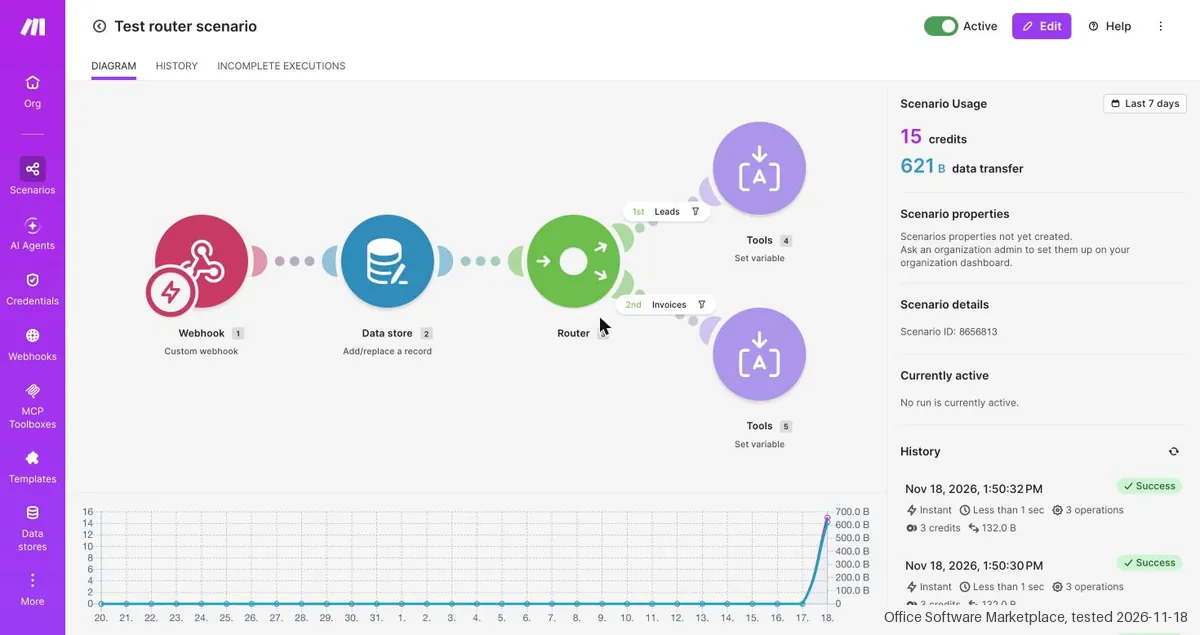
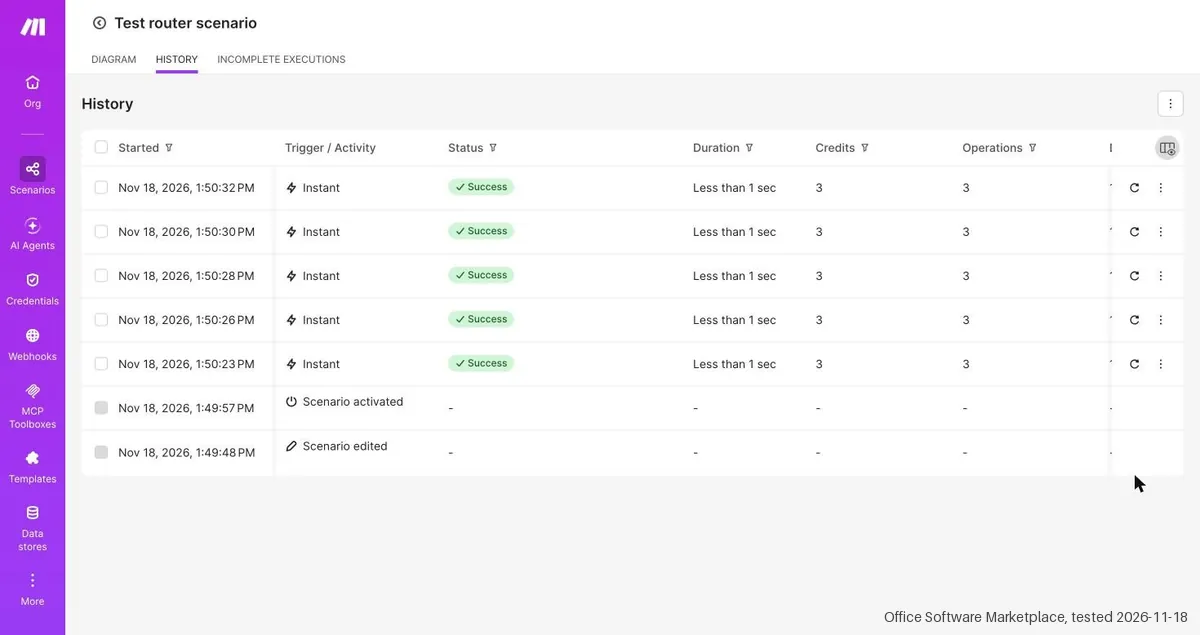
Does Make solve it?YesOur test (18 Nov 2026): a webhook feeding a data store ran instantly on the Free plan for 5 test posts. Each run took 3 credits, 15 of 1,000 monthly credits in total, and all 5 records were stored.
Your planFree, $0: 1,000 credits a month and 2 active scenarios. Core is $16 a month, or $11 billed yearly, for 10,000 credits.
Try Make →
Your pain“Our process has exceptions, and a simple trigger-and-action tool cannot send a record down two different paths.”
Does Make solve it?YesOur test (18 Nov 2026): a Router with two filtered routes sent leads and invoices down separate paths on the Free plan. A run counted 3 credits, so the Router itself cost nothing.
Your planRouters and filters work on the Free plan. Core costs $16 a month ($11 billed yearly) with 10,000 credits.
Try Make →
Your pain“A new order sits for a quarter of an hour before anything happens, and the customer is already writing in.”
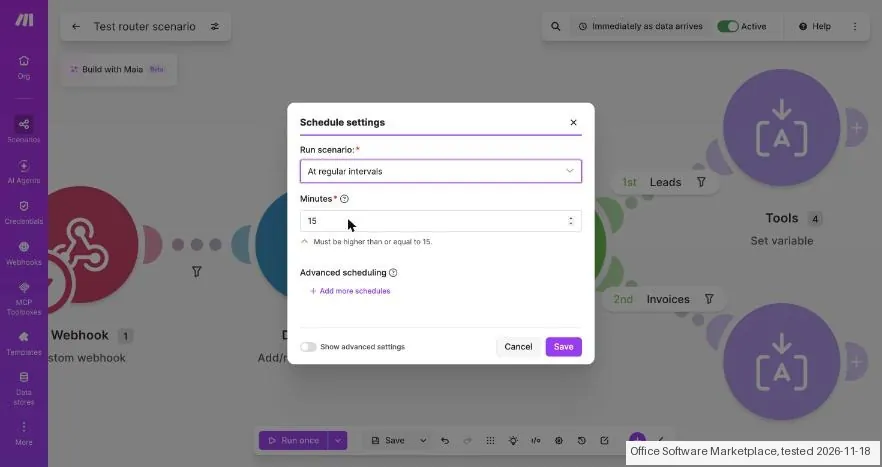
Does Make solve it?PartlyOur test (18 Nov 2026): a webhook run started within about 2 seconds on Free, but the schedule box refused anything under 15 minutes. Polling every minute needs Core, $16 a month.
If that catch rules it out: Zapier.
Your planCore, $16 a month ($11 billed yearly), 10,000 credits: scheduling down to every minute.
Try Make →
- you only need a single trigger and one action, you cannot estimate how many credits a workflow will use, or you want a tool we have tested ourselves on a paid plan.
The “Try” buttons are affiliate links: we may earn a commission if you sign up, at no extra cost to you, and it never changes our verdict.
Transparency: the “Visit” links on this page are affiliate links: we may earn a commission if you sign up, at no extra cost to you. No vendor can pay for a better review or verdict. How we make money →
- Checkout showed: What the checkout showed is in the claim table below
- Tax: Not shown before card details: the final amount with tax is unknown, not zero
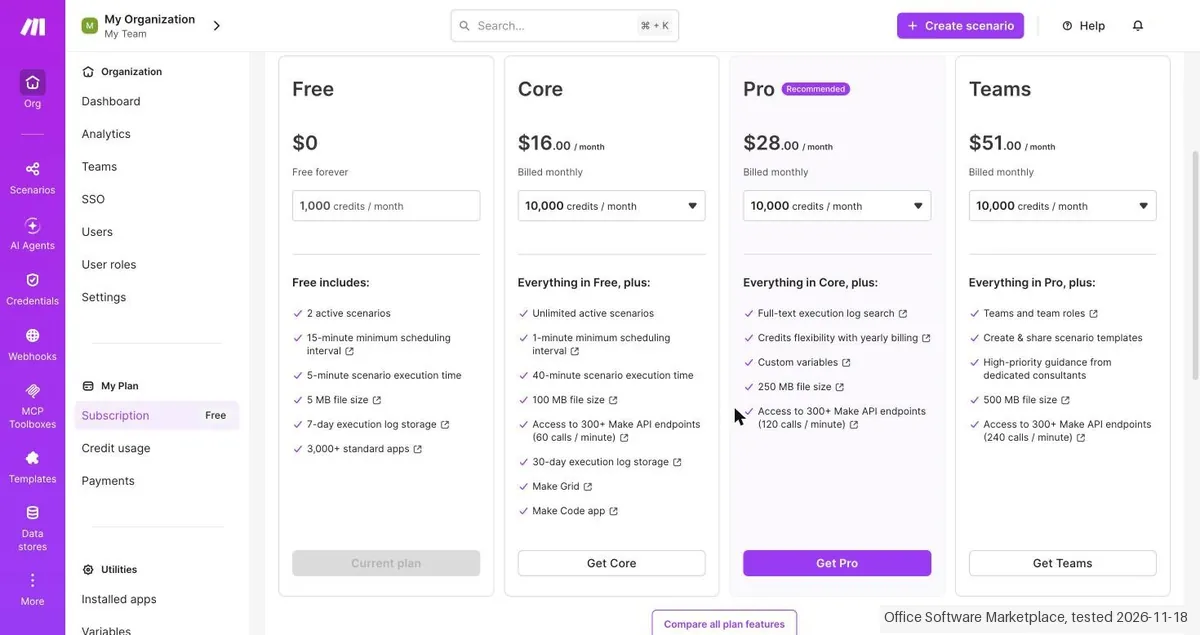
Daan created the account and our AI assistant ran the test in Daan's browser. On 18 November 2026 the session tested Make on the Free plan: a scenario with a webhook, a data store and a router with two branches took about 6 minutes and about 25 clicks to the first result, ran 5 times at 3 credits each (15 of 1,000 credits) and the router cost nothing. The 15-minute minimum interval turned out to apply to scheduled scenarios only, not to webhooks, which ran at once. The plan prices on the page are higher than in our dossier: Core $16, Pro $28 and Teams $51 a month, and the Free plan lists 3,000+ standard apps. The checkout of Core was viewed without an address and nothing was paid.
How we tested
- Free plan; a webhook, data store and router scenario was built and run 5 times with curl requests; no external apps were connected; the checkout of Core was viewed without an address and nothing was paid.
- Text we checked: "Subscription: Free". What we saw: The dashboard says Subscription: Free with 1,000 credits / month and usage resetting on Dec 16, 2026. Five runs of the test scenario used 15 of 1,000 credits (2% used).
- Text we checked: "3 credits". What we saw: Each of the 5 runs showed 3 credits and 3 operations: the webhook, the data store and one branch module counted 1 each, and the Router counted nothing. The public pricing page says the same about router modules.
- Text we checked: "15-minute minimum scheduling interval". What we saw: Schedule settings with At regular intervals says Must be higher than or equal to 15. The webhook scenario ran Immediately as data arrives, five runs between 13:50:23 and 13:50:32, so the 15 minutes apply to schedules, not to webhook triggers.
Pricing (2026)
✓ Pricing re-verified 18 Nov 2026
Free: $0, 1,000 credits a month, 15-minute minimum interval. Core: $15 ($11 a month billed yearly). Pro: $26 ($20 billed yearly). Teams: $47 ($36 billed yearly). Enterprise: custom. Prices change with the credit slider. We have not paid for a plan. Plans change, so check the live price on their site before you buy.
Category context: Operations & Workflow. Across the 55 tools in this category that we researched with a public US-dollar price, the median entry price is $25 a month (lowest paid plan as listed, per seat where the vendor prices per seat). Make’s entry price of $15 a month sits below that median. Compare pricing conditions in the Software Cost Atlas →
What the pricing page doesn’t say
Free is capped at 1,000 credits and a 15-minute interval. Credits expire at the end of the term. We have not run a workflow on a paid plan, so reliability and real credit use are unknown to us.
What Make does
Visual no-code automation platform that connects apps and AI models into multi-step scenarios, with a free plan and paid tiers priced by monthly credits.
Core adds per-minute scheduling and unlimited scenarios
Core at $15 a month (10,000 credits) adds unlimited active scenarios, scheduling down to the minute and the Make API. Pro at $26 adds priority execution, custom variables and log search. Teams at $47 adds team roles and shared templates. Most people start on Free to see how many credits a real workflow burns, then move to Core once they need minute-level scheduling or more than the free credits. What a bigger plan does not fix: credits are use-it-or-lose-it.
Make has a no cash refund policy, unused credits do not follow you to Free when you cancel, and on Core even a yearly plan hands them out month by month, so buying a bigger annual tier as a reserve only works on Pro and Teams. Extra credits bought on top cost 25% more than plan credits (help centre, read 18 November 2026), which makes picking the right tier cheaper than topping up.
What we found running Make ourselves
The first findings are at the top of this page. The rest:
- Text we checked: "567.0 B / 1.0 MB". What we saw: The data store Test Inbox has a fixed size of 1 MB on Free and held 5 records at 567.0 B / 1.0 MB.
- Text we checked: "3,000+ standard apps". What we saw: The Free plan card says 3,000+ standard apps. Our dossier says 3,500+ apps. No external app was connected in this test.
Claim vs. what we measured
We set a claim from Make's own pages next to what we saw in our test, on the plan named. The status says whether the two describe the same thing and match; it is not a verdict on the product. Confirmations are listed too.
| What the vendor says | What we measured | Status | What it means if you buy |
|---|---|---|---|
| Subscription: FreeSource: our test notes, read 18 Nov 2026 | Measured 2026-11-18: The dashboard says Subscription: Free with 1,000 credits / month and usage resetting on Dec 16, 2026. Five runs of the test scenario used 15 of 1,000 credits (2% used).Our test, 18 Nov 2026; Free plan; Core checkout viewed up to the payment button, nothing was paid | ConfirmedThe dashboard figure against the credits counted for one test scenario of five runs. | The free allowance is easy to see, and a small test scenario uses only a small part of it. |
| 3 creditsSource: our test notes, read 18 Nov 2026 | Measured 2026-11-18: Each of the 5 runs showed 3 credits and 3 operations: the webhook, the data store and one branch module counted 1 each, and the Router counted nothing. The public pricing page says the same about router modules.Our test, 18 Nov 2026; Free plan; Core checkout viewed up to the payment button, nothing was paid | ConfirmedThe credit and operation columns of the history against our own count of the modules in the scenario. | Plan on about 3 credits for every record that goes through a webhook, a data store and one action; the router branching itself is free. |
| 2 active scenariosSource: our test notes, read 18 Nov 2026 | Measured 2026-11-18: Only one scenario was switched on, so the limit of 2 active scenarios was not reached or tried; the scenario was switched on without a problem.Our test, 18 Nov 2026; Free plan; Core checkout viewed up to the payment button, nothing was paid | Not testableThe plan line against a test with one active scenario. | The Free limit of 2 active scenarios is listed but was not hit, so we cannot say what the message looks like at the limit. |
| 15-minute minimum scheduling intervalSource: our test notes, read 18 Nov 2026 | Measured 2026-11-18: Schedule settings with At regular intervals says Must be higher than or equal to 15. The webhook scenario ran Immediately as data arrives, five runs between 13:50:23 and 13:50:32, so the 15 minutes apply to schedules, not to webhook triggers.Our test, 18 Nov 2026; Free plan; Core checkout viewed up to the payment button, nothing was paid | ContradictedThe 15 minutes in our dossier text against the interval seen on the schedule dialog and the instant webhook runs; no longer schedule was saved. | On Free a webhook scenario is not slowed down to 15 minutes; only scheduled scenarios wait at least 15 minutes. |
| Maximum runs to start per minute 100Source: our test notes, read 18 Nov 2026 | Measured 2026-11-18: The scenario settings for the webhook trigger show a maximum of 100 runs to start per minute. Five runs were sent within a few seconds, far below this, so the limit was not tested.Our test, 18 Nov 2026; Free plan; Core checkout viewed up to the payment button, nothing was paid | Not testableThe setting on screen against a burst of 5 requests. | The webhook rate limit is shown on screen but a busier burst was not tried. |
| 567.0 B / 1.0 MBSource: our test notes, read 18 Nov 2026 | Measured 2026-11-18: The data store Test Inbox has a fixed size of 1 MB on Free and held 5 records at 567.0 B / 1.0 MB.Our test, 18 Nov 2026; Free plan; Core checkout viewed up to the payment button, nothing was paid | ConfirmedThe storage figure on the data store page against the 1 MB of the plan; a fuller store was not tried. | Free gives one small data store of 1 MB, small, so not meant for large data. |
| 7-day execution log storageSource: our test notes, read 18 Nov 2026 | Measured 2026-11-18: The plan page lists 7-day execution log storage on Free. The test lasted minutes, so the log retention of 7 days was not observed.Our test, 18 Nov 2026; Free plan; Core checkout viewed up to the payment button, nothing was paid | Not testableThe plan line against a session of a few minutes. | Logs on Free are kept only for a short time according to the plan page; this was not checked over days. |
| 3,000+ standard appsSource: our test notes, read 18 Nov 2026 | Measured 2026-11-18: The Free plan card says 3,000+ standard apps. Our dossier says 3,500+ apps. No external app was connected in this test.Our test, 18 Nov 2026; Free plan; Core checkout viewed up to the payment button, nothing was paid | ContradictedThe app count on the plan card against the dossier figure; the list of apps itself was not counted. | The page now lists fewer apps than the dossier; the number of apps matters little for a first test, but check the app you need. |
| Core $16.00 / monthSource: our test notes, read 18 Nov 2026 | Measured 2026-11-18: The plan page shows Core at $16.00 a month with monthly billing at 10,000 credits, against $15 in the dossier. The live public pricing page at the default 10,000 credits showed $16 as well.Our test, 18 Nov 2026; Free plan; Core checkout viewed up to the payment button, nothing was paid | ContradictedThe monthly Core price on the plan page and the live pricing page against the dossier figure; the yearly price of $11 a month was confirmed. | Core costs more per month when paid monthly than we listed before. |
| Pro $28.00 / month; Teams $51.00 / monthSource: our test notes, read 18 Nov 2026 | Measured 2026-11-18: The plan page shows Pro at $28.00 and Teams at $51.00 a month with monthly billing, against $26 and $47 in the dossier. The live pricing page showed the same amounts.Our test, 18 Nov 2026; Free plan; Core checkout viewed up to the payment button, nothing was paid | ContradictedThe monthly Pro and Teams prices on both pages against the dossier; the yearly prices of $20 and $36 were not in the dossier. | Pro and Teams cost more per month than we listed before when paid monthly. |
| Save up to 15%Source: our test notes, read 18 Nov 2026 | Measured 2026-11-18: The yearly billing tab says Save up to 15%, while the Core checkout says Save 31% ($16.00 monthly against $11.00 a month yearly). The tab text is lower than the saving shown at checkout for Core.Our test, 18 Nov 2026; Free plan; Core checkout viewed up to the payment button, nothing was paid | ContradictedThe text on the billing tab against the saving shown in the Core checkout and the prices on both pages. | Paying yearly saves more than the tab says on Core: $11 instead of $16 a month. |
| Unlimited active scenariosSource: our test notes, read 18 Nov 2026 | Measured 2026-11-18: Core lists unlimited active scenarios, a 1-minute minimum scheduling interval and a 40-minute execution time. Core was not bought, so none of this was tried.Our test, 18 Nov 2026; Free plan; Core checkout viewed up to the payment button, nothing was paid | Not testableThe Core feature list against a test on the Free plan only. | The extra Core features come from the plan page only and were not tested. |
| Total $16.00Source: our test notes, read 18 Nov 2026 | Measured 2026-11-18: The Get Core dialog showed Monthly $16.00 / month, Subtotal $16.00 and Total $16.00 with Proceed to payment; no tax was shown before an address was entered, no card was entered and nothing was paid. The amount matches the plan page.Our test, 18 Nov 2026; Free plan; Core checkout viewed up to the payment button, nothing was paid | ConfirmedThe plan page price against the checkout total before the address step; no tax line, fee or stored cost rule could be compared. | The monthly Core price at checkout equals the plan page, but tax may be added once your address is known. |
Exit test: can you take your data out?
Daan created the account and our AI assistant ran the test in Daan's browser. On 18 November 2026 the session tested Make on the Free plan: a scenario with a webhook, a data store and a router with two branches took about 6 minutes and about 25 clicks to the first result, ran 5 times at 3 credits each (15 of 1,000 credits) and the router cost nothing. The 15-minute minimum interval turned out to apply to scheduled scenarios only, not to webhooks, which ran at once. The plan prices on the page are higher than in our dossier: Core $16, Pro $28 and Teams $51 a month, and the Free plan lists 3,000+ standard apps. The checkout of Core was viewed without an address and nothing was paid. Account and start: the account on the Free plan was created by Daan, who was signed in; our AI assistant ran the test in its own Chrome tab of the browser of Daan, starting at 13:44. The interface was already in English; only the Locale in Profile settings (date and decimal format) said Dutch and was changed to English (United States), which showed Settings updated. The dashboard said Subscription: Free, 1,000 credits / month, usage resets on Dec 16, 2026. The dossier name is Make and the review is on OSM (make-review). Core action: a scenario with a Custom webhook, a Data store module (Add/replace a record) and a Router with two branches (Leads with the filter type = lead, Invoices with type = invoice), each ending in a Tools Set variable module. It took about 6 minutes and about 25 clicks to the first result. The data store Test Inbox was made with the structure Name, Email and Type, generated from a JSON example; the storage size is fixed at 1 MB on Free, and after 5 records it showed 567.0 B / 1.0 MB. The webhook needed one bare request to learn its structure (3 values detected and ready to map: name, email, type); the webhook window also warns that an inactive webhook is removed after too long. The scenario was switched on without a problem on Free, with Immediately as data arrives and a maximum of 100 runs to start per minute. Five curl requests were sent between 13:50:23 and 13:50:32: Test Lead 1 to 3 (type lead) and Test Invoice 4 and 5 (type invoice), each answered Accepted. The history showed 5 runs, each Instant, Success, less than 1 sec, 3 credits and 3 operations; in total 15 of 1,000 credits (2% used), and Scenario Usage showed 15 credits and 621 B data transfer. The Router did not count: the webhook (1), the data store (1) and one branch module (1) make 3 credits a run, and the public pricing page says router modules count no credits. The data store held 5 records. Schedule settings offer Immediately, At regular intervals, Once, Daily, Weekdays, Weekly, Monthly, Specified dates and On demand; At regular intervals says Must be higher than or equal to 15, so the 15 minutes only apply to scheduled scenarios and not to webhook triggers. The dialog was cancelled. Plans: The plans were read by the tester on 18 Nov 2026 on the Subscription page (Compare Plans, in USD) and read again just before this delivery the same day on the public pricing page make.com/pricing at the default 10,000 credits a month, with the same amounts. Monthly: Free $0 (1,000 credits a month), Core $16.00, Pro $28.00, Teams $51.00, Enterprise on request. Yearly: Core $11.00, Pro $20.00, Teams $36.00 a month (120,000 credits a year). Free includes 2 active scenarios, a 15-minute minimum scheduling interval, a 5-minute scenario execution time, a 5 MB file size, 7-day execution log storage and 3,000+ standard apps. Core adds unlimited active scenarios, a 1-minute minimum scheduling interval, a 40-minute execution time, a 100 MB file size and 30-day log storage. Differences against the dossier: Core $16 against $15, Pro $28 against $26 and Teams $51 against $47 a month (the yearly Core price of $11 a month matches the dossier); and 3,000+ standard apps on the Free plan against 3,500+ in the dossier. The prices on the live pricing page were checked again and confirm the new amounts. The Save up to 15% on the billing tab differs from Save 31% in the Core checkout. Checkout: Get Core was opened, with name and e-mail pre-filled and the address left empty: Monthly $16.00 / month, Yearly Save 31% $11.00 / month, Subtotal $16.00, Total $16.00 and a Proceed to payment button. No tax was shown before an address was entered, no card was entered and nothing was paid; the dialog was closed. Cancelling: there was no paid plan; going back to Free is Organization, Subscription, Change plan, and invoices are under Payments. Deleting the organization is Profile, Organizations, the three-dot menu, Delete; deleting the account is Profile, Settings, Danger zone, Delete my account (Permanently delete your account...). None of these were clicked or confirmed. Not tested: paying, Core and Pro features, external apps (no connections were made on purpose), the Maia AI builder, MCP toolboxes, teams and roles, replay of runs, and the sister products Grid and Code. Clean up: the scenario Test router scenario is switched OFF (Inactive) but not deleted; the data store Test Inbox with 5 test records and the webhook Test webhook are still there; the Locale of the profile stays on English (United States); the Chrome tab was closed. No kit records were entered. Test date: 18 Nov 2026. We describe the friction rather than score it; this is one run with synthetic records, not a verdict on Make.
| What we checked | What we saw |
|---|---|
| Fields offered by the export dialog | |
| Not offered in the field selector | None noted. |
| The exported file | We did not inspect the file, so data retention and loss remain unverified. |
| Awkward but not lost | Credits are counted per module run, so even this small scenario used 3 credits per record; the 1,000 free credits cover only a few hundred such runs a month. A data store has a fixed size of 1 MB on Free. A webhook that stays unused is removed after a while. The page prices are higher than we listed before, so check the plan page before you plan a budget. Deleting the account or the organization is a separate step in the profile and was not tried. |
| Export route | No export or reimport was performed; no file was downloaded or examined. The two categorised kit records were not entered; the objects tested were not kit records. |
| Export format | No downloaded bytes examined. |
| Re-importing the export | No reimport performed. |
| Cancelling | No cancellation or downgrade performed. |
What the exit test does not show:
- Session and source-reading date: 18 November 2026. Times are CET. The session started at about 13:44 CET. These are approximate tester observations, not benchmark timings. Midnight timestamps are required date anchors, not measured event times.
Screenshots from our test (click to enlarge)
What this test does not show:
- Paying, and the Core and Pro features.
- External apps (no connections were made on purpose).
- The Maia AI builder, MCP toolboxes, teams and roles, and the replay of runs.
- Make Grid and Make Code.
- Cancelling, deleting the organization or the account, which were looked up but not confirmed.
- Tax on the checkout, which showed no amount before an address was entered.
- Export and reimport.
Most of our reviews are researched rather than run. How we review explains which is which, and why we do not pretend otherwise.
How to actually use Make
Create a free account from make.com, build a first scenario in the visual builder by picking a trigger app and adding steps, then turn it on. The Free plan gives 1,000 credits a month to test with. We have not built a scenario ourselves, so we cannot say how long a first one takes.
Distilled from Make pricing page (make.com/pricing), read on 18 November 2026 in a browser, and the Make home page. Make is an affiliate partner of ours, and we may earn a commission if you sign up through our link. We have not paid for a plan. Help centre articles read 18 November 2026: Cancel your subscription (help.make.com/cancel-your-subscription), Change your subscription, Monthly and annual subscriptions, Extra credits, Teams and Scenario blueprints (all on help.make.com).
Make vs Zapier, side by side
Each column shows the vendor’s own published entry price, read on the date shown. Entry prices can cover different services or units, so check what each one buys. We do not average them into a score.
Both names above are affiliate links: we may earn a commission if you sign up, at no extra cost to you. Neither changes what this table says.
The natural comparison is Zapier: Zapier connects apps with simple trigger-and-action Zaps billed by tasks, while Make builds visual scenarios with routers and bills by credits. Compare the cost of your own workflow in each tool before you pick.
Frequently asked questions
Can you export your data from Make?
Exit check 2026-11-18; route excerpt: No export or reimport was performed; came along (excerpts): not tested; lost (excerpts): not tested; re-import: not tested.
How much does Make cost?
Per the pricing page read on 18 November 2026, in US dollars a month with the credit slider at 10,000 credits: Free is $0 with 1,000 credits, Core is $15, Pro is $26 and Teams is $47. Enterprise is custom. Billed yearly the same slider shows Core at $11, Pro at $20 and Teams at $36 a month.
What is a credit?
Credits are the unit Make bills in. The page says most actions cost 1 credit, router and error-handler modules cost nothing, and code runs in the Make Code App cost 2 credits per second. Credits expire at the end of the billing term.
Is there a free plan?
Yes. Free costs $0 and includes 1,000 credits a month, the visual workflow builder, 3,500+ apps, routers and filters, and a 15-minute minimum interval between runs. The home page says no credit card is required and the free plan has no time limit.
What does Core add over Free?
Unlimited active scenarios, scheduling down to the minute, higher data transfer limits and access to the Make API.
What do Pro and Teams add?
Pro adds priority scenario execution, custom variables and full-text search of the execution log. Teams adds team roles and shared scenario templates.
Why do older reviews show $9 and $16?
Make changed its pricing model to credits and the price depends on the slider. Our first read of the page showed $9 for Core and $16 for Pro at another slider position, so always check the credit count next to a price.
Can I cancel?
Yes. The page says you can cancel at any time, the paid plan runs until the end of the term and the account then drops to Free.
What happens to unused credits if I cancel or change plan?
Per Make's help centre, read 18 November 2026: after you cancel, the paid plan runs to the end of the billing cycle and the organization then drops to Free with the standard 1,000 credits a month; unused credits are not carried over, on monthly or annual billing. Free supports one team, so you pick which team to keep. Make has a no cash refund policy: on an upgrade your unused credits become a discount on the new plan, on a downgrade they move to the new plan. Only an Owner or Admin can cancel.
Do I get a year of credits up front on annual billing?
On Pro and Teams, yes: the help centre (read 18 November 2026) says an annual subscription allocates the whole year's credits at once to use flexibly. Core is the exception: it always hands out credits monthly, even when billed yearly. Extra credits cost 25% more than the credits in your plan, are sold in steps of 1,000 by card only, and expire at the end of the billing cycle; on Core with annual billing they expire at each monthly reset.
Can several people share one Make account, and can I take my scenarios with me?
Below the Teams plan an organization has one team and you cannot manage roles within it, per the Teams article read 18 November 2026, so separate access for different people starts at Teams. Scenarios can be exported as blueprint JSON files that hold the modules, settings and mapped values; connections are not included and have to be recreated after import.
What do we not know?
How reliable scenarios are at volume, how fast support answers and how fast the credit bill grows on a real workload. We are affiliates of Make but have not paid for a plan.
Is this a hands-on review of Make?
Yes. We tested Make ourselves on 2026-11-18; the section above says what we tested, what we found and what we did not test, and where a figure comes from the vendor's own documentation instead. Most of our reviews are researched rather than run; we say which is which. We name what each tool is good and bad at, and we earn a commission only if you sign up, at no cost to you.
- Read 2026-11-18 on make.com/pricing, US dollars a month, credit slider at 10,000 credits.
- A dated screenshot of that pricing page, kept on this site as the receipt.
- Our own hands-on session with Make (2026-11-18), written up in full further down this page.
Bottom line
In one line: Visual automation for connecting apps; free plan, paid from $15 a month.
Best for: small teams chaining several apps.
The Try button is an affiliate link; we may earn a commission at no extra cost to you.
Others in this category
Reviewed operations & workflow tools that share ground with Make. They are comparable in what they do, not drop-in swaps:
New reviews, price changes we recorded, and the cost conditions we found. No sponsored placements. Unsubscribe anytime.
This is our researched assessment, not a paid placement. The “Visit” links on this page are affiliate links: we may earn a commission if you sign up, at no extra cost to you, and it never changes our take. How we review →