TextExpander Review (2026)macOS Already Does the Basics
 By Daan Haket · Researched and written with an AI assistant · who does what
On a Mac the operating system already does the basic job free: Apple's built-in Text Replacement syncs static snippets across your Apple devices, though Apple's own documentation notes it is not available in every app.
support, clinical-admin and recruiting teams that need everyone sending identical approved wording — the shared library, permissions, auto-subscribe and SSO are what the paid tiers actually buy, and the SOC 2 and HIPAA-with-BAA posture is the one thing no free expander offers a compliance-bound team.
you are one person on a Mac with a couple of dozen fixed snippets. macOS Text Replacement is built in and free, Espanso is free and open source across all three desktop platforms, and TextExpander's own free plan now covers 5 active snippets. A subscription only starts earning its keep when you need fill-in fields, scripting, or a second person editing the same library.
Transparency: the “Visit” links on this page are affiliate links — we may earn a commission if you sign up, at no extra cost to you. No vendor can pay for a better review or verdict. How we make money →
Pricing (2026)
✓ Pricing re-verified 9 Oct 2026
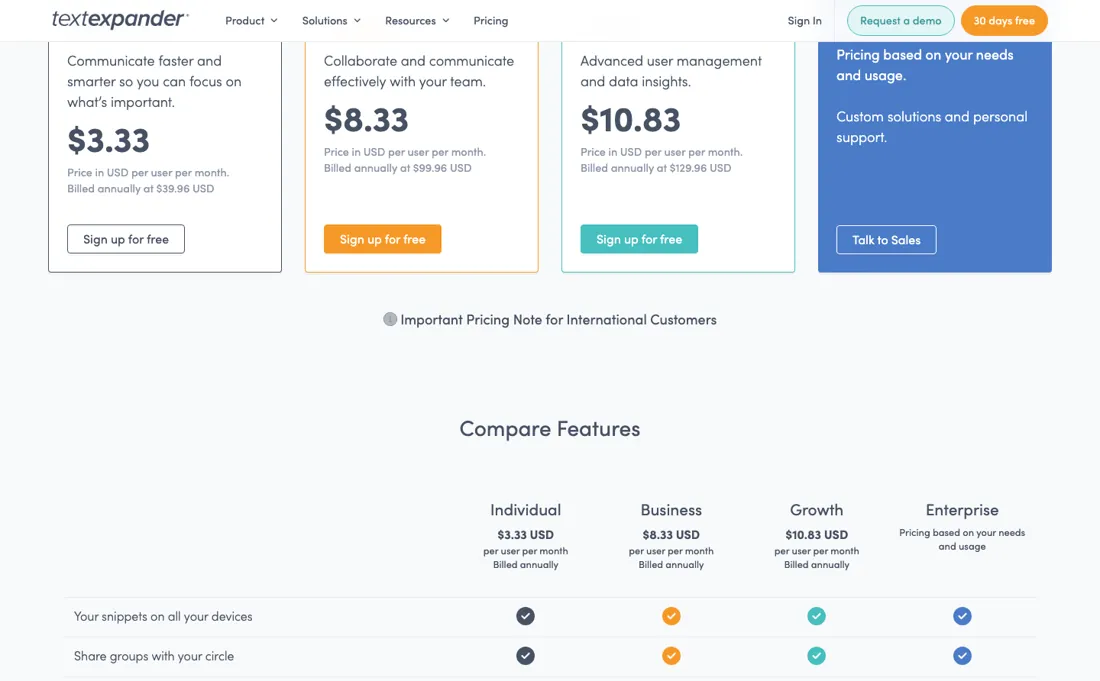
The line-up was rebuilt after our July reading and now starts at free; nothing on it moved between 18 August and 9 October 2026. Free is $0 forever with no credit card, Pro $5 (billed annually at $60), Business $10 (billed annually at $120), Enterprise quoted. Annual billing is sold as two months free against paying monthly; the rendered page does not print the monthly amounts next to the plans, even with the Monthly toggle selected, so we do not quote them.
The free plan is real but deliberately narrow: 5 active snippets out of an unlimited library, one snippet swap every two weeks, 3 teams, 5 team members and no snippet activity history at all. That history — what lets you see changes and restore deleted snippets — is 24 hours on Pro, 7 days on Business and unlimited only on Enterprise. Team members stay capped at 5 on Free and Pro; unlimited members start on Business, which is also the first tier with single sign-on (Google SSO on Business, all providers plus SCIM on Enterprise).
New accounts get a 30-day preview of the paid features; when it ends the account moves to Free automatically, all Snippets are kept and 5 stay active. The pricing note for international customers, readable on 9 October 2026, says the USD prices exclude tax, that buyers in VAT or GST countries including the EU, UK and Australia may see an estimated 20% increase, and that the total is converted to local currency by Paddle at checkout. Plans change — always verify the live price on their site.
What the pricing page doesn’t say
And Espanso covers the power-user case free and open source on Mac, Windows and Linux. On Windows there is no built-in equivalent (contrary to a widely repeated claim, PowerToys has no text-expansion utility), so the case for paying is genuinely stronger there. On mobile, only iPhone and iPad are covered: the vendor's mobile page, read 9 October 2026, offers a keyboard app for those, while Android is still a beta signup.
Then add the snippet activity history: nothing at all on the free plan, only 24 hours on the $5 Pro tier, 7 days on Business, and unlimited only on Enterprise. Add the vendor's own note that buyers in VAT/GST countries including the EU, UK and Australia may see an estimated 20% uplift on the listed USD price (read 21 July 2026). For one person with a few dozen fixed snippets, the honest answer is usually don't.
Watch the video review
The video version of this review, from our YouTube channel.
⚡ Short on time? Watch the 30-second verdict Short.
What TextExpander does
Text-expansion tool: you type a short abbreviation and it expands into a stored snippet system-wide on macOS and Windows and in Chrome, with fill-in fields, nested snippets, date maths and scripting. The real product is the team layer — a shared snippet library with permissions, sign-up by email domain, auto-subscribe for new hires, usage statistics and SSO — aimed at support, clinical-admin, recruiting and sales teams that need everyone sending the same approved wording. The vendor self-attests SOC 2/SOC 3 and HIPAA compliance with a BAA available, which is the clearest argument for paying rather than using a free expander.
What buyers report about TextExpander
Hands-on: not tested by usReported by buyers: G2, Capterra, Software Advice and TrustRadius, read August and October 2026
Themes from the buyer-review sites listed at the foot of this page, read in August and October 2026. We have not run TextExpander ourselves, so this is other buyers' experience rather than ours. We summarise it here because the complaints are usually the part a vendor page leaves out.
- • 4.8 on G2 across 425 reviews, over a billion expansions a year, with Uber and Shopify among the customers. Cross-platform reliability is what reviewers name.
- • For a support or agency team repeating the same messages daily, the time saved is straightforward to calculate.
- • On TrustRadius (read October 2026, a small sample of 11 ratings, several marked incentivized) a sales team lead values it for always dropping in the right walkthrough, trial or meeting link, and a support professional for pasting long standard passages and case notes.
- • The subscription is the complaint in nearly every review. It moved from a one-time Mac purchase to SaaS and long-time users have not forgiven it.
- • Cost per seat is the other recurring theme, but nearly all of those reviews predate the 2026 repricing that introduced a free plan, so the amounts quoted in them no longer match the tiers — read the pricing section rather than the reviews for what it costs today.
- • Solo users are pointed at free alternatives like Espanso or Raycast snippets, and reviewers say so themselves.
- • Occasional glitches and no dark mode.
- • The same TrustRadius reviewers say team editing of shared Snippets is tricky, rich-text formatting is sometimes buggy, there is no way to reformat many Snippets at once, and the interface looks dated.
Pages read (August and October 2026): TrustRadius
For one Mac user, the honest answer is usually no
The amounts are in the section above. What decides this purchase is not which paid tier you pick but whether the free one is enough, and that turns on a single line. The free plan is real but deliberately narrow, and one detail does most of the narrowing: five active snippets out of an unlimited library, with one snippet swap every two weeks. That is 26 changes a year. It is not a small version of the product, it is a demonstration with a cooldown timer, and anyone who has ever reorganised their snippets on a Tuesday afternoon will feel it immediately.
The ladder above it is shaped by two things that are easy to miss. Snippet activity history is what lets you see changes and restore a deleted snippet. It is nothing at all on Free, 24 hours on Pro, 7 days on Business, and unlimited only on Enterprise. Twenty-four hours is effectively none: a snippet deleted on Friday is gone by Monday. And team members stay capped at five on both Free and Pro.
For any real team the entry plan is $120 a user a year, not $60. Now the part that decides this for most readers, and it is not flattering to the product. On a Mac, the operating system already does the basic job for nothing. Apple's built-in Text Replacement syncs static snippets across your Apple devices — though Apple's own documentation notes it is not available in every app. Two more cautions.
On mobile, only iPhone and iPad are covered: the vendor's mobile page, read 9 October 2026, offers a TextExpander keyboard for iPhone and iPad, while Android is still a beta you sign up for. That takes Pro from $60 a year to about $72. So: for one person on a Mac with a few dozen fixed snippets, the honest answer is usually don't. Where this earns its money is a team sharing a snippet library — which the free alternatives handle badly — and a Windows user who needs dynamic snippets with fill-ins, dates and scripts.
There is a 30-day trial with full access to every feature and no card, which is the right way to find out which of those you are.
How to actually use TextExpander
Try the free alternative for your platform first, because it may settle the question. On a Mac, put your ten most-used snippets into Apple's built-in Text Replacement and live with it for a week. It syncs across Apple devices and costs nothing, though Apple notes it does not work in every app. On any platform, Espanso is free and open source and handles the power-user cases. If either does the job, you are finished.
If they do not, use the 30-day full-access trial rather than the free plan to evaluate. Free gives you five active snippets and one swap every two weeks, which is 26 changes a year — enough to see the interface, nowhere near enough to build a working library. Pick the tier from two things that are not on the marketing page. Team members stay capped at five on Pro, so any real team starts at Business, which is also where single sign-on begins.
And snippet activity history is 24 hours on Pro against 7 days on Business — if more than one person edits shared snippets, 24 hours is not a safety net. Budget about 20% above the listed USD price if you are in the EU, UK or Australia. On a phone it works on iPhone and iPad through the TextExpander keyboard; Android is still a beta.
Distilled from TextExpander's own pricing page, textexpander.com/pricing, read 10 September 2026: the per-user monthly and annual rates and the seat minimums, plus the trial length. Every figure in our text appears on that page. Re-read on 9 October 2026: the pricing page and its FAQ (downgrade and cancellation, team-member caps, the international tax note), the mobile page (textexpander.com/mobile), and the Learning Center articles 'How Active Snippets Work' and 'How Swaps Work on the Free Plan'.
The natural comparison is Text Blaze — Both have a free tier now, and Text Blaze still undercuts every paid rung: Pro $2.99 and Business $6.99 per user per month billed annually, read on their own plans page on 18 August 2026, against $5 and $10. So TextExpander has to win on OS-level expansion outside the browser, and on the SSO, SCIM and HIPAA-BAA paperwork a procurement team asks for — not on price.
Frequently asked questions
What happens to my Snippets if I stop paying for TextExpander?
They stay. The pricing FAQ (read 9 October 2026) says downgrading to Free keeps your Snippets, annual plans run to the end of the paid term, and after the 30-day preview the account moves to Free with 5 Snippets active. Two limits apply on Free, per the Learning Center articles on active Snippets and swaps (read 9 October 2026): your 5 active Snippets are the 5 you expanded most recently, with one swap every 2 weeks, and a Snippet that uses date or time math, nested Snippets, JavaScript, AppleScript, shell scripts or conditional fill-ins only expands again once you remove that feature or upgrade.
Can a team of six share one library on TextExpander Pro?
No. The pricing page (read 9 October 2026) caps team members at 5 on both Free and Pro; unlimited members start on Business at $10 per user a month billed annually ($120 a year), which also adds Snippet Requests, guest sharing, Google SSO and 7 days of Snippet activity history instead of 24 hours.
Does TextExpander work on my phone?
On iPhone and iPad, yes: the vendor's mobile page (read 9 October 2026) offers a TextExpander keyboard that expands Snippets in any app, and the Learning Center has a setup guide for it. On Android it is still a beta you sign up for. Earlier in 2026 the same page was a beta signup for both.
Is this a hands-on review of TextExpander?
This is a researched assessment, not a hands-on test — where we've used a tool ourselves, we say so explicitly. We name what each tool is good and bad at, and we earn a commission only if you sign up, at no cost to you.
- Buyer reviews on G2, Capterra, Software Advice and TrustRadius, read August and October 2026.
- Re-verified 2026-10-09 on the vendor's own pricing page; USD per user/month billed annually, excluding tax.
- A dated screenshot of that pricing page, kept on this site as the receipt.
Others in this category
Reviewed productivity tools that share ground with TextExpander — comparable in what they do, not drop-in swaps:
New reviews, price changes we recorded, and the cost conditions we found. No sponsored placements. Unsubscribe anytime.
This is our researched assessment — not a paid placement. The “Visit” links on this page are affiliate links: we may earn a commission if you sign up, at no extra cost to you, and it never changes our take. How we review →