xTiles Review (2026)Free Plan, Plus From $12.42/mo Yearly
 By Daan Haket · Researched and written with an AI assistant · who does what
The free plan keeps only two weeks of planner history and caps uploads at 5MB, so anyone using it as a daily planner will need Plus.
individuals, coaches and small teams who want notes, tasks and a daily planner in one visual workspace, and who want to connect ChatGPT or Claude to their projects.
you need a database-heavy wiki with deep permissions for a large team, you want a long refund window on a monthly plan, or the AI editing you need is among the features still marked soon.
Transparency: the “Visit” links on this page are affiliate links — we may earn a commission if you sign up, at no extra cost to you. No vendor can pay for a better review or verdict. How we make money →
Pricing (2026)
✓ Pricing re-verified 13 Oct 2026
Four plans, priced per user. Free costs nothing and gives unlimited pages and projects, free templates, 3 personal spaces, Google and Outlook calendar, an AI assistant with 1,000 credits and limited AI integrations; the table adds file uploads of up to 5MB, two weeks of planner history and one shared space. Plus is $19 a month, or $12.42 a month billed yearly, which the page says saves $79 a year: 100+ premium templates, recurring tasks, unlimited personal spaces, premium widgets, an unlimited AI assistant, basic AI integrations, full planner history, linked pages and unlimited file uploads.
Pro is $35 a month, or $24.92 billed yearly (saving $121 a year): two 45-minute personal onboarding sessions, unlimited shared spaces and unlimited AI integrations, which let ChatGPT, Claude and other assistants connected to xTiles edit any project and work in shared workspaces; several AI permissions in the comparison table, among them editing structure and access rights, are marked soon. Enterprise is custom, with SAML SSO, a dedicated account manager and organisation spaces.
VAT may apply. Educators, students and non-profits can get 50% off Plus for one year. The FAQ says subscriptions renew automatically, a monthly plan can be refunded in full within 72 hours and an annual one within 30 days, promotional and discounted plans are non-refundable, and only annual Plus can be upgraded to Pro with a calculated difference. Plans change — always verify the live price on their site.
What the pricing page doesn’t say
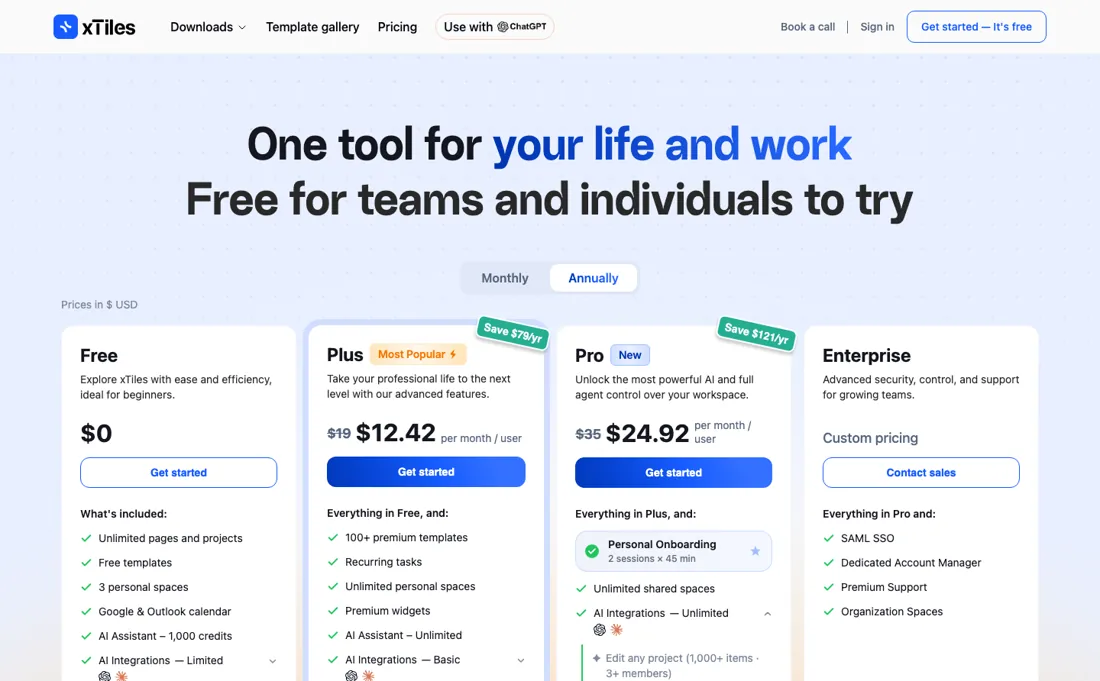
Pro's headline is AI control of your workspace, but several of its AI permissions, including editing structure and access rights, are still marked soon. Refund windows are short on monthly plans, 72 hours, and discounted plans are not refundable at all. Only annual Plus can be upgraded to Pro with a credit for what you paid. Prices are per user and VAT may apply. The user count on the site is xTiles' own claim. We have not used xTiles ourselves.
What xTiles does
Visual workspace that combines notes, projects, tasks and a daily planner with templates and an AI assistant, and connects ChatGPT and Claude to your projects through MCP; a free plan and per-user paid plans.
Plus is the planner, Pro is the AI and the team
Free is a real plan for one person: unlimited pages and projects, a calendar link and 1,000 AI credits. Its limits show up over time rather than on day one: only two weeks of planner history, 5MB uploads, three personal spaces and one shared space. Plus is the plan for someone who lives in the planner. Full planner history, recurring tasks, unlimited uploads and spaces and the premium templates are what make xTiles work as a daily system, and at $12.42 a month on yearly billing it costs about $149 a year, our arithmetic from the page's saving.
Pro is a different purchase. It buys unlimited shared spaces for working with others and full AI integrations, so an assistant connected through xTiles' MCP can edit any project and shared workspaces, plus two onboarding calls. Several AI permissions, including editing structure and access rights, are still marked soon, so check that what you need is live before you pay for it.
How to actually use xTiles
Start on Free and build one real week in the planner, since the two-week history limit on Free is the first wall you will hit. If you move from Notion, Evernote or another notes tool, use the Markdown import; xTiles also exports pages to PDF, Markdown and PNG, so you are not locked in. Try one AI integration on Free before upgrading: connect ChatGPT or Claude through the MCP connection and run one of the community workflows, such as a daily brief or a weekly review, to see whether the AI side is worth Pro to you.
If you buy, think about the term before you click. Monthly plans can be refunded only within 72 hours, annual plans within 30 days, discounted plans not at all, and only an annual Plus plan can be upgraded to Pro with a calculated difference.
Where this section comes from: our research notes (110 words)
xTiles' own pages, read in a live browser on 13 October 2026: the pricing page at xtiles.app/en/pricing in US dollars (four plans, monthly and yearly prices and the stated savings, the comparison table including the AI-integration rows marked soon, the education, student and non-profit discounts) with its FAQ (automatic renewal, cancellation, the 72-hour and 30-day refund windows, non-refundable discounted plans, upgrading annual Plus to Pro, export formats) and the home page at xtiles.app/en (MCP connections to ChatGPT and Claude, the community workflows).
The user count and the testimonials are xTiles' own and are not used as evidence. xTiles is a PartnerStack partner of ours. We have not used xTiles ourselves.
xTiles vs ClickUp, side by side
Each column shows the vendor’s own published entry price, read on the date shown. Entry prices can cover different services or units, so check what each one buys. We do not average them into a score.
Both names above are affiliate links: we may earn a commission if you sign up, at no extra cost to you. Neither changes what this table says.
The natural comparison is ClickUp — ClickUp is in our dossiers too, re-verified on 30 September 2026: Free Forever with unlimited tasks but 60MB of storage, then Unlimited at $7 per user a month billed yearly ($10 monthly), with AI priced on top at $9 or $28 per user a month. xTiles, read on 13 October 2026, is $12.42 per user a month billed yearly on Plus ($19 monthly) and includes an unlimited AI assistant in that price. ClickUp is the stronger project-management tool for teams; xTiles is the more visual notes-and-planner workspace for individuals and small groups, and for AI use it can work out cheaper because the assistant is not a separate charge..
Frequently asked questions
Is xTiles free?
Yes. The Free plan, read on 13 October 2026, has unlimited pages and projects, 3 personal spaces, Google and Outlook calendar and 1,000 AI credits, but limits planner history to two weeks and file uploads to 5MB. Plus at $19 a month, or $12.42 billed yearly, removes those limits.
Can I get a refund on xTiles?
Within limits. The FAQ on the pricing page, read 13 October 2026, offers a full refund within 72 hours of buying a monthly subscription and within 30 days of an annual one. Promotional and discounted plans are non-refundable after purchase.
What does xTiles Pro add over Plus?
Unlimited shared spaces, unlimited AI integrations so connected assistants can edit any project and shared workspaces, and two 45-minute onboarding sessions, for $35 a month or $24.92 billed yearly. Several AI permissions, including editing structure and access rights, are marked soon. Read 13 October 2026.
Is this a hands-on review of xTiles?
This is a researched assessment, not a hands-on test — where we've used a tool ourselves, we say so explicitly. We name what each tool is good and bad at, and we earn a commission only if you sign up, at no cost to you.
- Read 2026-10-13 in a live browser on xtiles.app/en/pricing, prices in US dollars, with the comparison table and FAQ.
- A dated screenshot of that pricing page, kept on this site as the receipt.
Others in this category
Reviewed productivity tools that share ground with xTiles — comparable in what they do, not drop-in swaps:
New reviews, price changes we recorded, and the cost conditions we found. No sponsored placements. Unsubscribe anytime.
This is our researched assessment — not a paid placement. The “Visit” links on this page are affiliate links: we may earn a commission if you sign up, at no extra cost to you, and it never changes our take. How we review →