Aplos Review (2026)
 By Daan Haket · Researched and written with an AI assistant · who does what
The headline you will see first is not the price you will pay.
small nonprofits and faith-based organisations that need true fund accounting rather than general small-business bookkeeping — tracking restricted and unrestricted funds separately is the thing generic tools genuinely cannot do.
you are a normal for-profit business, because you are paying for fund accounting you will never use; also skip Lite if several people need access but should not all be able to see and change everything — every Lite user is an Administrator, and role permissions start at Core.
Transparency: the “Visit” links on this page are affiliate links — we may earn a commission if you sign up, at no extra cost to you. No vendor can pay for a better review or verdict. How we make money →
Pricing (2026)
✓ Pricing re-verified 13 Oct 2026
(2026-10-13, read on their own pricing page and in their help centre) Three published tiers, billed monthly: Lite at $79/month, Core at $129 and Advanced at $229, plus a fourth Custom tier with tailored pricing aimed at organisations above $1 million in annual revenue. Advanced is framed as a quote rather than a checkout: the card reads "Customized solutions start at $229/month" and the button asks for a demo.
A promotion was running when we re-read the page on 13 October 2026 — 50% off for three months with code FALL26, showing Lite at $39.50 and Core at $64.50 — and the footnote dates it: new customers only, ending 31 October. On 10 September the same FALL26 offer was dated to 30 September, and in August it ran as SUMMER26 to 31 August, so the deadline moves.
What matters is still what you pay in month four. The trial is 15 days and takes no credit card. Lite and Core each include 2 users; Advanced includes 3. Aplos's help centre ('How to Manage Your Subscription', read 13 October 2026) adds what the plan cards leave out: all platform subscriptions include two users and further users cost $20 per month per user; the base subscription includes up to 500 contacts and the price rises $20 a month for each additional 1,000; and annual billing receives a 10% discount. Plans change — always verify the live price on their site.
What the pricing page doesn’t say
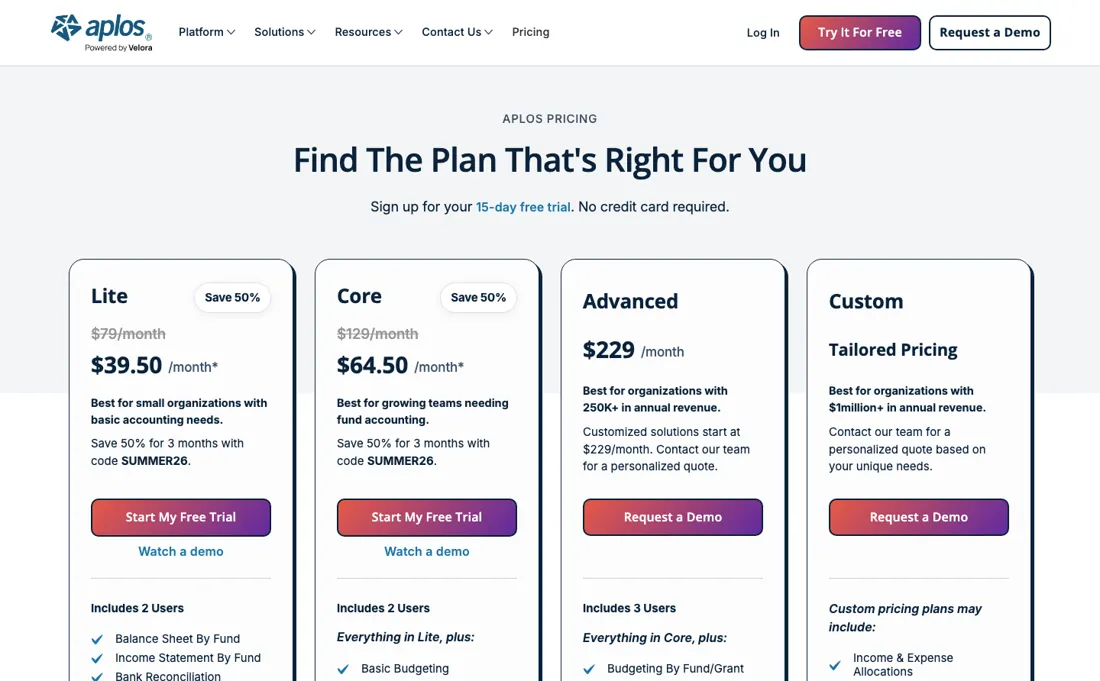
The 50%-off banner sits at the top of the page and rewrites every figure on it, so the $39.50 that catches your eye is a three-month rate against a $79 list price — a 100% increase waiting in month four, on software that holds your books and is therefore painful to leave. The second thing to pin down is what grows with you: each user beyond the two included adds $20 a month, every 1,000 contacts beyond 500 adds another $20, and on Lite every user is a full Administrator, because role permissions start at Core.
Watch the video review
The video version of this review, from our YouTube channel.
What Aplos does
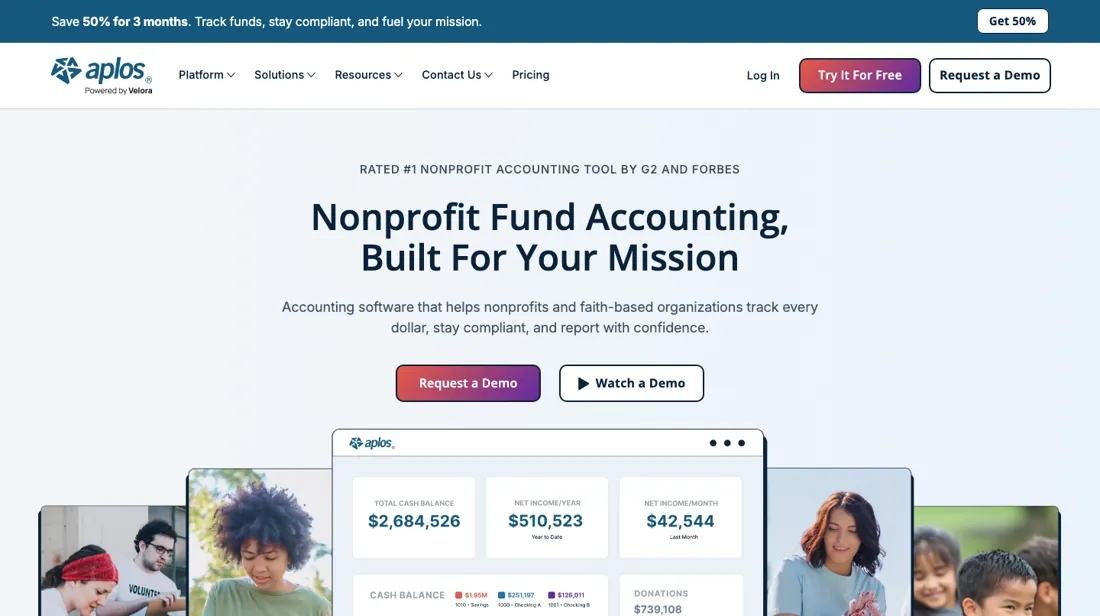
Fund accounting built for nonprofits and faith-based organisations, tracking restricted and unrestricted money separately. A 50%-off-for-three-months promotion was running again in September 2026, under a new code and to a new date, so check what month four costs.
What buyers report about Aplos
Hands-on: not tested by usReported by buyers: Capterra, read August 2026
Themes from the buyer-review sites listed at the foot of this page, read in August 2026. We have not run Aplos ourselves, so this is other buyers' experience rather than ours. We summarise it here because the complaints are usually the part a vendor page leaves out.
- • Reviewers who are not accountants say the fund structure is the reason they stay: restricted and unrestricted money stays separated without them having to invent a workaround, and volunteer treasurers describe getting productive without an accounting background.
- • Donor-side work is the other consistent positive — contribution tracking and year-end giving statements come up repeatedly, alongside the training videos and onboarding material.
- • Being cloud-hosted matters more here than in most categories, because reviewers describe boards and treasurers in different places working from the same books.
- • Support consistency is the loudest complaint. A January 2026 two-star reviewer describes being unable to reach customer service at all; others report waits of around two weeks for follow-up and difficulty getting complex cases resolved rather than acknowledged.
- • Several accounting mechanics are described as missing rather than awkward: contributions not posting at general-ledger level, no default expense coding per vendor, returned (NSF) cheques requiring duplicate entry, and no payroll of its own.
- • Bank feeds draw reports of mismatches between what Aplos shows and what the bank statement says, which is exactly the reconciliation work the software is bought to remove.
- • Price increases after signing are a recurring theme, including reviewers who say the subscription doubled without new features arriving, and features moving up into higher tiers.
Where the ratings disagree. The pricing complaints on Capterra are not about the entry price — they are about what happened afterwards. That is worth holding against a promotion that discounts the first three months: the reviewers describing a doubled subscription were already inside. Ask what the renewal price is, in writing, before the discount period sets your expectation.
When the paid plan is worth it
Start with the number you will actually pay in month four. On 13 October 2026 a promotion took 50% off the first three months with code FALL26 — Lite at $39.50 against a list price of $79, new customers only, now ending 31 October. A month earlier the same code was dated to 30 September, and in August it ran as SUMMER26: treat it as a fixture of the sales page, not a deadline, and budget on the list prices of $79, $129 and $229 a month.
The two things that move the bill are users and contacts, and neither needs a tier change. Lite and Core include two users, and Aplos's help centre prices each further user at $20 a month; an outside accountant added as an Accountant user is not counted, and a disabled user drops out of the count. Contacts are included up to 500, and the subscription rises $20 a month for each further 1,000 — automatically, the moment you add the 501st.
What moving from Lite to Core buys is control and process: user roles (on Lite every user is an Administrator), accounts payable and receivable, basic budgeting, recurring transactions and period close. It does not buy extra seats or contacts — those are priced the same on both — and it does not lower the rate after the promotion. Annual billing takes 10% off. The trial is 15 days and takes no credit card, long enough to run a real month-end close.
Our monthly capture read this vendor's pricing page every month from August 2026 to October 2026, and the amounts were the same all 3 times, including $64.50, $79, $129 and $229 from the pricing above. We keep watching — the registry records what moves.
How to actually use Aplos
Aplos publishes a six-step quick-start order, and it pays to follow it literally because one step is awkward to undo. Import your people first -- donors and vendors from a spreadsheet -- then edit the chart of accounts you are given and set starting balances on your asset and liability accounts. Aplos is explicit that those balances should be the bank balances as of the first transaction you enter, so they belong in place before you record anything, not after.
Then set the annual budget, and create your purposes in the Donations section: purposes are what contribution statements are built from, and linking each one to its accounts is what makes donation deposits post into the bookkeeping as well. Inviting the rest of the team is the last step, and seats decide how far you get -- both Lite and Core include two users, and each further one is $20 a month.
The 15-day trial takes no card, which is enough to carry one real month-end close.
Distilled from Aplos's own Quick Start Guide for Accounting and Finances in its support centre (help.aplos.com/hc/en-us/articles/30708075177997-Quick-Start-Guide-for-Accounting-and-Finances), read 19 August 2026, together with the plan cards and seat counts on aplos.com/pricing, read the same day. Users, roles, contacts and billing were read in Aplos's help centre on 13 October 2026: 'How to Manage Your Subscription' (help.aplos.com/hc/en-us/articles/30708084733837) and 'Adding And Managing Users' (help.aplos.com/hc/en-us/articles/30708015778829); the pricing page and its FALL26 footnote were re-read in a browser the same day.
The natural comparison is QuickBooks — the comparison every nonprofit treasurer ends up making, and it turns on one question rather than price. QuickBooks is cheaper and more widely known, but it tracks classes, not funds — so restricted and unrestricted money live in the same pot with a label on top. If your auditor or your grant terms require true fund separation, that difference is the whole decision and the price gap is secondary.
Frequently asked questions
Does a third user force me onto the Advanced plan?
No. Aplos's help article 'How to Manage Your Subscription' (read 13 October 2026) says all platform subscriptions include two users and further users can be added for $20 per month per user, on Lite or Core. An outside accountant or bookkeeper added as an Accountant user is not included in the user count, and a disabled user is not counted either ('Adding And Managing Users', read the same day). One exception: if you are on a contract with no open user slots, you cannot add users yourself and have to request an upgrade from your Customer Success Manager.
Can I limit what a volunteer or board member sees?
Not on Lite. According to 'Adding And Managing Users' (read 13 October 2026), on Aplos Lite every user has Administrator permissions with complete access to all features; choosing other roles needs Aplos Core. Core offers area-specific roles (for example Donations Manager or Accounts Payable Manager) and read-only roles such as Auditor and Custom Report Manager. The subscription article adds that a Custom Report Manager user costs the standard $20 per month, or $50 a month for a bundle of 10.
What happens if I downgrade from Core to Lite?
The help article 'How to Manage Your Subscription' (read 13 October 2026) says the switch takes effect immediately, that you lose access to some tools and features, and that data stored in your account 'will also be impacted'. Which data, and whether it comes back on re-upgrading, is not stated there, so treat it as not confirmed and export what you need from Core-only areas (payables, receivables, budgets) before you switch.
Is this a hands-on review of Aplos?
This is a researched assessment, not a hands-on test — where we've used a tool ourselves, we say so explicitly. We name what each tool is good and bad at, and we earn a commission only if you sign up, at no cost to you.
- Buyer reviews on Capterra, read August 2026.
- 2026-10-13, read on their own pricing page and in their help centre.
- A dated screenshot of that pricing page, kept on this site as the receipt.
Others in this category
Reviewed finance & accounting tools that share ground with Aplos — comparable in what they do, not drop-in swaps:
New reviews, price changes we recorded, and the cost conditions we found. No sponsored placements. Unsubscribe anytime.
This is our researched assessment — not a paid placement. The “Visit” links on this page are affiliate links: we may earn a commission if you sign up, at no extra cost to you, and it never changes our take. How we review →