Flatpay Review (2026)
 By Daan Haket · Researched and written with an AI assistant · who does what
“Zero monthly fees” is the headline, and there genuinely is no subscription — but there is a floor.
a physical shop, café or bar with steady card turnover above £1,100 a month that wants one predictable rate on every card type instead of a pricing table full of card categories. The on-site installation and 24/7 support suit an owner who would rather not configure hardware, and daily payouts help if cash flow is tight.
your card takings are small or seasonal: the £1,100 monthly minimum and the £39 shortfall charge punish exactly that pattern, and the price list says the assessment is annual so a quiet winter still counts. Skip it too if you are online-only — this is built around physical terminals and an in-person sales visit — or if you turn over more than £200,000 a year on cards, because then every published price is replaced by a quote.
Transparency: the “Visit” links on this page are affiliate links — we may earn a commission if you sign up, at no extra cost to you. No vendor can pay for a better review or verdict. How we make money →
Pricing (2026)
✓ Pricing re-verified 14 Oct 2026
Flatpay charges one rate per transaction on every card type, with no monthly subscription. The card terminal is 1.49% and costs GBP 0 to start. The three point-of-sale tiers all run at 1.69% and differ only in what you pay up front for onboarding and installation: GBP 995 for mobile POS, GBP 1,495 for POS Pro and GBP 2,495 for POS Premium.
Every one of those four prices is labelled "Below GBP 200,000 in annual card turnover". CHANGED SINCE AUGUST: the above-threshold panel is no longer reachable on the UK page -- there is no visible toggle, and the markup for it sits in a display:none component variant. That hidden markup holds both a "custom rate - contact sales" variant and a "0,99% / EUR 0" variant; neither renders for a UK visitor, and the comma decimal and euro sign mark the second as another market's card, so we do not quote 0.99% as a Flatpay UK rate (a WebFetch read it as a live figure on 2026-08-20 and that was wrong then too).
Full pricing notes (2 more paragraphs)
Included on all plans: 24/7 support, daily payouts and a customer portal. The part that needs reading is the price list, linked from the footer rather than from the pricing page. It sets a minimum monthly turnover, GBP 1,100 incl. VAT on 14 October 2026 (it read GBP 995 in August and September 2026), and charges GBP 39 in any month you fall short -- assessed annually, so seasonal businesses are explicitly in scope.
It also lists GBP 410 for a replacement terminal, GBP 25 to re-onboard after a change in business registration, and hardware separately: tablet GBP 495, printer GBP 495, cash drawer GBP 200. The page footnote says all prices exclude VAT; the turnover minimum is the one line labelled incl. VAT. One inconsistency worth raising with their salesperson: the pricing page puts POS Pro onboarding at GBP 1,495 while the price list quotes a "Pro POS bundle" at GBP 1,995 -- a GBP 500 gap between two pages on the same site.
Plans change — always verify the live price on their site.
What the pricing page doesn’t say
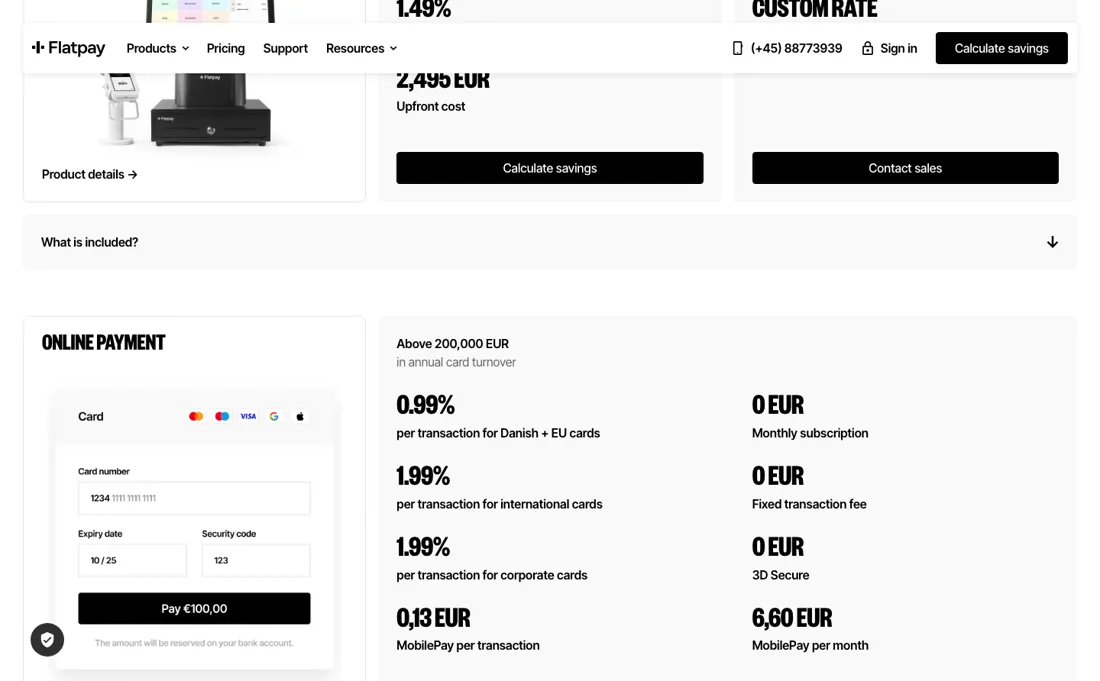
Miss £1,100 of card turnover in a month (the price list's figure on 14 October 2026, incl. VAT; it was £995 in September) and you are charged £39, which for a quiet month is the same thing as a monthly fee wearing a different hat. Do the sum before you sign: a shop turning over £500 on cards pays £7.45 in transaction fees and then £39 on top, so the cost of taking cards is six times what the rate suggests.
The rate itself is straightforward and the terminal really is free to start, so this is a good fit for a busy till and a poor one for a market stall, a seasonal business or anyone whose card volume swings. And the four-figure POS installation charges are real money that the “no hidden fees” promise sits directly above — they are disclosed, but they are not what most people picture when they read that line.
Watch the video review
The video version of this review, from our YouTube channel.
⚡ Short on time? Watch the 30-second verdict Short.
What Flatpay does
Card terminals, POS systems and online payments for physical shops across Europe, sold with on-site installation and 24/7 support. One flat rate on every card type: 1.49% on the terminal, 1.69% on the POS tiers, with daily payouts and no monthly subscription.
What buyers report about Flatpay
Hands-on: not tested by usReported by buyers: Trustpilot, read August 2026
Themes from the buyer-review sites listed at the foot of this page, read in August 2026. We have not run Flatpay ourselves, so this is other buyers' experience rather than ours. We summarise it here because the complaints are usually the part a vendor page leaves out.
- • Positive reviews are almost all about a named salesperson: merchants describe a rep who compared their previous card machine's rate line by line, set the terminal up, and kept checking in afterwards. The onboarding is a person, not a portal, and reviewers who liked it say so in those terms.
- • The flat rate itself draws very little complaint. Where merchants are unhappy it is about the contract and the extras, not about the percentage they were quoted.
- • The most detailed negative reviews say the term is 36 months and that cancelling means paying the remaining months, which reviewers say they did not understand they were signing. Flatpay's own marketing line is 'no contract', so read the agreement before the visit ends.
- • Merchants also report a minimum monthly card turnover with a charge for falling short, described as not explained at signing. That matches the minimum on Flatpay's separate price list, which is linked from the footer rather than from the pricing page.
- • One reviewer describes being cold-called and then asked to send passport, personal ID and home energy bills over email or WhatsApp during onboarding.
- • A reviewer reports an invoice dated December 2025 arriving in August 2026, with Flatpay saying it could no longer access the underlying records.
Where the ratings disagree. The gap is not between platforms, it is between Flatpay's own two pages. The pricing page says 'Zero monthly fees' and 'No fine print or surprises'; the price list behind the footer link carries the turnover minimum and the shortfall charge, and the contract-length complaints on Trustpilot cluster on exactly that gap. Flatpay replies to roughly half its negative reviews, and its profile notes replies typically take over a month.
Pages read (August 2026): Trustpilot
When the paid plan is worth it
The three point-of-sale tiers charge the identical transaction rate of 1.69%, so the GBP 995, 1,495 and 2,495 up front buy onboarding and installation, not a better rate. That GBP 1,500 spread never earns itself back, because there is no rate difference to earn it back with -- decide it on how much setup help you want. The card terminal on its own is cheaper per transaction at 1.49% and costs nothing to start.
The cost easiest to miss sits on a page linked from the footer, not from pricing: a minimum monthly turnover of GBP 1,100 incl. VAT (GBP 995 until September 2026; read 14 October 2026), with GBP 39 charged in any month you fall short. Assessed annually, so seasonal businesses are explicitly in scope and a quiet quarter is three charges. Also there: GBP 410 for a replacement terminal, GBP 25 to re-onboard after a change of business registration, and hardware separately -- tablet and printer GBP 495 each, cash drawer GBP 200, all excluding VAT.
Two boundaries to settle in writing. Every rate the UK page prints is labelled below GBP 200,000 in annual card turnover, and as of 13 September 2026 the above-threshold panel does not render: a larger merchant has no published rate, only a conversation. And the site contradicts itself on POS Pro: GBP 1,495 onboarding on the pricing page against a GBP 1,995 Pro POS bundle on the price list, a GBP 500 gap between two pages of one site. Ask which the contract will say.
Questions we are still checking
Facts about Flatpay that would change a buying decision, and where we stand on each. An unanswered question does not mean the feature is missing; it means we have not confirmed it yet.
- What is the standard contract term and the cost of leaving early? Still checking
Applies to: all products, UK.
Why it matters: Flatpay's help article says the expiry is on the signed agreement and publishes no term; Trustpilot reviewers report 36 months with the remaining months payable on exit.
Checked: Flatpay help: Contract and merchant information (2026-10-14); Trustpilot: Flatpay (2026-08)
Have a public source that answers one of these? How we review explains how we check and correct.
How to actually use Flatpay
There is no sign-up button, and that shapes the whole start. Flatpay's own three steps are an in-person meeting with one of their POS experts, a tailored offer built around your setup and business type, and then full on-site installation of hardware and software, with training. So the first thing to prepare is a sales visit, and the figure to bring to it is your annual card turnover, because every published rate applies only below GBP 200,000 and above that all four products read custom rate.
Once you are live the helpdesk carries the self-service: POS quick start, mPOS and terminal setup, payouts, accounting integration and the customer portal.
Where this section comes from: our research notes (109 words)
Flatpay's own pricing page (its "Ready, Set, Go" three-step section), the POS system product page, the support helpdesk category list and the contract-and-merchant-information FAQ -- flatpay.com/en-gb/pricing, flatpay.com/products/pos-system, help.flatpay.com/en/support/solutions and help.flatpay.com/en/support/solutions/articles/201000038267-contract-and-merchant-information-faq, all read 20 August 2026. Prices and the three onboarding steps re-read on flatpay.com/en-gb/pricing and flatpay.com/en-gb/pricelist on 13 September 2026, the pricing page also in a live browser to establish which panels actually render. For the buyer questions, three help-centre articles were read on 14 October 2026: https://help.flatpay.com/en/support/solutions/articles/201000118254-give-your-accountant-access-to-the-flatpay-portal, https://help.flatpay.com/en/support/solutions/articles/201000117612-payout-information and https://help.flatpay.com/en/support/solutions/articles/201000038267-contract-and-merchant-information; the same day the price list showed the minimum monthly turnover at GBP 1,100 incl. VAT. Buyer opinions on this page come from Trustpilot, read in August 2026.
Common Flatpay setup mistakes
Where Flatpay setups actually go wrong, and what it costs you when they do. Same sources as the setup notes above — not from a walkthrough we ran ourselves.
The part teams underestimate is the paperwork tied to your company registration number.
- Flatpay registers the agreement against that number and treats the two as inseparable, so a change of ownership means a new agreement rather than an amendment.
- Changes to company details have to arrive as a written request by email, and an address change needs telling them well in advance.
Flatpay vs Payoneer, side by side
Each column shows the vendor’s own published entry price, read on the date shown. Entry prices can cover different services or units, so check what each one buys. We do not average them into a score.
Both names above are affiliate links: we may earn a commission if you sign up, at no extra cost to you. Neither changes what this table says.
The natural comparison is Payoneer — not a like-for-like rival — Payoneer moves money for online and cross-border businesses while Flatpay sells the terminal on your counter — but it is the comparison our readers reach for when they ask what taking payments actually costs. The useful contrast is structural: Flatpay publishes one flat percentage and hides the conditions in a separate price list, where the fee that catches people out is a turnover floor rather than a per-transaction surprise.
Frequently asked questions
Who can see the money, and can I remove an accountant's access myself?
Flatpay's help article on accountant access (help.flatpay.com, 'Give your accountant access to the Flatpay portal', read 14 October 2026) says an invited accountant or bookkeeper gets the same access level as the business owner: viewing transactions, downloading reports and managing business settings. That article describes no read-only role. You invite them under My Business, Accounts, but you cannot revoke an invitation or remove a user account yourself; that goes through Flatpay support.
When is the money paid out, and how do refunds come back?
Flatpay's payout article (help.flatpay.com, 'Payout information', modified 5 October and read 14 October 2026) aims for next-business-day payouts, with bank holidays pushing a payout to the next business day; e-commerce payout dates differ per customer. Refunds are deducted from your turnover rather than taken from your bank account, so a heavy refund day shows up as a smaller payout.
How long is the contract, and can I hand it over if I sell the business?
The help article on contracts (help.flatpay.com, 'Contract and merchant information', read 14 October 2026) does not publish a term: it says the expiry date is on your signed agreement. It does say the agreement is tied to your company registration number, so a change of ownership or a new registration number means a new agreement, and changes to company details must arrive in writing from the registered contact person's email address. Merchant reviews on Trustpilot (read August 2026) report a 36-month term; Flatpay's documentation neither confirms nor contradicts that, so read the term on the agreement before you sign.
Is this a hands-on review of Flatpay?
This is a researched assessment, not a hands-on test — where we've used a tool ourselves, we say so explicitly. We name what each tool is good and bad at, and we earn a commission only if you sign up, at no cost to you.
- Buyer reviews on Trustpilot (flatpay.com profile), read August 2026.
- Re-verified 2026-10-14 on flatpay.com/en-gb/pricing and their separate /pricelist page; the four transaction rates and up-front fees unchanged since 2026-08-13, the minimum monthly turnover changed -- see below.
- A dated screenshot of that pricing page, kept on this site as the receipt.
Others in this category
Reviewed financial operations tools that share ground with Flatpay — comparable in what they do, not drop-in swaps:
New reviews, price changes we recorded, and the cost conditions we found. No sponsored placements. Unsubscribe anytime.
This is our researched assessment — not a paid placement. The “Visit” links on this page are affiliate links: we may earn a commission if you sign up, at no extra cost to you, and it never changes our take. How we review →