Melio Review (2026)
 By Daan Haket · Researched and written with an AI assistant · who does what
The free plan is genuinely useful for low bill volume, but the value case narrows as you scale into paid tiers — and the 2.9% card fee only makes sense when you're deliberately floating cash on a card for rewards or timing. Throughout this review we weigh it against Bill.com.
small businesses that want to pay bills by bank transfer or card and get paid, starting free with no subscription.
you already run AP through robust accounting software with bill-pay built in — a second tool adds little.
Transparency: the “Visit” links on this page are affiliate links — we may earn a commission if you sign up, at no extra cost to you. No vendor can pay for a better review or verdict. How we make money →
Pricing (2026)
✓ Pricing re-verified 7 Oct 2026
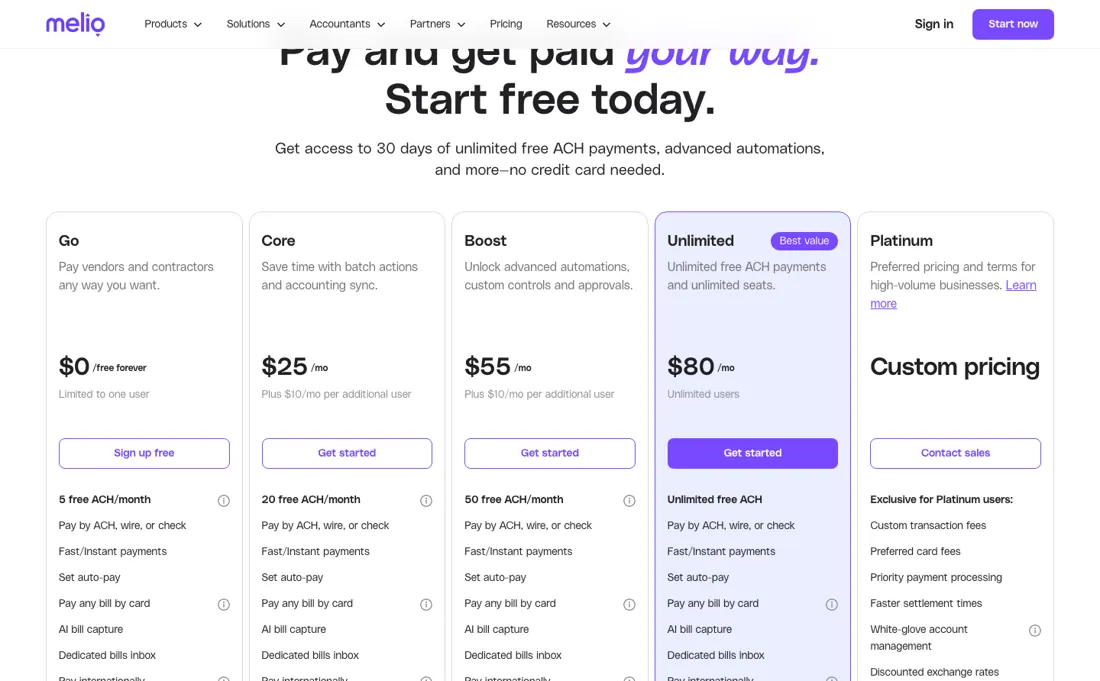
A free Go plan, $0 forever, with 5 free ACH payments a month and $0.50 for each one after that. Core is $25/mo, or $20 billed annually, with 20 free ACH a month; Boost $55/mo, or $44 annually, with 50 free ACH; Unlimited $80/mo, or $64 annually, with unlimited users. Go is limited to one user. The detail our earlier note missed: every paid plan adds $10 a month per additional user, or $8 on annual billing, so a three-person finance team on Core is $45 a month rather than $25.
Card payments carry a flat 2.9% fee; a standard paper check is $1.50 and a wire $10 per payment, with faster options priced higher. Paid plans now start with 90 days free rather than the 30 days we noted earlier: the page offers 90 days of unlimited free ACH payments with no card, and an account that has not subscribed by then drops to Go, losing premium features and the data held in them. Plans change — always verify the live price on their site.
What the price did
We capture Melio’s own pricing page every month and keep the figures, so this is our record of the page — not a forecast, and not someone else’s summary.
Melio's published ladder held steady over the summer: our July and August 2026 captures are identical — $0, $25 (or $20 annually), $55 (or $44) and the same $10 and $8 per-additional-user lines — and the page returned the same figures on 17 August 2026.
Melio’s pricing page, as we read it
Watch the video review
The video version of this review, from our YouTube channel.
⚡ Short on time? Watch the 30-second verdict Short.
What Melio does
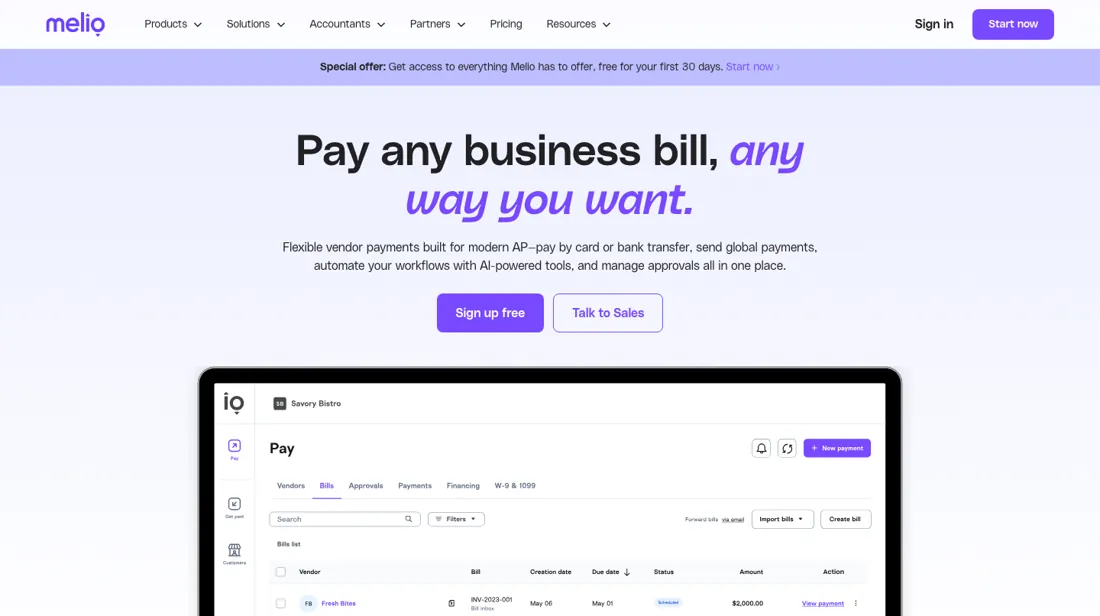
Bill payments for small businesses by bank transfer or card, syncing with your accounting tools. Card payments carry a flat 2.9%, which only pays off when you are deliberately floating cash.
What buyers report about Melio
Hands-on: not tested by usReported by buyers: G2, Capterra, Trustpilot, TrustRadius and the BBB, read August 2026
Themes from the buyer-review sites listed at the foot of this page, read in August 2026. We have not run Melio ourselves, so this is other buyers' experience rather than ours. We summarise it here because the complaints are usually the part a vendor page leaves out.
- • Free ACH transfers and no subscription on the entry tier — reviewers name the pricing as the main draw.
- • The QuickBooks integration and the interface are both repeatedly called easy.
- • TrustRadius reviewers name a feature the pricing page underplays: Melio prints and mails paper cheques for you, which is what actually removes the manual work for businesses whose suppliers still want a cheque.
- • The other repeated benefit is evidentiary — when a vendor claims they were not paid, the delivery tracking settles it in a few clicks. Scheduling payments ahead for cash-flow reasons and role-based access for the finance team come up alongside it.
- • Delays are the top G2 complaint tag (17 mentions), followed by payment issues (16) and payment delays (14). One reviewer's vendor payment left the account on 12 December 2025 and had still not arrived by 9 January 2026.
- • Reviewers report payments processing before the scheduled date, repeatedly, causing overdrafts. If you schedule against a cash-flow calendar, watch this.
- • International payments are the clear weak spot: failed transfers, poor fee disclosure and no way to inspect recipient details after submitting.
- • 2.9% on card payments, and support is thin on the lower tiers.
Pages read (August 2026): Trustpilot
When the paid plan is worth it
The payoff from upgrading tracks bill volume more than anything else. On the free Go plan you get 5 free ACH payments a month, then $0.50 for each additional one. At that price, moving up only pays for itself once your monthly ACH count is high enough that free-tier overage fees would exceed the subscription cost itself — or once you need features Go simply doesn't offer. Core ($25/mo, $20/mo billed annually) includes 20 free ACH a month, Boost ($55/mo, $44/mo annually) includes 50, and Unlimited ($80/mo, $64/mo annually) includes unlimited free ACH, so heavy bill-pay volume is where the paid tiers earn their keep.
The sharper breakpoint for growing teams is per-seat math: Core and Boost each add $10/mo per additional user ($8/mo billed annually), so a business adding several teammates can find Unlimited's flat unlimited-user pricing cheaper than stacking seats on a lower tier. Go itself is one user only, so the first teammate is a reason to upgrade on its own. What upgrading does not touch: the 2.9% card payment fee is flat across every tier, and per-item check and wire fees apply no matter which plan you're on.
Our monthly capture read this vendor's pricing page in July 2026 and again in August 2026, and the amounts were the same both times. We keep watching — the registry records what moves.
Questions we are still checking
Facts about Melio that would change a buying decision, and where we stand on each. An unanswered question does not mean the feature is missing; it means we have not confirmed it yet.
- Do Approver and Viewer users count toward the $10-a-month extra-user charge on Core and Boost? Still checking
Applies to: Core and Boost charge per additional user; the roles article describes approve-only and view-only roles.
Why it matters: a finance team that only needs a manager to approve payments pays for that seat or not.
Checked: Melio: What are the different subscription plans (2026-10-07); Melio: The different user roles (2026-10-07)
Have a public source that answers one of these? How we review explains how we check and correct.
How to actually use Melio
Getting started means creating an account with your business details (legal name, industry, address) and personal details, then connecting a way to pay — a bank account verified instantly through Plaid or via micro-deposits, or a card. Vendors get added the same way, with either their bank details for direct deposit or just a mailing address for a check. The first real payment happens from the Pay dashboard: start a new payment, enter the vendor, bill amount, invoice details and due date, then choose how and when the vendor gets paid.
Distilled from Melio's own pricing page (melio.com/pricing), Melio help-center article summaries and a QuickBooks community thread surfaced via search. Re-verified 7 October 2026: https://melio.com/pricing/ (plan cards, fee table and FAQ, served HTML) and these help-centre articles in a browser render: What are the different subscription plans in Melio https://help.melio.com/hc/en-us/articles/15943315824028-What-are-the-different-subscription-plans-in-Melio; The different user roles in Melio https://help.melio.com/hc/en-us/articles/4418593083932-The-different-user-roles-in-Melio; How to view and manage your Melio subscription plan https://help.melio.com/hc/en-us/articles/15965251242524-How-to-view-and-manage-your-Melio-subscription-plan.
Common Melio setup mistakes
Where Melio setups actually go wrong, and what it costs you when they do. Same sources as the setup notes above — not from a walkthrough we ran ourselves.
Where people get stuck in practice: skipping the micro-deposit bank verification step blocks payments until it's completed.
- QuickBooks users also report the accounting sync breaking down — bills not appearing inside Melio, the bill-pay screen stuck on "loading," or payments not posting back to the books afterward.
- Support is only staffed during U.S. Eastern business hours, so anything that goes wrong outside that window tends to sit unresolved until the next day.
Melio vs Bill.com, side by side
Each column shows the vendor’s own published entry price, read on the date shown. Entry prices can cover different services or units, so check what each one buys. We do not average them into a score.
Both names above are affiliate links: we may earn a commission if you sign up, at no extra cost to you. Neither changes what this table says.
The natural comparison is Bill.com — the per-seat AP platform for bigger finance teams. Weigh it against Bill.com on the job you actually need done.
Frequently asked questions
What does Melio cost?
The Go plan is free forever with 5 ACH payments a month, then $0.50 each, for one user. Core is $25 a month ($20 annually) with 20 free ACH, Boost $55 ($44) with 50 free ACH, and Unlimited $80 ($64) with unlimited ACH and users. Read on 17 August and again on 7 October 2026.
What does it cost for a team?
More than the plan price, and this is the part most summaries leave out: each additional user is $10 a month, or $8 on annual billing, on top of the plan. Core with three users is $45 a month billed monthly, not $25. Count the seats before comparing with a flat-fee competitor.
Are the payments themselves free?
ACH payments are free up to your plan's allowance and $0.50 each after it. Card payments cost a flat 2.9%, and cheques and wires carry their own fees. For a business paying mostly by ACH the effective cost is close to the subscription; for one paying suppliers by card, the 2.9% will dwarf it.
Is there a free trial, and what happens when it ends?
Paid plans open with 90 days free, which the pricing page describes as 90 days of unlimited free ACH payments with no card needed. If you have not subscribed by the end, the account converts to the free Go plan, you lose the premium features, and any data from those features is deleted, so note what you set up in paid features before day 90 if you might not continue (pricing FAQ, read 7 October 2026).
Who needs a paid seat?
Go is owner-only. Core and Boost allow all user roles at $10 a month per extra user ($8 annually), and Unlimited includes unlimited users (plan table, read 7 October 2026). Melio has six roles plus Cardholder: Owner, Admin, Accountant, Contributor, Approver and Viewer, where an Approver sees only the bills and payments assigned to them and a Viewer can look but not change anything. Whether an Approver or Viewer counts as a paid user on Core or Boost is not stated in the help centre: not confirmed. On Go, Xero and QuickBooks Online sync is limited to the first 10 payments.
Is this a hands-on review of Melio?
This is a researched assessment, not a hands-on test — where we've used a tool ourselves, we say so explicitly. We name what each tool is good and bad at, and we earn a commission only if you sign up, at no cost to you.
- Buyer reviews on G2, Capterra, Trustpilot, TrustRadius and the BBB, read August 2026.
- Re-verified 2026-08-17 and 2026-10-07 on their own pricing page.
- A dated screenshot of that pricing page, kept on this site as the receipt.
Others in this category
Reviewed financial operations tools that share ground with Melio — comparable in what they do, not drop-in swaps:
New reviews, price changes we recorded, and the cost conditions we found. No sponsored placements. Unsubscribe anytime.
This is our researched assessment — not a paid placement. The “Visit” links on this page are affiliate links: we may earn a commission if you sign up, at no extra cost to you, and it never changes our take. How we review →