Bill.com Review (2026)From $49/user Plus Per-Payment Fees
 By Daan Haket · Researched and written with an AI assistant · who does what
Per-user pricing plus per-transaction fees means the real cost depends on team size and payment volume — it's built for finance teams with genuine AP workflows and is overkill if you pay a handful of bills a month.
growing companies with real accounts-payable volume and approval chains that want to automate bill pay and sync to accounting.
you pay only a few bills a month — your accounting software or a free tool like Melio's base plan covers it without per-seat fees.
Transparency: the “Visit” links on this page are affiliate links — we may earn a commission if you sign up, at no extra cost to you. No vendor can pay for a better review or verdict. How we make money →
Pricing (2026)
✓ Pricing re-verified 15 Sep 2026
| Plan | Price | What you get |
|---|---|---|
| Essentials | $49 per user per month | Accounts-payable and receivable plan |
| Team | $65 per user per month | Accounts-payable and receivable plan |
| Corporate | $89 per user per month | Accounts-payable and receivable plan |
| Enterprise | no published price | Accounts-payable and receivable plan, quote-only |
| Spend and Expense | $0 per user per month | Credit lines $1,000-$5M, not guaranteed, set on approval |
| BILL AP & AR Partner | $49 a month | Accountant subscription |
| Accountant Console | $49 a month | Accountant subscription |
Summarised from the pricing notes below; the notes carry the conditions.
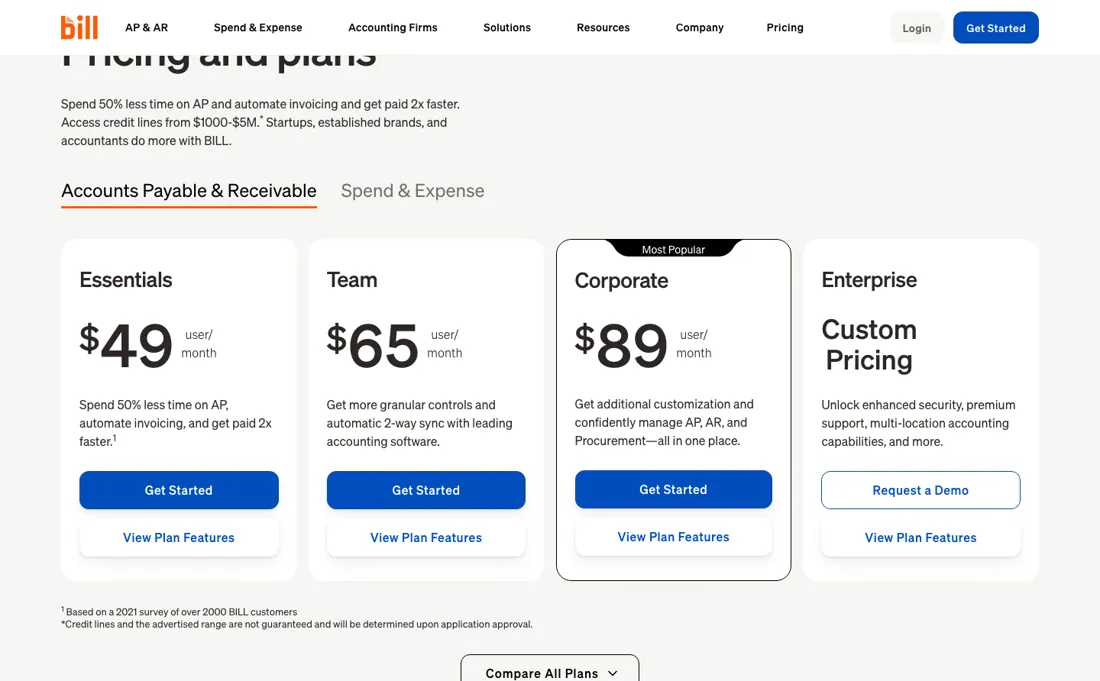
Accounts-payable and receivable plans priced per user: Essentials $49, Team $65 and Corporate $89 per user per month, plus a quote-only Enterprise - the same four cards as on 15 August 2026. The separate Spend and Expense product is $0 per user per month and carries credit lines the page advertises as $1,000-$5M, not guaranteed and set on approval. Transaction fees stack on top of the seat, and are where the real cost hides.
ACH or ePayment is $0.59, a mailed check $1.99, an international USD wire $19.99, and an international FX wire or a virtual card is free - free of a stated fee, that is, because the same row says the exchange rate applies and BILL only discloses that rate at the time of the transaction. Instant payment is 1.0% with a $9.99 minimum and a $100 maximum, and Pay Faster ACH $11.99.
Full pricing notes (2 more paragraphs)
Expedited checks are $24.99 overnight, $19.99 two-day and $14.99 three-day. Paying by card costs 2.9%, and the receiver pays 2.9% on credit or debit card payments; a receiver taking an instant transfer pays 1% to 1.49% with a $1 minimum. A second fee block, easy to miss under the payment table, prices the paperwork and the mistakes: 1099 e-filing to the IRS is $2.99 per form ($1.99 through an accountant console), state filing $1.49 and mailing a 1099 to the vendor $1.99, while voiding a check is $25, a returned check $3, a re-debit after failed funding $25 and an ACH that fails after the receiver has been paid $50.
The accountant side is priced separately again: a BILL AP & AR Partner subscription at $49 a month, an Accountant Console the FAQ also prices at $49 a month, and a 10-20% client subscription discount that scales with how many clients you onboard.
Plans change — always verify the live price on their site.
Correction after re-checking: Four figures in our earlier text were wrong, and we have corrected them against BILL's own pricing page. Essentials is $49 per user per month, not about $45. Team is $65, not about $55. ACH and ePayment cost $0.59 per transaction, not about $0.49. And an international wire is $19.99 in USD while an international FX wire is free, where we had a single figure of about $9.99. That $9.99 is in fact the minimum fee on the 1.0% instant-payment charge, which we had attached to the wrong line. Corporate at $89 and the $1.99 check fee were right. Our own captures of that page in July and August 2026 already carried $0.59 and $19.99, so this was our error rather than a price change. (re-verified 2026-08-15)
What the price did
We capture Bill.com’s own pricing page every month and keep the figures, so this is our record of the page — not a forecast, and not someone else’s summary.
Our July and August 2026 captures of BILL's pricing page differ as documents by 29 characters and by not one figure: all thirty-four price lines are identical, from the $0.59 ACH fee to the $24.99 overnight check. Reading it again on 15 August 2026 returned the same fees a third time, and on 14 and 15 September 2026 a fourth and fifth: $49, $65 and $89 per seat, and every per-transaction fee unchanged. The two September captures are byte-for-byte the same document. What that record shows is that the fee schedule has been stable while our own summary of it drifted, which is the more useful lesson: the numbers to check are the per-transaction ones, and they have not moved in five readings across three months.
Bill.com’s pricing page, as we read it
Watch the video review
The video version of this review, from our YouTube channel.
⚡ Short on time? Watch the 30-second verdict Short.
What Bill.com does
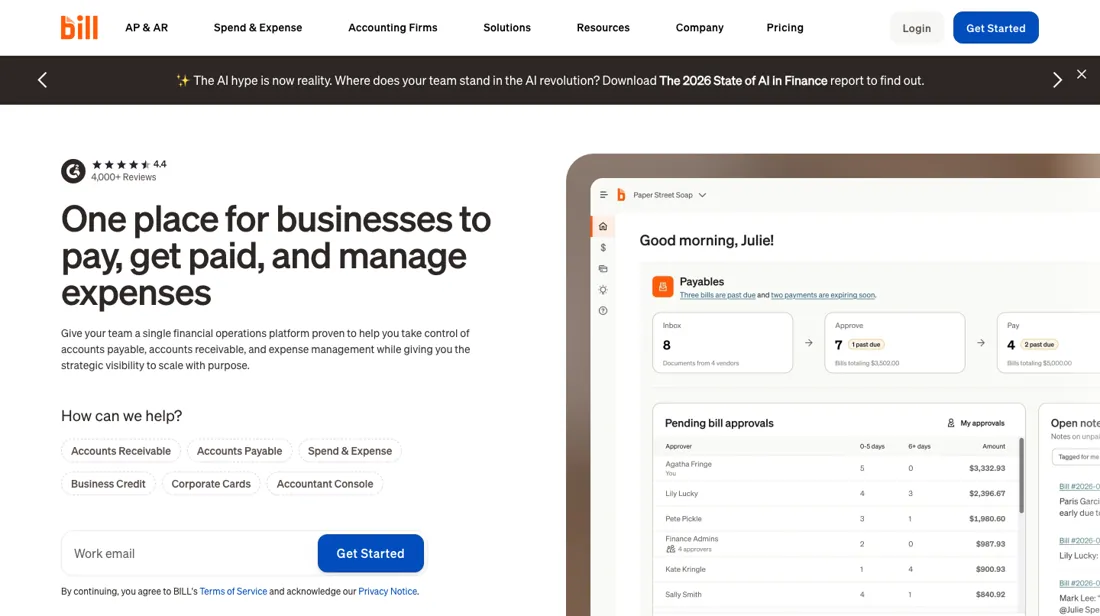
Accounts-payable and receivable automation for finance teams with real approval chains.
What buyers report about Bill.com
Hands-on: not tested by usReported by buyers: G2, TrustRadius, Gartner Peer Insights, the Apple App Store and GetApp, read August 2026 (App Store reviews from September 2025 through 30 July 2026; the GetApp listing is marked last updated July 2026)
Themes from the buyer-review sites listed at the foot of this page, read in August 2026 (App Store reviews from September 2025 through 30 July 2026; the GetApp listing is marked last updated July 2026). We have not run Bill.com ourselves, so this is other buyers' experience rather than ours. We summarise it here because the complaints are usually the part a vendor page leaves out.
- • Approval workflows and centralised payments genuinely save finance teams time — 4.3 on G2 across more than 700 reviews.
- • Scales with the business without needing to be replaced, which reviewers name as the reason they stay.
- • GetApp reviewers in operations and firm-administration roles name reliable, on-time payment processing and the fact that AP, AR, invoicing and reporting sit in one place, and one App Store reviewer in October 2025 reports a suggested fix actually shipping within days.
- • Support is the dominant complaint: hard to reach, and slow to resolve once you do.
- • Syncing with QuickBooks Online, Sage Intacct and NetSuite is reported as troublesome often enough to plan for — test your own integration during the trial, not after.
- • International payment capability is limited relative to the domestic product.
- • Held and delayed payments are the dominant App Store complaint and they run right up to July 2026: money described as held hostage, a five-day payment that took sixteen business days, and funds arriving on a virtual card rather than as the expected bank transfer.
- • Getting verified is its own ordeal. A March 2026 reviewer calls the verification process invasive and exhausting with daily phone calls, and several describe getting stuck creating or linking companies just to receive a single payment.
- • Support has no phone line in these accounts, and reviewers on both platforms describe tickets closed without resolution. GetApp reviewers put it plainly: once your problem falls outside the help articles you are at the mercy of whoever picks up.
- • Fee surprises come up too, including a debit-card payment triggering a charge reviewers considered unreasonable, and needing a subscription at all in order to be paid by other companies.
Where the ratings disagree. The App Store is where a different person complains. G2, TrustRadius and Gartner are written by the AP and AR administrators who chose BILL; the app reviews are largely from people on the receiving end of a payment, who did not choose it and just want their money. Their complaints — verification, held funds, an unexpected virtual card — are about being paid through BILL rather than paying with it. If you are evaluating it, that is the experience you are handing your own suppliers.
When the paid plan is worth it
BILL's AP & AR line runs Essentials at $49 user/month, Team at $65 user/month, Corporate at $89 user/month, and Enterprise at custom pricing. The largest step in that table is from Team to Corporate. Essentials connects to accounting software only through manual CSV import/export and gives you 6 standard user roles; Team adds automatic 2-way sync with QuickBooks Online, Pro, Premier and Xero; Corporate folds in procurement, which is an add-on on Essentials and Team, and lower-cost approver-only seats.
Upgrading pays off when most of the people you are adding only approve, or when you need purchase requests and purchase orders. What it does not solve is your ledger: automatic 2-way sync with QuickBooks Enterprise, Oracle NetSuite, Sage Intacct, Microsoft Dynamics, Acumatica and Rillet, plus API access, single sign-on, dual control and multi-entity accounting, all sit in Enterprise. No tier changes the per-payment fees either; they stack on every plan, at $0.59 for ACH, $1.99 for a mailed check, $19.99 for an international USD wire and 2.9% when you fund by card. The separate Spend & Expense product is listed at $0 user/month.
Our monthly capture read this vendor's pricing page in July 2026 and again in August 2026, and the amounts were the same both times. We keep watching — the registry records what moves.
How to actually use Bill.com
BILL's own docs route a new account through bill.com/signup, where you select Accounts Payable & Receivable, set a username and password, then sign in and add a bank account in the web app; production billing begins after a 30-day trial.
Distilled from All of this comes from BILL's own material opened in this session — the public pricing page and the developer documentation (production setup, sandbox-vs-production, and the Onboarding and User verification Element guides); the end-user help center at help.bill.com returned only a JavaScript shell with no readable text, the accountant onboarding guide is behind a download form, and we found no independent walkthrough worth citing.
Common Bill.com setup mistakes
Where Bill.com setups actually go wrong, and what it costs you when they do. Same sources as the setup notes above — not from a walkthrough we ran ourselves.
The friction sits after that form.
- A manually added bank account triggers a test ACH deposit that BILL says can take up to 2 business days before you can enter the amount and verify it; adding the account through Plaid skips verification entirely.
- Organization onboarding also runs KYC/KYB checks, and users flagged by BILL's risk model are marked NOMINATED and must clear identity verification, by questionnaire or document upload, before they can use a funding method at all.
- MFA with a valid phone number is required before adding a funding method or creating a payment.
- Then each vendor bank account you add carries its own one-time verification of 2 business days, and a first connection to a vendor in the BILL Network stays PENDING for 3 days.
Bill.com vs Melio, side by side
Each column shows the vendor’s own published entry price, read on the date shown. Entry prices can cover different services or units, so check what each one buys. We do not average them into a score.
Both names above are affiliate links: we may earn a commission if you sign up, at no extra cost to you. Neither changes what this table says.
The natural comparison is Melio — the free-to-start AP alternative for smaller volumes.
Frequently asked questions
BILL vs Ramp for accounts payable — which syncs better with QuickBooks and NetSuite?
We have not run both, so take this as what each vendor documents rather than a bench test. BILL is an AP and AR product sold per user — $49, $65 and $89 a month for Essentials, Team and Corporate — with two-way sync to accounting systems as its core pitch and per-transaction fees on top. Ramp leads with corporate cards and spend management and gives its software away against interchange, so the comparison is not like for like: you are weighing a paid AP workflow against a card-funded one. The question worth asking both in writing is which direction the sync runs for bills, vendors and payment status, and what happens to a record that is edited on the accounting side after it has synced.
I received a check from bill.com — is it legitimate?
Most likely yes, and here is why it looks odd. BILL is the platform thousands of companies use to pay their suppliers, so a check arriving with bill.com on it usually means your customer paid you through it rather than that BILL owes you anything. A mailed check is a standard $1.99 payment method on their fee schedule. Verify it the ordinary way — match it to an invoice you actually issued and to a customer you actually have, and contact that customer directly using a number you already had, not one printed on the letter. Buyers do report on the app stores that payments arrive in a different form than expected, including on a virtual card rather than as a bank transfer, so an unexpected format is not by itself a red flag.
What does BILL cost beyond the per-user price?
The fees are the part that scales with your business rather than your headcount. On top of $49, $65 or $89 per user per month sit $0.59 for an ACH payment, $1.99 for a mailed check, $19.99 for an international USD wire (an FX wire is free), 1.0% for an instant payment with a $9.99 minimum and $100 cap, and $11.99 for Pay Faster ACH. Expedited checks run $24.99, $19.99 and $14.99 for overnight, two-day and three-day. Paying by card costs 2.9%, and if you are the one being paid by card you pay 2.9% too. Read on their pricing page on 15 August 2026, and unchanged in our captures since July.
Is this a hands-on review of Bill.com?
This is a researched assessment, not a hands-on test — where we've used a tool ourselves, we say so explicitly. We name what each tool is good and bad at, and we earn a commission only if you sign up, at no cost to you.
- Buyer reviews on G2, TrustRadius, Gartner Peer Insights, the Apple App Store and GetApp, read August 2026 (App Store reviews from September 2025 through 30 July 2026; the GetApp listing is marked last updated July 2026).
- Re-verified 2026-09-15 on their own pricing page.
- A dated screenshot of that pricing page, kept on this site as the receipt.
Others in this category
Reviewed financial operations tools that share ground with Bill.com — comparable in what they do, not drop-in swaps:
New reviews, price changes we recorded, and the cost conditions we found. No sponsored placements. Unsubscribe anytime.
This is our researched assessment — not a paid placement. The “Visit” links on this page are affiliate links: we may earn a commission if you sign up, at no extra cost to you, and it never changes our take. How we review →