Imagify Review (2026)WordPress Image Compression From $4.99
 By Daan Haket · Tested hands-on · written with an AI assistant · who does what
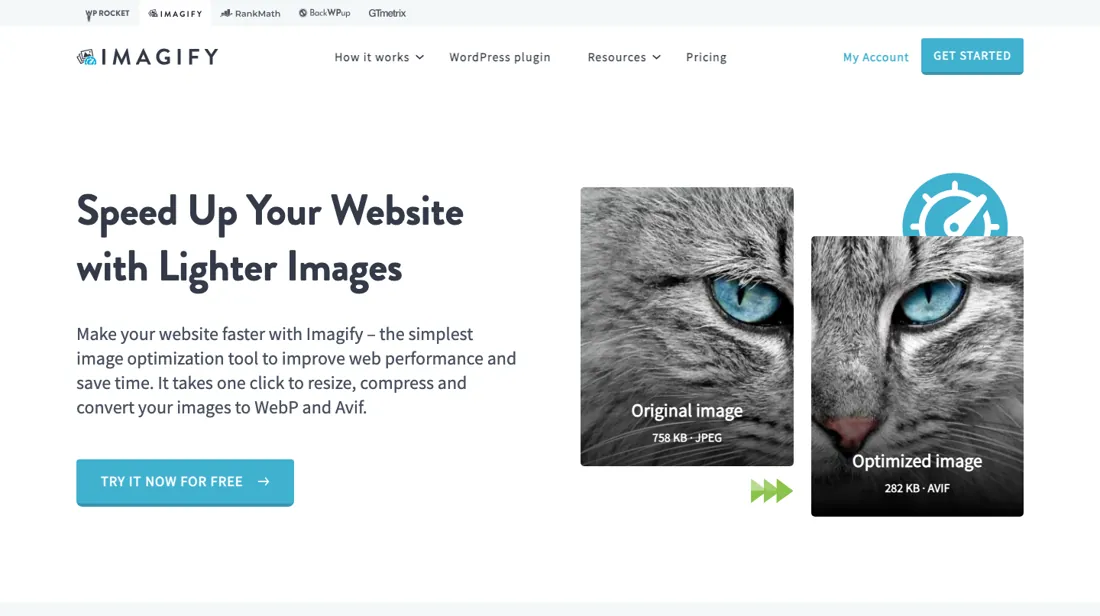
A prepaid yearly plan is not refunded.
- Best for WordPress owners with photo-heavy blogs or stores
From $4.99 · Growth · per month, billed yearly, excluding tax · read 2026-10-17
Try Imagify free →Affiliate link: we may earn a commission if you sign up, at no extra cost to you. It never changes our verdict.
Is Imagify right for you?
Your pain“Big photos make my pages slow, and shrinking each one by hand takes hours.”
Does Imagify solve it?YesOur test (21 Oct 2026): Smart compression cut a 48.9KB JPG to 12.3KB, and an 11.8KB PNG to 3.3KB, each in about 8 seconds.
Your planGrowth, $4.99 a month billed yearly ($5.99 monthly), with a 500MB monthly meter
Try Imagify →
Your pain“Years of uploads are still full size and I need to shrink them all in one pass.”
Does Imagify solve it?PartlyOur test (21 Oct 2026): the quota counted the original file size, not the compressed one, so a bulk run burns the meter faster than expected.
Your planInfinite, $9.99 a month billed yearly ($11.99 monthly); a single month can cover a catch-up, but a fair-use clause applies
Try Imagify →
Your pain“My site gets a handful of new photos a month and a paid plan feels like overkill.”
Does Imagify solve it?PartlyOur test (21 Oct 2026): a 3.4MB photo was refused at the 2MB per-image cap, though it used no quota.
Your planStarter, free, 20MB a month; larger photos need a paid plan
Try Imagify →
- your site is not on WordPress; your host, CDN or theme already compresses and converts images; or you add only a few images a month and the free quota or a manual tool covers it.
The “Try” buttons are affiliate links: we may earn a commission if you sign up, at no extra cost to you, and it never changes our verdict.
Also in: Software for Shopify and online stores
Transparency: the “Visit” links on this page are affiliate links: we may earn a commission if you sign up, at no extra cost to you. No vendor can pay for a better review or verdict. How we make money →
Which Imagify plan do you need?
3 plans, 2 questions, no signup.
Answer two quick questions to see your plan.
Your plan
Starter
$0 a month
20MB a month, about 200 images, 2MB per image
Your plan
Growth
$4.99 a month billed yearly, or $5.99 billed monthly
500MB a month, about 5,000 images; $5 per extra GB
Your plan
Infinite
$9.99 a month billed yearly, or $11.99 monthly
Unlimited images and upload size, fair-use clause
Prices as we read them on 2026-10-17; check the checkout before you pay. The plan button is an affiliate link: we may earn a commission, at no extra cost to you.
What Imagify costs at your size
What each plan costs a month on annual billing (monthly billing below it), per store from Imagify’s own pricing page. The cheapest plan at each size is marked.
| Stores | Starter | Growth | Infinite |
|---|---|---|---|
| 1 store | $0Best value at this size | $4.99 $5.99 monthly | $9.99 $11.99 monthly |
| 2 stores | $0Best value at this size | $4.99 $5.99 monthly | $9.99 $11.99 monthly |
| 3 stores | $0Best value at this size | $4.99 $5.99 monthly | $9.99 $11.99 monthly |
| 5 stores | $0Best value at this size | $4.99 $5.99 monthly | $9.99 $11.99 monthly |
| 10 stores | $0Best value at this size | $4.99 $5.99 monthly | $9.99 $11.99 monthly |
Prices read 2026-10-24; tax excluded unless the vendor says otherwise. Calculated by our cost engine; the same numbers are in our open data.
See current prices on Imagify →Tested by our team on 21 October 2026 on the free plan in Imagify's web app: Daan created the account and our AI assistant ran the test in Daan's browser. We uploaded three of our own simple test images (a 12 KB PNG, a 50 KB JPG and a 3.4 MB PNG), compared Smart and Lossless and watched the quota counter after each step.
How we tested
- Recorded the optimizer settings and initial allowance
- Submitted two reference images using Smart compression
- Read the optimizer summary for those uploads
- Resubmitted the first image with Lossless compression
- Applied a resize width of 600 pixels
- Attempted to submit the oversized reference image
- Opened the image optimisation history
- The account started at '0.0KB / 20MB used. You have 100% credit left.' Auto-converting PNG to JPEG is marked 'only for Pro users'; resizing is available on free.
- Smart compression took the PNG from 11.8KB to 3.3KB (72.36%) and the JPG from 48.9KB to 12.3KB (74.91%), each within about 8 seconds.
- After the first two images the quota counter read 61.44KB of 20MB, much closer to their input sizes than to the compressed results. The later counter increments varied, so we did not establish the exact quota accounting rule.
Pricing (2026)
✓ Pricing re-verified 17 Oct 2026
“shall not be entitled to a refund of the amount already debited.”Source: imagify.io/terms, read 23 Oct 2026
Starter is $0 a month: 20MB a month, about 200 images, unlimited websites, 2MB maximum per image, no credit card. Growth is $4.99 a month billed yearly, or $5.99 billed monthly: 500MB a month, about 5,000 images, unlimited websites and upload size, and $5 for each additional GB. Infinite is $9.99 a month billed yearly, or $11.99 monthly: unlimited images, websites and upload size at no extra cost, subject to the fair-use clause in the terms.
The page advertises two months free on yearly billing but does not show the yearly invoice total. The terms rule out a refund on a prepaid twelve-month subscription. You cancel from the Billing page, and images already optimised stay optimised. Plans change, so check the live price on their site before you buy.
Category context: IT & Productivity. Across the 43 tools in this category that we researched with a public US-dollar price, the median entry price is $15 a month (lowest paid plan as listed, per seat where the vendor prices per seat). Imagify’s entry price of $4.99 a month sits below that median. Compare pricing conditions in the Software Cost Atlas →
What the pricing page doesn’t say
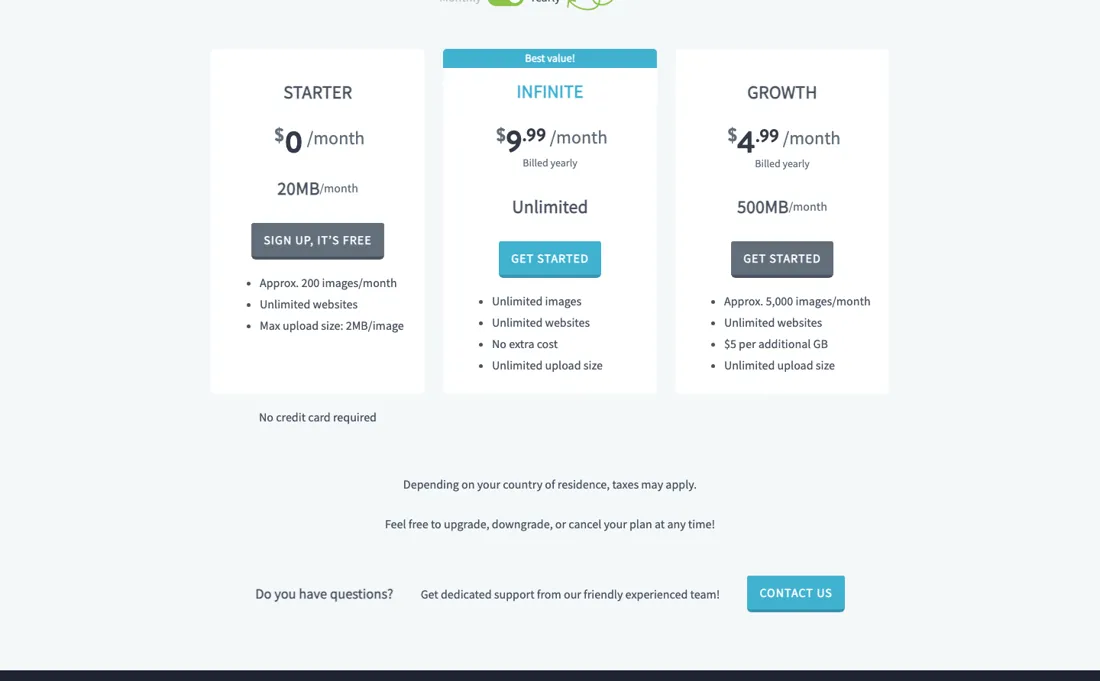
The free tier's 20MB a month and 2MB per image are only enough for a test, Growth charges $5 for each extra GB, and Infinite's unlimited use falls under a fair-use clause. In our test on 21 October 2026 the free quota counted the original file size, not the compressed result (a 11.8KB and a 48.9KB image moved the counter to 61.44KB), a 3.4MB file was refused at the 2MB cap without using quota, and the 'You saved' total on the web app's optimizer page showed the size after compression instead of the saving; the History page had the right figures.
Watch the video review
The video version of this review, from our YouTube channel.
What Imagify does
Image compression and WebP and AVIF conversion for WordPress, through a plugin that also bulk-optimises an existing media library; plans are metered by megabytes of images a month.
Past 500MB, Infinite is the cheaper plan
Growth covers 500MB of images a month, which Imagify puts at about 5,000 images, and charges $5 for each GB beyond that. On yearly billing, Growth at $4.99 plus one extra GB comes to $9.99, the same as Infinite, our arithmetic from the card prices. So if you regularly go past 500MB, Infinite removes the meter for the same money or less. Starter's 20MB a month, about 200 images with a 2MB cap per file, is enough to test the plugin but not to run a bulk optimisation of an existing media library.
A one-time catch-up of an old library is where most sites hit the limit, so a single month on Infinite at $11.99 can be cheaper than a year of overage.
What we found running Imagify ourselves
The first findings are at the top of this page. The rest:
- Lossless took the same PNG from 11.8KB to 5.8KB (51.05%), against 3.3KB with Smart.
- The 3.4MB file was refused straight away with 'File size must be under 2.0 MB. Current file size is 3.4 MB' and used no quota.
- The summary on the optimizer page is mislabelled: 'You saved 15.5KB out of 60.7KB' gave the size after compression (3.3KB + 12.3KB), while the real saving was about 45KB. The History page showed the right saving per file.
- History notes 'Optimized images are available to download for 24 hours' on a free account. End state: 92.16KB of 20MB used after four optimisations and one refused upload.
Claim vs. what we measured
We set a claim from Imagify's own pages next to what we saw in our test, on the plan named. The status says whether the two describe the same thing and match; it is not a verdict on the product. Confirmations are listed too.
| What the vendor says | What we measured | Status | What it means if you buy |
|---|---|---|---|
| "Max upload size: 2MB/image" on StarterSource: imagify.io, read 17 Oct 2026 | Measured 2026-10-21: A 3.4MB file was refused with 'File size must be under 2.0 MB. Current file size is 3.4 MB' and used no quota.Our test, 21 Oct 2026; Starter (free) in the web app, account not yet confirmed | ConfirmedSame quantity: the per-image upload limit. | Files over 2MB need resizing before upload on the free plan. |
| "20MB/month" on StarterSource: imagify.io, read 17 Oct 2026 | Measured 2026-10-21: The account showed '0.0KB / 20MB used'. After the first two images (11.8KB and 48.9KB) the counter read 61.44KB, much closer to their input sizes than to the compressed results; later increments varied, so we did not establish the exact accounting rule.Our test, 21 Oct 2026; Starter (free) in the web app, account not yet confirmed | ConfirmedSame quantity for the displayed allowance. We did not reach the 20MB limit or see a monthly reset. | Budget the free allowance on your original file sizes rather than on the compressed results, as a rough guide; the exact rule and what happens at 20MB were not tested. |
Mail in the first 14 days
3 emails in the 14-day window; first email after signup: unknown (exact signup time not recorded); 0 with an explicit offer.
Retained inbox and junk only; removed or archived mail is outside this observation. Ambiguous supplier attribution is excluded. Day numbers use elapsed 24-hour periods since the recorded signup date at midnight Europe/Amsterdam; the signup hour is unknown. Offer flags quote literal subject/body text. Replies in our own correspondence (support tickets, our comment requests) are excluded; one-time codes, our own address, our account name and our name are replaced in brackets.
| Day | Time (UTC) | Sender | Literal subject | Folder | Offer evidence |
|---|---|---|---|---|---|
| Day 0 | 2026-10-21 05:33:30 UTC | Imagify team / imagify.io | Welcome to Imagify! | inbox | |
| Day 0 | 2026-10-21 05:34:56 UTC | Imagify team / imagify.io | Getting started with Imagify | inbox | |
| Day 9 | 2026-10-29 22:02:28 UTC | Imagify team / imagify.io | Help Us To Improve Imagify | inbox |
What this test does not show:
- Downloading the results, and so their visual quality, transparency and actual dimensions
- The resize result (we did not check the output size)
- The WordPress plugin and automatic WebP and AVIF conversion (we only used the web app)
- Page Optimization and the API
- What happens when the 20MB a month runs out
- Real photos (we only used simple test images)
Most of our reviews are researched rather than run. How we review explains which is which, and why we do not pretend otherwise.
How to actually use Imagify
Make a backup of your site and its uploads folder first, because a bulk run rewrites many files at once. Imagify's documentation describes the setup: in WordPress go to Plugins, Add New, search for Imagify and click Install Now; create an account and enter your API key under Settings, Imagify; then run the bulk optimisation from the Media Library. Start on the free Starter plan and optimise a handful of images to judge the quality and the size saving on your own pages.
If you switch on WebP or AVIF, check that your theme, cache plugin and CDN deliver the new formats, and test a page in a browser afterwards. Measure your monthly upload volume before you buy: the meter is megabytes of the original files, not images and not the compressed result (as our test on 21 October 2026 showed), and yearly prepayment is not refunded.
Distilled from Imagify's own pages: imagify.io/pricing, read in a browser on 17 October 2026 (yearly view) and on 15 October 2026 (monthly view); the terms at imagify.io/terms (prices in US dollars excluding tax, the refund clause, fair use in section 5.2.2) and the documentation on installing the plugin, connecting the account, bulk optimisation and cancelling, read on 15 October 2026. The overage arithmetic is ours. Imagify is an affiliate partner of ours through Awin. For the backup-deletion question: imagify.io/documentation/safe-delete-original-images-backup/, read on 25 October 2026.
Imagify vs WP Rocket, side by side
Each column shows the vendor’s own published entry price, read on the date shown. Entry prices can cover different services or units, so check what each one buys. We do not average them into a score.
Both names above are affiliate links: we may earn a commission if you sign up, at no extra cost to you. Neither changes what this table says.
The natural comparison is WP Rocket: WP Rocket is in our dossiers too and comes from the same group of WordPress companies, but it is a caching plugin, priced as annual licences from $59 a year for one site when we read it on 2 October 2026. Imagify does the image side: compression and next-gen formats. Many sites run both.
Frequently asked questions
How much does Imagify cost?
Read 17 October 2026: Growth is $4.99 a month billed yearly or $5.99 monthly for 500MB a month, and Infinite is $9.99 billed yearly or $11.99 monthly for unlimited use. Starter is free for 20MB a month. Prices are in US dollars, excluding tax.
Is there a free plan?
Yes. Starter is $0 a month with no credit card: 20MB a month, about 200 images, unlimited websites and 2MB per image. In our test on 21 October 2026 the quota counted the original size of each image, a 3.4MB file was refused without using any of it, and the free web app kept optimised images available to download for 24 hours.
Can I get a refund?
The refund clause in the terms rules out a refund on a prepaid twelve-month subscription. Monthly billing is the lower-risk way to start.
What happens to my images if I cancel?
Imagify's cancellation guide says images that are already optimised remain optimised. You cancel from the Billing page.
Can I delete Imagify's original-image backups to save disk space?
You can, but you lose options. Imagify's documentation page on deleting original backups, read on 25 October 2026, says the backups sit in wp-content/uploads/backup and that deleting them is generally safe, but without them you cannot restore images to the original, re-compress at another level, or generate next-gen versions later. Imagify recommends downloading the originals to a safe place first. If you may switch compression level or add next-gen formats later, keep the backups or an off-server copy.
Is this a hands-on review of Imagify?
Yes. We tested Imagify ourselves on 2026-10-21; the section above says what we tested, what we found and what we did not test, and where a figure comes from the vendor's own documentation instead. Most of our reviews are researched rather than run; we say which is which. We name what each tool is good and bad at, and we earn a commission only if you sign up, at no cost to you.
- Read 2026-10-17 in a browser on imagify.io/pricing in the yearly view, with the monthly rates read on the same page on 15 October 2026; the terms name US dollars, excluding tax.
- A dated screenshot of that pricing page, kept on this site as the receipt.
- Our own hands-on session with Imagify (2026-10-21), written up in full further down this page.
Bottom line
In one line: Free tier is 20MB a month; Growth charges $5 per extra GB; no refund on yearly plans.
Best for: WordPress owners with photo-heavy blogs or stores.
The Try button is an affiliate link; we may earn a commission at no extra cost to you.
Others in this category
Reviewed it & productivity tools that share ground with Imagify. They are comparable in what they do, not drop-in swaps:
New reviews, price changes we recorded, and the cost conditions we found. No sponsored placements. Unsubscribe anytime.
This is our researched assessment, not a paid placement. The “Visit” links on this page are affiliate links: we may earn a commission if you sign up, at no extra cost to you, and it never changes our take. How we review →