Glide Review (2026)Two Products, Two Pricing Pages
 By Daan Haket · Tested hands-on · written with an AI assistant · who does what
Glide meters updates, not just seats.
teams that already run operations out of spreadsheets and want a real app on top — internal tools, field data capture, client portals — without hiring a developer.
you need heavy custom logic or a high-write consumer app: the update metering punishes exactly that shape of workload, and anything beyond the published ceilings is a quote-only conversation.
Transparency: the “Visit” links on this page are affiliate links — we may earn a commission if you sign up, at no extra cost to you. No vendor can pay for a better review or verdict. How we make money →
We already knew from their pricing pages that Glide sells two products. What we had never done is the thing a reader does: go to glideapps.com and press the free signup button. Daan created the account; everything after that was measured in the product.
- The free signup button does not lead to the product our pricing section describes. Both “Sign up” and “Get started” on glideapps.com point at os.glideapps.dev — GlideOS. We signed up and landed there. The classic builder, with the free tier of unlimited drafts, one editor and 25k rows, sits behind glideapps.com/classic, which you only reach if you already know to look for it.
- The two ladders are an order of magnitude apart. Classic business pricing starts at $199 a month billed yearly; GlideOS Basic is $25 a month. Same brand, same homepage, two different products with two different price floors.
- And the meter is different. Classic bills updates — 5,000 included, 2 cents each after that. GlideOS bills credits: Basic 100 a month, Plus 250, Pro 500 and upward with team size. So the “updates, not seats” warning that applies to Classic does not describe the product a new signup actually lands in.
Pricing (2026)
✓ Pricing re-verified 7 Sep 2026
(Classic re-verified 2026-09-03 in a live browser session on both tabs and both billing toggles, unchanged since 2026-08-04; the GlideOS plans were re-read the same day after a restructure) The classic spreadsheet-to-app builder still has a genuinely free tier: unlimited drafts, one editor, up to 25k rows. Its paid plans are unchanged, but they now live on glideapps.com/classic/pricing instead of the main pricing page.
On the individual tab, Explorer starts at $19 per month billed yearly or $25 billed monthly (one app, 100 personal users, 250 updates, up to 25k rows) and Maker at $49 per month billed yearly or $60 monthly. On the business tab, Business starts at $199 per month billed yearly or $249 monthly, with unlimited apps, 30 users included, 5,000 updates and up to 100k rows.
Full pricing notes (5 more paragraphs)
Extra users are $5 each on annual billing and $6 on monthly, and extra updates cost 2 cents each. Enterprise is quote-only. VAT is added at checkout, and Business comes with a 14-day free trial. Glide now sells two products from two pages. What glideapps.com/pricing shows today is GlideOS, the newer AI builder, on its own separate subscription, and its plan ladder was rebuilt between our August and September readings.
The Free, Solo and Team tiers we recorded on 4 August 2026 are gone; as read on 3 September 2026 the ladder is Free, Basic at $25 per month, Plus at $50, Pro at $125 and a quote-only Enterprise. Free carries 2 team members, 10 projects and limited credits, with no published apps. Basic adds 100 credits, 2 published apps and 1 enabled workflow.
Plus gives 250 credits, 3 team members, 5 published apps, 20 projects and 5 workflows, with credit bundles up to 10,000 a month. Pro starts at 5 team members with 500 credits, 50 credits included per member, unlimited published apps and workflows, premium integrations and the option to build with your own agent over MCP. Two things that used to be on the page are not any more: the $10 per additional member above five, and Glide's note that annual GlideOS plans were coming.
So the GlideOS prices are still monthly only, and what a sixth seat costs is no longer published. Credit top-ups are capped at one a month on Basic and two on Plus, and are unlimited on Pro and Enterprise. One caveat on the row ceilings, from Glide's own partner team on 18 August 2026. The 25k limit applies to synced spreadsheet sources regardless of plan type, and the 100k+ figures apply to their Big Table data source.
So which ceiling you hit is set by where the data lives as much as by what you pay. They also confirmed the Individual and Business tabs on the pricing page are audience segmentation rather than two halves of one plan ladder.
Plans change — always verify the live price on their site.
Category context: IT & Productivity. Across the 35 tools in this category that we researched with a public US-dollar price, the median entry price is $14 a month (lowest paid plan as listed, per seat where the vendor prices per seat). Glide’s entry price of $19 a month sits above that median. Compare pricing conditions in the Software Cost Atlas →
What the pricing page doesn’t say
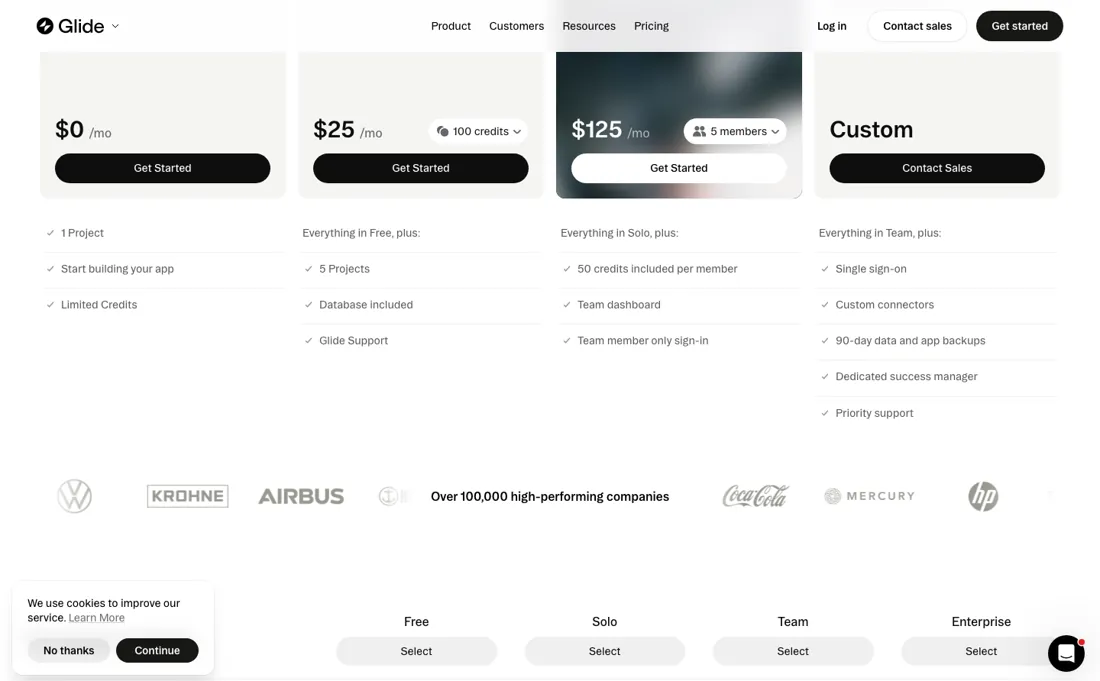
Your bill tracks how busy the app is rather than how many people own a licence. A write-heavy workflow can pass the included 5,000 updates and add 2 cents each without anyone changing plan. The jump from Maker to Business is also steep: $49 to $199 per month on annual billing, and the row ceiling only moves from 25k to 100k. Per Glide's partner team on 18 August 2026, those ceilings track the data source rather than the plan.
25k applies to synced spreadsheet sources whatever you pay, and the 100k+ figures belong to their Big Table source. So an upgrade alone does not lift a spreadsheet-backed app past 25k rows. The pricing page is hard to read for a reason Glide does not dispute. Asked about the Individual and Business tabs, the same team called them audience segmentation. They agreed on 18 August 2026 that the comparison tables confuse, because they never put all plans side by side.
And there is a trap before any of that arithmetic applies: everything above describes the classic builder, but the free signup button on glideapps.com does not lead there. We pressed it on 7 September 2026 and landed in GlideOS, the newer AI product, which meters credits instead of updates, starts at $25 a month instead of $199, and describes its free tier only as “limited credits” with no number anywhere in the pricing page or the app. Read the classic prices, click sign up, and you are evaluating something else.
Watch the video review
The video version of this review, from our YouTube channel.
⚡ Short on time? Watch the 30-second verdict Short.
What Glide does
No-code app builder — now sold as Glide Classic, next to the newer GlideOS — that turns spreadsheets and databases into working business apps: internal tools, client portals and field apps, with workflows and an API.
What buyers report about Glide
Hands-on: tested 2026-09-07Reported by buyers: G2 and practitioner reviews, read August 2026
Themes from the buyer-review sites listed at the foot of this page, read in August 2026. We tested Glide ourselves on 2026-09-07, but one test is a narrow sample, so here is what other buyers report. We summarise it here because the complaints are usually the part a vendor page leaves out.
- • Speed to a working app. Reviewers describe going from idea to a usable internal tool in an afternoon, with no code.
- • Genuinely usable free tier and a clean interface.
- • Spreadsheet-backed Classic apps cap at 25,000 rows on the free and individual plans (100,000 on Business). One team that grew a Glide app to $100k a year had to rebuild natively — a six-figure rebuild that the row ceiling made unavoidable.
- • Per-user pricing from $25/month adds up faster than comparable no-code tools.
- • No native mobile app and no App Store route, and no native push notifications — you fall back on email or Slack.
- • You build inside Glide's components, not your own architecture. Matching a brand exactly is hard, and unusual requirements hit a wall.
When the paid plan is worth it
Make sure you are looking at the right product before you compare tiers. Glide sells two things from two pages: the classic spreadsheet-to-app builder at glideapps.com/classic/pricing, and GlideOS, the newer AI builder, at glideapps.com/pricing. If you are pricing the tool you have read about for years, the main pricing page is not it. On Classic, re-read on 3 September 2026 and unchanged: a genuinely free tier (unlimited drafts, one editor, up to 25k rows), Explorer at $19 a month billed yearly or $25 monthly, Maker at $49 or $60, and Business at $199 yearly-billed or $249 monthly with unlimited apps, 30 users included, 5,000 updates and up to 100k rows.
Note the seat arithmetic. $199 across 30 included users is $6.63 a head, while extra users cost $5 on annual billing, so a growing team gets better value rather than worse. Extra updates run 2 cents each, and VAT is added at checkout. On GlideOS the ladder was rebuilt between our August and September readings. Free, Solo at $25 and Team at $125 are now Free, Basic at $25, Plus at $50 and Pro at $125 -- a tier inserted where nothing sat before, so the old Solo price now buys noticeably less.
Read on 3 September 2026: Free gives 2 members and 10 projects on limited credits but no published apps; Basic adds 100 credits and 2 published apps; Plus 250 credits, 3 members and 5 published apps; Pro starts at 5 members with 500 credits, 50 per member, unlimited apps and workflows, and your own agent over MCP. The $10 per extra member Glide used to print has come off the page, so a sixth seat has no published price.
Credits are the meter to budget, not seats: top-ups are capped at one a month on Basic and two on Plus, and are unlimited only from Pro up.
What we found running Glide ourselves
The first findings are at the top of this page. The rest:
- GlideOS's free tier publishes no number. Every paid tier lists its credit allowance; the free column says “Limited credits”, alongside 2 team members and 10 projects. Nowhere in the app is there a balance — not on the dashboard, not in the account menu, not on the upgrade screen. You cannot find out what you have or what you have spent.
- The AI itself is not walled off on free. From one sentence — “build a simple app to track software subscriptions” — it drew up a plan, asked a sensible clarifying question about where the data lives today, produced a working mockup and then began importing components one by one. We hit no credit wall during any of it.
Most of our reviews are researched rather than run — how we review explains which is which, and why we do not pretend otherwise.
How to actually use Glide
Work out which product you are buying first, because Glide now sells two. glideapps.com/pricing shows GlideOS, the newer AI builder on its own separate subscription; the classic spreadsheet-to-app builder lives at glideapps.com/classic/pricing. A feature you saw demonstrated on the homepage is not necessarily in the plan you are about to buy. Glide told its partners on 12 August 2026 that Classic is not being retired, and stays on sale, supported and updated.
So choosing it is not a bet on a product being wound down. Then settle your row ceiling by moving your data, not your plan. Per Glide's own partner team on 18 August 2026, the 25,000-row limit applies to synced spreadsheet sources regardless of what you pay, and the 100,000-plus figures belong to their Big Table source. So an app backed by a spreadsheet does not get more rows by upgrading — it gets them by changing where the data lives.
Estimate updates, not just seats, because that is the meter people miss. Business includes 5,000 updates a month and charges two cents each beyond that. Thirty users making ten writes a day on twenty-one working days is 6,300 — so a perfectly ordinary internal app passes the allowance without anyone changing plan. Work out writes per user per day before you choose. Use the free Classic tier to build something real first: unlimited drafts, one editor and up to 25,000 rows is enough to prove the concept.
Take the 14-day Business trial only once you know your user and update counts. Extra users are $5 a month on annual billing, and VAT is added at checkout. Two GlideOS changes from Glide's own changelog, dated 16 September 2026, are worth knowing before you build there. New apps now ask you to connect your live data sources before the first mockup is drawn, so what you see is built on your own columns and rows rather than placeholder data.
That is an improvement, but it moves the work forward: have the sheet or table ready before you start, not after. A federated search arrived in the same release, on Cmd+K or Ctrl+K, covering chats, projects and apps in one box. Check what publishing does before you press it. Public apps you publish in GlideOS are now indexed by search engines, so a project doubles as a searchable web page.
That is what you want for a customer-facing portal and not what you want for the internal tool full of client names that most people build first. Apps that require a sign-in get the other half of that release: from their next publish they can be installed straight to desktop or mobile.
Distilled from Glide's own pricing page, www.glideapps.com/pricing, read 10 September 2026: the plan rates ($25, $49, $125, $199 and $249 in the published ladder), the update allowances (5,000, 10,000 and 100,000) and the per-user and per-app limits beside them. Any total our text quotes that the page does not print — the crossover points and the per-update costs — is our own arithmetic on those figures.
Glide vs Softr, side by side
Each column shows the vendor’s own published entry price, read on the date shown. Entry prices can cover different services or units, so check what each one buys. We do not average them into a score.
Both names above are affiliate links: we may earn a commission if you sign up, at no extra cost to you. Neither changes what this table says.
The natural comparison is Softr — the other spreadsheet-to-app builder.
Frequently asked questions
Which Glide do I get when I sign up for free?
GlideOS, the newer AI builder, not the classic spreadsheet-to-app builder. In our test on 7 September 2026 both 'Sign up' and 'Get started' on glideapps.com led to os.glideapps.dev. The classic free tier (unlimited drafts, one editor, up to 25k rows) sits behind glideapps.com/classic, with its own pricing at glideapps.com/classic/pricing.
How do I see how many credits I have on free GlideOS?
You cannot. On 7 September 2026 the free column said only 'Limited credits', and the app showed no balance on the dashboard, the account menu or the upgrade screen. The paid GlideOS tiers do publish allowances: Basic $25 a month for 100 credits, Plus $50 for 250 and Pro $125 for 500 (read 3 September 2026).
What does classic Glide charge beyond the plan price?
Updates and users. Read 3 September 2026: Business is $199 a month billed yearly ($249 monthly) with 5,000 updates and 30 users included; extra updates cost 2 cents each and extra users $5 each on annual billing or $6 monthly. VAT is added at checkout.
Is this a hands-on review of Glide?
Yes. We tested Glide ourselves on 2026-09-07; the section above says what we tested, what we found and what we did not test, and where a figure comes from the vendor's own documentation instead. Most of our reviews are researched rather than run; we say which is which. We name what each tool is good and bad at, and we earn a commission only if you sign up, at no cost to you.
- Buyer reviews on G2 and practitioner reviews, read August 2026.
- Classic re-verified 2026-09-03 in a live browser session on both tabs and both billing toggles, unchanged since 2026-08-04; the GlideOS plans were re-read the same day after a restructure.
- A dated screenshot of that pricing page, kept on this site as the receipt.
- Our own hands-on session with Glide (2026-09-07), written up in full further down this page.
Others in this category
Reviewed it & productivity tools that share ground with Glide — comparable in what they do, not drop-in swaps:
New reviews, price changes we recorded, and the cost conditions we found. No sponsored placements. Unsubscribe anytime.
This is our researched assessment — not a paid placement. The “Visit” links on this page are affiliate links: we may earn a commission if you sign up, at no extra cost to you, and it never changes our take. How we review →