Murf Review (2026)
 By Daan Haket · Tested hands-on · written with an AI assistant · who does what
The meter is generation hours per YEAR, not per month — 24 hours sounds generous until you count retakes, because every text edit regenerates the whole sub-block and bills again. Throughout this review we weigh it against ElevenLabs.
creators, trainers and product teams that need studio-quality voiceovers in many languages without booking voice actors — explainers, courses, product videos.
you need real emotional acting range for premium brand work (humans still win), or your volume is tiny enough that free TTS built into your video tool suffices.
Transparency: the “Visit” links on this page are affiliate links — we may earn a commission if you sign up, at no extra cost to you. No vendor can pay for a better review or verdict. How we make money →
Tested by our team on 20 October 2026 on the free Studio trial: Daan created the account and our AI assistant ran the test in his browser. We generated a two-sentence script ('Dr. Maya Chen checked seventeen cobalt valves in Rotterdam. The warranty lasts thirty-seven days.'), replayed it, changed only the speed, then changed only one word, reading the voice-generation meter after each step, and opened the export dialog.
How we tested
- Entered the narration script in a single sub-block
- Generated speech with the playback control
- Played the unchanged script again
- Regenerated after changing only speed to +25%
- Replaced one spoken number and regenerated
- Inspected the voice export control
- The script stayed in one sub-block. The default voice was Ruby (US English) in the 'Angry' style, and the meter started at 00:10:00.
- Three generations of 7.1, 6.4 and 6.3 seconds of audio (19.8 seconds in total) took the meter from 10:00 to 9:46, so 14 seconds of the free 10 minutes were used.
- Replaying the same audio cost nothing: the meter stayed at 00:09:59.
Pricing (2026)
✓ Pricing re-verified 3 Oct 2026
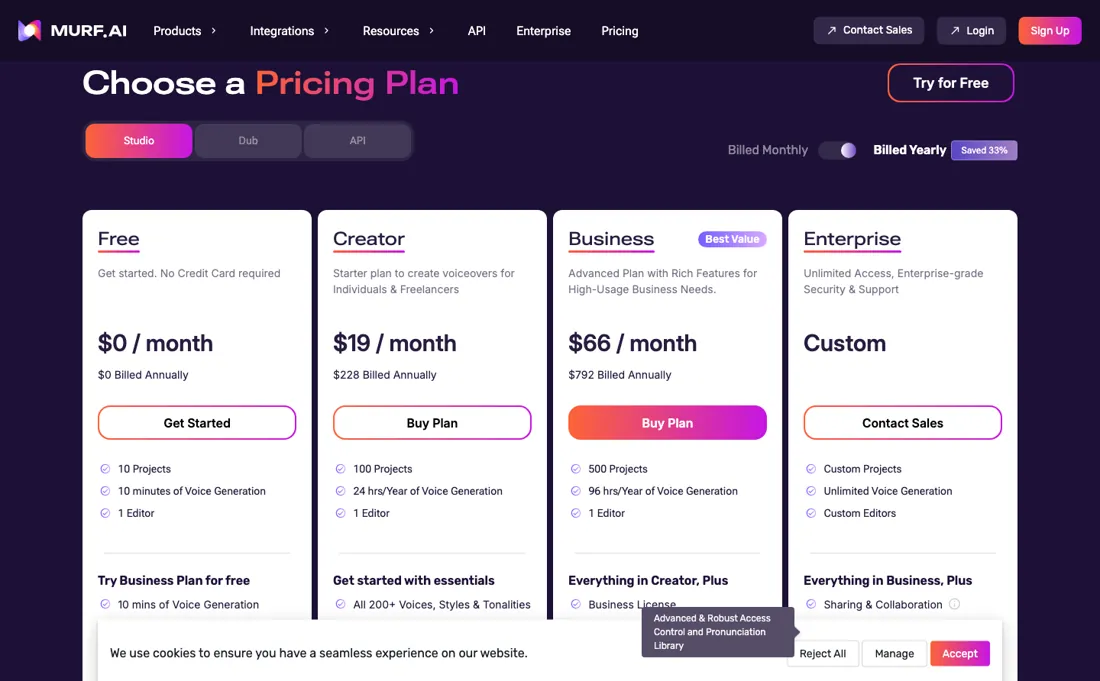
| Plan | Price | What you get |
|---|---|---|
| Free | $0 | 10 projects, 10 minutes voice generation, 1 editor, no downloads, no commercial rights |
| Creator | $19/mo billed annually ($228 a year) | 100 projects, 24 hours voice generation/year, 1 editor, all 200+ voices, unlimited downloads, commercial rights |
| Business | $66/mo billed annually ($792 a year) | 500 projects, 96 hours generation/year, business licence, PowerPoint integration, audio-to-text |
| Enterprise | no published price | voice cloning, SSO, AI translation |
Summarised from the pricing notes below; the notes carry the conditions.
Studio plans: Free $0 for 10 projects, 10 minutes of voice generation and one editor, with no downloads and no commercial rights. Creator $19/mo billed annually ($228 a year): 100 projects, 24 hours of voice generation a year, 1 editor, all 200+ voices, unlimited downloads and commercial rights. Business $66/mo billed annually ($792 a year): 500 projects, 96 hours of generation a year, business licence, PowerPoint integration and audio-to-text.
Enterprise is custom and is where voice cloning, SSO and AI translation sit. Annual billing is advertised as saving 33%. Dub and the API are separate products with their own pricing — the API tab of the pricing page meters by characters, not hours: $0.01 per 1,000 characters on the Falcon model and $0.03 on the studio-quality model, with $10 of free credit a month on the API trial and purchased credit that does not expire.
The Studio ladder on the page is Free, Creator, Business and Enterprise; there is no Growth plan, and Creator and Business are capped at one editor seat each, so a second person means Enterprise. Plans change — always verify the live price on their site.
Category context: Operations & Workflow. Across the 52 tools in this category that we researched with a public US-dollar price, the median entry price is $27 a month (lowest paid plan as listed, per seat where the vendor prices per seat). Murf’s entry price of $19 a month sits below that median. Compare pricing conditions in the Software Cost Atlas →
Correction after re-checking: Corrected 3 October 2026. An earlier note on this page, from 4 August 2026, listed a Growth tier at 8 hours a month and a Business tier at 20. Murf's pricing page, read in a browser on 14 September and 3 October 2026, shows no Growth plan: the Studio ladder is Free (10 minutes, no downloads), Creator at $19 a month billed annually (24 hours of generation a year), Business at $66 (96 hours a year) and Enterprise (unmetered, custom). The API is priced separately per 1,000 characters.
What the price did
We read Murf’s own pricing page on a schedule and keep every reading, so this is our record of the page — not a forecast, and not someone else’s summary. A change appears here only after we confirmed the new price on the page itself.
Unchanged. Every price on Murf’s pricing page was identical across our 17 reads from 4 Aug 2026 to 3 Nov 2026 (91 days).
Murf's Studio prices have held across our three browser readings, on 17 August, 14 September and 3 October 2026: Creator $19 a month billed annually ($228 a year) and Business $66 ($792 a year), with 24 and 96 hours of voice generation a year and the same advertised 33% annual saving.
What the pricing page doesn’t say
Replaying is free, and in our test on 20 October 2026 the on-screen meter only caught up after a page reload. Voice quality is genuinely strong, but the honest test for any TTS is your specific language, names and jargon: generate your hardest paragraph in the trial before subscribing, because demo voices always sound better than your edge cases.
Watch the video review
The video version of this review, from our YouTube channel.
⚡ Short on time? Watch the 30-second verdict Short.
What Murf does
AI voiceover generation for explainers, courses and product video.
What buyers report about Murf
Hands-on: tested 2026-10-20Reported by buyers: Product Hunt, G2, TrustRadius and hands-on write-ups, read August 2026
Themes from the buyer-review sites listed at the foot of this page, read in August 2026. We tested Murf ourselves on 2026-10-20, but one test is a narrow sample, so here is what other buyers report. We summarise it here because the complaints are usually the part a vendor page leaves out.
- • Voice quality is the consistent praise — 200+ voices across 30+ languages, with pitch, speed, pause and emphasis controllable per line.
- • It has real traction with instructional designers and content teams who need clean narration without booking talent.
- • The free tier is 10 minutes for the lifetime of the account, with no downloads. It is a demo, not a trial.
- • Voice cloning — the reason many people look at Murf — is enterprise-only and needs a custom contract.
- • Unused minutes do not roll over, and monthly billing costs about 33% more than annual.
- • Refunds close after 24 hours or 10 minutes of use, whichever comes first.
- • It is not built for real-time work. For an IVR or a live agent, latency becomes the ceiling.
- • TrustRadius carries only one written Murf review, so treat it as a single voice — but it independently reaches the same two conclusions as the other platforms: no real-time or on-the-fly synthesis, so it is the wrong tool for live applications, and long texts process slowly. It adds one more: integration with other tools is thin.
When the paid plan is worth it
The split is unusually clear on Murf's side. The free workspace carries 10 minutes of voice generation time and a limit of 10 projects, and Murf states plainly that the free trial does not support downloads. That makes the free tier an audition sandbox rather than a production tool: anyone who needs a finished audio file has to pay, regardless of how little they generate. The paid tiers earn their keep when output is steady and predictable, because generation time is metered rather than unlimited.
The pricing page, read 14 September 2026, sells that time in yearly buckets: 24 hours on Creator and 96 on Business, which is about 2 and 8 hours a month, and only Enterprise is unmetered. Annual billing is where the economics shift, since Murf advertises a flat 33% off yearly subscriptions. Upgrading pointedly does not solve two things. It does not buy collaboration, because Murf documents that only the Enterprise workspace allows inviting users to collaborate on projects, so extra seats become a sales conversation rather than a checkbox.
And it does not cover API usage, which is billed separately on its own pay-as-you-go meter.
What we found running Murf ourselves
The first findings are at the top of this page. The rest:
- The on-screen meter lags. After the one-word change it still showed 00:09:52, and only after a page reload did it show 00:09:46, so read it after reloading.
- Because of that lag we cannot split the 14 seconds exactly per step. The most likely split, about 8 seconds for the first generation, nothing for the speed change and about 6 for the word change, fits Murf's help text: delivery settings on unchanged text are free, and a text edit regenerates the whole sub-block.
- Downloads are blocked on the free trial. The export dialog lists MP3, WAV, FLAC, OGG and other formats up to 48 kHz, but has no download button, only 'Unlock unlimited downloads - You are on free plan' with 'Upgrade Plan'.
Mail in the first 14 days
1 emails in the 14-day window; first email after signup: unknown (exact signup time not recorded); 0 with an explicit offer.
Retained inbox and junk only; removed or archived mail is outside this observation. Ambiguous supplier attribution is excluded. Day numbers use elapsed 24-hour periods since the recorded signup date at midnight Europe/Amsterdam; the signup hour is unknown. Offer flags quote literal subject/body text. Replies in our own correspondence (support tickets, our comment requests) are excluded; one-time codes, our own address, our account name and our name are replaced in brackets.
| Day | Time (UTC) | Sender | Literal subject | Folder | Offer evidence |
|---|---|---|---|---|---|
| Day 0 | 2026-10-20 05:59:22 UTC | Murf team / mail.murf.ai | Welcome to Murf! | junk |
What this test does not show:
- How the name, the place and the numbers were pronounced: our AI assistant cannot listen to the audio
- Other voices and styles, pitch, pauses and emphasis
- Paid plans and their quotas
- Downloading, which is blocked on the free trial
Most of our reviews are researched rather than run — how we review explains which is which, and why we do not pretend otherwise.
How to actually use Murf
The shortest route to something usable is to open a free workspace, paste a script into the Studio editor and generate it in sub-blocks rather than as one long block. Voice selection is not the place to economise: Murf documents that changing voice actor, style, pitch, speed, pause, emphasis, pronunciation, punctuation and volume for the same text will not consume any voice generation time. Editing the text is what bills.
In our own test on 20 October 2026, replaying cost nothing and three short generations used 14 seconds, but the meter only showed that after a page reload, so reload before you read it. The practical discipline is therefore to lock the script first, then experiment with delivery afterwards. Budget before generating. Murf estimates that a 1,000-word English script consumes roughly 6 minutes of voice generation time, so the free allowance of 10 minutes covers about one script and little rehearsal.
That is also where most people hit the wall, because the free trial does not support downloads and the export step requires a paid plan. Upgrading happens on the pricing page, where the Buy Now button is replaced by an Upgrade button that shows a pro-rated breakdown before anything is charged.
Distilled from Murf help center: free trial, workspace, voice generation time, subscription upgrade and API plan/pay-as-you-go pages (help.murf.ai), read 4 August 2026. Pricing page re-read 3 October 2026 in a headless browser on the Studio and API tabs (the page opens on the API tab); murf.ai/llms.txt lists the pricing page but carries no prices. Documentation-based buyer questions added 21 October 2026 from the Murf help centre: https://help.murf.ai/cancelling-a-murf-subscription, https://help.murf.ai/downgrading-your-subscription, https://help.murf.ai/adding-editors-to-workspace, https://help.murf.ai/will-my-commercial-rights-and-business-license-be-valid-after-my-subscription-has-ended and https://help.murf.ai/do-i-have-commercial-rights-over-the-voice-over-created. The pricing page renders client-side and was not re-read on 21 October.
Murf vs ElevenLabs, side by side
Each column shows the vendor’s own published entry price, read on the date shown. Entry prices can cover different services or units, so check what each one buys. We do not average them into a score.
Both names above are affiliate links: we may earn a commission if you sign up, at no extra cost to you. Neither changes what this table says.
The natural comparison is ElevenLabs or Synthesia — ElevenLabs leads on raw voice realism, Synthesia bundles avatar video — Murf's edge is the studio workflow and per-language breadth. Weigh it against ElevenLabs on the job you actually need done.
Frequently asked questions
What does Murf cost, and what do the hours mean?
Creator is $19 a month billed annually ($228 a year) and Business $66 a month ($792 a year), read on 17 August 2026 and unchanged on 3 October 2026. The unit that decides which you need is not projects but generation time: 24 hours a year on Creator, 96 on Business. That is an annual pool, not a monthly one, and Murf states unused time does not roll over, so a bursty production month is the case to plan for.
How does Murf compare with Synthesia?
They solve different halves of the same job and the comparison is one of the searches that brings people here. Murf is voice: 200+ voices across 30+ languages with per-line control over pitch, speed, pause and emphasis, priced by generation time. Synthesia is video with a presenter avatar. If you already have the visuals and need narration, Murf is the cheaper half; if you need a talking presenter on screen, Murf alone will not get you there.
Can I use Murf for dubbing or in a live application?
Dubbing is a separate Murf product with its own pricing, so a Studio subscription is not automatically a dubbing subscription — check which product you are buying. For live use, be careful: reviewers have consistently reported that it is not built for real-time synthesis, and latency is the ceiling for anything like an IVR or a live agent. The API, priced from $0.01 per 1,000 characters on the Falcon model, is the route for programmatic generation, and Murf now pitches Falcon at real-time voice agents, so test its latency yourself rather than relying on older reviews.
Can I cancel or downgrade mid-term, and what do I lose?
Cancelling in Workspace Settings takes effect at the end of the current billing period, and Murf advises cancelling at least a day before renewal; refunds go through support under Murf's refund terms. Moving from annual to monthly billing is done by support, not in the app. A downgrade, for example Business to Creator, costs you the unused voice generation and transcription time from the previous cycle, project slots above the new limit, and download access to projects made with premium features. Help-centre articles read on 21 October 2026; applies to the Studio plans.
Do I keep commercial rights if I cancel, and can I use the audio on TV or radio?
Murf's help centre says the commercial and business-licence rights for voiceovers you created stay valid after the subscription ends. Broadcast rights, for traditional TV networks or commercial radio, are reserved for Enterprise plans. Read on help.murf.ai on 21 October 2026.
Is this a hands-on review of Murf?
Yes. We tested Murf ourselves on 2026-10-20; the section above says what we tested, what we found and what we did not test, and where a figure comes from the vendor's own documentation instead. Most of our reviews are researched rather than run; we say which is which. We name what each tool is good and bad at, and we earn a commission only if you sign up, at no cost to you.
- Buyer reviews on Product Hunt, G2, TrustRadius and hands-on write-ups, read August 2026.
- Re-verified 2026-10-03 in a browser; the page renders client-side and opens on annual billing, so check which column you are reading.
- A dated screenshot of that pricing page, kept on this site as the receipt.
- Our own hands-on session with Murf (2026-10-20), written up in full further down this page.
Others in this category
Reviewed operations & workflow tools that share ground with Murf — comparable in what they do, not drop-in swaps:
Also in operations & workflow, for browsing rather than as an alternative:
New reviews, price changes we recorded, and the cost conditions we found. No sponsored placements. Unsubscribe anytime.
This is our researched assessment — not a paid placement. The “Visit” links on this page are affiliate links: we may earn a commission if you sign up, at no extra cost to you, and it never changes our take. How we review →