FlexiQuiz Review (2026)
 By Daan Haket · Tested hands-on · written with an AI assistant · who does what
The monthly response caps are the business model: 20 on free, 500 on Essentials, 2,000 on Premium and 25,000 on Enterprise -- one viral quiz or one big exam cohort and you're shopping a tier up.
educators, trainers and small teams that want professional graded quizzes, exams and simple courses — with certificates, timed tests, question banks and analytics — without building out a full LMS.
you need a complete learning platform with deep integrations, or your volumes run past a few thousand responses a month — the caps make it the wrong shape.
Transparency: the “Visit” links on this page are affiliate links — we may earn a commission if you sign up, at no extra cost to you. No vendor can pay for a better review or verdict. How we make money →
Tested by our team on 20 October 2026 on a free account: Daan created the account and our AI assistant built the quiz in his browser and sent the answers as an anonymous visitor without logging in. We built one multiple-choice quiz, pushed it past the question limit, published it and submitted answers until the monthly response limit was reached.
How we tested
- Created a classic quiz from scratch
- Entered five multiple-choice questions with correct-answer markers
- Filled the quiz to ten questions and attempted to save an eleventh
- Published the quiz link after adjusting attempts and registration
- Submitted twenty responses using predetermined answer patterns
- Tried the public quiz link for a twenty-first response
- Compared Analyze > Response Summary with our answer log
- Ten questions saved. The form for an eleventh opened normally, and only on Save did FlexiQuiz say 'There is a maximum of 10 questions on the free plan. Upgrade to add more questions'; the eleventh was not saved.
- A new quiz is published with 'Maximum attempts' set to 1 and a registration page that requires first name, last name and email. We raised the attempts to 30 and switched registration off; the quiz link then worked without a login.
- Grading was correct: a submission with only questions 1-3 right scored '3/10 (30%)', and the 19 fully correct ones scored '10/10 (100%)'.
Pricing (2026)
✓ Pricing re-verified 30 Oct 2026
Free: 20 responses a month, no card required; in our test on 20 October 2026 a free quiz also stopped at 10 questions ('There is a maximum of 10 questions on the free plan'). Essentials $25/mo billed monthly or $17/mo billed yearly ($204/yr) -- 500 responses a month, 1 administrator, unlimited quizzes and questions, question bank, live quizzes, auto grading. Premium $39/mo monthly or $25/mo yearly ($300/yr) -- 2,000 responses a month, 2 administrators or trainers, learning paths, selling quizzes and courses, custom certificates, embedding, self-registration.
Enterprise $89/mo monthly or $60/mo yearly ($720/yr) -- 25,000 responses a month, 15 administrators or trainers, APIs and webhooks, single sign-on, white-label emails, custom CSS, 100 custom groups, 24/7 priority support. Enterprise+ is tailored and quoted by sales. Yearly billing works out 32-36% cheaper than monthly, which is more than the 'save over 25%' the toggle advertises. Purchases over $300 can be invoiced for bank transfer or cheque against an additional $50 fee. Plans change — always verify the live price on their site.
Category context: Operations & Workflow. Across the 52 tools in this category that we researched with a public US-dollar price, the median entry price is $27 a month (lowest paid plan as listed, per seat where the vendor prices per seat). FlexiQuiz’s entry price of $25 a month sits below that median. Compare pricing conditions in the Software Cost Atlas →
What the pricing page doesn’t say
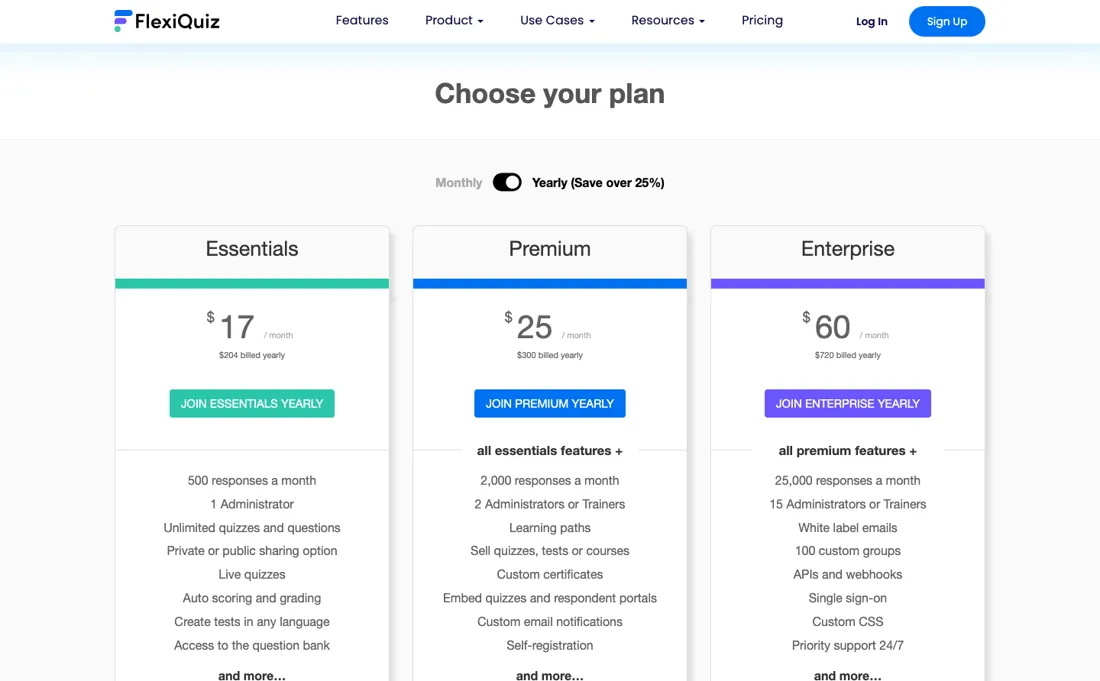
The cap hits the participant, not you: in our test on 20 October 2026 the 21st respondent of the month saw only 'This account has reached the maximum monthly response limit' instead of the quiz. The free plan also stops at 10 questions, a limit that only shows up when you save the eleventh. The per-response price falls steeply as you climb ($0.034, $0.0125, $0.0024 on yearly billing), so the ceiling is the thing to price, not the sticker.
Administrator seats are capped separately at 1, 2 and 15, and sharing a login is against the terms.
Watch the video review
The video version of this review, from our YouTube channel.
⚡ Short on time? Watch the 30-second verdict Short.
What FlexiQuiz does
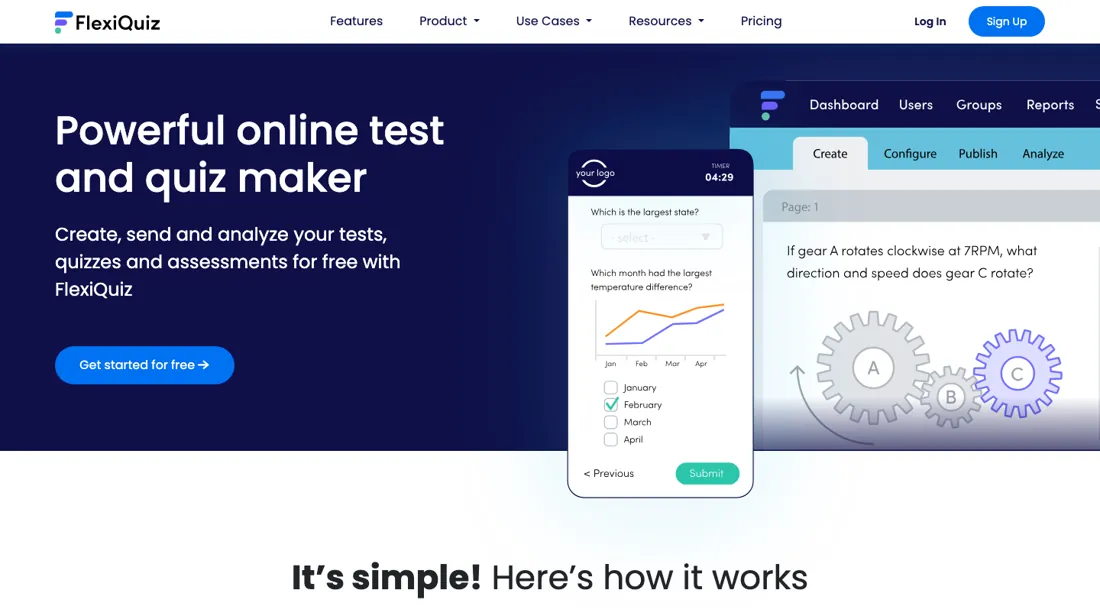
Online quiz and test maker for educators, trainers and businesses: build graded exams, assessments and simple courses with certificates, timed tests, question banks and analytics — from a genuinely free tier.
What buyers report about FlexiQuiz
Hands-on: tested 2026-10-20Reported by buyers: G2, Capterra, GetApp and Software Advice, read August 2026
Themes from the buyer-review sites listed at the foot of this page, read in August 2026. We tested FlexiQuiz ourselves on 2026-10-20, but one test is a narrow sample, so here is what other buyers report. We summarise it here because the complaints are usually the part a vendor page leaves out.
- • Auto-grading plus certificates is the combination that sells it to schools, trainers and HR onboarding — and reviewers say a quiz is built in minutes.
- • A free plan with 20 responses a month and no card, then $17 a month billed yearly ($25 month to month) for 500 responses with unlimited quizzes and questions.
- • The interface looks dated and reviewers say so directly.
- • It leans educational. For rigorous business research or survey work it is the wrong tool.
- • Styling options are limited and some layouts need work.
- • Responses are metered per month, so a busy intake period is what to price against, not your average.
When the paid plan is worth it
The monthly response caps are the business model, and the per-response arithmetic runs the opposite way from what the stickers suggest. Free stops at 20 responses a month. On yearly billing Essentials is $17 for 500, Premium $25 for 2,000, and Enterprise $60 for 25,000. Work out the cost per response and the ladder is steep rather than flat: about $0.034 on Essentials, $0.0125 on Premium and $0.0024 on Enterprise.
Premium is close to three times cheaper per response than Essentials for eight dollars more a month, and the 1,500 extra responses it adds work out at roughly half a cent each. If you are anywhere near the 500 ceiling, moving up is the cheap decision rather than the expensive one -- which is the reverse of how these ladders usually read. What upgrading does not fix is the calendar.
The caps reset monthly, so a plan sized on your average still breaks on the month an exam cohort lands, and no tier converts unused responses into next month's allowance. Nor does volume buy you people: administrator seats are rationed separately at one, two and fifteen, sharing a login is against the terms, and so a second trainer who needs their own account forces Premium no matter how few responses you collect.
What we found running FlexiQuiz ourselves
The first findings are at the top of this page. The rest:
- Analyze showed 'Total respondents 20' with Pass/Fail per submission, and the Response Summary (questions 1-3 at 100% correct, 4-10 at 95%) matched our own log exactly.
- The 21st submission attempt of the month was blocked before the quiz could start: the link showed only 'This account has reached the maximum monthly response limit'.
- The preview submission got stuck and did not count as a respondent.
- Timestamps in Analyze read 9:31 AM at about 17:30 our local time: the default time zone was not ours (Europe/Amsterdam).
Claim vs. what we measured
We set a claim from FlexiQuiz's own pages next to what we saw in our test, on the plan named. The status says whether the two describe the same thing and match; it is not a verdict on the product. Confirmations are listed too.
| What the vendor says | What we measured | Status | What it means if you buy |
|---|---|---|---|
| "20 responses a month" and "10 questions per quiz" on the free accountSource: flexiquiz.com, read 17 Oct 2026 | Measured 2026-10-20: Saving an eleventh question gave 'There is a maximum of 10 questions on the free plan'. After 20 submissions the quiz link showed only 'This account has reached the maximum monthly response limit'.Our test, 20 Oct 2026; Free, one quiz, submissions as an anonymous visitor | Not comparableNo literal claim covering this exact plan and trial; trial support can differ. | The limit blocked the 21st submission attempt before the quiz could start, so the free plan does not fit more than 20 submissions a month. |
Mail in the first 14 days
0 emails in the 14-day window; first email: none observed; 0 with an explicit offer.
Retained inbox and junk only; removed or archived mail is outside this observation. Ambiguous supplier attribution is excluded. Day numbers use elapsed 24-hour periods since the recorded signup date at midnight Europe/Amsterdam; the signup hour is unknown. Offer flags quote literal subject/body text. Replies in our own correspondence (support tickets, our comment requests) are excluded; one-time codes, our own address, our account name and our name are replaced in brackets.
| Day | Time (UTC) | Sender | Literal subject | Folder | Offer evidence |
|---|
What this test does not show:
- Whether a limit of 20 per quiz applies separately from the monthly limit (we had one quiz)
- When the monthly counter resets (that needs a check early next month)
- Respondent portals, email invitations, access codes and certificates
- Live quiz and Build with AI
- Question types other than multiple choice
Most of our reviews are researched rather than run — how we review explains which is which, and why we do not pretend otherwise.
How to actually use FlexiQuiz
The vendor describes the flow in three steps -- Create, Publish, Analyze -- and the useful detail is what sits inside each. You build the quiz from question types and a question bank, set test options such as timing and grading, then publish and share it; auto-grading removes the manual work afterwards, and the analytics come back per respondent and question. What to check on the free plan before committing is not the features but the ceiling.
Free allows 20 responses a month with no card and, in our test on 20 October 2026, 10 questions per quiz; a new quiz also published with one attempt per person and a required registration page until we changed both, which is enough to prove the quiz works and nowhere near enough to run a cohort, so treat it as a build-and-test environment rather than a trial of the real thing.
Note that unlimited quizzes and questions and the question bank are already on Essentials, so a long question bank is not what pushes you up a tier -- the response cap and administrator count are. The practical order that saves the most rework: build one complete quiz on Free, including certificates and timing if you need them, run it past a handful of real respondents, then count how many responses a normal month produces and how many people need their own login. Those two numbers, not the feature list, pick your plan.
Where this section comes from: our research notes (261 words)
Vendor plans page https://www.flexiquiz.com/Home/Plans (read 2026-08-31 from a European exit) -- the yearly-billed rates ($17/$25/$60, shown as $204/$300/$720 a year), the response caps of 500/2,000/25,000, the administrator counts of 1/2/15 and the per-tier feature lists were taken from the rendered plan cards; the monthly-billed rates ($25/$39/$89) were read from the changeToMonthly*Plan functions in that page's own billing-toggle script, since the cards default to yearly. The 20-response free plan with no card, the Enterprise+ contact-sales route, and the $50 invoicing fee on purchases over $300 come from the FAQ on the same page.
No machine-readable source exists: https://www.flexiquiz.com/llms.txt and /pricing.md both return 404, and /Pricing redirects to the site's not-found handler. Re-read 22 September 2026: every amount unchanged, the monthly rates confirmed again in the changeToMonthly*Plan functions (which also expose the internal plan ids PROFESSIONAL2, PREMIUM5 and ENTERPRISE3 for the tiers displayed as Essentials, Premium and Enterprise), and the comparison table read in full for the per-tier counters we had not recorded: respondent portals 100 / 800 / 5000, data storage 2 / 10 / 100 GB, maximum custom groups 10 / 50 / 100, live-quiz players 100 / 200 / 400, and 'sell a group of quizzes' at none / 20 / 100.
The second, quote-only card is headed 'Enterprise' on the page itself rather than Enterprise+. Plans page re-read 30 October 2026 with a plain HTTP fetch: yearly cards $17, $25 and $60, the billing-toggle script's monthly $25, $39 and $89, and the payment FAQ (invoice for bank transfer or check on purchases over $300, for an additional $50 fee).
The natural comparison is Typeform or Google Forms — the generic form tools win on price and ubiquity for simple surveys; FlexiQuiz wins on exam features — grading, certificates, timed tests and question banks.
Frequently asked questions
I have been quoted $25 a month. Which plan is that?
Either of two, and the page defaults to the reading that flatters it. Read 22 September 2026, $25 a month is Essentials billed monthly and it is also Premium billed yearly -- the same number, two different products. Essentials at $25 monthly gives 500 responses a month and one administrator. Premium at $25 a month on the yearly plan, $300 up front, gives 2,000 responses, two administrators, learning paths, custom certificates, embedding, self-registration and the ability to sell quizzes and courses. The cards open on the yearly view, so the $25 you see first is the better of the two. If you are willing to pay a year in advance, there is no version of this where monthly Essentials is the right buy at that price: the same money buys four times the responses and a second seat. Check which toggle the quote was taken from before you compare it with anything.
The page says save over 25% for paying yearly. Is that the real figure?
It is understated, on all three plans. Read 22 September 2026: the monthly rates behind the billing toggle are $25, $39 and $89 for Essentials, Premium and Enterprise, and the yearly equivalents are $17, $25 and $60 -- so the actual discounts are 32%, 36% and 33%, against the 'save over 25%' and 'more than 3 months free' the page advertises. On Premium it is closer to four and a half months free than three. The one thing to weigh against it is cash timing rather than price: yearly means $204, $300 or $720 up front, and if the bill runs over $300 and you need an invoice for bank transfer or cheque instead of a card, that costs an additional $50. Since Premium's yearly total is exactly $300, whether you land on the wrong side of that threshold depends on which plan you pick.
Both the third and the fourth plan are called Enterprise. What is the difference?
One has a price and one does not, and the page gives them the same name. Read 22 September 2026, the third card is Enterprise at $60 a month yearly or $89 monthly, and it is specific: 25,000 responses a month, 15 administrators or trainers, APIs and webhooks, single sign-on, white-label emails, custom CSS, 100 custom groups and 24/7 priority support. Beside it sits a second block, also headed Enterprise, described as 'designed for teams of all sizes with all the great features of Enterprise' plus expert strategic support, customization and unlimited options, with no figure and a Contact our sales team button. So the published tier is the one you can buy and the quote-only one is a superset of it; if someone tells you they are 'on Enterprise', that sentence does not say which. The practical trigger for the quoted version is the word unlimited, since every named tier is bounded -- responses, seats, groups, respondent portals and storage all have numbers.
Can our finance team pay FlexiQuiz by invoice and bank transfer?
Only for larger orders, and at a cost. The payment FAQ on the plans page, read 30 October 2026, says that for purchases over $300 and an additional $50 fee FlexiQuiz can issue an invoice payable by bank transfer or check; cards and PayPal are accepted on any plan. On the yearly prices that read the same day, only Enterprise ($720 a year) is over $300 on its own; Essentials ($204) and Premium ($300 exactly) are not.
Is this a hands-on review of FlexiQuiz?
Yes. We tested FlexiQuiz ourselves on 2026-10-20; the section above says what we tested, what we found and what we did not test, and where a figure comes from the vendor's own documentation instead. Most of our reviews are researched rather than run; we say which is which. We name what each tool is good and bad at, and we earn a commission only if you sign up, at no cost to you.
- Buyer reviews on G2, Capterra, GetApp and Software Advice, read August 2026.
- Re-verified 2026-10-30 on flexiquiz.com/Home/Plans, every amount unchanged since 22 September; the monthly-billed rates were read from the page's own billing-toggle script, the yearly rates from the rendered cards.
- A dated screenshot of that pricing page, kept on this site as the receipt.
- Our own hands-on session with FlexiQuiz (2026-10-20), written up in full further down this page.
Others in this category
Reviewed operations & workflow tools that share ground with FlexiQuiz — comparable in what they do, not drop-in swaps:
New reviews, price changes we recorded, and the cost conditions we found. No sponsored placements. Unsubscribe anytime.
This is our researched assessment — not a paid placement. The “Visit” links on this page are affiliate links: we may earn a commission if you sign up, at no extra cost to you, and it never changes our take. How we review →