Nifty Review (2026)Free Plan Limit Is Easy to Miss
 By Daan Haket · Tested hands-on · written with an AI assistant · who does what
The free limit is easy to miss.
From $10 · Pro · per month, Pro per member, billed yearly, before tax, as the in-app plan screen · read 2026-11-21
Try Nifty free →Affiliate link: we may earn a commission if you sign up, at no extra cost to you. It never changes our verdict.
Is Nifty right for you?
Your pain“Our projects, tasks, docs and client chat sit in five different tools.”
Does Nifty solve it?PartlyOur test (21 Nov 2026): a project with a roadmap, 5 tasks, a doc and a discussion post took about 3 minutes. We did not test client portals, and Discussions was hidden by default.
Your planFree, up to 2 active projects; Pro $10 per member a month billed yearly
Try Nifty →
Your pain“We want to start free, but I need to know where the free plan stops.”
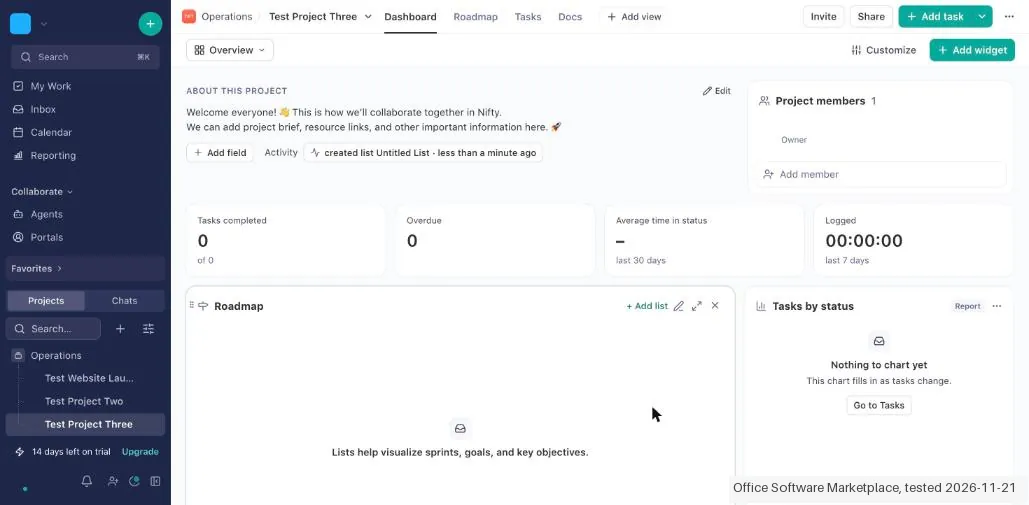
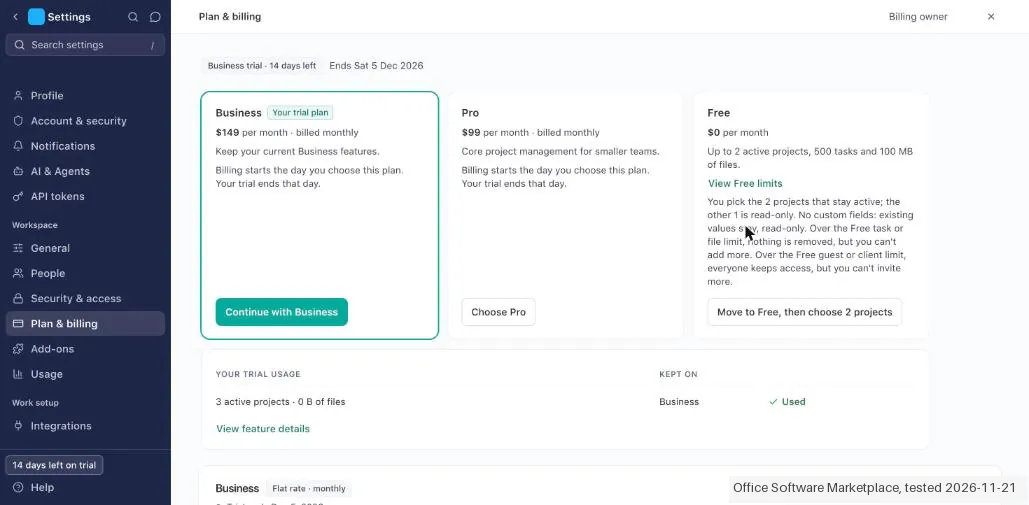
Does Nifty solve it?PartlyOur test (21 Nov 2026): the 14 day Business trial let us open a third project with no warning. After the trial Free keeps 2 active projects, and the rest turn read only.
Your planFree, $0 forever with unlimited members; flat Pro $79 a month billed yearly for up to 10 members
Try Nifty →
Your pain“I need milestones on a roadmap that clients can follow.”
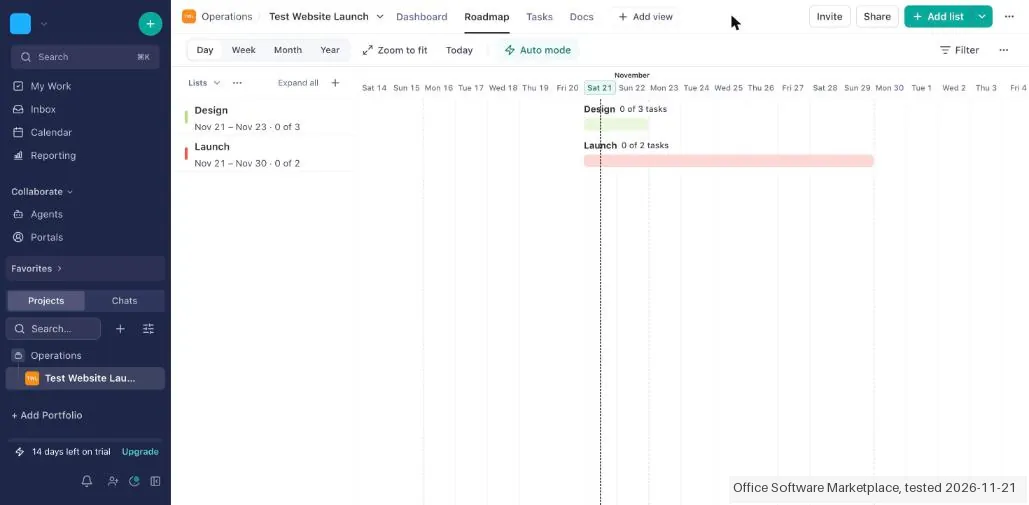
Does Nifty solve it?PartlyOur test (21 Nov 2026): the Roadmap tab has no milestone type. A list with dates shows as a bar, so a milestone becomes a list.
Your planFree includes Gantt charts; Pro $10 per member a month billed yearly
Try Nifty →
- you need milestones as their own item on a timeline, more than 2 active projects for free, or you want a track record you can check before you move your team.
The “Try” buttons are affiliate links: we may earn a commission if you sign up, at no extra cost to you, and it never changes our verdict.
Also in: Software for agencies
Transparency: the “Visit” links on this page are affiliate links: we may earn a commission if you sign up, at no extra cost to you. No vendor can pay for a better review or verdict. How we make money →
We created the account and our AI assistant ran the test in our browser on 21 November 2026, with the interface set to English. We made a project with two dated lists on the Roadmap, five tasks, a doc and a post in Discussions. About 3 minutes passed between the start and the finished project with its tasks, and about 25 clicks. A new account starts on a 14 day Business trial without a card, so we stayed on that trial and paid nothing. We did not delete the account.
How we tested
- Our AI assistant ran the test in the real web app with the interface set to English; nothing was paid
- The notes record screens, times and wording; five screenshots were kept with names, email and avatars covered
- Start: onboarding offered Start fresh, Bring your work and Build with Nifty AI. Start fresh asked only for a project name and a colour. Right after that the app showed "14 days left on trial", ending on 5 December 2026.
- Milestones: the Roadmap tab has no milestone type. The only match we found was a list with "Show in roadmap" ticked, which draws a dated bar such as "0 of 3 tasks". We used two lists, Design and Launch, and they showed on the Roadmap as bars.
- Tasks: Nifty set an end date on every new task by itself (23 November). We set one deadline ourselves and assigned one task to ourselves. The add task row under a list overlapped at times, and the plus button in the list header worked every time.
Pricing (2026)
✓ Pricing re-verified 21 Nov 2026
Free is $0 forever with unlimited members, 2 active projects, 500 tasks and 100 MB of files. Per member and billed yearly, Pro is $10 and Business $16 a month. Billed monthly they are $16 and $25. As one flat price for the team, billed yearly, Pro is $79 (up to 10 members) and Business $124 (up to 30 members), and Unlimited is $399; billed monthly they are $99, $149 and $499.
Enterprise is on request. White labeling is an add-on at $40 a month. Prices exclude tax. Plans change, so check the live price on their site before you buy.
The honest knock
New accounts start on a 14 day Business trial, so in our test a third project opened with no warning; under Free only 2 projects stay active and the rest turn read only. The Roadmap has no milestone type, only lists with dates, and Discussions is hidden until you switch it on.
What Nifty does
Project management with projects, tasks, docs and discussions in one workspace, a free plan for 2 active projects and unlimited members, and paid plans per member or one flat price for the team.
Free up to 2 active projects; Pro from $10 per member yearly
The Free plan covers 2 active projects, 500 tasks and 100 MB of files, with unlimited members. Pro adds time tracking, automations and AI, and lifts the project limit to 100. If you are 7 people or fewer, the screen says paying per member costs less than a flat plan. Over that, one flat price covers the whole team: $79 a month for Pro billed yearly, up to 10 members.
What we found running Nifty ourselves
The first findings are at the top of this page. The rest:
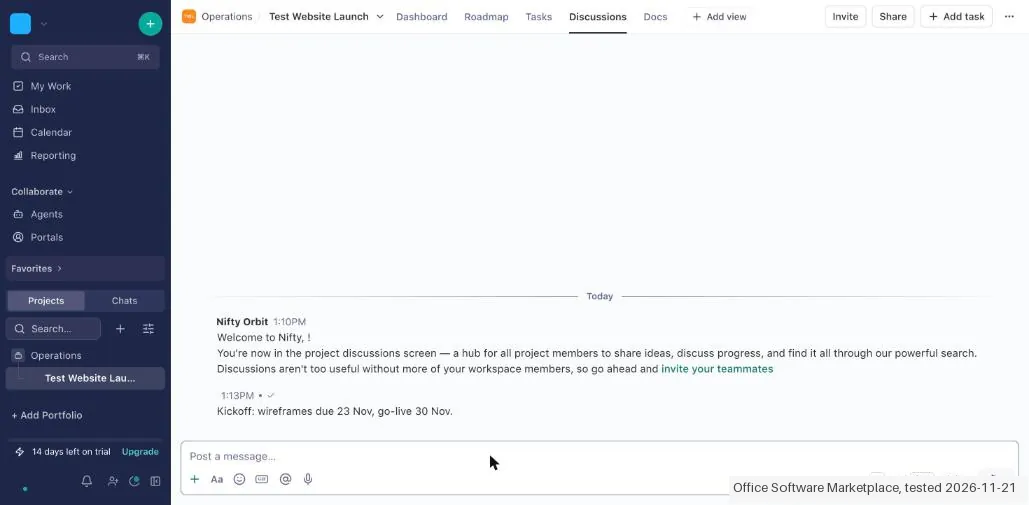
- Discussions: the Discussions tab was hidden by default. We switched it on under Add view, then Project views, and posted a message. The chat panel showed only ourselves, since nobody else was invited.
- Free limit: the trial hid it. We opened a third project and Nifty gave no warning. The plan screen read "Projects 3 Included in your plan". Under Free the page says "Up to 2 active projects, 500 tasks and 100 MB of files", and the Free limits link adds that you pick the 2 projects that stay active and the rest turn read only.
- Plans: the upgrade screen listed Free at $0 forever with unlimited members. The per-member yearly rates on that screen were $10 (Pro) and $16 (Business) a month. Monthly it was $16 and $25. A flat price for the whole team was $79 (Pro) and $124 (Business) billed yearly, and $99 and $149 monthly. We opened the payment screen for Pro ("Due today $99.00") and closed it without entering anything.
Screenshots from our test (click to enlarge)
What this test does not show:
- Not tested: moving down to Free and what it does to a third project, the 100 MB file limit (the app showed 1 TB during the trial), inviting colleagues, integrations, AI features, client portals and agents.
- Not tested: paying. We opened the payment screen and closed it, so we cannot say how billing or cancelling a paid plan works.
Most of our reviews are researched rather than run. How we review explains which is which, and why we do not pretend otherwise.
How to actually use Nifty
Sign up at niftypm.com and choose Start fresh when the first screen asks how you want to begin. Give the project a name and a colour. To get dates on the Roadmap, create lists inside the project and tick "Show in roadmap". To see discussions, switch the tab on under Add view, then Project views. In our test a project with two lists and five tasks took about 3 minutes.
Distilled from Nifty plan screens and our hands-on test of 21 November 2026 in the app, with the pricing page at niftypm.com/pricing read the same day. Nifty is listed through our Nifty Affiliates partner link, so we may earn a commission if you buy through our link; it does not change what we write.
Nifty vs ClickUp, side by side
Each column shows the vendor’s own published entry price, read on the date shown. Entry prices can cover different services or units, so check what each one buys. We do not average them into a score.
Both names above are affiliate links: we may earn a commission if you sign up, at no extra cost to you. Neither changes what this table says.
The natural comparison is ClickUp: ClickUp is the established work platform with a generous free plan; Nifty is smaller, puts projects, docs and discussions in one workspace, and caps the free plan at 2 active projects.
Frequently asked questions
How much does Nifty cost?
The in-app plan screen on 21 November 2026 listed Free at $0 forever with unlimited members. Billed yearly, Pro cost $10 and Business $16 per member a month. Billed monthly they cost $16 and $25. Teams can pay one flat price instead: $79 (Pro) or $124 (Business) a month billed yearly, or $99 and $149 billed monthly. A flat Unlimited plan read $399 a month on the yearly screen. Enterprise is on request.
What does the Free plan include?
The Free plan said "Up to 2 active projects, 500 tasks and 100 MB of files", with unlimited members, one guest and one external client, Gantt charts, Discussions, collaborative docs and 1,000 API and MCP calls a month. Custom fields, time tracking, automations and AI belong to the paid plans.
When does the 2 project limit start?
Not when you create a project. A new account starts on a 14 day Business trial and in our test we opened three projects without a warning. After the trial Nifty moves the account to Free, and you choose which 2 projects stay active; the others turn read only. Nothing is deleted, but you cannot add more over the task or file limit.
Does Nifty have milestones?
Not as a separate item in our test. The Roadmap tab shows lists that have "Show in roadmap" ticked, each as a dated bar with a count of tasks. We used two lists with dates in place of milestones.
How long does setup take?
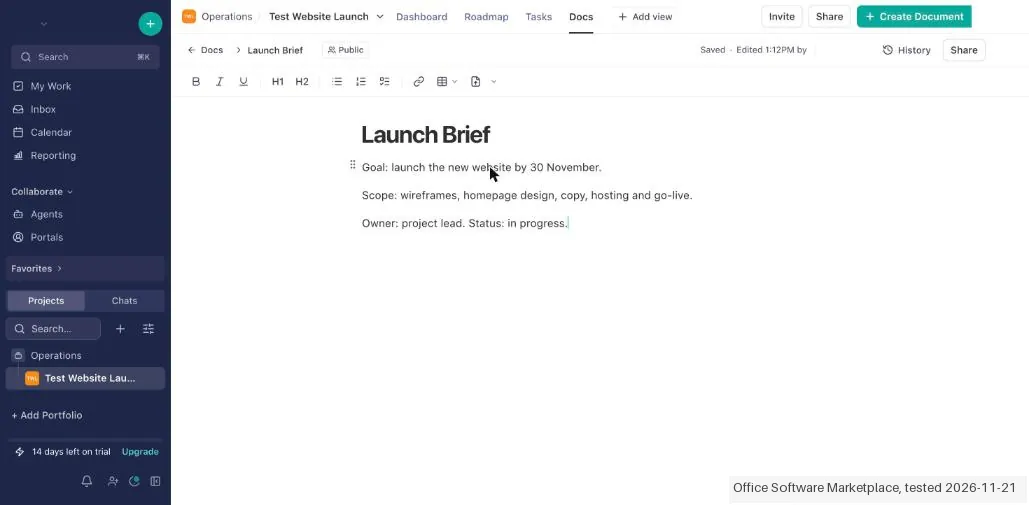
About 3 minutes in our test from the first screen to a project with two lists on the Roadmap and five tasks. A doc and a discussion post took about 1 minute more. A real team will spend longer on invites and imports, which we did not test.
Is the Discussions tab on by default?
No. It was hidden in our test. You switch it on under Add view, then Project views.
How do I delete my account?
Open Settings from the workspace menu, then Account and security, and use the Delete account button in the Delete account section. The page warns that it cannot be undone and that you lose access to all connected workspaces. We did not click it. There was no card on file and no subscription to cancel.
What do we not know?
How the account behaves once the trial ends and it drops to Free, how the 100 MB file limit works in practice, how billing and cancelling a paid plan work, and how integrations, AI and client portals perform.
Is this a hands-on review of Nifty?
Yes. We tested Nifty ourselves on 21 November 2026; the section above says what we tested, what we found and what we did not test, and where a figure comes from the vendor's own documentation instead. Most of our reviews are researched rather than run; we say which is which. We name what each tool is good and bad at, and we earn a commission only if you sign up, at no cost to you.
- Read 2026-11-21 in the Nifty app and on niftypm.com/pricing.
- Our own hands-on session with Nifty (21 November 2026), written up in full further down this page.
Bottom line
In one line: Project management with a free plan for 2 active projects and unlimited members; paid plans per member or one flat price for the team.
The Try button is an affiliate link; we may earn a commission at no extra cost to you.
Others in this category
Reviewed productivity tools that share ground with Nifty. They are comparable in what they do, not drop-in swaps:
New reviews, price changes we recorded, and the cost conditions we found. No sponsored placements. Unsubscribe anytime.
This is our researched assessment, not a paid placement. The “Visit” links on this page are affiliate links: we may earn a commission if you sign up, at no extra cost to you, and it never changes our take. How we review →