Tally Review (2026)Free Forms With a Badge, Tested
 By Daan Haket · Tested hands-on · written with an AI assistant · who does what
The free forms carry a Made with Tally badge, and file uploads are capped at 10 MB each.
- Best for Small businesses collecting sign ups with a free form tool
From €20 · Pro · per month, Pro billed yearly, as the pricing page and the in-app upgrade screen · read 2026-11-21
Try Tally free →Affiliate link: we may earn a commission if you sign up, at no extra cost to you. It never changes our verdict.
Is Tally right for you?
Your pain“I need a form with a follow up question and an export, and I do not want a monthly bill for it.”
Does Tally solve it?YesOur test (21 Nov 2026): a form with a conditional question, one submission and a CSV export took about 3 minutes 30 seconds on the free plan. The free form shows a Made with Tally badge.
Your planFree, unlimited forms and submissions under fair use; Pro EUR 20 a month billed yearly
Try Tally →
Your pain“The field has to appear only when the answer is Yes, and it has to stay hidden otherwise.”
Does Tally solve it?PartlyOur test (21 Nov 2026): a Show rule did not hide the follow up field before an answer. A Hide rule on the other answer worked, though the field still showed until a choice was made.
Your planLogic is on the free plan; Pro removes the Tally badge
Try Tally →
Your pain“People need to upload documents with their answers and I do not want to pay for that.”
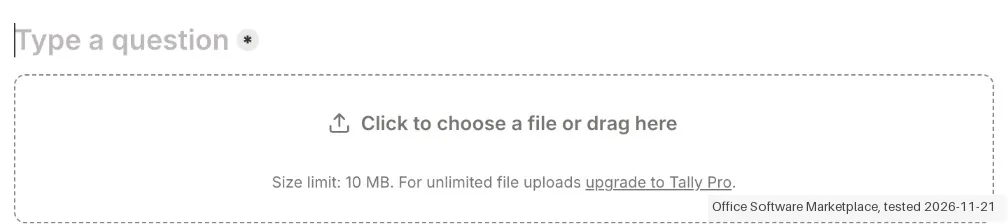
Does Tally solve it?YesOur test (21 Nov 2026): the File upload block is on the free plan with a 10 MB limit per file; unlimited uploads need Tally Pro.
Your planFree, 10 MB per file; Pro EUR 25 a month billed monthly lifts the limit
Try Tally →
- you need your own branding without paying, long uploads on the free plan, or a form builder with a long track record of integrations and templates.
The “Try” buttons are affiliate links: we may earn a commission if you sign up, at no extra cost to you, and it never changes our verdict.
Transparency: the “Visit” links on this page are affiliate links: we may earn a commission if you sign up, at no extra cost to you. No vendor can pay for a better review or verdict. How we make money →
We created the account and our AI assistant ran the test in our browser on 21 November 2026 on the free plan. We built a form with three questions and one conditional rule, published it, sent in one test answer and downloaded the answers as a CSV file. About 3 minutes 30 seconds passed from the empty dashboard to the first answer in the Submissions tab, including a detour with the conditional rule. The account asked for no card and no phone number, and we paid nothing. We did not delete the account.
How we tested
- Our AI assistant ran the test in the real web app with the interface set to English; nothing was paid
- The notes record screens, times and wording; five screenshots were kept
- Start: the dashboard went straight to a new form with a blank page that works like a document: type a slash and pick a block. We added Short answer, Multiple choice with Yes and No, and a second Short answer.
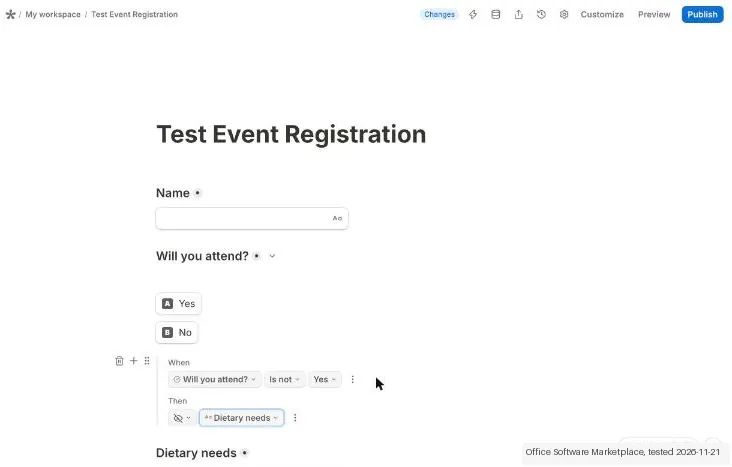
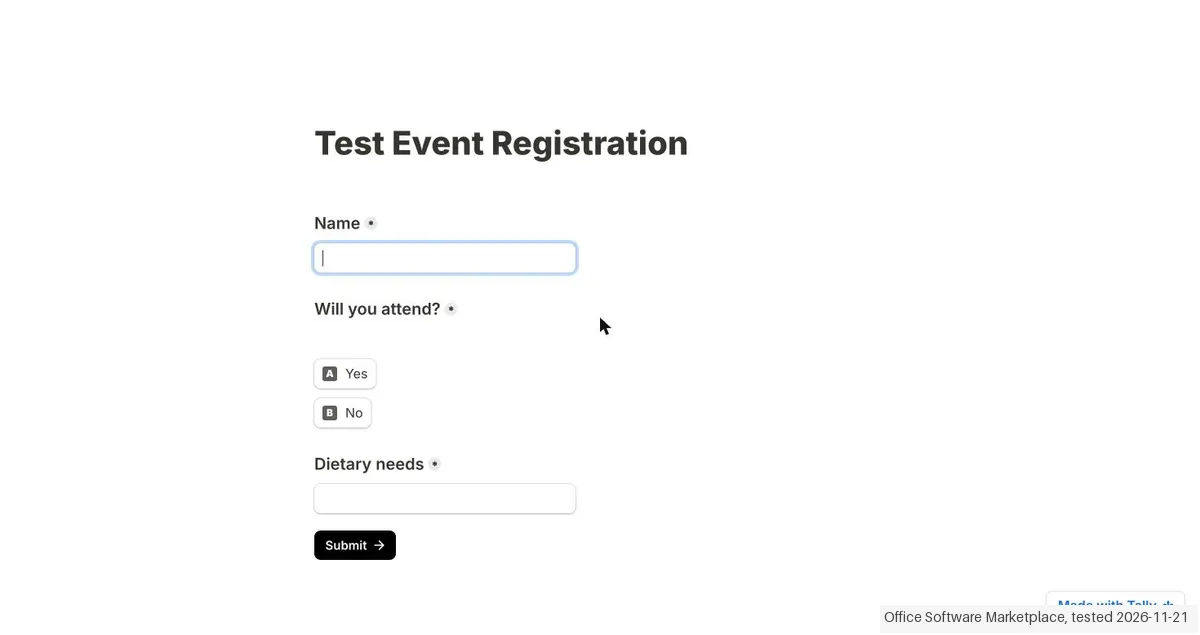
- Conditional logic: our first rule, When "Will you attend?" Is Yes, Then Show blocks "Dietary needs", did not hide the field beforehand. The published form showed it right away. The rule that worked was When the answer Is not Yes, Then Hide blocks. Until a choice is made the field stays visible.
- Editor: the logic block landed at the bottom of the form and dragging it up did not work with our mouse actions, which may be down to our tool. We inserted a new logic block right under the question instead.
Pricing (2026)
✓ Pricing re-verified 21 Nov 2026
The free plan lists unlimited forms and submissions as long as you stay within the fair usage guidelines. Pro is EUR 20 a month billed yearly (EUR 250 a year) or EUR 25 a month billed monthly. Business is EUR 65 a month billed yearly (EUR 790 a year) or EUR 79 a month billed monthly. We paid nothing and stopped at the plan screen. Plans change, so check the live price on their site before you buy.
The honest knock
Unlimited use is subject to fair usage guidelines. In our test a Show rule did not hide a field beforehand, and only a Hide rule on the opposite answer worked.
What Tally does
Form builder that works like a document, with conditional logic, payments, file uploads and unlimited forms and submissions on the free plan under fair use.
Free is generous; Pro from EUR 20 a month yearly
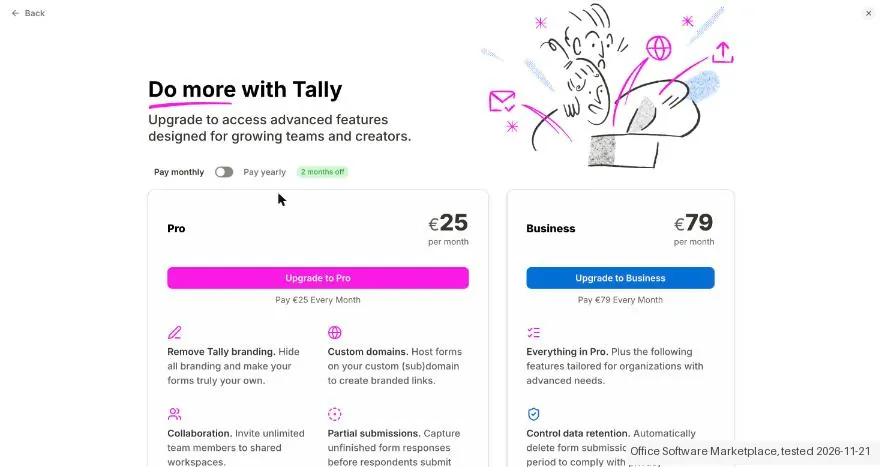
The free plan has the logic, payments and file uploads most small forms need. Pro is worth a look when you want to remove the Made with Tally badge, lift the 10 MB upload limit, invite people into shared workspaces or capture partial submissions. Pro costs EUR 20 a month billed yearly or EUR 25 billed monthly, according to the app on 21 November 2026.
What we found running Tally ourselves
The first findings are at the top of this page. The rest:
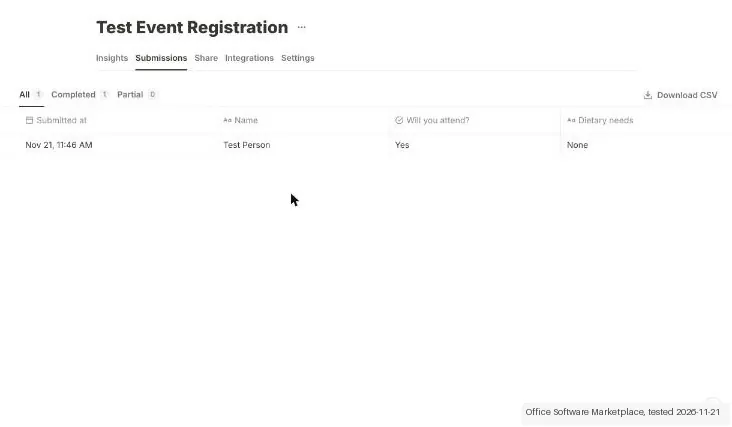
- Publish and answers: Publish was one click, and the share page opened with Insights, Submissions, Share, Integrations and Settings. The Submissions tab listed our answer, and Download CSV gave a 160 byte file with Submission ID, Respondent ID, Submitted at (in UTC) and one column per question.
- Free plan limits: the free form showed a "Made with Tally" badge. File upload was available on the free plan, with the note "Size limit: 10 MB. For unlimited file uploads upgrade to Tally Pro". The pricing page lists unlimited forms and submissions "as long as you stay within our fair usage guidelines".
- Prices: the in-app upgrade screen showed Pro at EUR 25 a month and Business at EUR 79 monthly, and EUR 20 and EUR 65 a month when billed yearly (EUR 250 and EUR 790 a year). We went no further than that screen.
Screenshots from our test (click to enlarge)
What this test does not show:
- Not tested: email notifications, integrations such as Google Sheets and webhooks, the AI form builder, templates, custom domains, version history, and paying for Pro or Business.
- Not tested: what happens when usage goes past the fair usage guidelines, and more than one submission.
Most of our reviews are researched rather than run. How we review explains which is which, and why we do not pretend otherwise.
How to actually use Tally
Sign up at tally.so and open the dashboard. Choose New form and type a title. Press slash to add a block, for example Short answer or Multiple choice. For a follow up question, add a Conditional logic block directly under the question it depends on. Use a Hide rule on the answer that should not see the field. Publish takes one click and gives a share link.
Distilled from Our hands-on test of 21 November 2026 in the Tally app on the free plan, and the pricing page at tally.so/pricing read the same day. We have no partner link for Tally at the time of writing, so this review carries no commission.
The natural comparison is Jotform: Jotform is the bigger, older form builder with a form limit and a submission limit on its free plan; Tally lists unlimited forms and submissions, but shows its own badge on free forms and has fewer extras.
Frequently asked questions
How much does Tally cost?
Free puts no cap on forms or submissions; the only limit the plan names is Tally's fair usage guidelines. In the app on 21 November 2026 Pro cost EUR 25 a month billed monthly or EUR 20 a month billed yearly (EUR 250 a year), and Business cost EUR 79 monthly or EUR 65 a month billed yearly (EUR 790 a year). The pricing page showed the yearly amounts of EUR 20 and EUR 65 a month.
What does the free plan include?
The pricing page lists unlimited forms, unlimited submissions, payments, signatures, file uploads, conditional logic and calculations, password protected forms, a Google Sheets integration and webhooks. Free forms carry a Made with Tally badge.
What needs Pro?
The pricing page lists removing the Tally branding, unlimited file uploads (free is 10 MB per file), partial submissions, custom domains, inviting team members, email notifications, custom CSS, workspaces and folders, drop-off analytics and version history for up to 30 days. Business adds data retention controls, email verification and 90 days of version history.
Does conditional logic work the way you expect?
Not in every case in our test. A rule that said Show blocks when the answer is Yes did not hide the field beforehand, so it showed at once. A rule that hid the field when the answer was not Yes worked. The field stays visible until a choice is made.
How long does a first form take?
About 3 minutes 30 seconds in our test, from an empty dashboard to a published form with one answer in the Submissions tab, including the logic detour. The build itself took about 14 steps.
What is in the CSV export?
One row per answer, with Submission ID, Respondent ID and the time submitted in UTC, then one column per question. Our file was 160 bytes with one answer.
How do I delete my account?
Go to Settings, My account and scroll to Danger zone. The Delete account button deletes the account with all forms, submissions and workspaces. We did not click it. On the free plan there was no subscription to cancel.
What do we not know?
How the fair usage guidelines are applied, how email notifications and integrations behave, how the AI form builder performs, and how paying and cancelling work on Pro or Business.
Is this a hands-on review of Tally?
Yes. We tested Tally ourselves on 21 November 2026; the section above says what we tested, what we found and what we did not test, and where a figure comes from the vendor's own documentation instead. Most of our reviews are researched rather than run; we say which is which. We name what each tool is good and bad at, and we earn a commission only if you sign up, at no cost to you.
- Read 2026-11-21 on tally.so/pricing and in the Tally app.
- Our own hands-on session with Tally (21 November 2026), written up in full further down this page.
Bottom line
In one line: Form builder that works like a doc, with unlimited forms and submissions on the free plan under fair use.
Best for: small businesses collecting sign ups with a free form tool.
The Try button is an affiliate link; we may earn a commission at no extra cost to you.
Others in this category
Reviewed productivity tools that share ground with Tally. They are comparable in what they do, not drop-in swaps:
New reviews, price changes we recorded, and the cost conditions we found. No sponsored placements. Unsubscribe anytime.
This is our researched assessment, not a paid placement. The “Visit” links on this page are affiliate links: we may earn a commission if you sign up, at no extra cost to you, and it never changes our take. How we review →