Deputy Review (2026)$30 Monthly Floor Under Six Users
 By Daan Haket · Tested hands-on · written with an AI assistant · who does what
The minimum monthly spend is the number to check before anything else: at $5.50 per user on monthly billing, a team of fewer than about six people still pays the $30 floor, so the headline per-user price is misleading at small scale.
shift-based businesses — hospitality, retail, healthcare, any hourly workforce — that need rostering, clocking and labour-law compliance in one system and have enough staff to clear the minimum spend.
you run a small salaried desk team: the $30 monthly minimum means you pay for roughly six users whether you have them or not, and salaried staff rarely need shift-level clocking at all.
Transparency: the “Visit” links on this page are affiliate links — we may earn a commission if you sign up, at no extra cost to you. No vendor can pay for a better review or verdict. How we make money →
Exit test (measured 2026-10-24)
- Export route
- People > Add People > Bulk import and update > Update team members > Download
- Formats
- CSV, XLSX
- Attachments included
- Not tested
- Re-import tested
- Yes
- Lost on export
- The base rates (20 and 25) we pasted in on the first import: empty in the export and no pay rate in People
- Signing up
- To sign up: screens not tested, no card, chat/call not tested (observed 2026-10-24)
- Cancelling
- To cancel: screens not tested, chat/call not tested
- Colleague invitations
- Invitations default: on. Invitation mail: not tested. Invitee opt-out: not tested.
Formats describe this export route; offered formats may not have been inspected. Full exit test and scope ↓
Tested by our team on 24 October 2026 during the Core plan trial, without a card, without sending invitations, publishing a schedule or connecting payroll: Daan created the account and our AI assistant ran the test in Daan's browser. We pasted two made-up team members (with a payroll ID and a base rate) into the bulk importer, exported the team data, and pasted the exported rows back with one changed name.
How we tested
- Completed the Core trial onboarding and location setup
- Skipped the invitation step and explored Add People
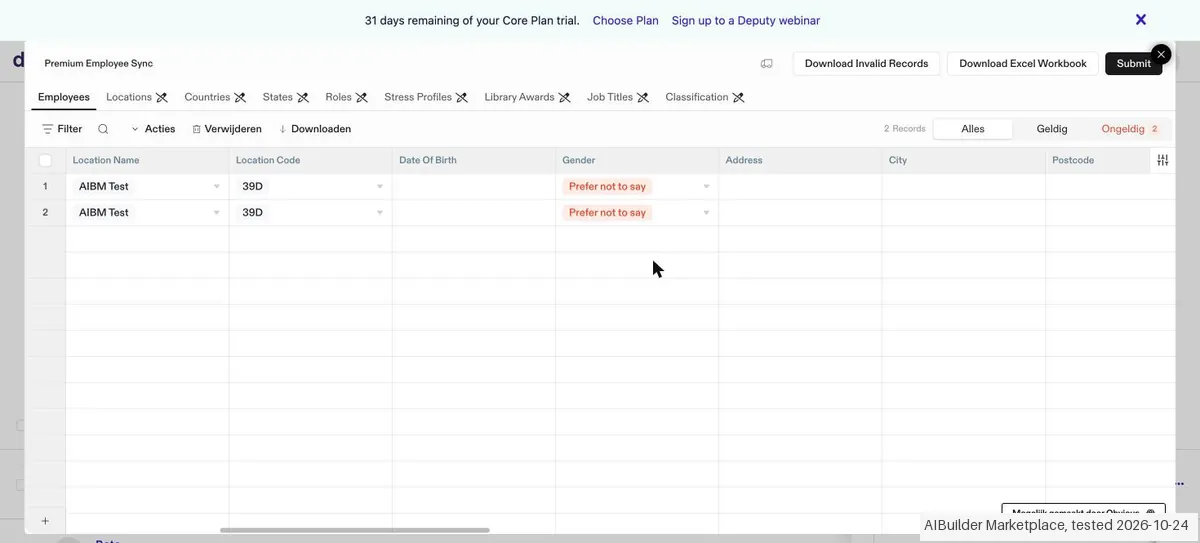
- Pasted two synthetic employee rows into the bulk-import grid
- Requested existing team-member data and opened its CSV
- Updated a preferred name through a Deputy ID re-import
Test files: fixture.csv SHA-256: b1ebe3c3e25e353faf4100dc28a48d54d051791304aa33c86c456386a823c2f6
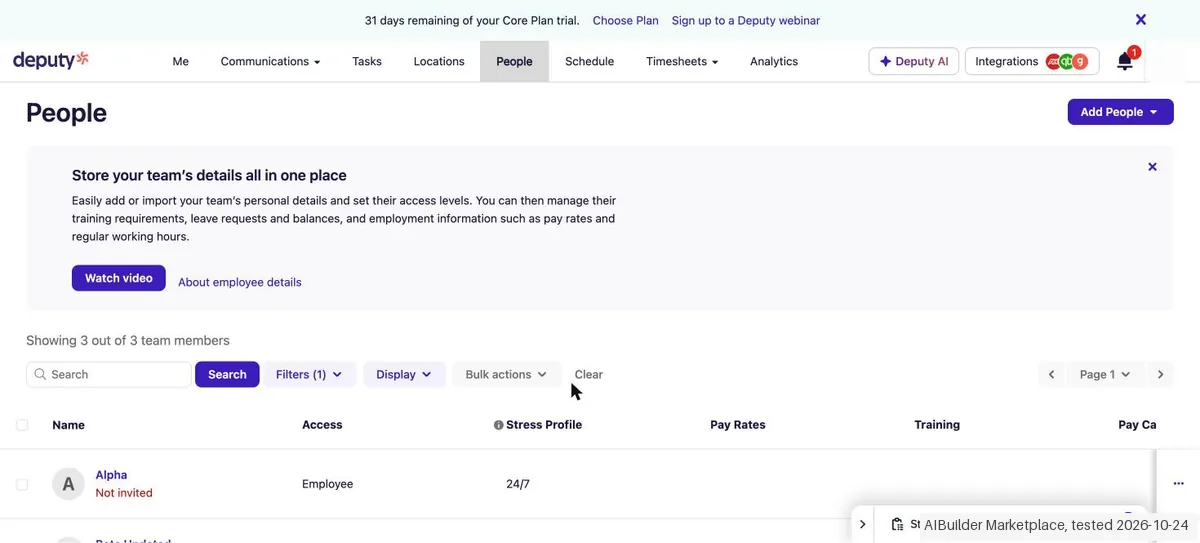
- The bulk importer accepted both rows after we cleared a job title that did not exist yet ('Tester'): only existing job titles are allowed. 'Job Complete: 2 records imported successfully, 0 records failed', and both people showed as Employee, 'Not invited'. The importer's column order differs from the CSV template, so rows copied from the template land in the wrong columns; whether an uploaded file is matched by column name we did not test.
- The base rates we pasted in (20 and 25) did not come through: they were empty in the export and no pay rate showed in People.
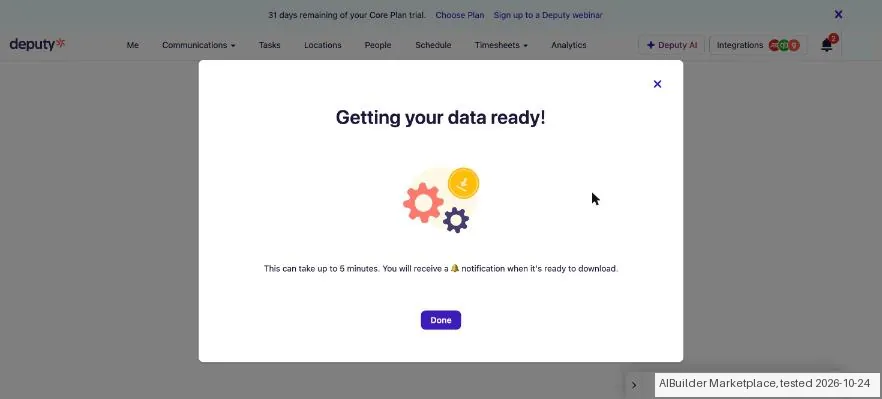
- The team export is prepared in the background ('This can take up to 5 minutes'); ours was ready after about 20 seconds via the notification bell. The CSV had the same 29 columns as the import template, with both people, our payroll IDs and a Deputy ID each. Deputy had filled in a username, a stress profile (24/7) and gender 'Prefer not to say' on its own.
Pricing (2026)
✓ Pricing re-verified 19 Sep 2026
| This tool | $5 | 4th cheapest of 5 |
| Cheapest | $3 | Mera Work |
| Median | $4.99 | |
| Most expensive | $8 | eBillity |
Lowest paid entry price per seat a month, billed annually, in USD, among the 5 time-tracking & scheduling tools we have researched (read between 2026-07-31 and 2026-10-15). Only tools priced in the same unit and on the same billing are compared — not a market survey, and cheapest is not best.
Three plans, per user per month and excluding tax. On annual billing Lite is $5, Core $6.50 and Pro $9; switch the toggle to monthly and the same three read $5.50, $7.25 and $10. Add-ons are billed monthly on top. HR is $2 per user, Messaging+ $1.95 per user and Analytics+ $1.50 per user, and the last two are included in Pro.
Deputy Payroll enabled by Paycor is $8 per user plus a $49 monthly base fee, available only on annual Core and Pro plans in the US. The page also states a minimum monthly spend of USD $30 / AUD $30 / GBP £20 per invoice on the monthly Lite, Core and Pro plans. Lite and Core start with a free trial; Pro is Contact us rather than self-serve.
Two things the page added since: every plan card now carries Deputy AI marked INTRODUCTORY FREE with the line that price and availability may change, so the AI is not a paid-for feature you can hold them to. And a banner across the top, read again on 24 October 2026, now says 'Switch & Get 6 Months Free | Add WFM and Payroll before Nov 30 and get 6 months on us' (earlier it offered three months) — Payroll being the $8-per-user add-on with the $49 monthly base fee, US-only and annual Core or Pro, so the free months arrive attached to the most expensive thing on the page. Plans change — always verify the live price on their site.
Category context: Operations & Workflow. Across the 52 tools in this category that we researched with a public US-dollar price, the median entry price is $27 a month (lowest paid plan as listed, per seat where the vendor prices per seat). Deputy’s entry price of $5 a month sits below that median. Compare pricing conditions in the Software Cost Atlas →
What the pricing page doesn’t say
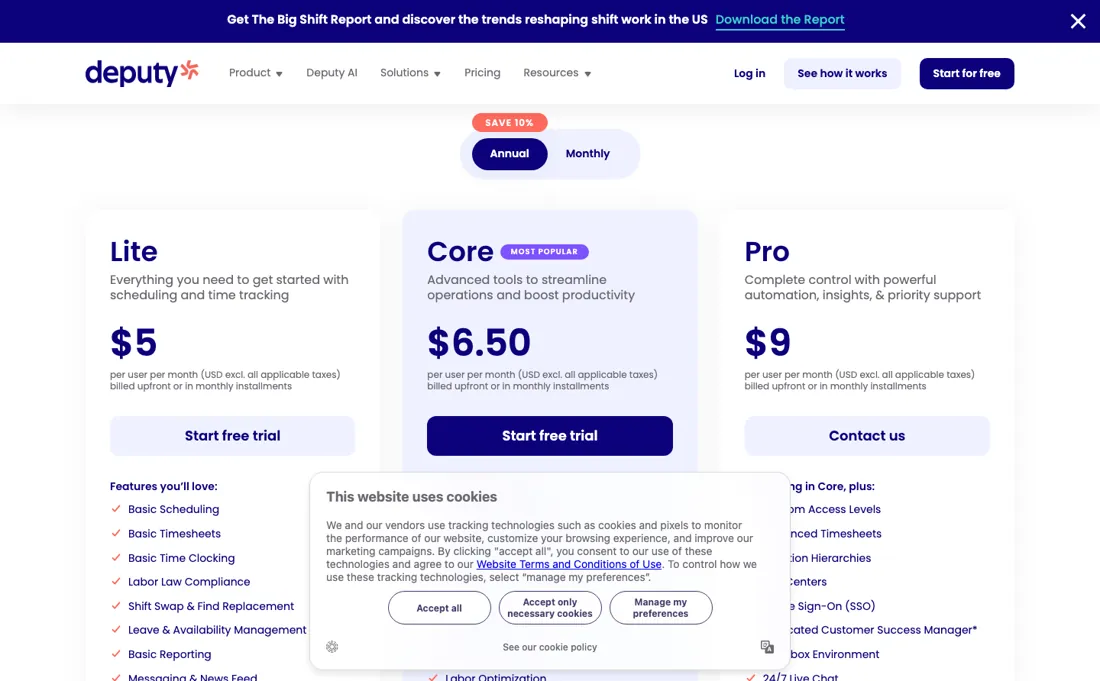
Beyond that, the plan you probably want is not the one you first price — auto-scheduling, demand forecasting and labour budgets sit in Core, and SSO, custom access levels and location hierarchies only in Pro, which has no public self-serve checkout. The add-ons stack per user as well, and the payroll add-on is US-only and annual-only.
Watch the video review
The video version of this review, from our YouTube channel.
⚡ Short on time? Watch the 30-second verdict Short.
What Deputy does
Workforce management for hourly and shift-based teams: rota building, time clocking, timesheet approval and labour-law compliance, with payroll and HR integrations.
What buyers report about Deputy
Hands-on: tested 2026-10-24Reported by buyers: G2, Capterra and Trustpilot, read August 2026
Themes from the buyer-review sites listed at the foot of this page, read in August 2026. We tested Deputy ourselves on 2026-10-24, but one test is a narrow sample, so here is what other buyers report. We summarise it here because the complaints are usually the part a vendor page leaves out.
- • The mobile app is the part shift workers actually touch, and it is rated well — around 4.6 on G2 across 660+ reviews.
- • Scheduling holds up in fast, high-churn shift environments, which is the job it is bought for.
- • Reporting depth. Reviewers who want to analyse rather than schedule run out of room.
- • Support response times, named in most of the negative reviews.
- • Billing clarity draws criticism from a meaningful minority — confirm what you will pay at your headcount before signing.
- • Behaviour differs between mobile and desktop, and glitches get mentioned.
Where the ratings disagree. 4.6 on G2 against 3.9 on Trustpilot Australia, where award-interpretation problems drive much of the difference. If you are rostering under Australian awards, weigh the Trustpilot side more heavily than the G2 average.
Pages read (August 2026): Trustpilot
When the paid plan is worth it
Do the add-on arithmetic before you pick Core, because on the published rates the tier above it is cheaper. Annual per user: Lite $5, Core $6.50, Pro $9. Messaging+ costs $1.95 a user and Analytics+ $1.50, and both are included in Pro. So Core with those two is $9.95 a user against $9 for Pro -- ninety-five cents a head more for less. If you want either of those add-ons, price Pro first.
The catch is that Pro is not self-serve: Lite and Core start with a free trial while Pro says Contact us, so the cheaper option requires a conversation. Worth having that conversation with the sum above in hand. Two things that hit small teams harder than the per-user rate suggests. Monthly billing carries a minimum spend of USD $30 (AUD $30, GBP 20) per invoice on Lite, Core and Pro, so a team of three on monthly Lite pays $30 rather than $16.50 -- an effective $10 a head, double the list price.
Annual billing has no such floor and is cheaper per user anyway ($5 against $5.50 on Lite). And Deputy Payroll through Paycor is $8 a user PLUS a $49 monthly base fee, available only on annual Core and Pro in the US -- that base fee alone is more than ten Lite seats.
Our monthly capture read this vendor's pricing page every month from August 2026 to October 2026, and the amounts were the same all 3 times, including $9, £20, $30 and $49 from the pricing above. We keep watching — the registry records what moves.
What we found running Deputy ourselves
The first findings are at the top of this page. The rest:
- Pasting the exported rows back with their Deputy ID created no duplicates and applied the changed name. But 'Prefer not to say', the gender value from Deputy's own export, was flagged as invalid and had to be cleared first.
- After setup, 'Now let's add your team members' had 'Send email invites' ticked by default; we skipped it. The template's sample rows set 'Send Invite' to Y and the role to System Administrator.
- The trial bar said '31 days remaining of your Core Plan trial.' and no card was asked. Consent to sales and marketing calls is a line of text under the phone field; SMS marketing is a separate tick box, which we left off.
Claim vs. what we measured
We set a claim from Deputy's own pages next to what we saw in our test, on the plan named. The status says whether the two describe the same thing and match; it is not a verdict on the product. Confirmations are listed too.
| What the vendor says | What we measured | Status | What it means if you buy |
|---|---|---|---|
| "Up to 31 days"Source: deputy.com, read 23 Oct 2026 | Measured 2026-10-24: On sign-up day the app showed '31 days remaining of your Core Plan trial.' No card was asked.Our test, 24 Oct 2026; Core Plan trial | ConfirmedSame quantity: trial length on day one; the claim is an upper bound and we got the full 31 days. | A new account got the full 31-day trial of the Core plan without a card. |
Exit test: can you take your data out?
On 24 October 2026, in the trial account from this test, we exported our two imported test team members through 'Download your existing team member data', then pasted the exported rows back into the importer with their Deputy IDs and one changed preferred name. Test date: 24 Oct 2026. We describe the friction rather than score it; this is one run with synthetic records, not a verdict on Deputy.
| What we checked | What we saw |
|---|---|
| Re-importing the export | Re-importing with the Deputy ID created no duplicates: still 3 of 3 team members, and the changed name came through ('Beta Updated'). But the gender value 'Prefer not to say', which Deputy itself had put in the export, was flagged as invalid in the importer, and we had to clear it before both rows were accepted. |
| Came along in the export |
|
| Lost in the export |
|
| Awkward but not lost | Deputy filled in a username, a stress profile (24/7) and gender 'Prefer not to say' on its own, and that gender value is then rejected on re-import. The export is prepared in the background ('This can take up to 5 minutes'); ours was ready after about 20 seconds via the notification bell. |
| Export route | People > Add People > Bulk import and update > Update team members > Download; a notification says when it is ready ('can take up to 5 minutes'). |
| Export format | CSV or XLSX in the import format, including the Deputy ID; no schedules, hours or leave. |
| Re-importing the export | Re-import on Deputy ID works without duplicates, but the gender value from Deputy's own export is rejected, and the base rates were already lost on the first import. |
| Cancelling | Not tested. |
What the exit test does not show:
- The Deputy Data Exporter (a separate tool with a CSV per data source)
- Exporting schedules, hours and leave
- Uploading a file (we only pasted rows into the importer)
- Pay rates set through 'Assign pay by area'
Mail in the first 14 days
Measurement running until 2026-11-06T23:00:00Z (last observed 2026-10-31T02:18:02.201141Z).
7 emails in the 14-day window so far; first email after signup: unknown (exact signup time not recorded); 0 with an explicit offer.
Retained inbox and junk only; removed or archived mail is outside this observation. Ambiguous supplier attribution is excluded. Day numbers use elapsed 24-hour periods since the recorded signup date at midnight Europe/Amsterdam; the signup hour is unknown. Offer flags quote literal subject/body text. Replies in our own correspondence (support tickets, our comment requests) are excluded; one-time codes, our own address, our account name and our name are replaced in brackets.
| Day | Time (UTC) | Sender | Literal subject | Folder | Offer evidence |
|---|---|---|---|---|---|
| Day 0 | 2026-10-24 08:25:02 UTC | Deputy team / deputy.com | [code] is your Deputy code | junk | |
| Day 0 | 2026-10-24 08:25:22 UTC | Deputy team / deputy.com | Your Deputy login details | junk | |
| Day 0 | 2026-10-24 08:49:07 UTC | Deputy team / team.deputy.com | Step 1 of 6: Start your first rota | junk | |
| Day 2 | 2026-10-26 08:49:13 UTC | Deputy team / team.deputy.com | Ready for your next step? | junk | |
| Day 2 | 2026-10-26 09:00:12 UTC | Deputy team / team.deputy.com | Get started with Deputy | junk | |
| Day 4 | 2026-10-28 08:49:13 UTC | Deputy team / team.deputy.com | Step 2 of 6: Add team members to your trial | inbox | |
| Day 5 | 2026-10-29 09:51:55 UTC | Deputy team / updates.deputy.com | What’s squeezing your margins—and what can you control? | inbox |
Screenshots from our test (click to enlarge)
What this test does not show:
- Scheduling and publishing a roster
- Clocking in and timesheets
- Payroll connections
- What happens after 31 days
- Deputy AI
Most of our reviews are researched rather than run — how we review explains which is which, and why we do not pretend otherwise.
How to actually use Deputy
Setup follows Deputy's own hierarchy, and getting it wrong is what forces a rebuild later: the Organisation at the top, then Locations, then Areas. A Location needs a real street address rather than a label, because Deputy uses it to show where a shift was started and ended; Areas are the parts of a location staff are scheduled into, so they determine what a roster can look like. Team members go in with a name and an access level, and the email address is documented as optional.
But the same documentation is explicit that without one they cannot create an account with your organisation, which means no clock-in and no shift notifications. Nothing reaches staff until you publish the shifts. Two costs sit outside the roster. Deputy's pricing FAQ states that administrators and supervisors count as billable users like anyone else. It also puts SMS at 160 characters a segment — 1c in the US, 5p in the UK, 5c in Australia, 7c elsewhere — while noting that many messages sent through Deputy run longer than one segment.
Distilled from Deputy help centre articles "Getting started with Deputy", "Organisations, Locations and Areas set up" and "Creating your Locations", plus the FAQ on the Deputy pricing page covering minimum spend, billable users and SMS charges, read 21 August 2026. Pricing page re-read 19 September 2026: plan cards with the Deputy AI label, the add-on blocks, the promotional banner and the full billing FAQ on minimum spend, part-month users, SMS rates, plan changes and cancellation. Deputy homepage (deputy.com) read 26 October 2026 for the no-card trial wording.
Deputy vs Connecteam, side by side
Each column shows the vendor’s own published entry price, read on the date shown. Entry prices can cover different services or units, so check what each one buys. We do not average them into a score.
Both names above are affiliate links: we may earn a commission if you sign up, at no extra cost to you. Neither changes what this table says.
The natural comparison is Connecteam — the all-in-one deskless-team app.
Frequently asked questions
Can you export your data from Deputy?
Exit check 2026-10-24; route excerpt: People > Add People > Bulk import and update > Update team members > Download …; came along (excerpts): Both team members with name, email, location, role, our Payroll ID, hired date and a Deputy ID / 29 columns, the same as the import template; lost (excerpts): The base rates (20 and 25) we pasted in on the first import: empty in the export and no pay rate in People; re-import: tested.
Deputy AI is listed as free on every plan. Is it?
For now, and the page says so in the same breath. Read on 19 September 2026, all three plan cards carry Deputy AI with the label INTRODUCTORY FREE and, directly underneath, the sentence that price and availability may change. That is more honest than most vendors manage, and it is also a clear instruction: do not choose Deputy for the AI, and do not build a process on a feature whose price has not been set. Pick your plan on the things you are actually paying for — scheduling, time clocking and labour-law compliance on Lite, auto-scheduling, demand forecasting and labour budgets on Core, SSO and access control on Pro — and treat anything AI-labelled as a bonus that may one day carry a per-user rate. If it becomes central to how you roster, ask your account manager for the post-introductory price in writing before you renew.
What does the annual plan actually lock me into?
Twelve months, paid upfront, with the size of your team fixed at the top end only. Deputy's own billing FAQ, read 19 September 2026, is unusually plain about it: on an annual plan you are charged immediately for the year on the day you upgrade, you can add users during the term — pro rata if you pre-pay — but you cannot change the plan you are on and you cannot lower the number of employees on the account. You may cancel before the twelve months are up, and there are no refunds if you do. Monthly billing is the opposite: you can change plan at any time without penalty. So the annual discount is roughly ten percent, and what it costs you is the ability to shrink. For a seasonal business — hospitality over winter, retail after Christmas — that is the wrong way round, and the ten percent is cheap to give up. For a stable headcount it is straightforwardly worth taking.
What will show up on the bill beyond the per-user price?
Three things, and none of them are in the plan cards. First, part-month users are full-month users: the FAQ states that a person added five days before month end is billed for the whole month, that archiving someone partway through bills the full month too, and that unarchiving bills a full month again regardless of the day. In a business with turnover, the same seat can be paid for twice in one month. Second, SMS is metered separately, per 160 characters — a cent in the US, five pence in the UK, five cents in Australia, seven cents elsewhere — with the page's own note that many Deputy messages run past 160 characters, so a shift-notification habit has a per-message cost attached. Third, the monthly minimum of $30, £20 or AU$30 an invoice applies whatever your headcount. Price a busy month with real turnover, not a quiet one with a stable roster.
Can I try Deputy without entering a payment card?
The homepage says so: read on 26 October 2026, deputy.com advertises a trial of up to 31 days with no credit card required. The words 'up to' matter. The page does not say which length applies to which region or plan, so the exact trial length you get and what happens to your data when it ends are not confirmed. The billing rules quoted above (part-month users charged as full months, admins counted as paid users, the minimum spend) apply from the moment you convert.
Is this a hands-on review of Deputy?
Yes. We tested Deputy ourselves on 2026-10-24; the section above says what we tested, what we found and what we did not test, and where a figure comes from the vendor's own documentation instead. Most of our reviews are researched rather than run; we say which is which. We name what each tool is good and bad at, and we earn a commission only if you sign up, at no cost to you.
- Buyer reviews on G2, Capterra and Trustpilot, read August 2026.
- Re-read 2026-09-19 on deputy.com/pricing; amounts unchanged since the browser reading of 2026-07-31, which used both billing toggles.
- A dated screenshot of that pricing page, kept on this site as the receipt.
- Our own hands-on session with Deputy (2026-10-24), written up in full further down this page.
Others in this category
Reviewed operations & workflow tools that share ground with Deputy — comparable in what they do, not drop-in swaps:
New reviews, price changes we recorded, and the cost conditions we found. No sponsored placements. Unsubscribe anytime.
This is our researched assessment — not a paid placement. The “Visit” links on this page are affiliate links: we may earn a commission if you sign up, at no extra cost to you, and it never changes our take. How we review →