Getscreen Review (2026)
 By Daan Haket · Tested hands-on · written with an AI assistant · who does what
AnyDesk tends to feel faster and lower-latency, and TeamViewer carries the heavier security/compliance certifications (HIPAA, SOC 2). Throughout this review we weigh it against TeamViewer.
From $4.17 · a month per technician plus $0.08 per device, billed annually · read 2026-09-23
Try Getscreen free →Affiliate link: we may earn a commission if you sign up, at no extra cost to you. It never changes our verdict.
Is Getscreen right for you?
Your pain“My customers can't install software, and talking them through a download eats the call.”
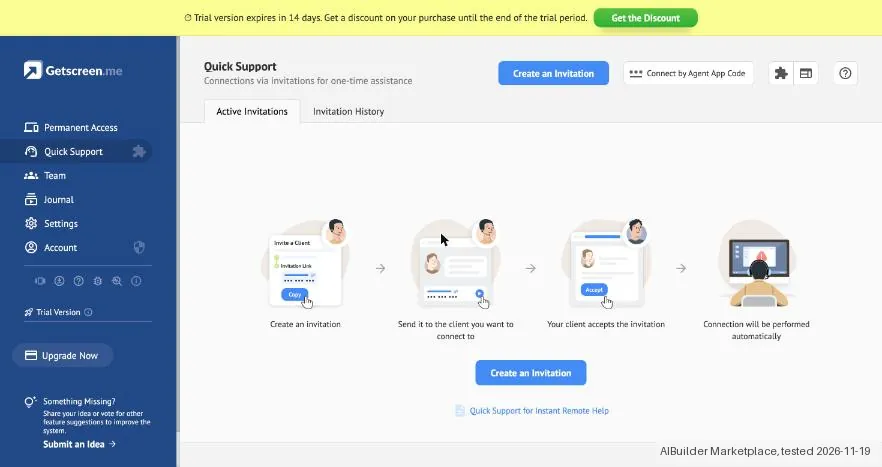
Does Getscreen solve it?PartlyOur test (19 Nov 2026): the Quick Support link took under a minute to make, but the client page says to download and run a file. The helper needs no install, the customer still does.
Your planTrial (500 devices, 5 technicians) needed no card. Advanced for 10 devices and 1 technician showed 9.5 EUR a month, or 7.9 EUR a month yearly.
Try Getscreen →
Your pain“Remote-access tools keep billing me monthly for computers I only reach occasionally.”
Does Getscreen solve it?PartlyPricing page, read 23 Sep 2026: the one-time deal covers 50 devices and 10 quick-support invitations a day, but only for single personal use.
Your planPersonal Lifetime Deal, $149 once (EUR 139 on a European connection)
Try Getscreen →
Your pain“Our technicians copy session links by hand between the helpdesk and the remote tool.”
Does Getscreen solve it?PartlyPricing page, read 23 Sep 2026: the HTTP API is missing on the cheapest paid tier, and the next one allows 100 requests per hour per device.
Your planAdvanced, $6.67 per technician a month plus $0.13 per device, billed annually
Try Getscreen →
- you need the absolute lowest latency (AnyDesk) or heavy compliance certifications like HIPAA/SOC 2 (TeamViewer).
The “Try” buttons are affiliate links: we may earn a commission if you sign up, at no extra cost to you, and it never changes our verdict.
Transparency: the “Visit” links on this page are affiliate links: we may earn a commission if you sign up, at no extra cost to you. No vendor can pay for a better review or verdict. How we make money →
Which Getscreen plan do you need?
4 plans, 3 questions, no signup.
Answer three quick questions to see your plan.
Your plan
Standard
$4.17 per technician a month plus $0.08 per device, billed annually
Business tier; no unlimited client invitations
Your plan
Advanced
$6.67 per technician a month plus $0.13 per device, billed annually
Unlimited client invitations, one-time quick connections
Your plan
Enterprise
$8.33 per technician a month plus $0.17 per device, billed annually
White-label, roles and mass-device management
Prices as we read them on 2026-09-23; check the checkout before you pay. The plan button is an affiliate link: we may earn a commission, at no extra cost to you.
What Getscreen costs at your size
What each plan costs a month on annual billing (monthly billing below it), per user from Getscreen’s own pricing page. The cheapest plan at each size is marked.
| Users | Free | Standard | Advanced | Enterprise |
|---|---|---|---|---|
| 1 user | $0Best value at this size | $4.17 $5 monthly | $6.67 $8 monthly | $8.33 $10 monthly |
| 3 users | $0Best value at this size | $12.51 $15 monthly | $20.01 $24 monthly | $24.99 $30 monthly |
| 5 users | $0Best value at this size | $20.85 $25 monthly | $33.35 $40 monthly | $41.65 $50 monthly |
| 10 users | $0Best value at this size | $41.70 $50 monthly | $66.70 $80 monthly | $83.30 $100 monthly |
| 25 users | $0Best value at this size | $104.25 $125 monthly | $166.75 $200 monthly | $208.25 $250 monthly |
| 50 users | $0Best value at this size | $208.50 $250 monthly | $333.50 $400 monthly | $416.50 $500 monthly |
Prices read 2026-11-01; tax excluded unless the vendor says otherwise. Calculated by our cost engine; the same numbers are in our open data.
See current prices on Getscreen →We created the account and our AI assistant ran the test in our browser. On 19 November 2026 the session tested Getscreen in the 14-day trial of an account we created. The trial needed no card and showed limits of 500 devices and 5 technicians. A Quick Support invitation was ready in under a minute. Its client page, however, asks the client to download and run a file and offered no way to join from the browser, so no session was connected. The purchase window showed Advanced at EUR 7.9 a month on yearly billing and EUR 9.5 a month on monthly billing; Buy Now was not clicked.
How we tested
- Our AI assistant worked in its own tab of our browser on the 14-day trial; the notes record what each screen showed and the screenshots have our details masked
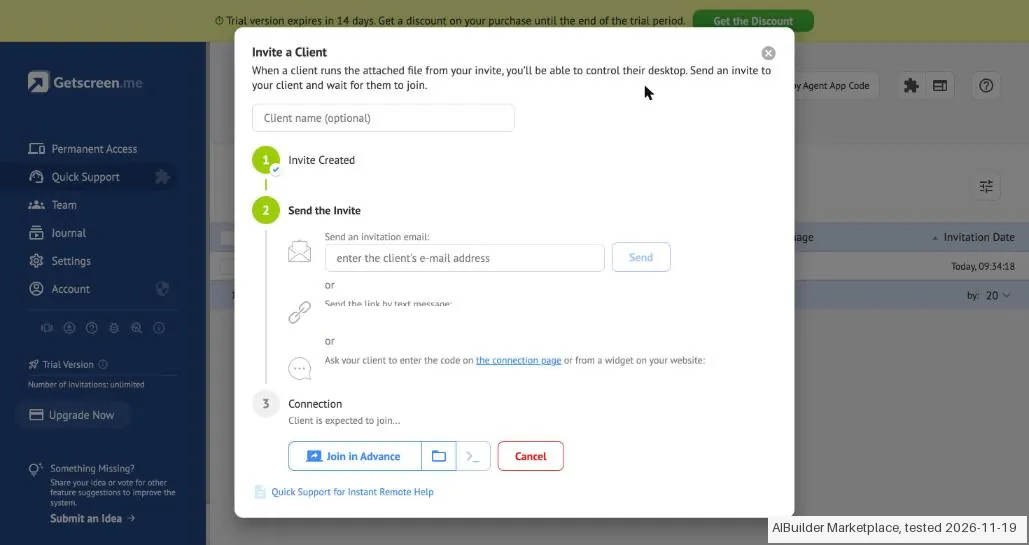
- Text we checked: "When a client runs the attached file from your invite, you'll be able to control their desktop". What we saw: The dossier says a one-off remote session sends the other person a browser link with nothing to install. The invitation window and the client page both ask the client to download and run a file, for Windows, macOS or Linux, and the client page offered no join in the browser.
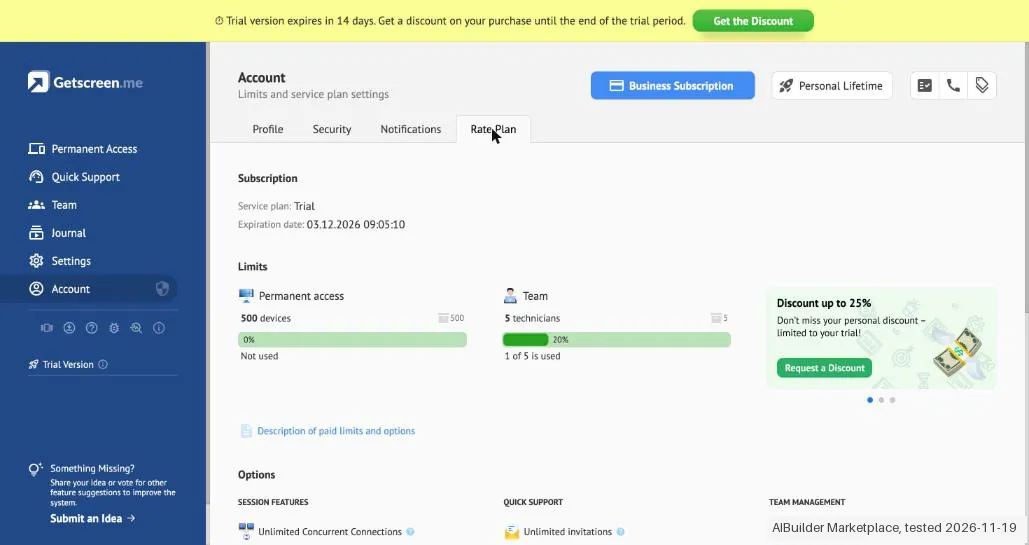
- Text we checked: "Trial version expires in 14 days". What we saw: The banner, the welcome message and Rate Plan (expiration date 03.12.2026) all show a 14-day trial, started with the account, with no card asked.
- Text we checked: "You have been granted access to the trial plan with all options and limits for 500 devices and 5 technicians". What we saw: Rate Plan showed 500 devices (0% used) and 5 technicians (1 of 5 used), with Unlimited invitations.
Pricing (2026)
✓ Pricing re-verified 23 Sep 2026
| Plan | Price | What you get |
|---|---|---|
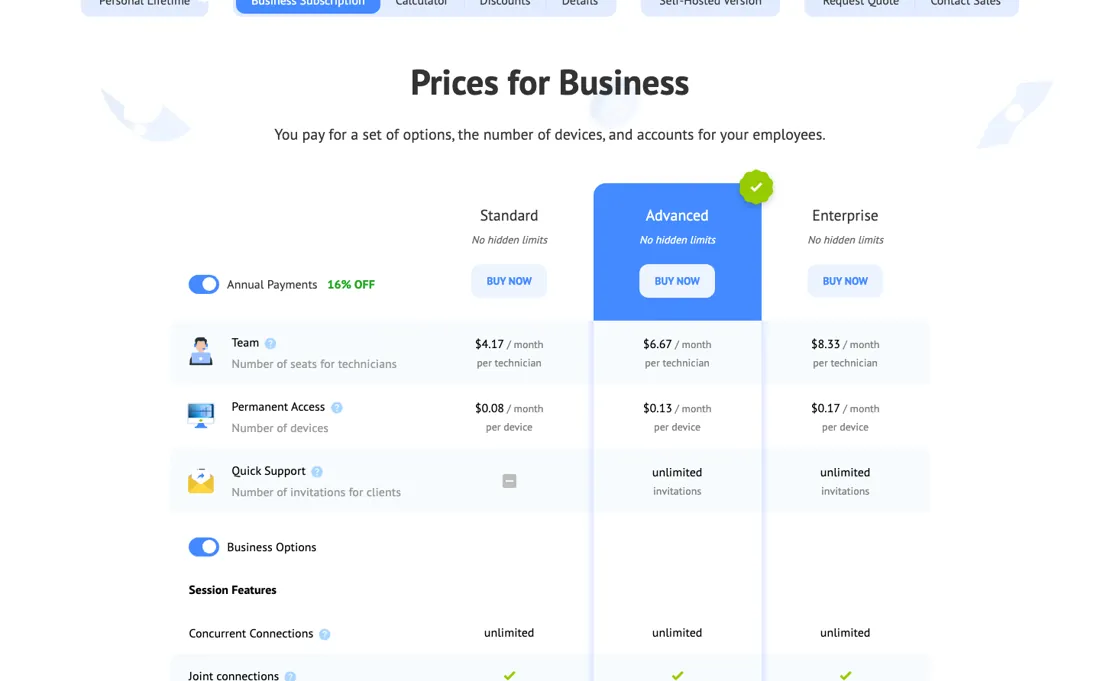
| Standard | $4.17 per technician/mo | plus $0.08 per device; annual payment, marked 16% off |
| Advanced | $6.67 per technician/mo | plus $0.13 per device; unlimited client invitations |
| Enterprise | $8.33 per technician/mo | plus $0.17 per device; white-label and mass device management |
Business rates on getscreen.me/en/pricing/plans/ are quoted on annual payment, which the page marks 16% off. The figures were first read over a US connection on 2026-08-26 as dollars and have not moved since; from a Dutch connection the same numerals print as euros, so the currency symbol follows the visitor region rather than the price. The business subscription bills on two meters at once, and quoting only the first understates it: Standard is $4.17 per technician a month plus $0.08 per device, Advanced $6.67 plus $0.13, and Enterprise $8.33 plus $0.17.
Advanced and Enterprise add unlimited client invitations. Free plan (2 devices); paid tiers add one-time quick connections (Advanced) and white-label, roles and mass-device management (Enterprise), plus a one-time Personal Lifetime Deal at $149 in the page as served, which a browser on a European connection re-renders as EUR 139 (a different number, not just a different symbol, unlike the business rates), and which sidesteps the recurring fees of rivals like TeamViewer (~$50/mo).
Without annual payment the business rates are 5.00 / 8.00 / 10.00 per technician and 0.10 / 0.15 / 0.20 per device a month (Standard / Advanced / Enterprise). The HTTP API is absent on Standard and limited to 100 requests per hour per device on Advanced and 1,000 on Enterprise; video recording storage is 1 GB, 2 GB and 5 GB per technician. Plans change, so check the live price on their site before you buy.
Category context: IT & Productivity. Across the 44 tools in this category that we researched with a public US-dollar price, the median entry price is $15 a month (lowest paid plan as listed, per seat where the vendor prices per seat). Getscreen’s entry price of $4.17 a month sits below that median. Compare pricing conditions in the Software Cost Atlas →
What the pricing page doesn’t say
Getscreen's real edge is being fully browser-based, nothing to install on the other person's machine, and cheaper, especially with the lifetime deal.
Watch the video review
The video version of this review, from our YouTube channel.
⚡ Short on time? Watch the 30-second verdict Short.
What Getscreen does
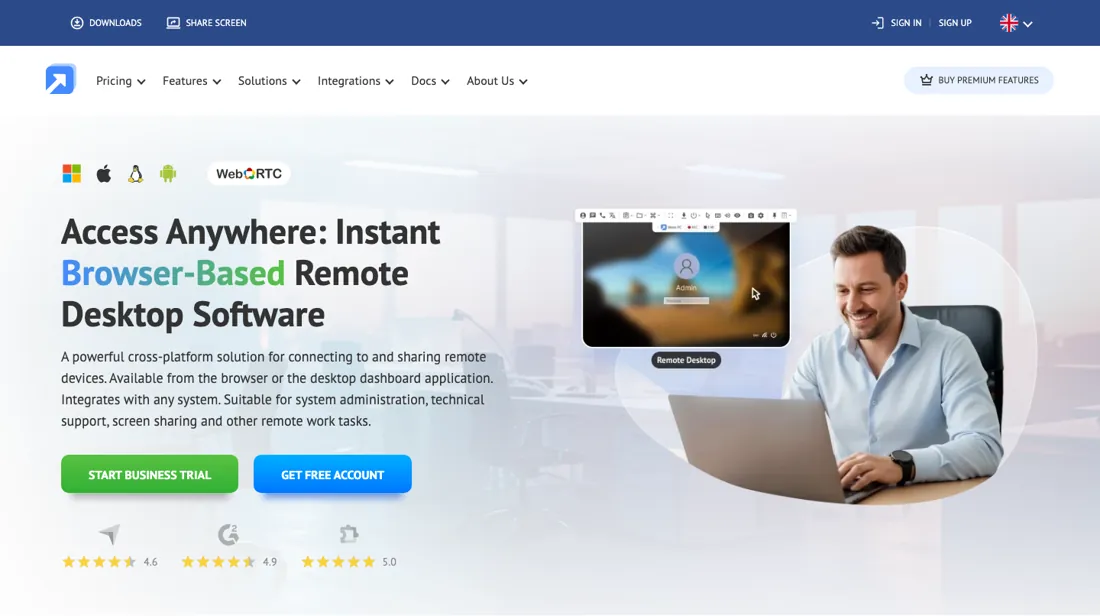
Browser-based remote desktop and remote-support software: connect to any computer with no client install, share one-click access links, transfer files and record sessions. Built for IT teams, MSPs and remote support.
What buyers report about Getscreen
Hands-on: tested 2026-11-19Reported by buyers: Capterra, GetApp and Software Advice, read August 2026
Themes from the buyer-review sites listed at the foot of this page, read in August 2026. We tested Getscreen ourselves on 2026-11-19, but one test is a narrow sample, so here is what other buyers report. We summarise it here because the complaints are usually the part a vendor page leaves out.
- • Browser-based, so nothing to install on the machine you are helping.
- • Commercial use is allowed even on the free plan, which most competitors forbid. From $5/month, with a $149 lifetime option.
- • It leans hard on connection quality: reviewers report occasional drops and minor bugs when the line is not stable.
- • The review base is small and heavily positive, so treat 4.8 as a modest sample rather than a broad verdict.
When the paid plan is worth it
Free covers exactly two devices with a 50MB per-file limit, which works for a single side gig but breaks down the moment you manage a third machine or need to move a file bigger than that. The paid tiers price on two separate axes. There is a per-technician seat fee ($5.00/month per technician on Standard, dropping to $4.17/month when billed annually), and a separate per-device access fee ($0.10/month per device on Standard, $0.08/month annually).
So a small team supporting many devices pays for both the seats and the devices, not one flat number. Annual billing saves 16%, but the total still climbs with headcount and fleet size, which is where the payback math gets real for anyone scaling past a couple of technicians. Standard also skips quick-support invitations entirely, unlimited only from Advanced up, and caps file transfer at 4GB while video-recording storage stays at 1GB one tier above free.
None of that metering resets with a subscription upgrade, it keeps compounding every month. The $149 Personal Lifetime deal sidesteps that math altogether: 50 devices forever and 10 invitations a day for a one-time payment, but it is scoped to individual use rather than the technician-seat model teams actually need.
What we found running Getscreen ourselves
The first findings are at the top of this page. The rest:
- Text we checked: "Not intended for serving real clients!". What we saw: The client page of the trial invitation says the session is a trial version, not intended for serving real clients, and warns the client not to trust the technician with control of the computer.
Claim vs. what we measured
We set a claim from Getscreen's own pages next to what we saw in our test, on the plan named. The status says whether the two describe the same thing and match; it is not a verdict on the product. Confirmations are listed too.
| What the vendor says | What we measured | Status | What it means if you buy |
|---|---|---|---|
| When a client runs the attached file from your invite, you'll be able to control their desktop.Source: our test notes, read 19 Nov 2026 | Measured 2026-11-19: The dossier says a one-off remote session sends the other person a browser link with nothing to install. The invitation window and the client page both ask the client to download and run a file, for Windows, macOS or Linux, and the client page offered no join in the browser.Our test, 19 Nov 2026; 14-day trial; the plans were read in the Buy a Subscription window and on the public pricing page; no checkout was opened | ContradictedThe invitation window and client page against the dossier line on browser links. | Plan on your client running a downloaded file for a one-off session; a browser-only join was not offered on that page. |
| Trial version expires in 14 days.Source: our test notes, read 19 Nov 2026 | Measured 2026-11-19: The banner, the welcome message and Rate Plan (expiration date 03.12.2026) all show a 14-day trial, started with the account, with no card asked.Our test, 19 Nov 2026; 14-day trial; the plans were read in the Buy a Subscription window and on the public pricing page; no checkout was opened | ConfirmedThe trial banner and Rate Plan against the dossier trial line. | You can try the business features for 14 days without a card. |
| You have been granted access to the trial plan with all options and limits for 500 devices and 5 technicians.Source: our test notes, read 19 Nov 2026 | Measured 2026-11-19: Rate Plan showed 500 devices (0% used) and 5 technicians (1 of 5 used), with Unlimited invitations.Our test, 19 Nov 2026; 14-day trial; the plans were read in the Buy a Subscription window and on the public pricing page; no checkout was opened | ConfirmedThe welcome message against the limits on the Rate Plan page. | The trial limits are wide enough to try a team setup. |
| Not intended for serving real clients!Source: our test notes, read 19 Nov 2026 | Measured 2026-11-19: The client page of the trial invitation says the session is a trial version, not intended for serving real clients, and warns the client not to trust the technician with control of the computer.Our test, 19 Nov 2026; 14-day trial; the plans were read in the Buy a Subscription window and on the public pricing page; no checkout was opened | ContradictedThe trial warning on the client page against the dossier line that the trial covers every feature. | During the trial you cannot fairly use the tool with a real customer, because the customer sees this warning. |
| Annual Subscription EUR 7.9 / month (16% cheaper)Source: our test notes, read 19 Nov 2026 | Measured 2026-11-19: Buy a Subscription, Advanced for 10 devices and 1 technician: EUR 9.5 a month monthly, which is 8.00 plus 10 times 0.15, and EUR 7.9 a month yearly, while the pricing page gives 6.67 plus 10 times 0.13, which is 7.97. The dossier gives the same numerals in dollars. Buy Now was not clicked, so no tax or total was seen.Our test, 19 Nov 2026; 14-day trial; the plans were read in the Buy a Subscription window and on the public pricing page; no checkout was opened | Not testablePurchase window amounts without a payment page; no stored cost rule was compared. | The price at the end of the buying path is not known from this test. |
Exit test: can you take your data out?
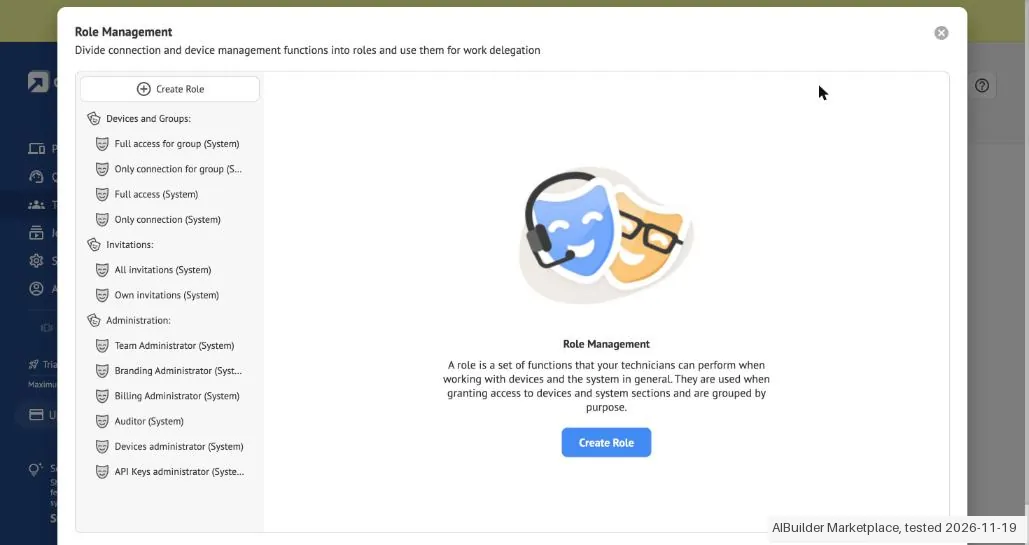
Account and start: we created the account; our AI assistant ran the test in our browser, in its own tab on getscreen.me/panel, on 19 November 2026 from 09:33 CET. The interface was already in English. Nothing was installed, downloaded or sent. The dossier name is Getscreen and the review is on AIBM (b2b/getscreen-review). The account opened with Your trial subscription is activated: access to the trial plan with all options and limits for 500 devices and 5 technicians, 14 days left. Rate Plan showed Service plan Trial, expiration date 03.12.2026, 500 devices (0% used), 5 technicians (1 of 5 used), Unlimited invitations, 25 GB video recording and 500000 HTTP API requests per hour. No card was asked for the account or the trial. The free plan of 2 devices was not shown in the app during the trial. Core action, a one-off support invitation: Quick Support, Create an Invitation made an invitation at 09:34:18, in under a minute and two clicks. The window Invite a Client says that when a client runs the attached file from the invite, you will be able to control their desktop, and offers an e-mail, a link or a code. The client page behind the link was opened but nothing on it was clicked: it says the session is a trial version not intended for serving real clients, asks the client to download and run the attached file, and lists files for Windows, macOS and Linux. That page offered no way to join in the browser without the file, so no screen was shared and no session was connected. Team, Technicians was empty; Role Management lists the system roles for devices, invitations and administration. Settings has Team, Branding, Integrations, Gateways, API Keys and Self-Hosted; branding was not set and was not turned on. Plans: On getscreen.me/en/pricing/plans/, billed yearly with 16% off and shown in EUR from a Dutch connection: Standard 4.17 per technician plus 0.08 per device a month, Advanced 6.67 plus 0.13 and Enterprise 8.33 plus 0.17; Quick Support has unlimited invitations on Advanced and Enterprise and is not in Standard; the HTTP API is absent on Standard, 100 requests per hour per device on Advanced and 1000 on Enterprise. In the app Buy a Subscription, with Advanced preselected for 10 devices and 1 technician, shows Monthly Subscription EUR 9.5 a month and Annual Subscription EUR 7.9 a month (16% cheaper). The window also shows Trial Subscription Free, 14 days, Not available for this plan, and the payment marks Visa, Mastercard, PayPal, Apple Pay, Google Pay and Alipay. Checkout: Buy Now was not clicked, so no payment page, card field, tax or total was seen. Cancelling: no cancel button for the trial was seen; the trial ends on 03.12.2026 and no subscription is attached. Account, Profile has a bin icon to delete the account, which was not clicked. Cancelling a paid plan was not tested. Not tested: the agent on a device, screen sharing in the browser, a connected session, inviting a technician, branding, device groups, the API, the free plan after the trial and the lifetime deal. Clean up: the account and the trial stay; one test invitation stays open in Quick Support, never sent, and expires by itself. The own tab was closed. No kit records were entered. Test date: 19 Nov 2026. We describe the friction rather than score it; this is one run with synthetic records, not a verdict on Getscreen.
| What we checked | What we saw |
|---|---|
| Fields offered by the export dialog | |
| Not offered in the field selector | None noted. |
| The exported file | We did not inspect the file, so data retention and loss remain unverified. |
| Awkward but not lost | The client side of a Quick Support invitation asks for a downloaded file, and the trial client page warns the client not to trust the technician with their computer, so a trial is hard to use with a real customer. The purchase window marks the 14-day trial as not available for the chosen plan while the account is already in a trial. |
| Export route | No export or reimport was performed; no file was downloaded or examined. The two categorised kit records were not entered; the objects tested were not kit records. |
| Export format | No downloaded bytes examined. |
| Re-importing the export | No reimport performed. |
| Cancelling | No cancellation or downgrade performed. |
What the exit test does not show:
- Session and source-reading date: 19 November 2026. Times are CET. The session started at about 09:33 CET. These are approximate tester observations, not benchmark timings. Midnight timestamps are required date anchors, not measured event times.
How this compares: across our exit tests of 329 tools, 60 gave us an export file. For Getscreen no usable export file reached us during the test session. Report 08: can you get your data out?
Mail in the first 14 days
Measurement running until 2026-12-02T23:00:00Z (last observed 2026-11-21T02:18:02.127388Z).
3 emails in the 14-day window so far; first email after signup: unknown (exact signup time not recorded); 0 with an explicit offer.
Retained inbox and junk only; removed or archived mail is outside this observation. Ambiguous supplier attribution is excluded. Day numbers use elapsed 24-hour periods since the recorded signup date at midnight Europe/Amsterdam; the signup hour is unknown. Offer flags quote literal subject/body text. Replies in our own correspondence (support tickets, our comment requests) are excluded; one-time codes, our own address, our account name and our name are replaced in brackets.
| Day | Time (UTC) | Sender | Literal subject | Folder | Offer evidence |
|---|---|---|---|---|---|
| Day 0 | 2026-11-19 08:04:17 UTC | Getscreen team / notify.getscreen.me | Registration complete | inbox | |
| Day 0 | 2026-11-19 08:05:13 UTC | Getscreen team / news.getscreen.me | New account login | inbox | |
| Day 0 | 2026-11-19 08:32:07 UTC | Getscreen team / news.getscreen.me | Welcome to your Trial, here’s where to start 🚀 | inbox |
Screenshots from our test (click to enlarge)
What this test does not show:
- A connected support session and screen sharing in the browser; the client page asked for a downloaded file.
- The agent on a device and unattended access.
- Inviting a technician and the roles in use.
- Branding, device groups and the API.
- The free plan of 2 devices after the trial.
- The lifetime deal.
- A payment page, tax and total; Buy Now was not clicked.
- Cancelling a paid plan; no plan was bought.
- Export of a file into a kit, and reimport.
Most of our reviews are researched rather than run. How we review explains which is which, and why we do not pretend otherwise.
How to actually use Getscreen
Signup is free and needs no card, and business users can trial every feature free for 14 days, also with no card required. Getting to core value differs by use case. For a one-off support session, you send the other person a browser link, nothing to install on their side, since browser-based delivery is the whole pitch. For unattended access to a device you control, you install the agent app instead, available for Windows, macOS, Linux, and Android.
Then add the device to your list and set up technician access rights if you are working as a team. In practice the friction shows up during that install. On Mac, the remote screen stays blank until you manually grant Screen Recording and Accessibility permissions; on Windows, antivirus and firewall software commonly blocks the agent executable outright; and on Android the app needs security restrictions loosened to run at all.
Where this section comes from: our research notes (111 words)
official pricing/personal/plans pages, docs.getscreen.me user guides, and community/user reports on installation issues. Note for anyone re-checking: the plan table carries no prices in the served HTML and only fills in once a browser runs the page, so it has to be read rendered rather than fetched Re-read 23 September 2026 in the browser pane: getscreen.me/en/pricing/plans/ with the annual toggle on and off (EUR numerals from a Dutch connection), and getscreen.me/en/pricing/personal/, whose served HTML (fetched from the Mac and from a German server) says $149 while the rendered page in the Netherlands says EUR 139.
Getscreen's blog post on remote-access pricing plans (Standard features: browser-based connections, unattended access) read 30 October 2026.
The natural comparison is AnyDesk or TeamViewer: the faster and the more enterprise-secure rivals. Weigh it against TeamViewer on the job you actually need done.
Frequently asked questions
Can you export your data from Getscreen?
Exit check 2026-11-19; route excerpt: No export or reimport was performed; came along (excerpts): not tested; lost (excerpts): not tested; re-import: not tested.
What does Getscreen cost for two technicians and 40 computers?
Both meters apply, so work it out per line. Read 23 September 2026 on getscreen.me/en/pricing/plans/, Standard on annual payment is 4.17 per technician and 0.08 per device a month: 2 x 4.17 plus 40 x 0.08 comes to 11.54 a month, about 138 a year. Advanced at 6.67 and 0.13 gives 18.54 a month; Enterprise at 8.33 and 0.17 gives 23.46. Without the annual discount Standard is 5.00 and 0.10, so 14.00 a month. The page prints these numerals in euros to a European visitor and in dollars to a US one. The step up to Advanced is not about scale: it is what you pay for unlimited client invitations, since Standard has no quick-support invitations at all, and for unlimited file size instead of 4 GB.
Is the Getscreen lifetime deal $149 or EUR 139?
Both, depending on where you open the page. Read 23 September 2026, the page as served from the server says $149, and a browser on a European connection replaces that with EUR 139. That is different from the business plans, where the same numerals simply switch symbol. For the money you get one personal licence with 50 devices permanently and 10 quick-support invitations a day, file transfers up to 4 GB and up to 1 GB of session recording. It is sold for single personal use, so it is not a way around the per-technician seat model if more than one person needs to connect.
Do I need Advanced to use the Getscreen API?
Yes. Read 23 September 2026, the comparison table leaves the HTTP API row empty for Standard and gives Advanced 100 requests per hour per device and Enterprise 1,000. The same step decides quick support, which Standard lacks entirely, and file transfers, capped at 4 GB on Standard and unlimited above it. So if your plan is to hook remote sessions into a helpdesk or RMM script, price Advanced from the start: 6.67 per technician plus 0.13 per device a month on annual payment, against 4.17 and 0.08 on Standard. Whether 100 requests per device per hour is enough depends on how often your integration polls, which the page cannot tell you; test it on the 14-day business trial, which needs no card.
Can Getscreen reach a computer from a browser when nobody is sitting at it?
Getscreen's own plan overview says Standard covers both. Its blog post on remote-access pricing plans, read 30 October 2026, lists browser-based connections and unattended access among the main Standard features and describes small companies using it to organize unattended remote access through a browser. It does not say whether the managed computer needs Getscreen's agent installed for unattended sessions or which operating systems qualify, so that is not confirmed; check the setup guide for your platform before paying for devices.
Is this a hands-on review of Getscreen?
Yes. We tested Getscreen ourselves on 2026-11-19; the section above says what we tested, what we found and what we did not test, and where a figure comes from the vendor's own documentation instead. Most of our reviews are researched rather than run; we say which is which. We name what each tool is good and bad at, and we earn a commission only if you sign up, at no cost to you.
- Buyer reviews on Capterra, GetApp and Software Advice, read August 2026.
- Price re-verified 2026-09-23.
- A dated screenshot of that pricing page, kept on this site as the receipt.
- Our own hands-on session with Getscreen (2026-11-19), written up in full further down this page.
Bottom line
The Try button is an affiliate link; we may earn a commission at no extra cost to you.
Others in this category
Reviewed it & productivity tools that share ground with Getscreen. They are comparable in what they do, not drop-in swaps:
New reviews, price changes we recorded, and the cost conditions we found. No sponsored placements. Unsubscribe anytime.
This is our researched assessment, not a paid placement. The “Visit” links on this page are affiliate links: we may earn a commission if you sign up, at no extra cost to you, and it never changes our take. How we review →