Reclaim.ai Review (2026)From $10 a Seat, Free Lite Plan
 By Daan Haket · Tested hands-on · written with an AI assistant · who does what
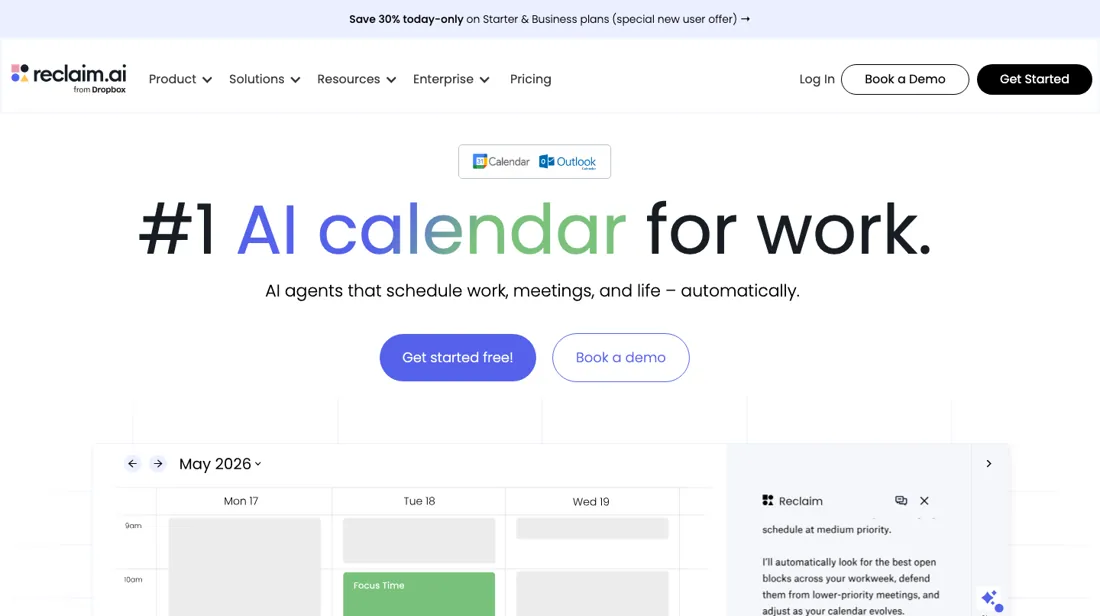
The magic only works on a calendar it can write to.
From $10 · per seat a month billed yearly ($12 monthly) · read 2026-11-18
Try Reclaim.ai free →Affiliate link: we may earn a commission if you sign up, at no extra cost to you. It never changes our verdict.
Is Reclaim.ai right for you?
Your pain“Meetings eat my calendar and my own work never gets a protected slot.”
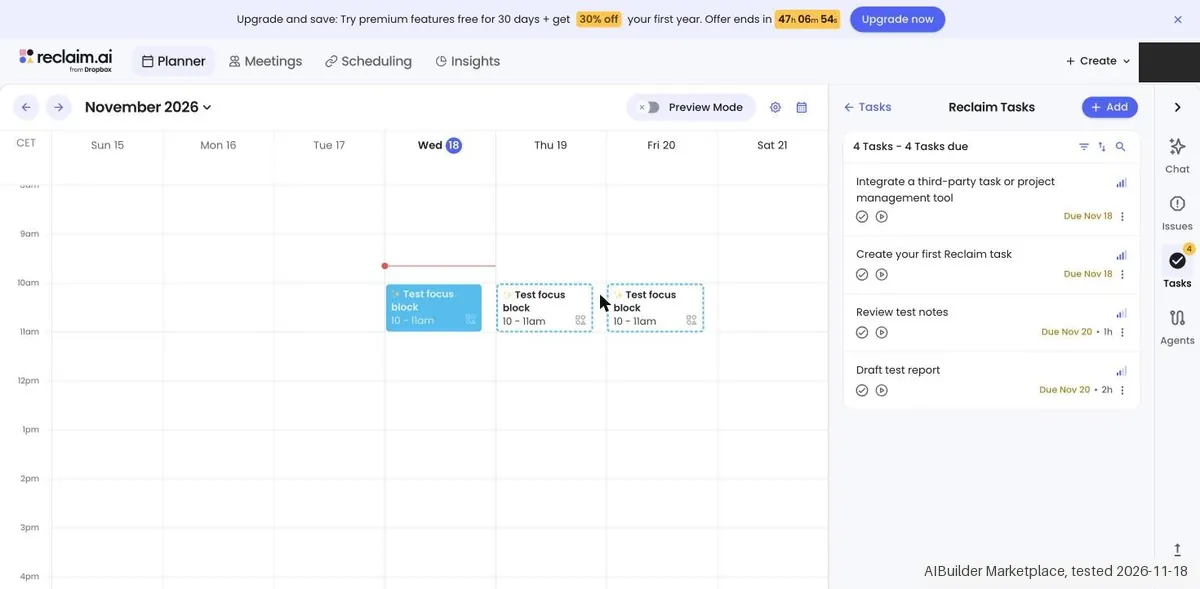
Does Reclaim.ai solve it?PartlyOur test (18 Nov 2026): a daily 1 hour habit landed in our Google calendar within seconds and moved from 10:00 to 11:00 about 3 seconds after we added a clashing event, but tasks with deadlines got no time blocks of their own.
Your planLite is free with a 1 week scheduling range; Starter, $10 per seat a month billed yearly ($12 monthly)
Try Reclaim.ai →
Your pain“Nobody can see who is out, and my assistant cannot act on my calendar.”
Does Reclaim.ai solve it?PartlyPricing page, re-verified 3 Oct 2026: team out-of-office calendar and delegated access are marked No on Lite and Starter, Yes from Business.
Your planBusiness, $15 per seat a month billed yearly ($18 monthly)
Try Reclaim.ai →
Your pain“Every smart scheduler seems built for Google, and our calendars live in Outlook.”
Does Reclaim.ai solve it?PartlyVendor integration page, read 15 Sep 2026: Microsoft 365 and Outlook.com work, but its help centre says hosted and on-premise Exchange cannot be connected.
Your planStarter, $10 per seat a month billed yearly; its hashtags do not work in a Microsoft event's RSVP note
Try Reclaim.ai →
- you run hosted or on-premise Exchange, which Reclaim's help centre lists as unsupported, or you don't overbook your calendar: the auto-scheduling has little to optimize.
The “Try” buttons are affiliate links: we may earn a commission if you sign up, at no extra cost to you, and it never changes our verdict.
Transparency: the “Visit” links on this page are affiliate links: we may earn a commission if you sign up, at no extra cost to you. No vendor can pay for a better review or verdict. How we make money →
Which Reclaim.ai plan do you need?
4 plans, 3 questions, no signup.
Answer three quick questions to see your plan.
Your plan
Lite
Free forever
1 user, 2 connected calendars, 1 scheduling link, 5 AI agents
Your plan
Starter
$10 per seat/mo billed yearly ($12 monthly)
Up to 10 seats, 3 scheduling links, 10 AI agents per seat
Your plan
Business
$15 per seat/mo billed yearly ($18 monthly)
Up to 100 seats, unlimited links, webhooks, 100 agents per seat
Your plan
Enterprise
$22 per seat/mo billed yearly
Over 100 seats, unlimited AI agents per seat
Prices as we read them on 2026-11-18; check the checkout before you pay. The plan button is an affiliate link: we may earn a commission, at no extra cost to you.
What Reclaim.ai costs at your size
What each plan costs a month on annual billing (monthly billing below it), per user from Reclaim.ai’s own pricing page. The cheapest plan at each size is marked. On annual billing the cheapest plan changes from Lite to Starter between 1 and 2 users. Lite stops at 1 user; Starter stops at 10 users; Business stops at 100 users; Enterprise starts at 101 users.
| Users | Lite | Starter | Business | Enterprise |
|---|---|---|---|---|
| 1 user | $0Best value at this size | $10 $12 monthly | $15 $18 monthly | not available |
| 3 users | not available | $30Best value at this size $36 monthly | $45 $54 monthly | not available |
| 5 users | not available | $50Best value at this size $60 monthly | $75 $90 monthly | not available |
| 10 users | not available | $100Best value at this size $120 monthly | $150 $180 monthly | not available |
| 25 users | not available | not available | $375Best value at this size $450 monthly | not available |
| 50 users | not available | not available | $750Best value at this size $900 monthly | not available |
Prices read 2026-11-18; tax excluded unless the vendor says otherwise. Calculated by our cost engine; the same numbers are in our open data.
See current prices on Reclaim.ai →Daan created the account and our AI assistant ran the test in Daan's browser. We read the Reclaim plans and tested the planner in the existing Lite account of Daan on 18 November 2026, with a test calendar linked through calendar scopes only. A custom habit showed up in the calendar within about 2 seconds and moved to a free slot about 3 seconds after we added a clashing event, then moved back when we removed it. The habit defaults to Free, so others can book over it. Two tasks with a duration and a deadline got no calendar block of their own: Tasks is marked Beta and only suggests them inside a habit. We bought no plan.
How we tested
- Connected a test calendar to the existing free Reclaim account with calendar scopes only
- Created a focus habit, then added a clashing event and removed it again to watch the block move
- Added two tasks with deadlines and checked whether they got calendar blocks
- Text we checked: "Unlimited Calendar Syncs". What we saw: The in-app plan card of Starter lists Unlimited Calendar Syncs, while the public pricing page says 3 Calendar Syncs for Starter. Neither number was exercised.
- Text we checked: "1 Calendar Sync". What we saw: Lite promises 1 Calendar Sync on both pricing pages, but in Settings, Calendars the Add a sync and New sync buttons carry a STARTER label, and the Calendar Syncs box says No syncs are set up. Whether a Lite user can make the one sync was not tried.
- Text we checked: "Task created. You'll find it in your Reclaim Tasks". What we saw: Two tasks with a duration and a deadline were made and found in the task list, but neither got a block in the calendar, also not after a reload and about 3 minutes. Priority Critical and an earlier deadline changed only the list order. Tasks is marked Beta and shows tasks only as a suggestion inside a habit. The dossier says Reclaim auto-schedules tasks.
Pricing (2026)
✓ Pricing re-verified 18 Nov 2026
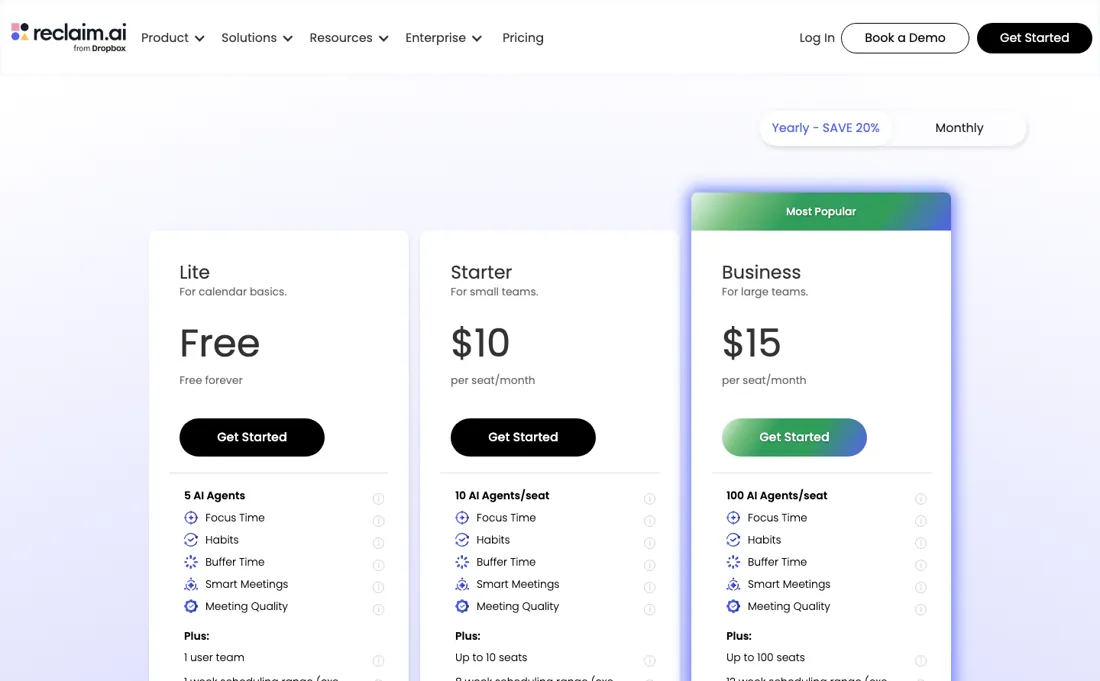
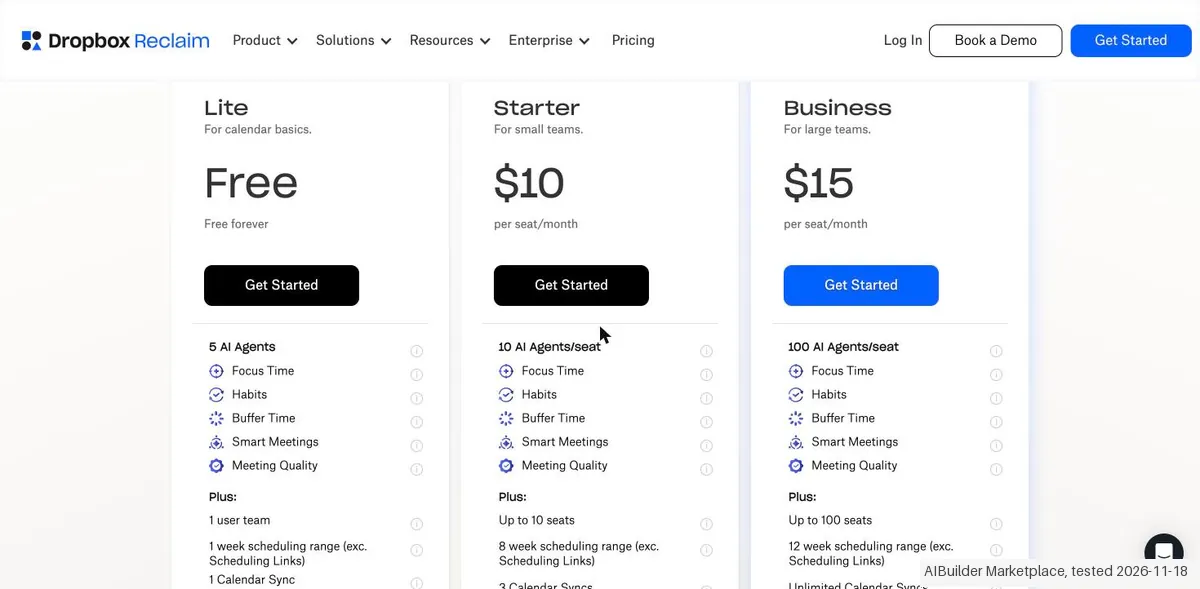
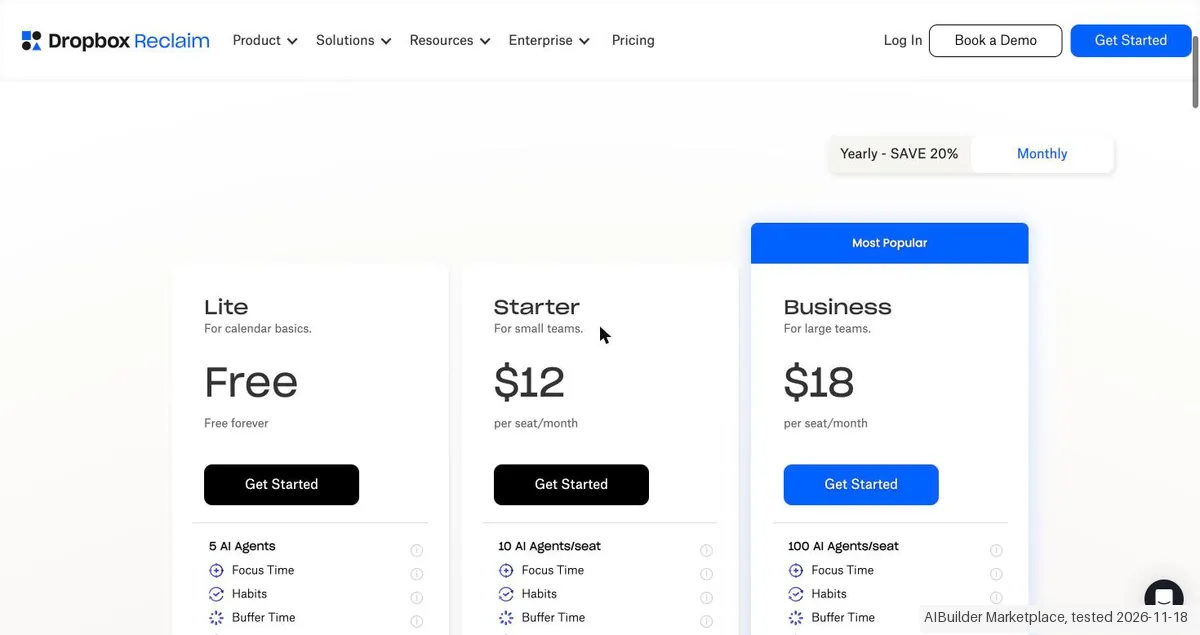
Four levels, and the page keeps both billing terms in the markup rather than recomputing them. Lite is free forever for a single user. Billed yearly the seats are Starter $10, Business $15 and Enterprise $22 per seat a month; billed monthly Starter is $12 and Business $18, and the monthly column marks Enterprise 'Unavailable on monthly plans'. Seats are capped by tier rather than open: 1 user on Lite, up to 10 on Starter, up to 100 on Business and over 100 on Enterprise, with the AI-agent allowance per seat stepping 5, 10, 100 and unlimited beside them.
Calendar Syncs are counted per plan: 1 on Lite, 3 on Starter and unlimited from Business. In our test on 18 November 2026 the app showed Unlimited Calendar Syncs on Starter, and on Lite the 'Add a sync' button carried a STARTER label, so check the count in your own account. The Attendee Unit packs are no longer shown: on 18 November 2026 the page showed neither the AU packs nor the '20% off with code MEETINGS' banner.
Full pricing notes (2 more paragraphs)
Both are still in the page code but hidden, so we no longer count either as part of the price. Our October reading listed AU packs from $8 for 3 on Starter, for attendees without a paid seat in Smart Meetings of 3 or more. The page now lists four discounts you apply for: Student 50% for 12 months (students, educators and faculty), Nonprofit 20% for 3 years, Startup 20% for 3 years, and Switching Providers 20% for 6 months when you move from Clockwise, Motion or Calendly.
The site now carries a Dropbox Reclaim logo (alt text 'Reclaim.ai from Dropbox').
Plans change, so check the live price on their site before you buy.
Category context: Operations & Workflow. Across the 55 tools in this category that we researched with a public US-dollar price, the median entry price is $25 a month (lowest paid plan as listed, per seat where the vendor prices per seat). Reclaim.ai’s entry price of $10 a month sits below that median. Compare pricing conditions in the Software Cost Atlas →
Correction after re-checking: Lite is free forever; Starter is $10 per seat/month billed yearly ($12 billed monthly), Business is $15 per seat/month yearly ($18 monthly), and Enterprise is $22 per seat/month on yearly billing only (not custom-quoted, and unavailable on monthly). The annual toggle is labelled SAVE 20%, not roughly 29%. Priced per seat. The vendor's own machine-readable pricing file carries the same four prices. (re-verified 2026-08-11)
What the price did
We read Reclaim.ai’s own pricing page on a schedule and keep every reading, so this is our record of the page. It is not a forecast, and not someone else’s summary. A change appears here only after we confirmed the new price on the page itself.
Unchanged. Every price on Reclaim.ai’s pricing page was identical across our 21 reads from 24 Jul 2026 to 18 Nov 2026 (117 days).
The Attendee Unit ladder has been stable. Our July and August 2026 captures carry identical AU pricing, $8, $16, $24 and $32 on Starter, $12, $24, $36 and $48 on Business, and the same packs were on the page on 17 August 2026. What varies between readings is the promotional banner on top, which has advertised both a 30% new-user discount and a 20% code. Re-read on 14 September and 3 October 2026, the seat prices ($10/$15/$22 yearly, $12/$18 monthly) and every AU pack were unchanged; on 3 October the banner offered 20% off with the code MEETINGS, and the expired 'free through July 31st' promo line was still on the page. On 18 November 2026 the seat prices were unchanged, but the AU packs and the MEETINGS banner were no longer shown (they remain only as hidden page code), and four standing discounts had been added.
What the pricing page doesn’t say
Google Calendar was first, but Microsoft 365, Outlook.com and Exchange-backed accounts are supported too (reclaim.ai/integrations/outlook-calendar, read 15 September 2026); Reclaim's own help centre still lists hosted and on-premise Exchange as unsupported. The free tier is quite limited. A genuine time-saver for the right setup, useless for the wrong one.
Watch the video review
The video version of this review, from our YouTube channel.
⚡ Short on time? Watch the 30-second verdict Short.
What Reclaim.ai does
Auto-schedules tasks, habits and meetings around your stated priorities. Google Calendar-first, so Outlook-heavy teams are out, and the free tier is limited.
What buyers report about Reclaim.ai
Hands-on: tested 2026-11-18Reported by buyers: G2 and Trustpilot, read August 2026
Themes from the buyer-review sites listed at the foot of this page, read in August 2026. We tested Reclaim.ai ourselves on 2026-11-18, but one test is a narrow sample, so here is what other buyers report. We summarise it here because the complaints are usually the part a vendor page leaves out.
- • It defends focus time on your calendar automatically, and that is what earns 4.8 on G2 across 120+ reviews.
- • There is a real free tier, and paid starts at $10 per seat.
- • No native iOS app. It is on the public roadmap as In Planning and had not shipped as of July 2026: the most-cited gap in G2 feedback.
- • The free Lite tier has shrunk over time, from 3 calendars and 16 habits down to 1 and 3. Long-time free users describe that as being squeezed toward paying.
- • Trustpilot sits at 2.7 across 14 reviews, mostly billing. Small sample, but the theme is consistent.
- • Several users report Reclaim being hard to fully remove from Google Calendar after deleting the account, with notifications persisting.
- • The team features that justify it organisationally (analytics, team OOO, delegated access) are all on Business or Enterprise, so the free tier does not show you what you would be buying.
Pages read (August 2026): Trustpilot
When the paid plan is worth it
Lite includes 5 AI Agents, Focus Time, Habits, Buffer Time and Smart Meetings, but the pricing page marks it 'Limited integrations', 'Limited' AI Memories, 'Limited' AI Assistant (LLM chat) and 'Default settings' for time blocking customization, against 'Full customization' on paid tiers. Lite caps you at 2 connected calendars, 1 scheduling link, 5 AI agents, a 1 week scheduling range and 1 user team. Starter, $10 per seat/month on yearly billing ($12 monthly), lists an 8 week range, unlimited connected calendars, unlimited integrations, 3 scheduling links and 10 AI agents per seat.
Business at $15 yearly ($18 monthly) shows 12 weeks, unlimited scheduling links, 100 agents per seat, webhooks support, and up to 100 seats against Starter's 10. The vendor's machine-readable pricing file lists Team OOO Calendar and Delegated Access as 'No' on Lite and Starter, 'Yes' from Business. Enterprise is $22 per seat/month on yearly billing only. Upgrading does not close the documented Outlook gaps. Hosted or on-premise Exchange account holders 'will not be able to create accounts or add calendars', and the vendor says it won't add that support 'for the foreseeable future'.
Reclaim's own hashtags also do not work in the RSVP note of a Microsoft event. Read on 18 November 2026, the page counts Calendar Syncs: 1 on Lite, 3 on Starter and unlimited from Business; in our test the app showed unlimited syncs on Starter.
Our monthly capture read this vendor's pricing page every month from July 2026 to October 2026, and the amounts were the same all 4 times, including $12, $15, $18 and $22 from the pricing above. We keep watching, and the registry records what moves.
What we found running Reclaim.ai ourselves
The first findings are at the top of this page. The rest:
- Text we checked: "Skip when busy". What we saw: The habit block appeared in the calendar within seconds, moved from 10 to 11am to 11am to 12pm within about 3 seconds when a busy test appointment was put in the same hour, and jumped back within a few seconds when the appointment was deleted.
- Text we checked: "code MEETINGS". What we saw: The dossier mentions Attendee Unit packs and the 20% off code MEETINGS. The public page no longer shows them and the app showed no packs. New offers are Student 50% (12 months), Nonprofit 20% (3 years), Startup 20% (3 years) and Switching Providers 20% (6 months), and a 30 days free banner.
Claim vs. what we measured
We set a claim from Reclaim.ai's own pages next to what we saw in our test, on the plan named. The status says whether the two describe the same thing and match; it is not a verdict on the product. Confirmations are listed too.
| What the vendor says | What we measured | Status | What it means if you buy |
|---|---|---|---|
| Unlimited Calendar SyncsSource: our test notes, read 18 Nov 2026 | Measured 2026-11-18: The in-app plan card of Starter lists Unlimited Calendar Syncs, while the public pricing page says 3 Calendar Syncs for Starter. Neither number was exercised.Our test, 18 Nov 2026; No plan was bought and no trial was started; the billing page and the public pricing page were read without clicking a plan button | ContradictedThe in-app plan card against the public pricing page on the same day; no Calendar Sync was made, so the limit itself was not tried. | A buyer who needs many syncs may get more on Starter than the public page says, or the page is out of date. |
| 1 Calendar SyncSource: our test notes, read 18 Nov 2026 | Measured 2026-11-18: Lite promises 1 Calendar Sync on both pricing pages, but in Settings, Calendars the Add a sync and New sync buttons carry a STARTER label, and the Calendar Syncs box says No syncs are set up. Whether a Lite user can make the one sync was not tried.Our test, 18 Nov 2026; No plan was bought and no trial was started; the billing page and the public pricing page were read without clicking a plan button | ContradictedThe pricing page line against the label on the buttons in Settings; no sync was started. | A free user may be unable to use the one sync that the plan lists. |
| Task created. You'll find it in your Reclaim Tasks.Source: our test notes, read 18 Nov 2026 | Measured 2026-11-18: Two tasks with a duration and a deadline were made and found in the task list, but neither got a block in the calendar, also not after a reload and about 3 minutes. Priority Critical and an earlier deadline changed only the list order. Tasks is marked Beta and shows tasks only as a suggestion inside a habit. The dossier says Reclaim auto-schedules tasks.Our test, 18 Nov 2026; No plan was bought and no trial was started; the billing page and the public pricing page were read without clicking a plan button | ContradictedThe dossier wording on tasks against two tasks on one Lite account, in one session of about 15 minutes; the Starter and Business plans were not used. | A buyer who expects tasks to get time in the calendar by themselves has to attach them to a habit first. |
| Skip when busySource: our test notes, read 18 Nov 2026 | Measured 2026-11-18: The habit block appeared in the calendar within seconds, moved from 10 to 11am to 11am to 12pm within about 3 seconds when a busy test appointment was put in the same hour, and jumped back within a few seconds when the appointment was deleted.Our test, 18 Nov 2026; No plan was bought and no trial was started; the billing page and the public pricing page were read without clicking a plan button | ConfirmedThe dossier wording on habits against one habit and one conflicting appointment; larger calendars and many habits were not tried. | Habit blocks do defend their time and move around busy slots by themselves, as promised. |
| Shallow Work, Free, Default visibility, Default remindersSource: our test notes, read 18 Nov 2026 | Measured 2026-11-18: The new habit is set to Free by default, so other people can book over the block, and the block stays visible as a normal event.Our test, 18 Nov 2026; No plan was bought and no trial was started; the billing page and the public pricing page were read without clicking a plan button | Not comparableA default setting of one habit; no stored claim about the default exists in the dossier or on the public page. | Someone who wants the time to be really protected has to change this setting for each habit. |
| Also remove future events for: Test focus blockSource: our test notes, read 18 Nov 2026 | Measured 2026-11-18: Removing a habit has a tick box to also remove future events, which is OFF by default. Without it the blocks stay in the calendar, and the block of the day stayed as an ordinary repeating appointment until it was deleted by hand.Our test, 18 Nov 2026; No plan was bought and no trial was started; the billing page and the public pricing page were read without clicking a plan button | Not comparableA removal dialog default seen once; no stored claim about the removal exists. | Leaving a habit behind leaves appointments in your calendar unless you tick the box. |
| Primary calendar on main account cannot be disconnectedSource: our test notes, read 18 Nov 2026 | Measured 2026-11-18: The switch of the primary calendar of the main account is locked with this message, and the account has only the menu item Delete account. The calendar could not be unlinked again, so Reclaim keeps its read and write access until it is withdrawn in the permissions of the Google account.Our test, 18 Nov 2026; No plan was bought and no trial was started; the billing page and the public pricing page were read without clicking a plan button | Not comparableAn app message against a dossier remark that Reclaim needs a calendar it can write to; no earlier claim about unlinking exists. Delete account was not clicked. | A buyer who tries Reclaim cannot go back to an unlinked calendar without deleting the account or withdrawing access at Google. |
| 1 week scheduling rangeSource: our test notes, read 18 Nov 2026 | Measured 2026-11-18: Lite lists a 1 week scheduling range on both pricing pages. In the planner the habit blocks stood two weeks ahead, though dashed (provisional), so the limit was not seen.Our test, 18 Nov 2026; No plan was bought and no trial was started; the billing page and the public pricing page were read without clicking a plan button | Not testableA plan limit line against dashed blocks in a planner that may be showing a preview; the blocks were not checked in the calendar itself. | It is unclear how far ahead a Lite user can really plan. |
| € 8 per seat/monthSource: our test notes, read 18 Nov 2026 | Measured 2026-11-18: In the app on the yearly toggle with EUR the plans are Starter 8, Business 15 and Enterprise 22 per seat a month; the public page shows $10, $15 and $22 yearly, $12 and $18 monthly, and Enterprise Unavailable on monthly plans. No conversion rate is shown, so the euro and dollar figures are not compared.Our test, 18 Nov 2026; No plan was bought and no trial was started; the billing page and the public pricing page were read without clicking a plan button | Not comparableEuro prices in the app against dollar prices on the public page, which are two currencies on two pages; no exchange rate or tax was applied. | The price depends on currency, toggle and page; the amount to compare is only clear at the checkout. |
| code MEETINGSSource: our test notes, read 18 Nov 2026 | Measured 2026-11-18: The dossier mentions Attendee Unit packs and the 20% off code MEETINGS. The public page no longer shows them and the app showed no packs. New offers are Student 50% (12 months), Nonprofit 20% (3 years), Startup 20% (3 years) and Switching Providers 20% (6 months), and a 30 days free banner.Our test, 18 Nov 2026; No plan was bought and no trial was started; the billing page and the public pricing page were read without clicking a plan button | Out of dateThe dossier text against the public pricing page of 18 November and the app; the discounts were not applied. | The old code and the packs cannot be counted on; the new discounts may lower the price for some buyers. |
| Dropbox ReclaimSource: our test notes, read 18 Nov 2026 | Measured 2026-11-18: The brand is now Dropbox Reclaim (reclaim.ai from Dropbox in the app), where the dossier calls it Reclaim.ai.Our test, 18 Nov 2026; No plan was bought and no trial was started; the billing page and the public pricing page were read without clicking a plan button | Out of dateThe dossier brand against the public page header and the app logo; no terms were read. | The vendor is part of Dropbox now; terms, data handling and prices may follow Dropbox. |
| Get your first 30 days free. Cancel at any time.Source: our test notes, read 18 Nov 2026 | Measured 2026-11-18: The billing page offers the first 30 days free and says to cancel at any time; no plan, trial or Upgrade now button was clicked, so no tax, total or payment screen was seen. The price of Starter is EUR 8 per seat a month on this page.Our test, 18 Nov 2026; No plan was bought and no trial was started; the billing page and the public pricing page were read without clicking a plan button | Not testableThe billing page offer against a checkout that was not reached; no stored cost rule was compared. | The final amount with tax and the way to cancel a trial are not confirmed. |
Exit test: can you take your data out?
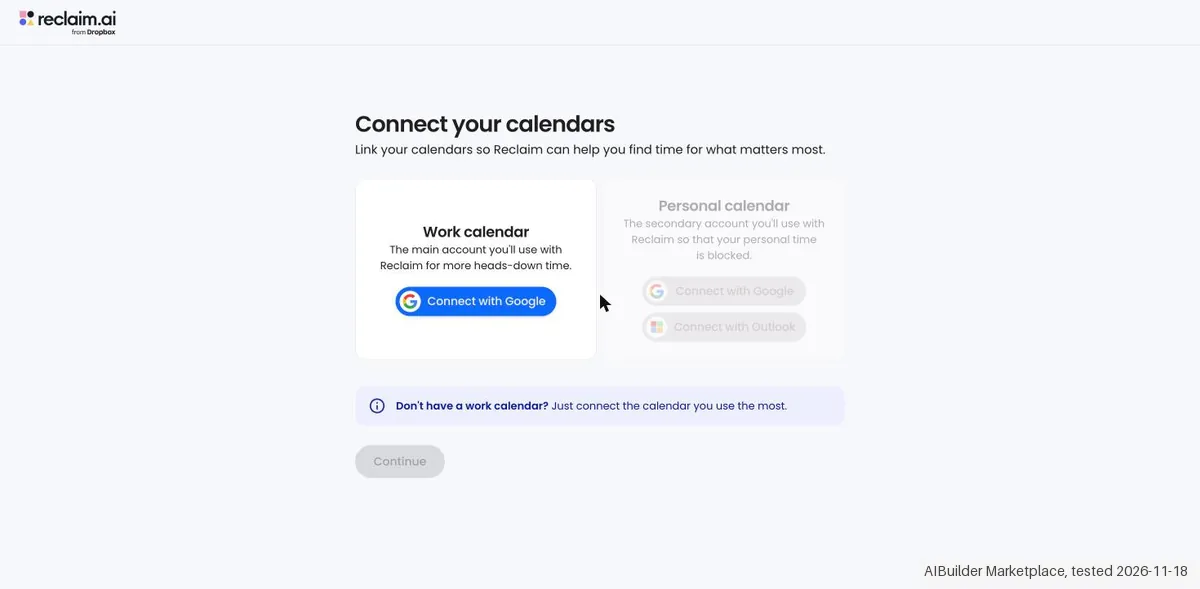
Daan created the account and our AI assistant ran the test in Daan's browser. On 18 November 2026 the session tested Reclaim (now Dropbox Reclaim) in the existing Lite account of Daan after a calendar was linked with only the calendar scopes: a habit appeared in the calendar within seconds and moved by itself within about 3 seconds when a busy appointment came in, and back when it was removed, but it is set to Free by default so others can book over it. Two tasks with a deadline and a duration got no block of their own; Tasks is marked Beta and shows them only as a suggestion inside a habit, and priority or an earlier deadline only changed the order of the list. The primary calendar cannot be unlinked, only by deleting the account. The app lists Unlimited Calendar Syncs for Starter where the public page says 3, Lite promises 1 Calendar Sync while Add a sync has a STARTER label, and the in-app yearly prices are in euro. No plan was bought. Account and start: the test used the existing Reclaim account of Daan (social login, no sign-up during the test), on the Lite plan, with the interface in English. Three earlier attempts (08:51 to about 09:30) stopped before a calendar was linked: the onboarding needs a calendar, the Continue button stays grey without one, and a Google consent has to come from Daan himself. The scope list in the Google link was read from the link: only calendar events and calendar list (read and write), plus name and mail address, no Gmail, Drive, Contacts or Tasks. The calendar of a test mailbox of Daan was then linked at about 09:33 on Daan's approval, and the real test ran from 09:33 to 09:47. The brand is now Dropbox Reclaim (reclaim.ai from Dropbox), the dossier name is Reclaim.ai and the review is on AIBM (b2b/reclaim-ai-review); the handson folder is reclaim. Onboarding: Continue, then Turn on my assistant or Maybe later (Maybe later chosen), then the About you page (Finish worked without any choice), then the planner at about 09:35, about 2 minutes and 3 clicks after the start. A banner offered premium features free for 30 days plus 30% off the first year, with a countdown; it was not clicked. Settings and the billing page show Lite as the current plan, and no trial was active. The planner of the week and the next week held no appointment before the test, only two onboarding tasks of Reclaim in the task list. Core action, tasks: two tasks were made with Create, Task (Draft test report, 2 hrs, due 20 November; Review test notes, 1 hr, due 20 November) with the message Task created. You'll find it in your Reclaim Tasks. Neither task got a block in the calendar, also not after a reload and about 3 minutes of waiting. They appear only in the Tasks side panel (marked Beta) under Now: Free time, with Mark Done and Start Task; the task menu has Edit, Priority, Start timer, Log work and Delete, and no option to schedule. Setting the priority of one task to Critical moved it to the top of the list within about 3 seconds and moving the deadline of the other to an earlier day changed only the order of the list; the calendar did not change. Tasks only show as a suggestion inside a habit block (Task Suggestions, Assign Tasks, a saved search); in Preview Mode that could not be set (Cannot change the saved search while previewing). Core action, habit: Create, Habit opens the Agent library; Custom Work Habit was chosen and in Preview Mode three blocks of 10 to 11am (Wednesday to Friday) were shown within about 2 seconds. It was renamed Test focus block (Every weekday, 10 to 11:00am, Shallow Work, Free, Default visibility, Default reminders, 30 mins minimum, Working Hours, Skip when busy, Reclaim Smart Time Defense enabled). After Apply changes at about 09:38 (Your changes have been applied and will sync shortly.) the block was in the calendar of the day within seconds, and the next weeks showed blocks Monday to Friday 10 to 11 as dashed, provisional blocks. A busy test appointment (Test conflict block, 10 to 11am; the date field did not take 19 November, so it landed on 18 November) pushed the habit block to 11am to 12pm within about 3 seconds at 09:39, and when the appointment was deleted the block jumped back to 10 to 11 within a few seconds. The habit does what Reclaim promises, quickly and by itself, but it is set to Free by default, so other people can still book over it. Plans, read up to the payment step: the billing page (Select a plan, Based on your usage the Starter plan looks just right for you, Get your first 30 days free. Cancel at any time.) was only looked at, nothing was clicked. Yearly toggle, currency EUR, 1 user: Lite Free (Current plan; 1 user team, 5 Agents/seat, Limited LLM usage, 1 Scheduling Link, Essentials integrations, 1 week scheduling range, 1 Calendar Sync, Limited MCP access); Starter EUR 8 per seat/month (up to 10 seats, 10 Agents/seat, 3 Scheduling Links, Unlimited integrations, 8 week scheduling range, Unlimited Calendar Syncs, Full MCP access, Proactive Assistant); Business EUR 15 (up to 100 seats, 100 Agents/seat, 12 week scheduling range, Team OOO Calendars, Delegated Access); Enterprise EUR 22 with Contact us (SSO and SCIM user provisioning). The public pricing page (images 02 and 03) shows dollars: yearly $10, $15 and $22 per seat/month, monthly $12 and $18, and Enterprise Unavailable on monthly plans. Deviations from the dossier and the public page: (a) the app lists Unlimited Calendar Syncs for Starter, the public page says 3. (b) Lite promises 1 Calendar Sync on both pages, but in Settings the Add a sync and New sync buttons carry a STARTER label. (c) The in-app yearly prices are in euro (8, 15 and 22) against $10, $15 and $22 on the public page, with no conversion rate shown; the euro and dollar prices are not compared. (d) The Attendee Unit packs and the 20% off code MEETINGS of the dossier are gone from the public page and the app; new offers are Student 50% (12 months), Nonprofit 20% (3 years), Startup 20% (3 years) and Switching Providers 20% (6 months), plus the 30 days free offer in the banner. (e) The brand is now Dropbox Reclaim. (f) The Lite limit of 1 week scheduling range was not seen: habit blocks stood two weeks ahead, though dashed. (g) Enterprise is not available on monthly plans. The price fields of our pages are not touched. Checkout: NOT reached. No plan, trial or Upgrade now button was clicked, so no tax, total or payment screen was seen. Cancelling: Settings, Calendars shows for the main account only the menu item Delete account, and the switch of the primary calendar says Primary calendar on main account cannot be disconnected, so the calendar cannot be unlinked without deleting the account; Delete account was NOT clicked. Calendar access reads 5 scopes granted, 2 partially granted and 2 missing (granted: Identity and sign-in, Read calendar events, Create and edit events, Calendar access, Settings; partial: Availability and Out of office sync; not granted: People suggestions and Tasks); Grant access to all was not clicked. Reclaim keeps read and write access to the calendar until the access is withdrawn in the permissions of the Google account, which the tester did not do. There is no paid plan to cancel. Not tested: the Focus Time agent, Buffers, Smart Meetings, Scheduling Links (the page was only looked at), Calendar Sync, Outlook calendars, integrations (Asana, ClickUp, Jira, Linear, Todoist, Zoom, Slack), Reclaim Chat, the paid plans and the 30 days trial, and the groups of managers with shared time off and teams on Microsoft 365 calendars. Clean up: both test tasks and the two onboarding tasks were deleted (the task list is empty). Removing the habit (Remove Agent) has a tick box Also remove future events that is OFF by default; without the tick the blocks stay in the calendar, and the block of the day stayed as an ordinary repeating appointment (Every weekday, until Nov 18, 2026), which was then deleted with All events; the test appointment was deleted too. At 09:44 the planner of three weeks held no test, habit or focus entry. The five default Essentials agents were switched off. The calendar link could not be removed. The account stays on Lite. The tab was closed. Test date: 18 Nov 2026. We describe the friction rather than score it; this is one run with synthetic records, not a verdict on Reclaim.ai.
| What we checked | What we saw |
|---|---|
| Fields offered by the export dialog | |
| Not offered in the field selector | None noted. |
| The exported file | We did not inspect the file, so data retention and loss remain unverified. |
| Awkward but not lost | The onboarding cannot be finished without a linked calendar, and the primary calendar cannot be unlinked again; the only way out in the app is Delete account. Tasks get no calendar block of their own and are only a suggestion inside a habit (Tasks is marked Beta). A new habit is set to Free, so others can book over it. Removing a habit leaves the future blocks in the calendar unless you tick Also remove future events, which is off by default. Starter shows Unlimited Calendar Syncs in the app but 3 on the public page, and Add a sync has a STARTER label although Lite promises 1 Calendar Sync. |
| Export route | No export or reimport was performed; no file was downloaded or examined. The two categorised kit records were not entered; the objects tested were not kit records. |
| Export format | No downloaded bytes examined. |
| Re-importing the export | No reimport performed. |
| Cancelling | No cancellation or downgrade performed. |
Screenshots from our test (click to enlarge)
What this test does not show:
- Focus Time agent, Buffers, Smart Meetings, Scheduling Links, Calendar Sync, Outlook calendars and the integrations.
- Reclaim Chat and the Lite limit of 1 week scheduling range.
- Sign-up, which was done earlier by Daan.
- Checkout, the paid plans and the 30 days trial, and Delete account.
- Export and reimport.
- Session and source-reading date: 18 November 2026. Times are CET. The session started at about 09:33 CET. These are approximate tester observations, not benchmark timings. Midnight timestamps are required date anchors, not measured event times.
Most of our reviews are researched rather than run. How we review explains which is which, and why we do not pretend otherwise.
How to actually use Reclaim.ai
The 2.0 FAQ argues for restraint. The vendor files it under 'Beta features > Reclaim 2.0' and sends 1.0 users to support for 'early access'. A good starting setup is your working hours, one Focus goal, 1-3 Habits, one Scheduling Link and any task or collaboration integrations you use regularly. On Agents it says 'Start small'. The 2.0 overview calls it 'currently in private beta and actively evolving.' Focus best practices: 'Start with a modest weekly target, then tune it after a week' and 'Protect 2+ hour blocks when possible'.
The FAQ lists five reasons 'An Agent may not schedule'. On a Scheduling Link where you're a co-organizer or main organizer, the booking page carries a 'Troubleshoot availability' toggle, which requires being logged in to Reclaim and shows why a given time isn't available. After the 14-day trial the account 'will be automatically switched to our free forever Lite plan' unless you upgrade; only 'if you're using features outside of the free Lite plan limit' does it 'roll into a free overage period for 28 days'.
Pick the sign-up account with care. In our test on 18 November 2026 the app said 'Primary calendar on main account cannot be disconnected', so the calendar of the account you sign up with stays the main one.
Where this section comes from: our research notes (284 words)
Vendor pricing page https://reclaim.ai/pricing (read 2026-08-11; raw HTML, both sides of the yearly/monthly toggle) plus the vendor's own machine-readable pricing file, linked from that page as 'Are you an AI agent? View our machine-readable pricing.', at https://cdn.prod.website-files.com/67859049c02d67b2cfcceebf/6a511b43e3d83c8bdf8c6549_pricing.md (read 2026-08-11; header 'Last updated: 2026-07-09'). Vendor help centre, all five articles read 2026-08-11, each with the collection the vendor itself files it under: Reclaim 2.0 FAQ https://help.reclaim.ai/en/articles/15280604-reclaim-2-0-faq (collection 'Beta features > Reclaim 2.0'; banner 'This article refers to Reclaim 2.0 features and workflows'; carries 'Still on Reclaim 1.0?
Contact [support] to request early access to Reclaim 2.0.'), Reclaim.ai 2.0 overview https://help.reclaim.ai/en/articles/14846468-reclaim-ai-2-0-overview (same collection, same banner, same early-access line), what happens at the end of a free trial https://help.reclaim.ai/en/articles/6405151-what-happens-at-the-end-of-a-free-trial (collection 'Billing > Billing and Account Administration'; no version banner), Microsoft Outlook integration overview and updates https://help.reclaim.ai/en/articles/9590707-microsoft-outlook-integration-overview-updates (collection 'Beta features'; no version banner; the article itself states 'Outlook support is officially available to all Reclaim users'), troubleshooting your availability on scheduling links https://help.reclaim.ai/en/articles/8823063-troubleshooting-your-availability-on-scheduling-links (collection 'Scheduling Links > Troubleshooting'; no version banner).
All of these are vendor-published documentation, not independent reviews. No claim in this text rests on an article carrying the vendor banner 'This article refers to Reclaim 1.0 features and workflows'; none of the five carries it. reclaim.ai/pricing re-read 3 October 2026 (served HTML, both billing terms in the markup): prices and AU packs unchanged, free seat per extra AU pack, banner '20% off with code MEETINGS'; reclaim.ai/pricing.md returns 404.
Re-read 18 November 2026 from the served HTML and the site stylesheet: the AU cards and the MEETINGS banner are set to display:none, the four discount cards are visible. In our own account that day we read the plan, calendar sync and account screens in the app.
The natural comparison is Motion or Clockwise: other AI-scheduling tools.
Frequently asked questions
Can you export your data from Reclaim.ai?
Exit check 2026-11-18; route excerpt: No export or reimport was performed; came along (excerpts): not tested; lost (excerpts): not tested; re-import: not tested.
What does Reclaim.ai cost per seat?
Read on 18 November 2026: Starter is $10, Business $15 and Enterprise $22 per seat a month billed yearly, and $12 and $18 billed monthly; Enterprise is unavailable on monthly plans. Lite is free for one user. The Attendee Unit packs that used to sit on top of the seat price are no longer shown.
What happened to Attendee Units?
On 18 November 2026 the pricing page no longer showed the Attendee Unit packs, which earlier covered attendees without a paid seat in Smart Meetings of three or more. The old pack prices are still in the page code but hidden. If you schedule a lot with people outside your team, ask Reclaim whether those meetings cost extra before you plan around it.
Are there discount codes?
The '20% off with code MEETINGS' banner is no longer shown (18 November 2026). The page now lists four discounts you apply for: Student 50% for 12 months, Nonprofit 20% for 3 years, Startup 20% for 3 years, and 20% for 6 months if you switch from Clockwise, Motion or Calendly.
Can I change my main calendar later?
Not easily. In our test on 18 November 2026 the app said 'Primary calendar on main account cannot be disconnected'. Sign up with the account whose calendar you want Reclaim to manage, and add other calendars as syncs.
Is this a hands-on review of Reclaim.ai?
Yes. We tested Reclaim.ai ourselves on 2026-11-18; the section above says what we tested, what we found and what we did not test, and where a figure comes from the vendor's own documentation instead. Most of our reviews are researched rather than run; we say which is which. We name what each tool is good and bad at, and we earn a commission only if you sign up, at no cost to you.
- Buyer reviews on G2 and Trustpilot, read August 2026.
- Read 2026-11-18 on reclaim.ai/pricing, USD, and in our own test that day; earlier: re-verified 2026-10-03.
- A dated screenshot of that pricing page, kept on this site as the receipt.
- Our own hands-on session with Reclaim.ai (2026-11-18), written up in full further down this page.
Bottom line
The Try button is an affiliate link; we may earn a commission at no extra cost to you.
Others in this category
Reviewed operations & workflow tools that share ground with Reclaim.ai. They are comparable in what they do, not drop-in swaps:
New reviews, price changes we recorded, and the cost conditions we found. No sponsored placements. Unsubscribe anytime.
This is our researched assessment, not a paid placement. The “Visit” links on this page are affiliate links: we may earn a commission if you sign up, at no extra cost to you, and it never changes our take. How we review →