BackupMaster Review (2026)
 By Daan Haket · Researched and written with an AI assistant · who does what
The listing header says free to install, and there is a free tier, but it is not for you unless you are an agency: Agency is limited to Shopify Partner development stores before they are handed over to a client.
Shopify stores under roughly 1,500 orders a month that want the whole store backed up daily — metafields, metaobjects and translations included — without anyone having to remember to trigger it.
you need backups exported to storage you control on the entry tier, retention you can configure beyond one year, or orders you can restore, which BackupMaster's own documentation says are backup-only.
Transparency: the “Visit” links on this page are affiliate links — we may earn a commission if you sign up, at no extra cost to you. No vendor can pay for a better review or verdict. How we make money →
Pricing (2026)
✓ Pricing re-verified 10 Oct 2026
Four tiers, each paid one with a 7-day free trial. Agency is free to install but only for Shopify Partner development stores before they are transferred to a client, with all features enabled for three months. Essentials $19 a month or $205.20 a year, a 10% saving, covers stores up to 300 orders a month. That is automatic daily backups of products, collections, themes, blogs, pages, files, metafields, metaobjects, translations, customers, orders and inventories, restore of supported items, 365-day retention and unlimited cloud storage.
Pro $39 a month or $421.20 a year covers up to 600 orders a month and adds downloadable backup copies, Google Drive sync and duplication of data for staging or expansion. Plus $79 a month or $853.20 a year covers up to 1,500 orders a month, and adds multi-store pricing, detailed audit logs, external portal access, a custom backup time and priority support.
The listing says higher-volume plans exist on the vendor's own pricing page without printing what they cost. All charges are billed in USD and recur every 30 days. Developer BackupMaster, Bondi, NSW, Australia; the app launched 4 August 2017, carries Shopify's “Built for Shopify” badge, is available in English and German, and had 108 reviews at the time of writing. Read again on 10 October 2026: the four tiers and their prices are unchanged and the listing showed 124 reviews at 4.8. backupmaster.io/pricing lists further order bands from 2,500 to more than 1,000,000 orders a month without printing their prices, says it does not auto-upgrade, and offers refunds within 7 days of the first purchase depending on usage, with renewals not refundable. Plans change — always verify the live price on their site.
Category context: Operations & Workflow. Across the 53 tools in this category that we researched with a public US-dollar price, the median entry price is $29 a month (lowest paid plan as listed, per seat where the vendor prices per seat). BackupMaster’s entry price of $19 a month sits below that median. Compare pricing conditions in the Software Cost Atlas →
What the pricing page doesn’t say
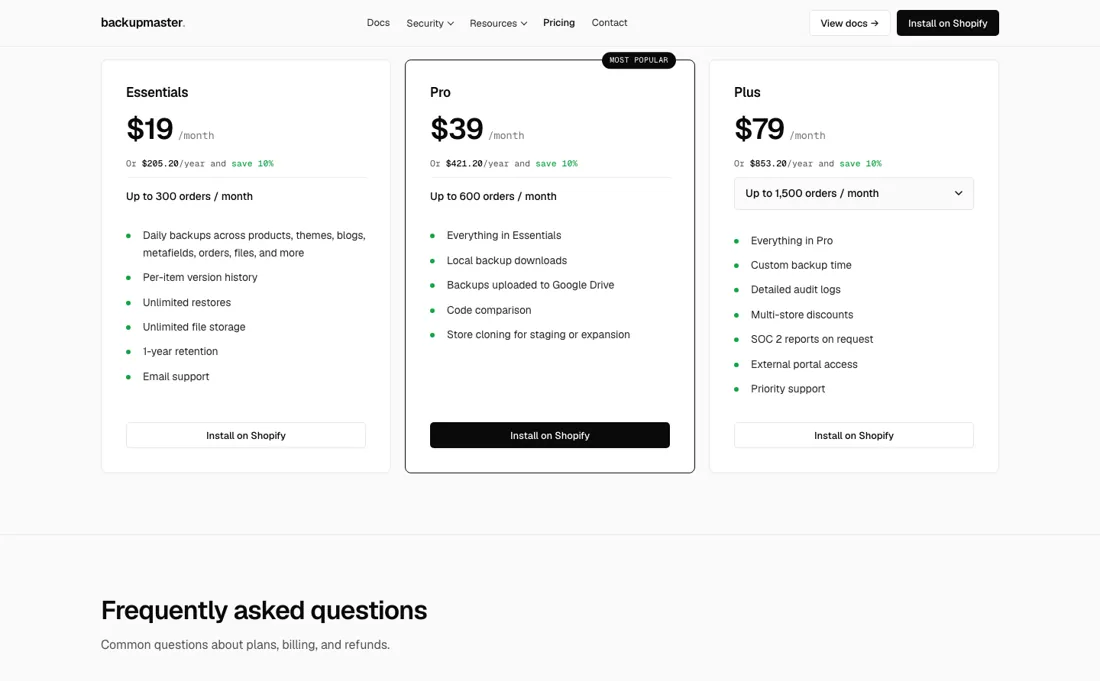
For a live store the entry price is $19 a month and it buys 300 orders a month. Restore is described on the listing as restoring supported items, and the list of what that excludes lives in the documentation rather than on the listing. It matters. Read on 10 October 2026, the coverage page says orders are backed up but cannot be restored or cloned, because Shopify limits updates to existing orders.
Locations, saved searches, policies and shipping zones are backup-only, and inventory comes back only through a manual download and Shopify's own inventory import. Store settings, third-party app data, reviews, redirects, coupons, companies, catalogs and analytics are not covered at all. Read that page before you rely on the product, and run one real restore into a development store rather than discovering the boundary during an incident. The most useful review on the page is the critical one.
In April 2026 a merchant asked for exports over SFTP to storage the vendor does not control, on-demand backups before risky changes, configurable retention and languages beyond English and German. The same merchant noted that a second store costs extra here where some rivals include one. None of that is damning; it is a fair map of where this app currently stops. One of those requests has since been met in part: the documentation now describes a Backup Now button for a manual backup at any time (read 10 October 2026).
Worth adding to the same note: your store data sits with a vendor in Australia, which belongs in your processing register whatever you decide.
Watch the video review
The video version of this review, from our YouTube channel.
What BackupMaster does
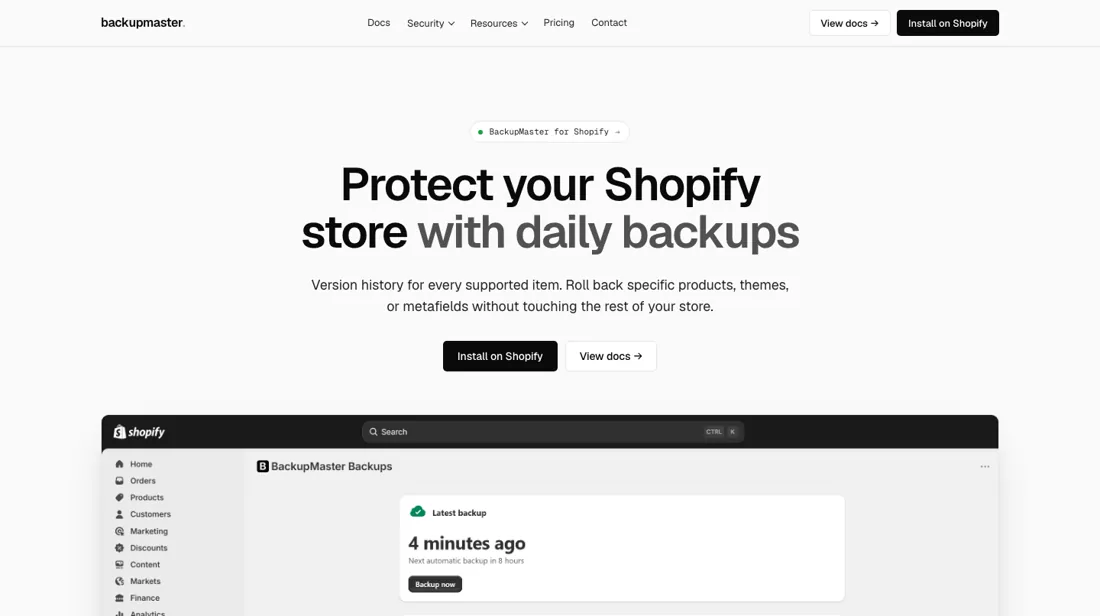
Automatic daily backups for Shopify: products, collections, themes, blogs, pages, files, metafields, metaobjects, translations, customers, orders and inventory, with 365-day retention and one-click restore; Pro adds downloadable copies, Google Drive sync and store duplication for staging.
What buyers report about BackupMaster
Hands-on: not tested by usReported by buyers: Shopify App Store, read August 2026
Themes from the buyer-review sites listed at the foot of this page, read in August 2026. We have not run BackupMaster ourselves, so this is other buyers' experience rather than ours. We summarise it here because the complaints are usually the part a vendor page leaves out.
- • The restores people describe are real ones, and they come from the longest-tenured merchants. A UK store three years in (November 2025) had a previous theme version put back after CSS errors broke the site, walked through it by the developer. A UK store of about seven years (August 2025) had never needed the app until someone breached their theme access, and then got the store back — 'countless hours' saved. A UK store two years in (October 2025) says the system reliably restores the version they ask for.
- • Merchants who moved from a competitor point at coverage rather than price. A US jewellery store (November 2023) tested alternatives and left Rewind after five years, saying BackupMaster reaches more store data than any other app they tried, metafields included. An Australian store (November 2023) switched from the same competitor for scope, interface and support.
- • Setup is described as fast even by stores that have had it a fortnight (UK, June 2026; UK, August 2025), and support is named personally in most of the positive reviews.
- • The sharpest review on the page is the three-star, and it is a list of the things the listing does not settle. A Spanish merchant (April 2026, about two hours in) says the app does the basic job but that getting backups onto external SFTP storage costs a steep amount, that competitors cover multiple stores free, and asks for four things that are not there: languages beyond English and German, an option to keep the data off the vendor's servers, configurable retention, and an on-demand backup you can trigger before a risky change rather than waiting for the daily run.
- • The one one-star is a trial-to-billing complaint and the developer answered it in the open. A Pakistani store 16 days in (December 2025) wrote only 'I want my refund'; the developer replied the next day that the seven-day free trial had lapsed with the app still installed, that a full refund had been issued through Shopify, and that bank processing takes a few days.
Where the ratings disagree. 108 reviews at 4.8, but almost no middle: 106 at five stars, one at three, one at one. What is unusual is which merchants wrote which. Here the multi-year stores are the positive ones, because they are the only people who have actually needed a restore and can say it worked — the opposite of the pattern in most app categories, where the long-tenured reviews are the disappointed ones. The critical review, by contrast, comes from someone two hours in who read the plan page carefully. That split is worth knowing: the public record tells you restores work, and tells you almost nothing about what restore does not cover, because nobody who hit that boundary has written about it.
Pages read (August 2026): Shopify App Store
When the paid plan is worth it
The ladder is metered on order volume rather than capability, and that is the first thing to check against your own numbers: 300 orders a month on Essentials, 600 on Pro, 1,500 on Plus. A growing store climbs it without needing a single extra feature, and above 1,500 the vendor's own pricing page lists order bands from 2,500 up to more than a million a month without printing what any of them cost (read 10 October 2026).
It also says it does not auto-upgrade you. One feature step is worth real attention. Downloadable backup copies and Google Drive sync start on Pro at $39. On Essentials at $19 your backups exist only inside their service, which is fine right up until the thing you need a backup from is the backup provider. If you want a copy you hold yourself, Pro is the entry price, not Essentials.
Annual billing takes 10% off every tier: $205.20 against $228, $421.20 against $468, $853.20 against $948. That is a month and a bit free in exchange for committing a year to an app whose trial runs seven days.
Our monthly capture read this vendor's pricing page every month from August 2026 to October 2026, and the amounts were the same all 3 times, including $79, $205.20, $421.20 and $853.20 from the pricing above. We keep watching — the registry records what moves.
How to actually use BackupMaster
Install it and then, during the trial week, do the one thing almost nobody does: run a restore. Duplicate something small into a development store — a theme, a set of collections, a batch of metafields — and check that what comes back is what went in. A backup you have never restored is a receipt, not a safety net, and seven days is exactly the window in which finding a gap costs you nothing.
While you are in there, work out which tier your order volume actually puts you on, and whether you need a copy you hold yourself. If you do, Pro is the floor, because downloads and Google Drive sync do not exist on Essentials. Then write down what is not covered. The documentation's coverage page lists it (orders, for one, are backed up but cannot be restored), so keep it next to your runbook and note the one-year retention window beside it so nobody assumes last year's theme is still there.
And if you ever uninstall, export first: the documentation says backup data is kept for seven days after an uninstall and then permanently deleted.
Distilled from apps.shopify.com/backup-master, read 22 August 2026. Re-verified 10 October 2026 on apps.shopify.com/backup-master and backupmaster.io/pricing, plus the documentation at docs.backupmaster.io: "What BackupMaster backs up, restores, and clones" and "How backups work", read 10 October 2026.
Frequently asked questions
Can I restore orders if something goes wrong?
No. BackupMaster's coverage page (docs.backupmaster.io, "What BackupMaster backs up, restores, and clones", read 10 October 2026) says orders are backed up and can be exported for records, but cannot be restored or cloned because Shopify limits updates to existing orders. Locations, saved searches, policies and shipping zones are backup-only too; inventory is restored by downloading it and using Shopify's own inventory import; and store settings, third-party app data, reviews, redirects, coupons, companies, catalogs and analytics are not covered. Order and customer metafields are only included on request to support.
What happens to my backups if I uninstall the app?
The documentation ("How backups work", read 10 October 2026) says backup data is kept for seven days after an uninstall and then permanently deleted, and deleted data cannot be recovered. It does not say what happens on a plan change without uninstalling, so that is not confirmed. Backups are daily, a Backup Now button runs one manually, and every plan keeps versions for one year. Downloading copies is listed from Pro upward, so on Essentials export before you leave.
What if my store goes over the plan's order limit?
backupmaster.io/pricing (read 10 October 2026) says it does not auto-upgrade; it recommends a higher tier if your volume consistently exceeds the plan for three months. It lists bands from 300 up to more than 1,000,000 orders a month but prints prices only for Essentials ($19), Pro ($39) and Plus ($79). Billing runs through Shopify; refunds are possible within 7 days of the first purchase, depending on usage, and renewals are not refundable.
Is this a hands-on review of BackupMaster?
This is a researched assessment, not a hands-on test — where we've used a tool ourselves, we say so explicitly. We name what each tool is good and bad at, and we earn a commission only if you sign up, at no cost to you.
- Buyer reviews on Shopify App Store, read August 2026.
- Read 2026-08-22 on apps.shopify.com/backup-master.
- A dated screenshot of that pricing page, kept on this site as the receipt.
Others in this category
Reviewed operations & workflow tools that share ground with BackupMaster — comparable in what they do, not drop-in swaps:
New reviews, price changes we recorded, and the cost conditions we found. No sponsored placements. Unsubscribe anytime.
This is our researched assessment — not a paid placement. The “Visit” links on this page are affiliate links: we may earn a commission if you sign up, at no extra cost to you, and it never changes our take. How we review →