DigiParser Review (2026)From $49/mo, Billed per Page
 By Daan Haket · Researched and written with an AI assistant · who does what
Billing is per page, not per document, so multi-page POs and invoices use up the allowance faster than the plan names suggest, and confidence scoring doubles the credits per page.
manufacturers and distributors that retype customer purchase orders or supplier invoices and want the fields and line items extracted for review, then sent to Sheets, Xero, an ERP via Zapier or Make, or their own system through the API.
your volume swings a lot from month to month, you need a refund route after paying, or you process receipts for bookkeeping, where a capture tool built for accountants fits better.
Transparency: the “Visit” links on this page are affiliate links — we may earn a commission if you sign up, at no extra cost to you. No vendor can pay for a better review or verdict. How we make money →
Pricing (2026)
✓ Pricing re-verified 13 Oct 2026
Three self-serve plans, priced by pages processed per month, each with a 7-day free trial that needs no card. Starter is $69 a month billed monthly, or $49 a month billed yearly ($588 a year): 500 pages a month, 5 parsers and 3 team members, table and field extraction, email-inbox processing, API access and integrations. Pro is $199 monthly or $149 a month yearly ($1,788): 2,000 pages, 25 parsers, 10 team members, AI splitting of multi-invoice PDFs, document-type rules, classification, per-field confidence scores and custom roles.
Scale is $399 monthly or $299 a month yearly ($3,588): 5,000 pages, 100 parsers, 25 team members, extraction modes and your own storage. Enterprise is custom for 10,000+ pages, with SSO, your own AI key, white label and on-premise options. EU and US hosting and a standard DPA come with every plan. The FAQ sets the rules: each page uses one credit, confidence scoring costs one more credit per page when enabled, unused credits do not roll over, yearly plans still hand out credits month by month, an upgrade mid-period is charged as a prorated difference, and once a subscription has been charged DigiParser does not issue refunds, though it asks you to contact support with a valid reason. Plans change — always verify the live price on their site.
Category context: Operations & Workflow. Across the 53 tools in this category that we researched with a public US-dollar price, the median entry price is $29 a month (lowest paid plan as listed, per seat where the vendor prices per seat). DigiParser’s entry price of $69 a month sits above that median. Compare pricing conditions in the Software Cost Atlas →
What the pricing page doesn’t say
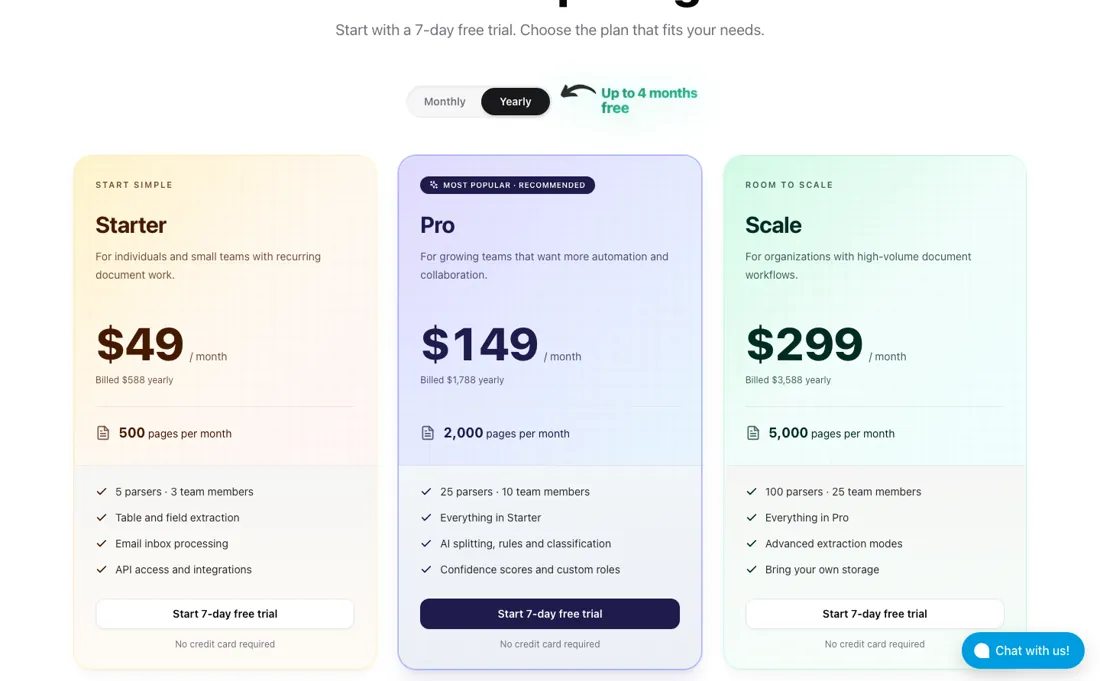
Unused credits expire every month, also on yearly plans, and a charged subscription is not refunded. AI splitting, classification and confidence scores start on Pro at $149 a month billed yearly. The ~99% accuracy, 2,000+ businesses and 5M+ documents on the home page are DigiParser's own figures. We have not used DigiParser ourselves.
What DigiParser does
Document extraction for manufacturers that turns customer purchase orders and supplier invoices into structured fields and line items, with review before export, email-inbox processing, an API and integrations; priced by pages per month.
Count pages, then choose the plan
The plans differ in two ways: how many pages you can push through and how much automation sits around the extraction. Start with the page count, because DigiParser bills pages, not documents. Its own example is 50 purchase orders a day at 2 pages each over 20 working days, which is 2,000 pages a month and therefore Pro, not Starter. Turning on confidence scores doubles the credits per page. Starter at $49 a month on yearly billing suits a small office with one or two document types arriving by email.
Pro is the plan most manufacturers will need once orders and invoices are mixed: AI splitting of PDFs that hold several invoices, rules that skip document types you do not want, classification to route each type to the right parser, and confidence scores to flag fields for review. Yearly billing saves $240 a year on Starter and $600 on Pro, our arithmetic from the two views. It is only a saving if your volume is steady: credits are issued monthly, do not roll over, and a charged subscription is not refunded.
How to actually use DigiParser
Use the 7-day trial on your own documents, not the sample: forward a week of real customer POs or supplier invoices to the inbox address and check the extracted fields and line items against the originals. That tells you more about accuracy on your layouts than the ~99% claim on the home page. While you do that, count pages. Multiply your documents by their page count and add repeat runs and confidence scoring, as the pricing page itself advises, then pick the plan that covers it with some room.
Connect the output last: Google Sheets, Xero, Zapier, Make, Pabbly, webhooks, the API or the MCP server. Start monthly if you are unsure of the volume, because unused pages are lost each month and DigiParser does not refund a charged subscription.
Where this section comes from: our research notes (100 words)
DigiParser's own pages, read in a live browser on 13 October 2026: the pricing page at digiparser.com/pricing in both the monthly and the yearly view (plans, page allowances, parsers, team sizes, the feature comparison, EU and US hosting, the page-count examples) with its FAQ opened (paid credits, prorated upgrades, refunds, credit rollover, yearly billing) and the home page (the focus on manufacturers' customer POs and supplier invoices, review before export, the integrations).
The accuracy figure, customer count and documents-processed figure are DigiParser's own claims. DigiParser is an affiliate partner of ours through Lemon Squeezy. We have not used DigiParser ourselves.
DigiParser vs Dext, side by side
Each column shows the vendor’s own published entry price, read on the date shown. Entry prices can cover different services or units, so check what each one buys. We do not average them into a score.
Both names above are affiliate links: we may earn a commission if you sign up, at no extra cost to you. Neither changes what this table says.
The natural comparison is Dext — Dext is in our dossiers too, re-verified on 10 October 2026: from $25.21 a month billed annually for 250 documents and 5 users ($31.50 billed monthly), excluding tax, with line-item extraction an add-on. DigiParser, read on 13 October 2026, starts at $49 a month billed yearly for 500 pages and 3 team members, with line items included. They aim at different desks: Dext captures receipts and bills for bookkeeping into Xero, QuickBooks or Sage and counts documents, while DigiParser turns POs and invoices into data for operations and counts pages..
Frequently asked questions
How does DigiParser count usage?
By pages, not documents. Read on 13 October 2026, the FAQ says each page you process uses one credit, and per-field confidence scores use one more credit per page when enabled. Starter includes 500 pages a month, Pro 2,000 and Scale 5,000.
Do unused DigiParser credits roll over?
No. The FAQ, read 13 October 2026, says unused credits do not carry over, and on yearly billing you still receive credits month by month, so unused monthly credits are lost there too.
Can I get a refund from DigiParser?
Generally not. The FAQ says that once a subscription has been charged, DigiParser does not issue refunds, but invites you to contact support with a valid reason, especially if credits are unused. There is a 7-day free trial without a card. Read 13 October 2026.
Is this a hands-on review of DigiParser?
This is a researched assessment, not a hands-on test — where we've used a tool ourselves, we say so explicitly. We name what each tool is good and bad at, and we earn a commission only if you sign up, at no cost to you.
- Read 2026-10-13 in a live browser on digiparser.com/pricing in both the monthly and the yearly view, with the FAQ opened, and on the home page.
- A dated screenshot of that pricing page, kept on this site as the receipt.
Others in this category
Reviewed operations & workflow tools that share ground with DigiParser — comparable in what they do, not drop-in swaps:
New reviews, price changes we recorded, and the cost conditions we found. No sponsored placements. Unsubscribe anytime.
This is our researched assessment — not a paid placement. The “Visit” links on this page are affiliate links: we may earn a commission if you sign up, at no extra cost to you, and it never changes our take. How we review →