Recruit CRM Review (2026)Agency ATS and CRM, From €79 a User
 By Daan Haket · Tested hands-on · written with an AI assistant · who does what
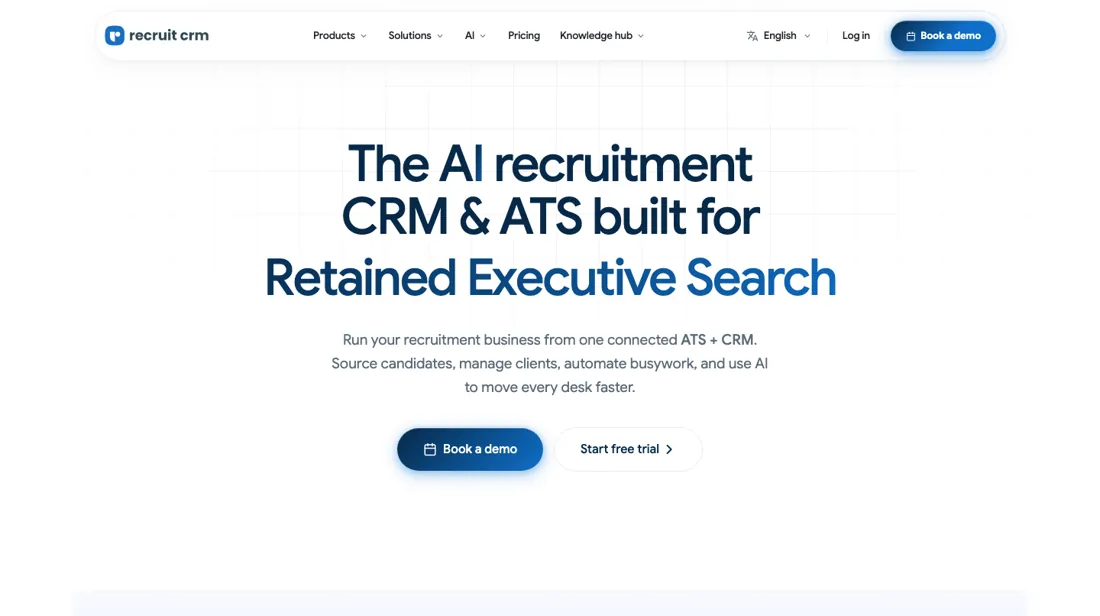
The headline seat price is not the whole bill: the features recruiters use daily for outreach run on credits, and LinkedIn messaging alone uses 150 credits per user a month while Pro includes 100.
- Best for Recruitment agencies running an ATS and client CRM
- Not for agencies that want to work split placements
From €79 · Pro · per user a month billed annually (€95 billed monthly) · read 2026-11-02
Try Recruit CRM →Affiliate link: we may earn a commission if you sign up, at no extra cost to you. It never changes our verdict.
Is Recruit CRM right for you?
Your pain“Our candidates, clients and hiring managers sit in different places instead of one.”
Does Recruit CRM solve it?YesPricing page, read 25 October 2026: Pro covers the ATS and CRM with pipelines, a hiring manager portal, a Chrome sourcing extension and two-way email and calendar sync.
Your planPro at €79/user on annual billing (€95 on monthly); 100 credits per user; 30-day trial
Try Recruit CRM →
Your pain“Multichannel outreach looks useful, but I can't tell what it will really cost us.”
Does Recruit CRM solve it?PartlyPricing page, read 25 October 2026: LinkedIn messaging alone uses 150 credits per user a month while Pro includes 100; multichannel sequences and the open API start on Business.
Your planBusiness, €109 per user a month billed annually (€135 monthly), 200 credits per user a month
Try Recruit CRM →
- Agencies that want to work split placements. Our comparison (Top Echelon re-read 6 October 2026): Top Echelon adds a split-placement network priced per agency, from $79 per seat a month billed annually. Better fit: Top Echelon.
The “Try” buttons are affiliate links: we may earn a commission if you sign up, at no extra cost to you, and it never changes our verdict.
Also in: Software for agencies
Transparency: the “Visit” links on this page are affiliate links: we may earn a commission if you sign up, at no extra cost to you. No vendor can pay for a better review or verdict. How we make money →
Which Recruit CRM plan do you need?
3 plans, 3 questions, no signup.
Answer three quick questions to see your plan.
Your plan
Pro
€79 per user a month billed annually, €95 monthly
ATS and CRM, 100 credits per user, 10,000 records per user
Your plan
Business
€109 per user a month billed annually, €135 monthly
200 credits, multichannel sequences, open API, SSO, audit logs
Your plan
Enterprise
€189 per user a month billed annually, €225 monthly
2,000 credits, Recruit Craft career-site builder, named account manager
Probably not Recruit CRM
From your answers, look at Top Echelon instead. Why ↓
Prices as we read them on 2026-11-02; check the checkout before you pay. The plan button is an affiliate link: we may earn a commission, at no extra cost to you.
What Recruit CRM costs at your size
What each plan costs a month on annual billing (monthly billing below it), per user from Recruit CRM’s own pricing page. The cheapest plan at each size is marked.
| Users | Pro | Business | Enterprise |
|---|---|---|---|
| 1 user | €79Best value at this size €95 monthly | €109 €135 monthly | €189 €225 monthly |
| 3 users | €237Best value at this size €285 monthly | €327 €405 monthly | €567 €675 monthly |
| 5 users | €395Best value at this size €475 monthly | €545 €675 monthly | €945 €1,125 monthly |
| 10 users | €790Best value at this size €950 monthly | €1,090 €1,350 monthly | €1,890 €2,250 monthly |
| 25 users | €1,975Best value at this size €2,375 monthly | €2,725 €3,375 monthly | €4,725 €5,625 monthly |
| 50 users | €3,950Best value at this size €4,750 monthly | €5,450 €6,750 monthly | €9,450 €11,250 monthly |
Prices read 2026-11-02; tax excluded unless the vendor says otherwise. Calculated by our cost engine; the same numbers are in our open data.
See current prices on Recruit CRM →Exit test (measured 2026-11-02)
- Export route
- Contacts > select two > More > Export > Fields to Export > Export to CSV
- Formats
- CSV
- Attachments included
- Not tested
- Re-import tested
- No
- Lost on export
- Contact Note text absent
Formats describe this export route; offered formats may not have been inspected. Full exit test and scope ↓
Tested by our team on 2 November 2026 on the free trial: Daan created the account and our AI assistant ran the test in Daan's browser. We imported two made-up contacts from a CSV file, then exported them again to CSV. We did not open the checkout.
How we tested
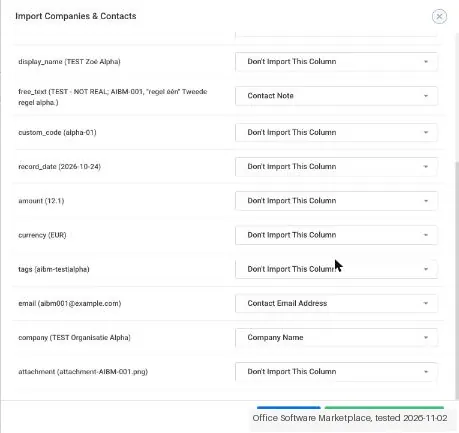
- Imported two made-up contacts from a CSV with accented names and a note
- Mapped each column by hand
- Exported both contacts to CSV and compared the result with the input
- The dashboard showed '30 days left', matching the 30-day trial in the help centre, and the workspace already held sample contacts and candidates.
- The importer started every column on 'Don't Import This Column' and had the header row switched off by default, so each field has to be mapped by hand. We found no custom fields in the mapping list.
- The import warned that 'all the special characters in FirstName and LastName will be removed', yet both exported first names kept their accents.
Pricing (2026)
✓ Pricing re-verified 2 Nov 2026
“no refunds will be issued for any unused portion of your subscription.”Source: help.recruitcrm.io, read 15 Oct 2026
Pro is €79 per user a month billed annually or €95 monthly, with 100 credits per user a month. Business is €109 annually or €135 monthly with 200 credits, and adds the resume formatting agent, multichannel sequences across email, LinkedIn and WhatsApp, white-labelled pages, the open API, SSO, IP whitelisting and 30-day audit logs. Enterprise is €189 annually or €225 monthly with 2,000 credits, Recruit Craft (the career-site builder) included and a named account manager.
Credits are pooled across all users in the account and pay for AI sourcing (3 credits per 100 profiles), data enrichment (1 to 4 credits per record), job multiposting (25 credits per job), LinkedIn messaging (150 credits per user a month), WhatsApp (100 per user a month), advanced analytics (300 per user a month) and workflow automation; extra credits can be bought.
The help centre says annual billing charges the discounted rate upfront for the whole year. There is a 30-day free trial. Recruit CRM told us it has no discount code for our readers (October 2026). The plan comparison re-read on 1 November 2026 lists the Recruit CRM MCP (for Claude and other AI assistants) as included in Pro, Business and Enterprise, and data migration as a free CSV import tool with assisted migration paid on every plan. Plans change, so check the live price on their site before you buy.
Category context: HR & People. Across the 15 tools in this category that we researched with a public US-dollar price, the median entry price is $49 a month (lowest paid plan as listed, per seat where the vendor prices per seat). Compare pricing conditions in the Software Cost Atlas →
What the pricing page doesn’t say
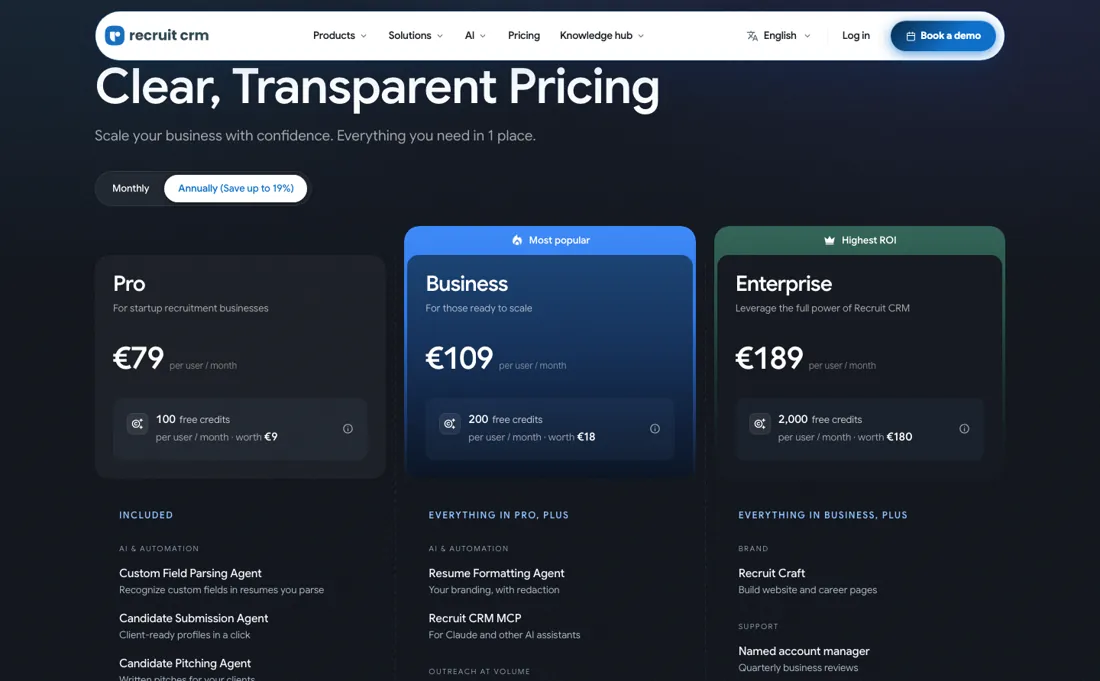
The pricing table says unlimited candidates and contacts, but the help centre sets per-user record limits (10,000 each on Pro). Annual billing is charged upfront and the subscription article rules out refunds for unused time, so a wrong tier choice is expensive to undo.
Watch the video review
The video version of this review, from our YouTube channel.
What Recruit CRM does
Applicant tracking system and client CRM for recruitment agencies, with a Chrome sourcing extension, hiring manager portal, AI sourcing and multichannel outreach on a shared credit pool.
Business buys the outreach and the API
Pro at €79 per user a month (annual) covers the ATS and CRM itself: pipelines, the hiring manager portal, the Chrome sourcing extension, two-way email and calendar sync. Business at €109 is the step most growing agencies weigh, because it adds multichannel sequences across email, LinkedIn and WhatsApp, the open API (the onboarding guide says API access needs Business or higher), SSO and audit logs, and doubles the record limit per user from 10,000 to 20,000 candidates, companies and contacts each.
The credits are the hidden part of the bill. LinkedIn messaging alone uses 150 credits per user a month and Pro includes 100, so a recruiter who wants LinkedIn sync on Pro is already buying credits. Map which credit features you will use before you pick a tier.
What we found running Recruit CRM ourselves
The first findings are at the top of this page. The rest:
- The export kept the two contacts with their IDs, but left out the note text we entered: 'Last Note Added' is only a timestamp. The Contact Name column added a trailing space to each name.
- Getting the export took four clicks: select the contacts, More, Export, then pick the fields and Export to CSV.
Claim vs. what we measured
We set a claim from Recruit CRM's own pages next to what we saw in our test, on the plan named. The status says whether the two describe the same thing and match; it is not a verdict on the product. Confirmations are listed too.
| What the vendor says | What we measured | Status | What it means if you buy |
|---|---|---|---|
| 30-day trialSource: help.recruitcrm.io, read 25 Oct 2026 | Measured 2026-11-02: Dashboard showed 30 days left; import and CSV export worked during this short trial session.Our test, 2 Nov 2026; 30-day trial | ConfirmedThe duration claim uses the reported dashboard countdown and completed two-contact route, not full registration timing. | Trial contact import/export was usable for this scope; other roles and add-ons remain untested. |
| Please note that all the special characters in 'FirstName' and 'LastName' will be removed.Source: app.recruitcrm.io, read 2 Nov 2026 | Measured 2026-11-02: The exported Contact First Name values retained ë and è in both synthetic contacts despite this import warning.Our test, 2 Nov 2026; 30-day trial | ContradictedThe exact import warning is compared with the original downloaded first-name cells; no general guarantee for other characters or routes. | Unicode survived the tested import route; the broad removal warning did not describe this observed result. |
| 30-day trialSource: help.recruitcrm.io, read 25 Oct 2026 | Measured 2026-11-02: Checkout not opened; no checkout price, tax, final total or cost-rule comparison observed.Our test, 2 Nov 2026; 30-day trial | Not testableRecruit CRM: checkout and a matching cost-rule basis are absent; prepared trial wording provides no price comparison. | A purchase price cannot be confirmed from this session. |
Exit test: can you take your data out?
Two synthetic contacts were imported and exported on the trial. The observed importer offered standard fields only. The export preserved Unicode names but omitted the entered note text. Test date: 2 Nov 2026. We describe the friction rather than score it; this is one run with synthetic records, not a verdict on Recruit CRM.
| What we checked | What we saw |
|---|---|
| Came along in the export |
|
| Lost in the export |
|
| Awkward but not lost | Every mapping began unset. The import warning predicted special-character removal, but exported first names retained Unicode. Contact Name added a trailing space to each name. The Last Note Added timestamp did not carry the note text. |
| Export route | Contacts > select two > More > Export > Fields to Export > Export to CSV. |
| Export format | UTF-8 CSV, two test rows, 1893 original bytes; owner/actor and address cells withheld in a separate inspection derivative. |
| Re-importing the export | No herimport in the short session. A duplicate-merge choice existed, but its matching key and update behavior were not inspected. |
| Cancelling | Cancellation and downgrade were not performed. |
What the exit test does not show:
- Support, invitations, checkout, tax and final total.
- Complete original signup, cancellation and deletion.
- Native-ID update roundtrip and long-term access.
Kit check counts
Kit crm-contacts 1.0.0; run recruit-crm-2026-11-02; observed 2026-11-02.
- export / AIBM-001: Of 10 checks: 1 kept, 0 changed, 1 lost, 5 not offered, 3 not tested
- export / AIBM-002: Of 10 checks: 1 kept, 0 changed, 1 lost, 5 not offered, 3 not tested
- reimport / AIBM-001: Of 10 checks: 0 kept, 0 changed, 0 lost, 0 not offered, 10 not tested
- reimport / AIBM-002: Of 10 checks: 0 kept, 0 changed, 0 lost, 0 not offered, 10 not tested
Each record and phase uses this kit’s checks. Counts describe this run; they are not a score or a comparison between kits.
How this compares: across our exit tests of 102 tools, 57 gave us an export file. Recruit CRM gave us a file, but some of our test data was missing or changed in it. Report 08: can you get your data out?
Mail in the first 14 days
Measurement running until 2026-11-15T23:00:00Z (last observed 2026-11-13T02:18:02.597303Z).
4 emails in the 14-day window so far; first email after signup: unknown (exact signup time not recorded); 0 with an explicit offer.
Retained inbox and junk only; removed or archived mail is outside this observation. Ambiguous supplier attribution is excluded. Day numbers use elapsed 24-hour periods since the recorded signup date at midnight Europe/Amsterdam; the signup hour is unknown. Offer flags quote literal subject/body text. Replies in our own correspondence (support tickets, our comment requests) are excluded; one-time codes, our own address, our account name and our name are replaced in brackets.
| Day | Time (UTC) | Sender | Literal subject | Folder | Offer evidence |
|---|---|---|---|---|---|
| Day 0 | 2026-11-02 09:21:15 UTC | Recruit CRM team / recruitcrm.io | Recruit CRM: Verify Your Email ID | inbox | |
| Day 0 | 2026-11-02 11:00:25 UTC | Recruit CRM team / recruitcrm.io | [our name], let’s book your Recruit CRM demo | inbox | |
| Day 1 | 2026-11-03 11:00:19 UTC | Recruit CRM team / recruitcrm.io | [our name], it’s time for your demo | inbox | |
| Day 9 | 2026-11-11 04:30:16 UTC | Recruit CRM team / recruitcrm.io | Do you remember what your client asked for? | inbox |
Screenshots from our test (click to enlarge)
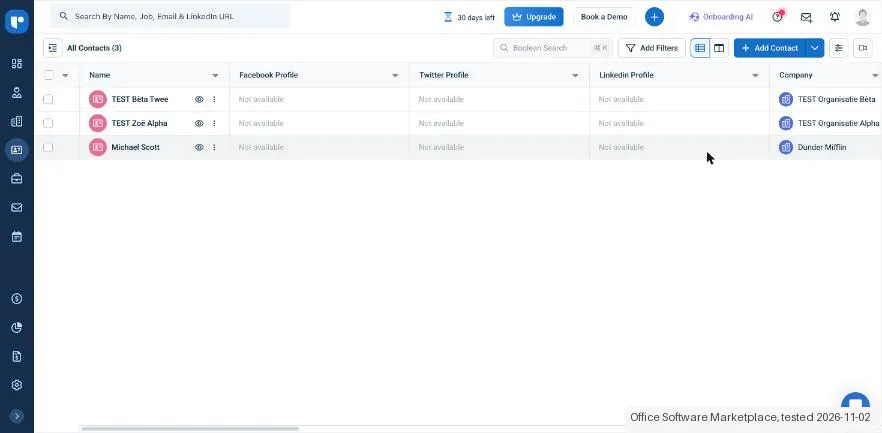
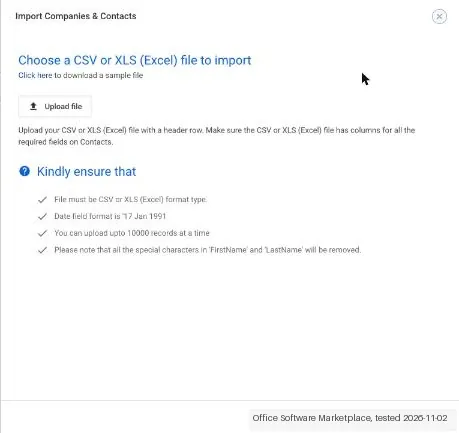
What this test does not show:
- Checkout, tax and the paid plans
- Re-importing the export and how duplicates are matched
- Roles, API access and downgrading
- Inviting teammates and contacting support
Most of our reviews are researched rather than run. How we review explains which is which, and why we do not pretend otherwise.
How to actually use Recruit CRM
The 30-day trial is enough for a real pilot, but the help centre caps trial records at 50 candidates, 50 companies, 50 contacts and 4 jobs, so test the workflow, not your whole database. Connect your mailbox and your Google or Outlook calendar first, set up your profile, then customise the hiring pipeline stages to match how your desk works. Import existing candidates and companies from Excel or CSV once you have decided to stay; the onboarding guide allows up to 10,000 records per import.
Invite teammates last, because you pay per provisioned seat, and check which of your daily actions consume credits.
Where this section comes from: our research notes (99 words)
Recruit CRM's own pages, read on 25 October 2026: the pricing page at recruitcrm.io/pricing/ (Annually and Monthly toggles, euro prices shown to a Netherlands visitor), the help-centre articles Managing your Recruit CRM subscription (help.recruitcrm.io/en/articles/4033085) and Recruit CRM onboarding part 1 (help.recruitcrm.io/en/articles/8659210). The note that there is no discount code comes from Recruit CRM's partner team by email on 22 October 2026. An earlier research pass on 15 October 2026 found the same euro prices.
Prices re-read 2 November 2026 on recruitcrm.io/pricing/ in a headless browser with both the Annually and the Monthly toggle (€79/€95, €109/€135, €189/€225, credits 100/200/2,000), unchanged.
Recruit CRM vs Top Echelon, side by side
Each column shows the vendor’s own published entry price, read on the date shown. Entry prices can cover different services or units, so check what each one buys. We do not average them into a score.
Both names above are affiliate links: we may earn a commission if you sign up, at no extra cost to you. Neither changes what this table says.
The natural comparison is Top Echelon: Top Echelon is in our dossiers and lives on Office Software Marketplace: its TE Recruit ATS and CRM was $79 per seat a month billed annually or $95 month to month on Standard when we re-read it on 6 October 2026, and it adds a split-placement network priced per agency. Recruit CRM's Pro is €79 billed annually or €95 monthly (read 25 October 2026, in euros) and leans on AI sourcing, enrichment and multichannel outreach through credits; Top Echelon fits an agency that wants to work split placements with other recruiters.
Not a fit for you?
Recruit CRM is not the pick for agencies that want to work split placements. In that case, look at Top Echelon, built for recruiting agencies and SMB staffing firms that want an applicant tracking system and CRM in one place, especially ones that would actually work split placements with other recruiters.
Top Echelon price: From $79 per seat/mo billed annually ($95 month to month) (read 2026-10-06)
The Visit link is an affiliate link: we may earn a commission, at no extra cost to you. We picked this alternative for fit first; commission only decides between equal fits.
Frequently asked questions
Can you export your data from Recruit CRM?
Exit check 2026-11-02; route excerpt: Contacts > select two > More > Export > Fields to Export > Export to CSV; came along (excerpts): Two exported contacts, IDs 2 and 3 / Unicode in both first names; lost (excerpts): Contact Note text absent; re-import: not tested.
What does Recruit CRM cost?
Read on 25 October 2026 (prices shown in euros): Pro €79 per user a month billed annually or €95 monthly, Business €109 or €135, Enterprise €189 or €225. Each plan includes credits per user per month (100, 200 or 2,000) for features such as AI sourcing, enrichment and LinkedIn messaging. There is a 30-day free trial.
Is there a Recruit CRM discount code?
No. Recruit CRM's partner team told us in October 2026 that there is no discount code at the moment. The only saving on the pricing page is annual billing, which the page labels 'Save up to 19%'.
Can I get a refund if I cancel?
The subscription article says no refunds are issued for any unused portion of a subscription. Changes and payment issues have to be raised before the renewal date to avoid the renewal charge; after cancelling you are not charged from the next billing date.
Are candidates and contacts really unlimited?
The pricing comparison says unlimited jobs, candidates and contacts, but the help centre's subscription article, read the same day, lists record limits: 10,000 candidates, companies and contacts each per user on Pro, 20,000 on Business and 30,000 on Enterprise, pooled across the account. Jobs are unlimited on paid plans.
Do I need Business for the API?
Yes. The onboarding guide says API access requires a Business plan subscription or higher.
Is this a hands-on review of Recruit CRM?
Yes. We tested Recruit CRM ourselves on 2026-11-02; the section above says what we tested, what we found and what we did not test, and where a figure comes from the vendor's own documentation instead. Most of our reviews are researched rather than run; we say which is which. We name what each tool is good and bad at, and we earn a commission only if you sign up, at no cost to you.
- Read 2026-10-25 on recruitcrm.io/pricing/ with both the Annually and the Monthly toggle clicked, from the Netherlands, where the page shows euros; and in the Recruit CRM help centre.
- A dated screenshot of that pricing page, kept on this site as the receipt.
- Our own hands-on session with Recruit CRM (2026-11-02), written up in full further down this page.
Bottom line
In one line: Seats are only part of the bill: outreach features run on credits, and unused annual time is not refunded.
Best for: recruitment agencies running an ATS and client CRM.
The Try button is an affiliate link; we may earn a commission at no extra cost to you.
Others in this category
Reviewed hr & people tools that share ground with Recruit CRM. They are comparable in what they do, not drop-in swaps:
New reviews, price changes we recorded, and the cost conditions we found. No sponsored placements. Unsubscribe anytime.
This is our researched assessment, not a paid placement. The “Visit” links on this page are affiliate links: we may earn a commission if you sign up, at no extra cost to you, and it never changes our take. How we review →