Gusto Review (2026)Base Plus $6 to $22 an Employee
 By Daan Haket · Researched and written with an AI assistant · who does what
The base-plus-per-employee model is transparent but adds up, and Gusto is US-only — excellent for straightforward US payroll and benefits, but not the pick for international teams or complex multi-entity HR. Throughout this review we weigh it against ADP.
US small businesses that want genuinely easy full-service payroll, benefits and tax compliance in one place.
you want one vendor for staff outside the US — since 1 May 2026 Gusto refers new international hires to Remote's employer-of-record service (from about $599 per employee a month, a separate contract) — or you need enterprise, multi-entity HR.
Transparency: the “Visit” links on this page are affiliate links — we may earn a commission if you sign up, at no extra cost to you. No vendor can pay for a better review or verdict. How we make money →
Pricing (2026)
✓ Pricing re-verified 16 Oct 2026
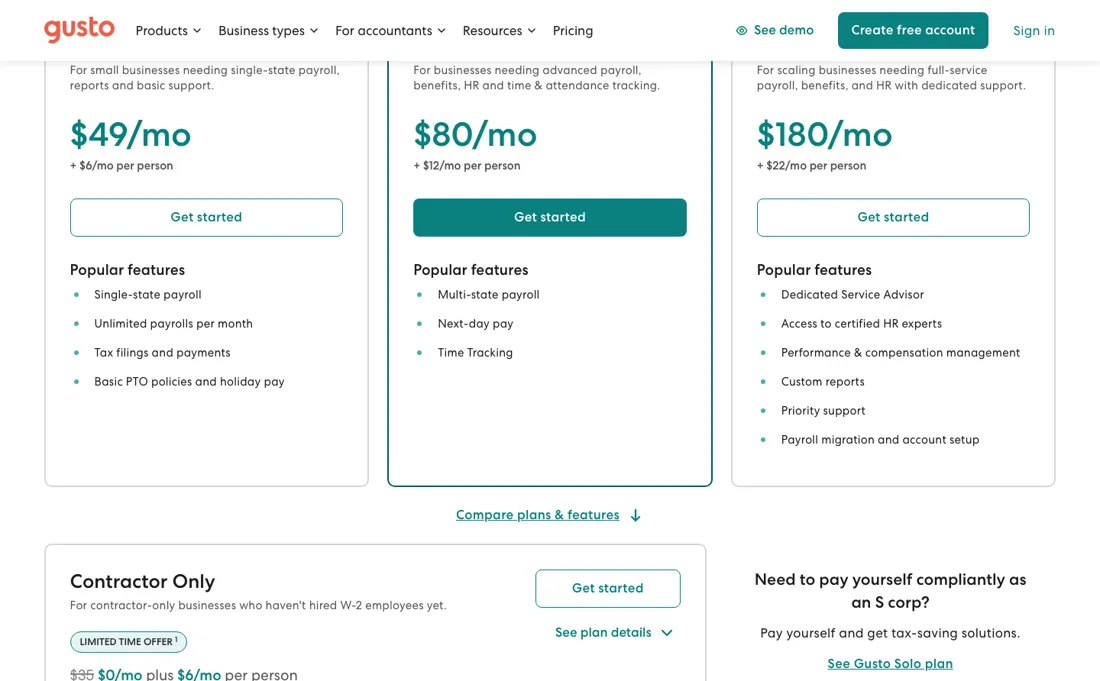
Read in a browser on gusto.com/product/pricing on 16 October 2026; the page blocks plain fetches. On the 'Pay My Team' tab, Simple is $49 a month plus $6 per person for single-state payroll, Plus $80 plus $12 per person with multi-state payroll, next-day pay and time tracking, and Premium $180 plus $22 per person with premium account support and HR guidance. The Contractor Only card ($35 a month plus $6 per contractor, base fee waived in a promotion, on our 5 September 2026 reading) is no longer on the page; the 'Pay Myself' tab now shows Solo, for solopreneurs, at $49 a month plus $6 per person.
US contractors are billed at the plan's per-person rate only in months you pay them. No contracts, free setup, month-to-month. Plans change — always verify the live price on their site.
Category context: Financial Operations. Across the 10 tools in this category that we researched with a public US-dollar price, the median entry price is about $26 a month (lowest paid plan as listed, per seat where the vendor prices per seat). Gusto’s entry price of $49 a month sits above that median. Compare pricing conditions in the Software Cost Atlas →
What the price did
We capture Gusto’s own pricing page every month and keep the figures, so this is our record of the page — not a forecast, and not someone else’s summary.
There is no series to show, and the reason is technical: Gusto's pricing page refuses our monthly capture, so the July and August 2026 readings are identical and empty. An unchanged empty reading is not evidence that the price held, and it is worth saying so rather than presenting stale figures as current.
Gusto’s pricing page, as we read it
Watch the video review
The video version of this review, from our YouTube channel.
⚡ Short on time? Watch the 30-second verdict Short.
What Gusto does
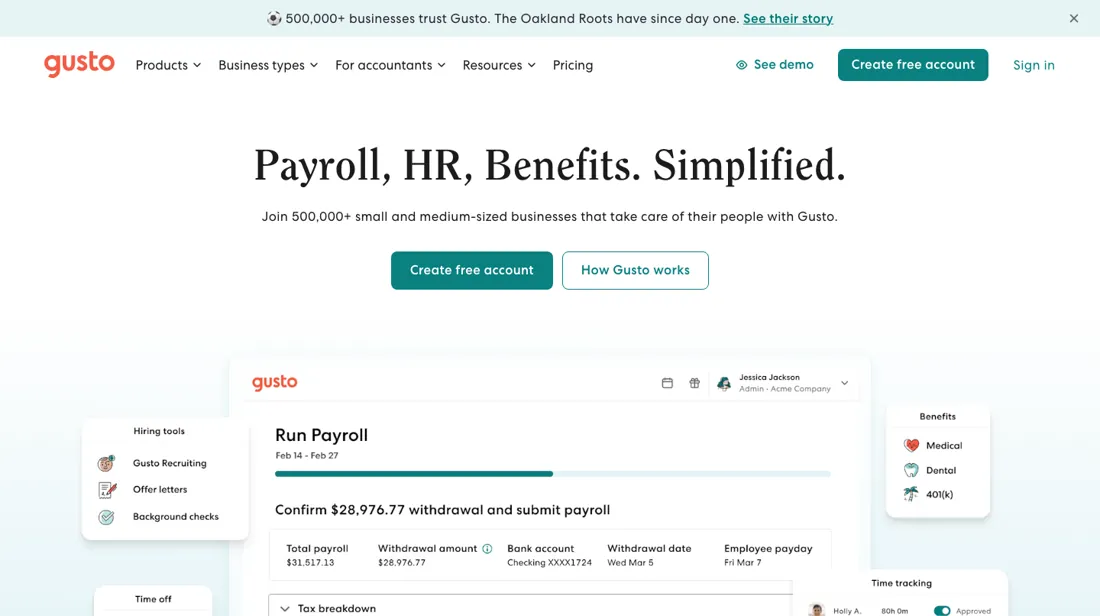
Payroll, benefits and HR in one friendly platform. Automated tax filings, employee onboarding and time tracking — run payroll for your whole team in just a few clicks.
What buyers report about Gusto
Hands-on: not tested by usReported by buyers: G2, Capterra and Trustpilot, read August 2026
Themes from the buyer-review sites listed at the foot of this page, read in August 2026. We have not run Gusto ourselves, so this is other buyers' experience rather than ours. We summarise it here because the complaints are usually the part a vendor page leaves out.
- • 4.6 on G2 across more than 9,000 reviews and ranked first on G2's Highest Satisfaction Products list for 2026.
- • Running payroll, onboarding someone and giving employees self-service are all genuinely easy — that is what reviewers name.
- • The Simple plan base fee went from $40 to $49 a month in early 2026, plus $6 per employee. That increase narrowed the gap to cheaper rivals — OnPay now matches it on base price.
- • Support on the lower tiers is inconsistent, and reviewers say it is exactly when something has gone wrong that it fails.
- • The mobile app trails the desktop and reporting flexibility is limited.
Where the ratings disagree. 4.6 on both G2 and Capterra against roughly 2.4-2.5 on Trustpilot across 2,364 reviews. The Trustpilot cluster is billing disputes and support delays — the experience when payroll goes wrong, which is not what the average G2 reviewer is rating.
Pages read (August 2026): Trustpilot
When the paid plan is worth it
Every tier is a base fee plus a per-employee charge, and which half dominates flips completely with headcount. Our dated reading: Simple about $49 a month plus $6 an employee, Plus $80 plus $12, Premium $180 plus $22. A contractor-only plan at $35 plus $6 was on the page in September 2026 and gone by 16 October 2026. Run those at real team sizes and the base fee turns out to be a small-team tax.
On Simple, five employees costs about $79 — $15.80 a head, of which 62% is the base fee you would pay for one employee. Twenty employees costs $169, or $8.45 a head with the base down to 29%. Fifty costs $349: $6.98 a head, base 14%. The effective per-employee price therefore more than halves between five and fifty people without you changing anything. The same shape holds on every tier — Premium runs $58 a head at five employees and $25.60 at fifty.
The consequence for choosing a tier: the jump from Simple to Plus costs $31 of base plus $6 an employee, so at twenty people it is $151 more a month, and at fifty it is $331. Tier decisions get expensive as you grow in a way the headline does not show, which argues for deciding what you actually need from Plus and Premium while the team is small and the gap is cheap.
One limit on all of the above, stated because it matters: Gusto blocks plain fetches of its pricing page, so these figures come from reading it in a browser, last on 16 October 2026 — check them against your own quote. And the structural caveat no tier changes: Gusto is US-only, so an international team is outside what this product does at any price.
How to actually use Gusto
Gusto blocks plain fetches of its pricing page, so these figures come from reading it in a browser — last on 16 October 2026, when every amount below was on the page. Confirm them yourself anyway before you budget: the contractor-only plan we saw in September had disappeared from the page by October, so the lineup does move. Then model at your real headcount, because the base-plus-per-employee structure changes shape as you grow.
On our reading, twenty employees costs about $169 a month on Simple ($49 base plus $6 a head), $320 on Plus and $620 on Premium — and in every case roughly three quarters of the bill is the per-head component, not the base. Comparing base fees between payroll providers is therefore close to meaningless; compare the total at your headcount. Check the geography before anything else, though. Gusto is US-focused throughout.
If you have anyone on payroll outside the United States, or you run multiple entities, this is the wrong tool regardless of price — and if you only have US contractors, note that they are billed at the per-person rate only in months you pay them; the separate contractor-only plan is no longer on the pricing page.
Where this section comes from: our research notes (114 words)
Gusto's own pricing page, gusto.com/product/pricing, read 16 October 2026 in a browser (plain HTTP clients get a 403): three cards on the 'Pay My Team' tab, Simple at $49 plus $6, Plus at $80 plus $12 and Premium at $180 plus $22, Solo at $49 plus $6 on the 'Pay Myself' tab, the add-on prices and the pricing FAQ (billing for active employees and contractors, upgrades and downgrades). The Contractor Only card ($35 struck through to $0 plus $6) was on the page on 10 September 2026 and gone on 16 October 2026.
The monthly totals we quote for a twenty-person team ($169, $320 and $620) are our own arithmetic on the base-plus-per-head structure.
Gusto vs Rippling, side by side
Each column shows the vendor’s own published entry price, read on the date shown. Entry prices can cover different services or units, so check what each one buys. We do not average them into a score.
Both names above are affiliate links: we may earn a commission if you sign up, at no extra cost to you. Neither changes what this table says.
The natural comparison is Rippling or QuickBooks Payroll — other payroll platforms. Weigh it against ADP on the job you actually need done.
Frequently asked questions
What does Gusto cost?
Read in a browser on gusto.com/product/pricing on 16 October 2026 (the page blocks plain fetches): Simple is $49 a month plus $6 per person, Plus $80 plus $12, Premium $180 plus $22, and Solo, for solopreneurs, $49 plus $6. The Contractor Only plan we read on 5 September 2026 ($35 plus $6, base fee waived in a promotion) was no longer listed.
How does the price scale with headcount?
Faster than the base fee suggests. On Simple, twenty employees adds $120 a month to a $49 base; on Premium the same headcount adds $440 to $180. The per-employee component is what you are really buying, so compare providers on that number rather than on the monthly base.
Is it usable outside the US?
For US payroll only, by itself. For employees in other countries Gusto has referred new customers to Remote's employer-of-record service since 1 May 2026 (from about $599 per employee a month; Remote runs onboarding, payroll and support), while customers who joined earlier keep the integrated Gusto + Remote experience. If most of your team is abroad, compare employer-of-record services directly instead.
Do I pay for contractors and former employees every month?
No. Gusto's pricing FAQ (read 16 October 2026) says you are charged only for active employees, and that US contractors are billed at your plan's per-person rate only in months when you have paid them. Global contractors carry no monthly per-contractor fee; Gusto charges a service and foreign-exchange fee per payment instead.
If I downgrade, when does the lower price start?
On the first of the next month. The same FAQ says upgrades take effect immediately and downgrades at the beginning of the next billing period, the first of the month. Gusto is month-to-month with no long-term contract, so there is no notice period to wait out.
Is this a hands-on review of Gusto?
This is a researched assessment, not a hands-on test — where we've used a tool ourselves, we say so explicitly. We name what each tool is good and bad at, and we earn a commission only if you sign up, at no cost to you.
- Buyer reviews on G2, Capterra and Trustpilot, read August 2026.
- Gusto’s own published pricing page.
- A dated screenshot of that pricing page, kept on this site as the receipt.
Others in this category
Reviewed financial operations tools that share ground with Gusto — comparable in what they do, not drop-in swaps:
New reviews, price changes we recorded, and the cost conditions we found. No sponsored placements. Unsubscribe anytime.
This is our researched assessment — not a paid placement. The “Visit” links on this page are affiliate links: we may earn a commission if you sign up, at no extra cost to you, and it never changes our take. How we review →